


Muse + Zapier
How it works
Put Muse to work in the apps you already use. Zapier is a built-in connector in Muse. Connect it once, and Muse can find, create, and update your data across 9,000+ apps and 40,000+ actions through Zapier MCP. You decide what Muse can do. By default, Muse checks with you before taking any action it flags for review.
- Start free
- Full audit trails and controls
- SOC 2 and GDPR compliant
How to set up Zapier in Muse
Step 1
Find Zapier in Muse
Open your Muse settings and select Connectors. Search for "Zapier" and click Connect.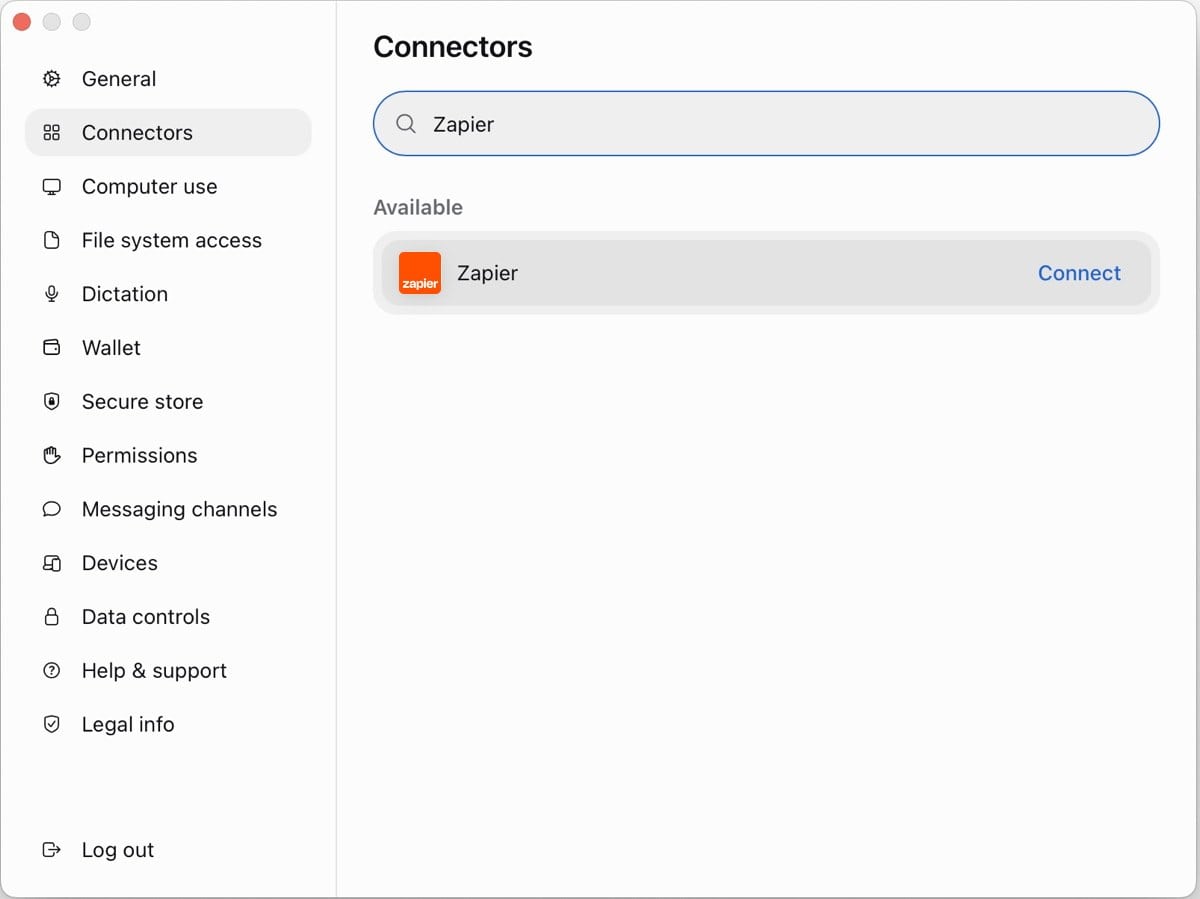
Step 2
Review access and sign in
Review what Muse can access in Zapier, like your Zaps, connected apps, and workflow history. Click Connect, sign in to Zapier or create a free account, then click Allow to complete the connection.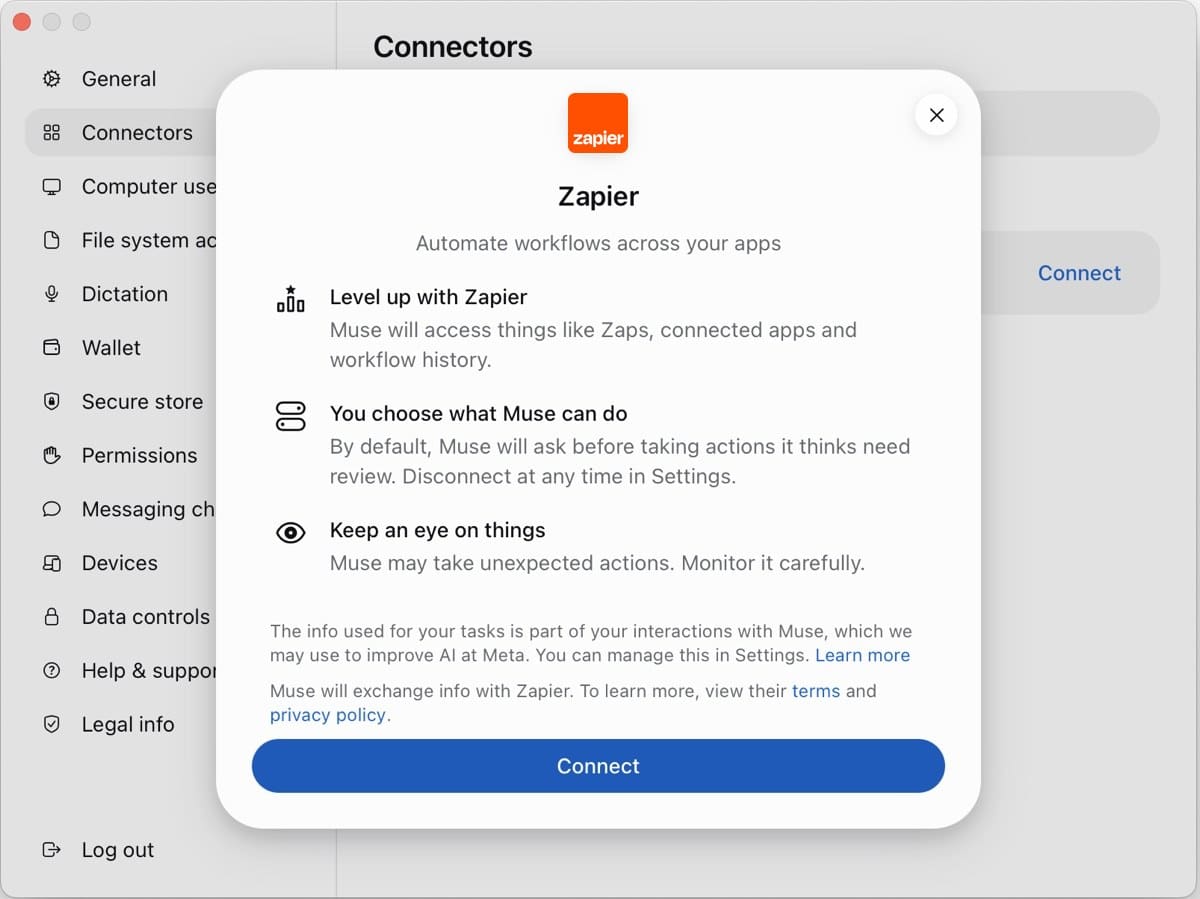
Step 3
Choose what Muse can do
For each permission, select Allow so Muse acts on its own, or Ask so Muse checks with you first. Then give Muse a task in any of your apps.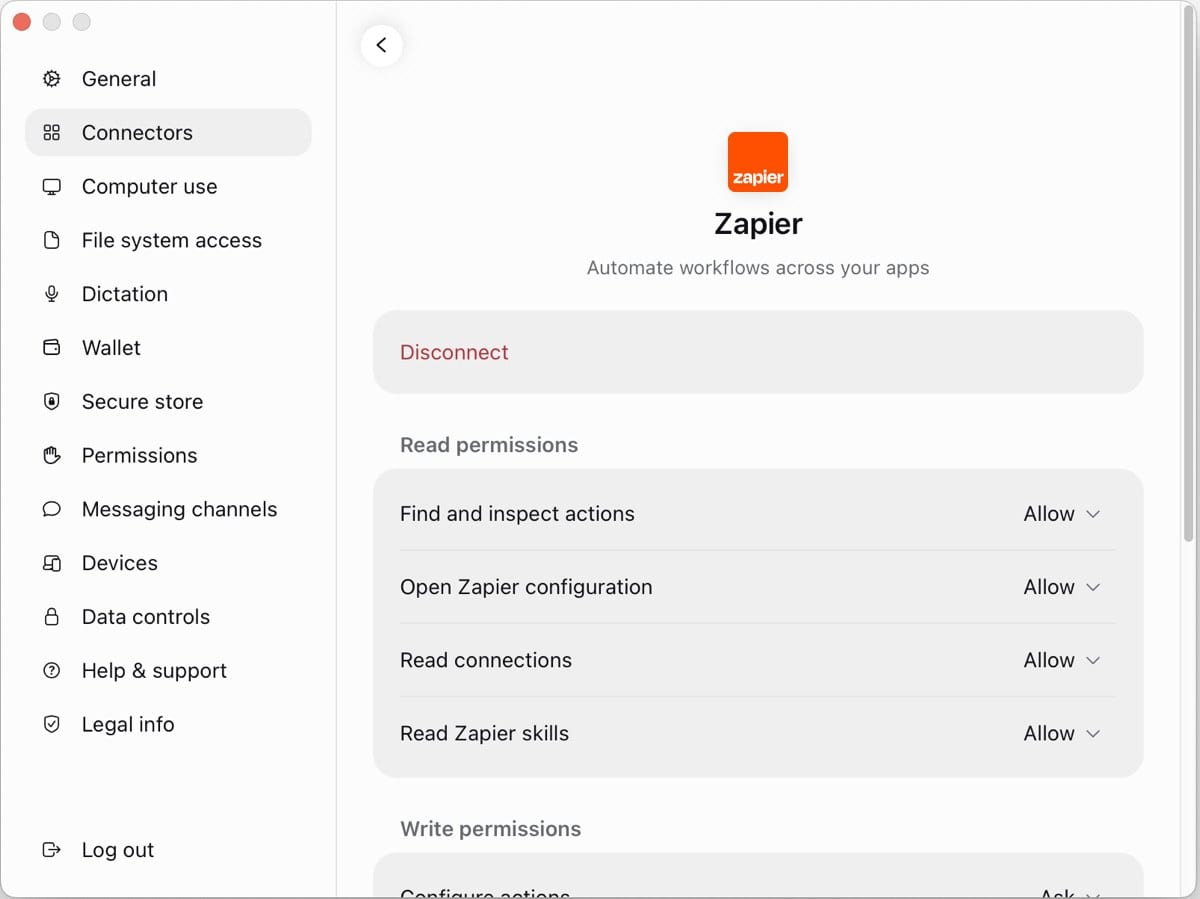
When to use Muse with Zapier
Work across your whole stack
Muse works with HubSpot, Mailchimp, Typeform, Airtable, Trello, Salesforce, monday.com, and thousands more. One connector covers all of them.
Find what you need
Muse can look up a contact, an order, spreadsheet rows, or a ticket's status. You get answers without switching tabs.
Keep your records up to date
Muse can create a HubSpot deal, add a task, append a spreadsheet row, or update a support ticket. Your records stay current without the copy-paste.
Send messages and emails
Muse can post in Slack or Microsoft Teams, or send an email from Gmail or Outlook. You can share updates from the same chat you're working in.
Teach Muse once with Zapier skills
Save repeatable instructions as a skill in Zapier, and Muse loads them on demand. You explain a task once, then reuse it.
Build automations that keep running
With Next Gen Zaps (early access), describe what you want, and Muse builds an automation in Zapier. It runs on a trigger or schedule, even after you close the chat.
Popular ways to use Muse + Zapier
Text me a summary of my latest Shopify orders
Muse pulls your newest orders and texts you a quick rundown of totals and top items.
Add my Calendly bookings to my Airtable client list
Muse copies each booking's name, email, and time into Airtable, so your client list is ready for follow-up.
Every Monday, post my open Notion tasks in Slack
Muse builds a Next Gen Zap (early access) that posts your open Notion tasks to a Slack channel each Monday, so your team starts the week on the same page.
Log today's Stripe payments as sales in QuickBooks
Muse records each payment as a sale in QuickBooks, so your books stay current.
Draft a Gmail reply using my HubSpot history
Muse checks your history in HubSpot and drafts a Gmail reply that picks up where you left off. The reply waits in your drafts until you send it.
Add my latest Strava runs to my Notion training log
Muse copies the distance, time, and pace of each run into Notion, so you can track your progress in one place.
Frequently asked questions about automating with Muse
Does Muse work with Zapier?
Yes. Zapier is a built-in connector in Muse. Open Settings > Connectors, search for Zapier, and click Connect.
What can Muse do with Zapier?
Muse can search, create, update, and send across 9,000+ apps and 40,000+ actions through Zapier MCP.
Is Zapier free to use in Muse?
Yes. Connecting is free and works on every Zapier plan, including Free. Each successful action uses two tasks from your plan.
Do I need to set up an MCP server first?
No. Zapier creates the server for you when you sign in during setup.
Can Muse take actions without asking me?
Only if you allow it. By default, Muse checks with you before taking any action it flags for review. Change each permission in Settings > Connectors > Zapier.
Can Muse run automations when I'm not chatting?
Yes. With Next Gen Zaps (early access), Muse can build a Zap in Zapier that runs on its own, on a trigger or schedule.
How do I disconnect Zapier from Muse?
Open Settings > Connectors > Zapier and click Disconnect. You can also revoke access at mcp.zapier.com.