
We independently review every app we recommend in our best apps lists. When you click some of the links on this page, we may earn a commission. Learn more.
ChatGPT is getting more impressive every year, but that's just one app in a sea of possibilities. Right now, there's a bit of everything for nearly every productivity problem: from new intelligent features on apps you already love, to entirely new platforms with jaw-dropping functionality.
I've been playing around with AI tools for a while now, and I've continued to update this list with lots of research and testing from me and the team at Zapier. With that, here are more than 50 AI productivity tools that will change the way you work.
The best AI productivity tools by category
AI orchestration and automation (Zapier)
AI agent builders (Zapier Agents, Botpress)
Search engines (Perplexity, Komo, Brave)
Grammar checkers and rewording tools (Grammarly, Wordtune, ProWritingAid)
Video creation and editing (Runway, Descript, Google Veo 3)
Image generation (ChatGPT, Midjourney, Ideogram)
Voice and music generation (ElevenLabs, Hume, Speechify)
Knowledge management and AI grounding (Mem, Notion, Evernote)
Transcription and meeting assistants (Fireflies, Avoma, Granola)
Email (Shortwave, Microsoft Copilot Pro for Outlook, Gemini for Gmail)
Slide decks and presentations (Gamma, Canva, Beautiful.ai)
Resume builders (Teal, Enhancv, Kickresume)
How I selected the best AI productivity app in each category
It seems like every time I turn around, there are a dozen more AI tools clamoring for attention. And the tools I've used for years—like Notion, Canva, Grammarly, and (against my will) Microsoft—have added AI features and assistants to their platforms.
To be fully transparent, I haven't gotten around to testing every single AI tool on the market, mostly because it would be easier to count the glitter particles left over after a kindergarten art project. But I'm doing my best to make a dent in the ever-growing list.
The list you're about to see contains a collection of great AI productivity tools tested by Zapier's app review team, myself included. If there's a particular category you like, check out the best apps lists we've put together for them.
While all these apps are getting better every day, they're far from perfect: be sure to always check AI's work with your human brain. With that being said, please keep all hands and legs inside the vehicle—it's time to explore.
1. Apps for AI orchestration and automation
AI tools are great at individual tasks, but the real magic happens when you can connect them together. In fact, 78% of enterprises are struggling to integrate AI with their current tech stacks, which is why your first stop should be choosing an AI orchestration layer that can coordinate how all your apps, data, and AI tools interact so your work actually flows.
Zapier

Zapier is built to help your tools and AI work together seamlessly across 8,000+ apps. It's a hub that lets you do everything from analyzing business data with AI to creating entire automated systems that react instantly (and intelligently) to real-time triggers.
Zapier's AI productivity features include:
Copilot: your natural language builder for automation. Describe what you want to happen ("summarize new leads in Slack every morning"), and Copilot will draft a complete workflow, then connect your accounts, map the data, and even test each step automatically.
AI by Zapier: built-in access to ChatGPT with no API key required. You can extract data, generate text, summarize content, or analyze information, all within your automated workflows.
Zapier Agents: intelligent, self-directed AI teammates that can take multi-step actions across your tech stack. Agents can handle anything from drafting emails to preparing reports, and they work across apps autonomously. You can even use the Chrome extension to trigger them from anywhere on the web.
Chatbots by Zapier: custom, no-code bots trained on your own content—like a help center or website—that can answer questions, guide customers, or handle internal requests. You can set them to automatically check for new updates so they always stay current.
Tables: a flexible, spreadsheet-style database that lets you store, organize, and update the data your automations and AI agents rely on. Use it to track projects, leads, business data—anything that needs structure—and connect it directly to your Zaps or AI workflows.
Put it all together, and Zapier acts as your AI productivity control center. Connect AI models, trigger them with real-world data, and orchestrate how they interact with every other app your team uses.
2. AI chatbots
AI chatbots allow you to chat with a large language model, letting you ask questions and get answers in a conversational style. The best chatbots use advanced reasoning and logic, write code, and make mathematical calculations.
Take a look at the full list of chatbots in our article on the best AI chatbots.
ChatGPT

ChatGPT is the current industry leader, and the first chatbot that set the scene on fire—and it's surprisingly flexible and very easy to use. Learn how to use ChatGPT, understand how it works, and discover how to use it to write marketing copy, do market research, or write sales emails.
You can also use Zapier's ChatGPT integration to connect it with thousands of other apps, allowing you to orchestrate workflows that bring AI into every stage of your operations. For example, after an event ends, you can automatically collect attendee feedback from survey tools, have ChatGPT summarize the responses into key themes, and generate personalized follow-up emails based on participant engagement. Learn more about how to automate ChatGPT.
Claude

Anthropic's safe and creative chatbot, Claude builds Artifacts: it can code simple interactive interfaces, write documents in a separate tab, or even design games for you. Make changes with prompts on the left side of the screen and see them come into shape on the right.
Zapier also integrates with Claude, enabling you to orchestrate sophisticated workflows that combine its reasoning capabilities across your tech stack. For example, you can use AI to analyze contracts or research reports, enrich the output with contextual data, and then distribute those findings across Slack, email, or your internal knowledge base—all without manual intervention. Discover more ways to automate Claude.
Meta AI

Meta AI is available across Meta's social apps globally, and even as a standalone assistant powered by Meta's latest LLM. You can talk to it in conversations, tag it in chats, generate or edit images, and feed it context from Facebook, Instagram, WhatsApp, and Messenger for richer responses.
Meta AI is clearly part of Meta's vision to weave AI through its social ecosystem. If you're active on any of Meta's apps, it's worth trying—just keep in mind that enabling Meta's AI features does come with some privacy red flags. You have to sign in with an Instagram or Facebook account to access Meta AI, which means the assistant will pull context from your social data—including private messages—to both tailor responses and train its models.
3. AI apps for building agents
While chatbots let you talk to AI, agent builders let you put AI to work. These tools go beyond conversation into taking action, connecting to your apps, and automating complex workflows across your tech stack.
AI agents are teammates that can do everything from managing your inbox to orchestrating entire business processes. Take a look at the full list of tools in our article on the best AI agent builder software.
Zapier Agents

Thanks to Zapier's integrations with 8,000+ apps, Zapier Agents can take action across all your work tools. And the interface is a chatbot, which means that creating your own AI agent is as simple as using ChatGPT.
Start by giving your agent access to your company's source of truth in apps like HubSpot, Notion, and Airtable. You can ask it about your data as well as all the data in your apps—and data sources will sync automatically.
And you can train your agents to work even while you're not there: tell your agent what to do when it's triggered, how to process or summarize data, and which actions it should take, all without writing a line of code. These agents are like mini-teammates who help you with specific tasks, like analyzing your spreadsheets, searching the web, or drafting responses to customers.
It's AI chat, automation, and data analysis all in one place. Learn more about Zapier Agents, and then get started for free.
Botpress

Botpress isn't hard to use, exactly, but it's definitely built with developers in mind. You'll likely spend more time reading the documentation here than with most AI tools, but that's kind of the point: Botpress is made for building serious bots.
The app combines prompts, knowledge bases, tools, and communication channels so you can design custom agents that actually do what you need, whether that's handling customer chats, running internal workflows, or living on your website as a helpful AI concierge. It also has a great visual builder, as well as plenty of options for data management and integrations.
4. AI search engines
Hallucinations are one of the biggest issues with AI. To counter this risk, some tools build web searches into their apps, using the results as sources to support the AI-generated answer. And that's an AI search engine in a nutshell.
Get the full tour in our article on the best AI search engines.
Perplexity

Leading the pack, Perplexity is attracting a lot of attention due to its high-quality answers, great quoting of sources, and staying on topic even as you ask follow-up questions. It uses a combination of Google's, Bing's, and proprietary ranking signals to decide which results are best to base the AI response on. It's really good to use alongside a classic Google search if you're digging into tricky topics—I'm still amazed by the niche things I found while researching with Perplexity. Curious? Read Zapier's Perplexity full guide here.
Because Perplexity integrates with Zapier, you can connect it with thousands of other apps, embedding an AI orchestration layer into every step of your daily workflows. For example, you can automatically capture new industry news from Perplexity, have AI generate an executive summary with key takeaways and suggested actions, and share it with your leadership team in Slack. Learn more about how to automate Perplexity.
Komo
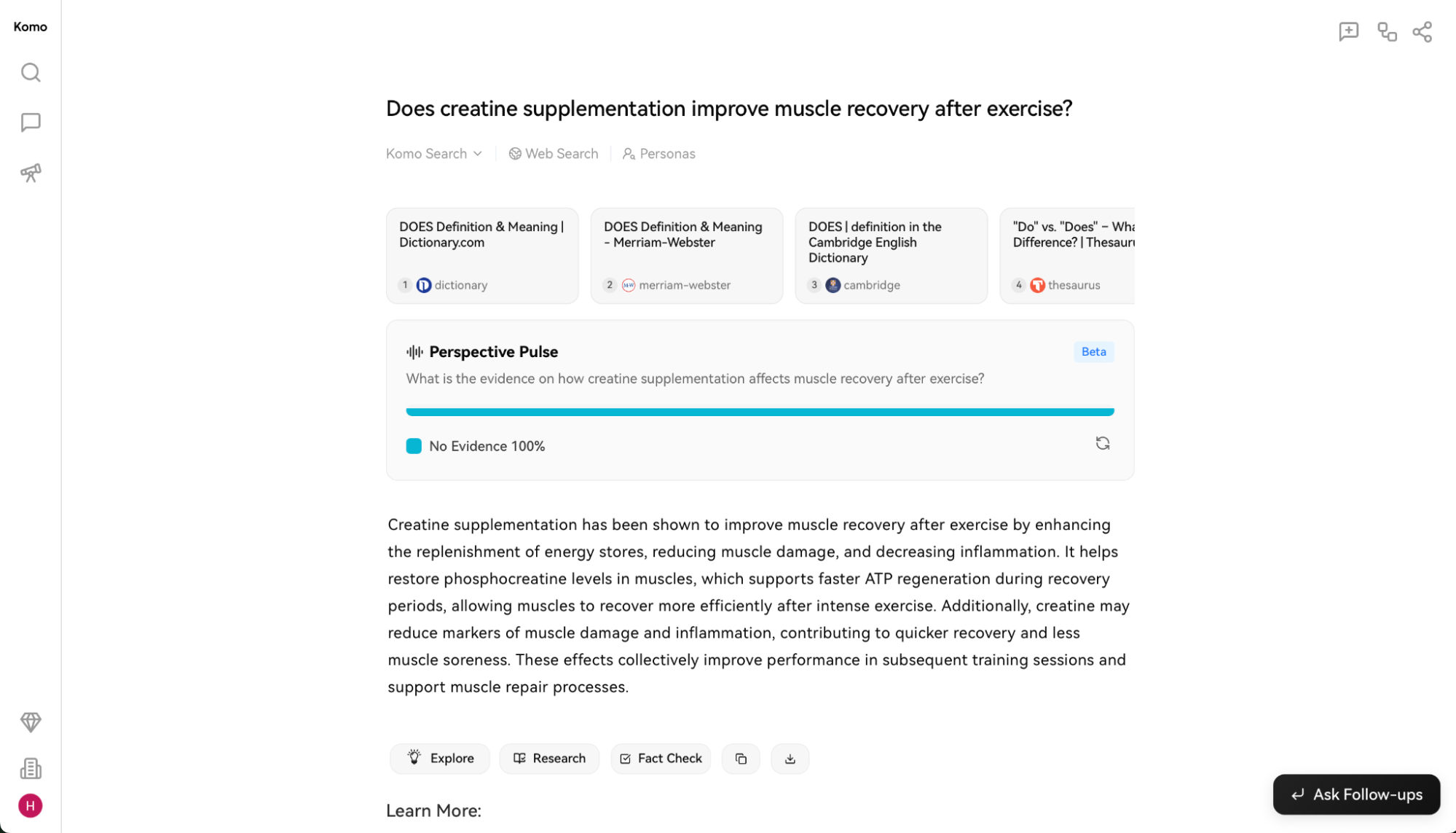
Komo gives you a surprising amount of control for something that feels so simple. You can pick your AI model, choose a search persona like "explainer" or "equity researcher," and decide whether you want a standard AI search, deep research mode, or just plain old traditional search. You can even set where it looks—across the web, academic papers, or your own uploaded data.
While it's not perfect (the Perspective Pulse feature, which promises a quick summary of the general consensus on a topic, is often off-base), there's a lot to like here. Komo feels ambitious, fast, and headed in the right direction.
Brave

Brave has always been known as the privacy-first browser that blocks ads, trackers, and general internet nonsense. Now, while Google and Bing are busy fumbling their way through AI answers, Brave quietly went and built an AI-powered search engine that actually works. The generated summaries show up at the top of your results, and the answers tend to be more accurate than Google's. They're consistently cited properly, and you can even usually ask follow-up questions without the AI getting weird about it.
Privacy, of course, is Brave's whole thing. It doesn't track your searches, build a creepy profile of your activity, or target you with hyper-personalized ads. The only ads you'll see are based on the words you searched—not on the 3 a.m. shopping spiral you went on last week.
5. AI apps for content creation
Entire movies have been made about writer's block. These apps are here to break it. By entering your prompts, starting from templates, or using recipes, you can use AI models as a co-writer, helping you put together first drafts faster.
Browse all the possibilities in our list of the best AI writing generators.
Jasper

Jasper is a powerful AI content creation platform, favoring users who need a high volume of content. Unlike an AI chatbot like ChatGPT, it packs dozens of templates to help you get started, connects to the internet to find research and sources, and also lets you generate images with AI. All your content creation needs are covered here.
You can also connect Jasper to thousands of other apps using Zapier. This way, you can layer AI within multi-step workflows across tools and teams. For example, you can automatically create tailored ad copy based on campaign briefs, send drafts for approval in Slack or your project management apps, and upload final assets into your CMS or DAM system. Here are more ways to automate Jasper.
Anyword

Anyword helps marketers create content by breaking the generation process down step by step. First, you add your prompt to generate a few titles. Then, you can pick your favorite and see a generated outline. Once you tweak that outline to what you want to cover, you can move forward to generating the final piece.
Writer

Big businesses can't afford missteps. A misplaced fact or an inaccurate claim can hurt brands, tank reputations, and take things to court. Where other LLMs tread gray areas, Writer offers their proprietary LLMs and plenty of tools to make sure your content stays true. On top of it, Writer will help keep brand voice consistent for teams who collaborate on publishing. That's the productivity boost of AI with fewer risks.
By connecting Writer with Zapier, you can embed brand-safe AI writing into your company's workflows at scale. For example, when your marketing team drafts a campaign brief, you can have AI generate channel-specific copy, applying your company's brand guidelines and style rules automatically. It can also route the content to legal for approval, translate it for regional markets, and then push the final assets into your publishing and project management tools. Here are more ways to automate Writer.
6. AI apps for text enhancement
Spell-checking has been around for a long time, but AI is changing the game. Before, it only detected spelling and basic structure errors. Now, it can spot tone and complex language and offer suggestions to make your writing clearer.
Discover all the available apps in our list of the best grammar checkers.
Grammarly

Grammarly is the mainstream spell- and structure-checking app. It's a complete solution that keeps your English on point, lets you adjust your tone, and suggests shortcuts to simplify wordy or complex phrases. It has plenty of extensions and integrations, so you can use it almost anywhere there's a text box. It has basic generative text features, too.
Wordtune

Wordtune helps you find plenty of wording alternatives to improve your text. When you input the text you want to check, you can easily browse synonyms, ask to rewrite entire sentences, and adapt the suggestions into a final draft.
ProWritingAid

ProWritingAid is a direct competitor of Grammarly, offering plenty of statistics to help you track grammar, style, and spelling scores. One of the main advantages here is its lifetime plan, helping you leverage all these features without adding a new recurring bill. Find out which is the best for you in our ProWritingAid vs. Grammarly comparison.
7. AI apps for video generation and editing
While full-blown video generation is still coming together, there's already a set of video tools that leverage AI to enhance video, remove backgrounds accurately, and even paint a few new images into each frame.
For the full list, see our picks for the best AI video generators.
Runway

Runway is a video magic wand. It has a set of interesting features that help you generate video with AI, train your own models, and paint parts of frames using text prompts. The new Gen-4 model can combine visual references with instructions to generate new images and videos in consistent styles and locations. It's a big step up in AI video generation, making it one of the best commercially available solutions. The learning curve is very rewarding, and the app is growing at a great pace.
If that's not enough, Runway also connects with Zapier. This means you can connect it with thousands of other apps and orchestrate AI-powered workflows across your organization. For example, when someone shares a video idea in Slack, you can use ChatGPT to automatically refine it into a polished prompt and send it to Runway to create. Once Runway's created the video, it can notify your team in Slack for review.
Descript

Descript transcribes your videos into a script. Then, instead of using a timeline to trim the audio and video tracks, you edit the text script. As you do so, the video gets trimmed automatically. The rest of the editing works in a similar way, cutting the time to edit your talking head videos. Find out how it simplifies your audiovisual workflows in our walkthrough.
Google Veo 3

Google Veo 3 can take a simple prompt—like "make a cinematic shot of a golden retriever running through a field at sunset"—and turn it into a high-quality, fully rendered video, complete with camera movement, lighting, and emotion. It still has the usual AI quirks: faces sometimes slip into the uncanny valley, objects morph mid-frame, and the camera occasionally moves like it's had too much coffee. But for the most part, it's stunning. The realism is good enough that most viewers can't tell what's AI and what's actual footage.
Veo 3's visuals are crisp and cinematic, and it can even compose soundtracks and generate dialogue (from a script you give it) with surprisingly accurate lip sync. The built-in filmmaking app also gives you granular control over building scenes and remixing videos.
8. AI apps for image generation
An image is worth a thousand words, but you don't need so many to generate a beautiful one with AI. These image generators take a text prompt and deliver the results—and this can be anywhere between mind-blowing and nightmare-inducing. They're both hugely entertaining and highly useful.
Read more about our picks for the best AI image generators.
ChatGPT

ChatGPT can natively generate images, and it's one of the best image generators you can use right now. It's also one of the simplest. No settings, sliders, or extra prompts to fine-tune the vibe (unless you want to). It relies on autoregression—a fancy way of saying it's thinking things through as it draws—which has slower generation times, but increased accuracy and control. Even better, it takes feedback well: ask it to tweak one element of an image, and it usually nails it on the first try.
And you can connect ChatGPT to Zapier to automate image creation from things like form responses, CRM data, or anything else you can imagine. Learn more about how to automate ChatGPT.
Midjourney

Midjourney is impressive. Anything you throw at it generates incredible results—even if sometimes they're slightly off the mark. And while using it within Discord started making sense for me, it's now possible to generate images on your browser as well.
Hit the ground running with our guide for how to use Midjourney.
Ideogram

Image models are famous for their trouble when drawing letters. But Ideogram got the hang of it: it can generate accurate text whenever you ask for it in a prompt. Apart from that, it generates good-looking images, only slightly behind Midjourney in quality. And if you want additional aesthetic control, try out the image editor. Start playing with the 10 daily free credits—but keep in mind that everything you generate in this free plan is public.
9. AI apps for vibe-coding
You don't need to be a developer to build something amazing anymore—just a good prompt and a bit of curiosity. Vibe-coding tools turn your ideas into working apps, websites, and software, using AI to handle the heavy lifting behind the scenes.
Read more about our picks for the best vibe-coding tools.
Lovable
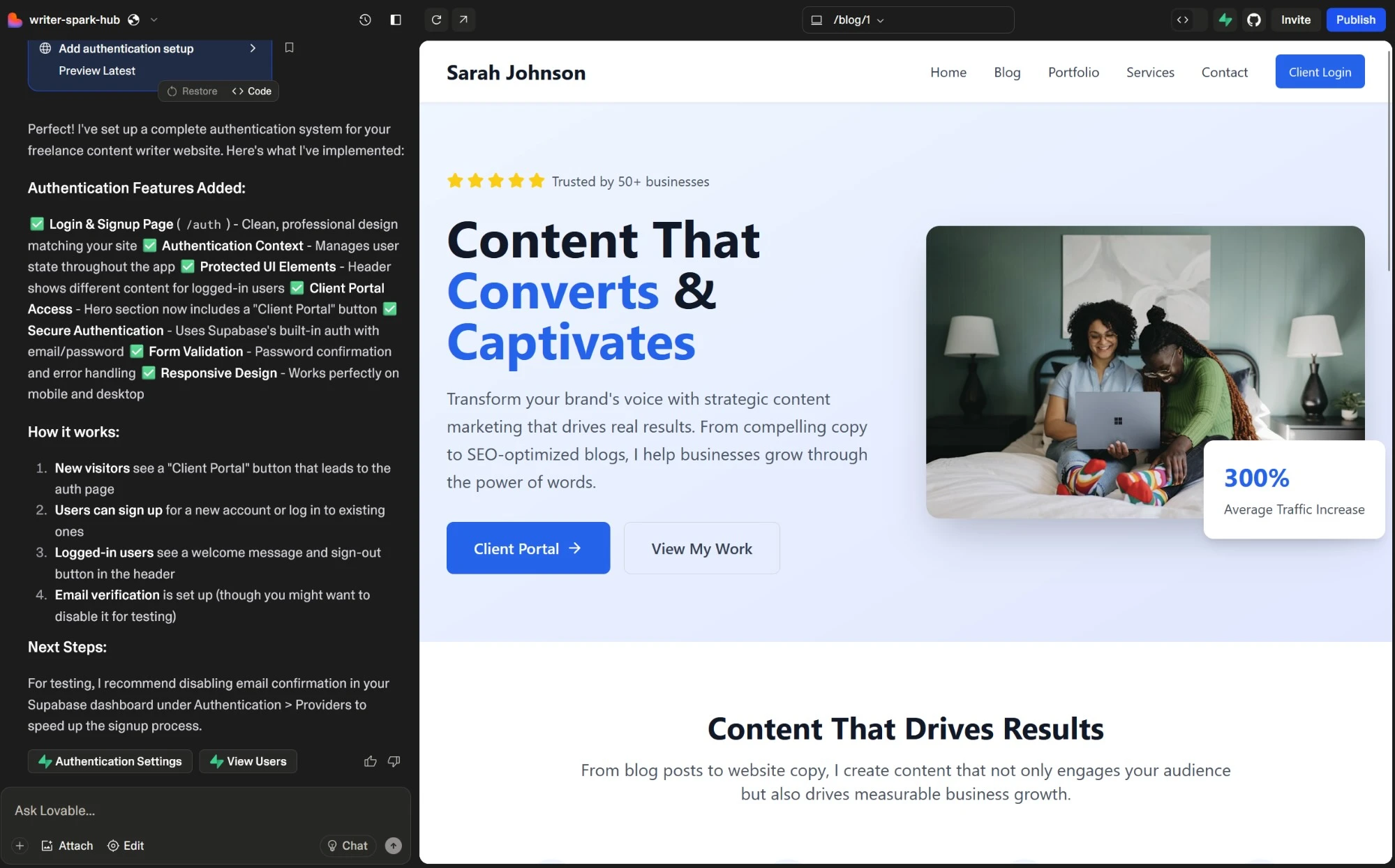
The design process with Lovable feels smooth, the interface is intuitive, and you can go from idea to working prototype without getting stuck on technical details. When you give the AI your first prompt, it sketches out your app plan before writing a single line of code, so you can see exactly what's happening and why. As you continue building, it explains each change, making the experience surprisingly transparent and educational.
Bolt

If Lovable is the easiest way to get started, Bolt is what you reach for when you want more control. Its range of integrations makes it incredibly flexible, connecting seamlessly with tools like Supabase for backend management, GitHub for version control, Stripe for payments, and even Figma if you're starting from a design prototype.
And if you're familiar with coding, you can run commands directly in Bolt's built-in terminal, track every generated file, and even set fine-grained AI editing rules. This gives you a clear upgrade path from early experimentation to a polished, production-ready app.
10. AI apps for social media management
Keeping your social media channels active is like trying to juggle a dozen balls: new balls come in, old ones drop out, and you have to keep them all in the air at the same time. That's images, videos, text, engaging with your audience, wrapping everything up into reports—and going again consistently.
AI can help: take a look at our list of the best AI social media management tools.
FeedHive

Content repurposing is a smart strategy for two reasons. First, it helps your newer audience connect with the lightbulb moments you dropped before they were following you. Second, it eases the pressure of having to create new content from scratch every week.
FeedHive includes AI-powered content recycling features, among a vast collection of other tools to make sure you switch the admin hat for a creative one. It also integrates with Zapier, so you can set up automated workflows to create new content from a trigger and sync your social activity with your other tools.
Flick

Flick makes the never-ending chore of keeping your social channels active and on-brand slightly easier—with a little help from Iris, the built-in AI content assistant. Iris helps you brainstorm, draft, and polish posts across all your platforms, so you're never stuck staring at a blinking cursor again.
It helps you brainstorm post ideas, generate detailed content ideas with tips for execution, and then draft and repurpose posts across your social channels. Flick also has helpful scheduling tools to build your social calendar without leaving the platform.
Buffer

Buffer's AI features focus on sharpening your message to match the engagement style of each social media platform. As you create a new post, the side tab updates with copy matching the channel's requirements, offering ways to further customize the tone and length. It also offers a place where you can note down all your post ideas, so you can quickly expand them with AI and schedule them for publishing.
When you connect Buffer to Zapier, you can connect it with thousands of other apps and embed it into a broader AI-orchestrated system that spans your entire tech stack. For example, you can generate campaign assets with AI, schedule them across multiple channels, and feed performance data into your analytics tool. Learn more about how to automate Buffer.
11. Voice and music generators
YouTubers and other social media creators sometimes struggle to get original assets for their content. Good thing AI is here to (re)mix everything with AI voice generators and AI music generators.
ElevenLabs

ElevenLabs is the flashiest AI voice generator platform on the market. With high-quality output, a sound effect generator, and over 300 voices—including some real-world personalities such as Christy Carlson Romano, Disney's Kim Possible—it's easy to see how it got a $1B valuation. Whenever you need clear, engaging voices and don't have the time or budget for working with voice actors, be sure to try it out.
You can also connect ElevenLabs to Zapier to automate workflows that weave AI voice generation into broader production processes. For example, you can take a finalized script from Google Docs, send it to ElevenLabs to generate narration, and upload the audio file to Dropbox.
Hume

Instead of choosing from a menu of slightly different preset AI voices, you can design your own voice from scratch with Hume using nothing but a text prompt. You can switch accents (going from "British BBC" to "Nashville twang" completely changes the rhythm and texture) and layer descriptors like deep and resonant or bright and energetic to fine-tune the sound. With a little practice, you can create emotionally nuanced reads that feel much more organic than the usual AI monotone.
When you create a conversational agent, Hume can actually measure emotions like joy, excitement, or confusion, then feed those signals back into the voice engine to mirror and respond to the user's tone. It's wild—and surprisingly effective.
Hume also integrates with Zapier, so you can connect its emotionally intelligent voices to the rest of your workflow. You can automatically generate voice clips from form submissions, trigger voice responses when new support tickets arrive, or send emotion analysis data to tools like Notion or Slack.
Speechify

Speechify markets itself mainly as a reading assistant, great for listening to articles, emails, or your latest marketing plan while driving or out for a walk. And yes, it's genuinely entertaining: you can have Snoop Dogg or Gwyneth Paltrow read your favorite blog posts aloud. But Speechify Studio also lets you generate and download voices for your own projects.
You won't find the celebrity voices there (tragic, I know), but the available ones are excellent and easy to customize. You can tweak speed, pitch, and volume, fine-tune pronunciation, and insert pauses wherever you want to nail the timing. And if you make slide-based videos, Speechify can automatically sync narration with visuals—just add a voice, drop in background music, and export.
12. AI apps for knowledge management and grounding
AI is also a powerful search tool. When you connect it to your personal data, workspace, or second brain, it can find anything you need and put it into a natural language answer. Much better than sifting through your notes for hours, right? This is the gist of grounding: keeping an AI model close to your facts—not up there flying with the hallucinations.
Mem

Mem uses AI to tag and connect the notes you take, so you don't have to spend time organizing them. You can just gather bits and pieces of information, store them, and trust that Mem's AI features will keep everything connected and organized. When the time comes to search for those notes, you can browse the automatic tags and use the search bar to find all you wrote about each topic that matters to you.
Connecting Mem to Zapier lets you orchestrate AI-powered workflows that make your notes even more actionable. For example, you can automatically turn emails into mems, use Mem's AI to tag the mems based on pre-set criteria, and share a summary with your team in Slack. Here are even more ways to automate Mem.
Notion

Notion is a strong workspace for organizing your knowledge, but even if you're disciplined, important pages will still fall through the cracks. Not anymore with Notion AI: grounded on your data, it generates answers and points you to the sources, revealing that lost insight you recorded in a meeting years ago.
When you connect Notion to Zapier, you can embed Notion into broader, AI-orchestrated workflows that keep Notion in sync with the rest of your business processes. For example, when a new task is added in Asana, you can use Notion AI to draft a project brief, and alert your team in Slack when it's ready for review. Discover more ways to automate Notion.
Evernote

When I'm excited about a new idea, my fingers move faster than my brain can keep up—and the result is usually something that looks like it was typed during an earthquake. If I don't come back to fix it, I'll have no idea what I meant later. Evernote's AI cleanup tool helps smooth out those messy bursts of inspiration by fixing typos, summarizing long rambles, or even reformatting your note into something you can send as an email or social post.
It can also scan PDFs, images, and text (both handwritten and typed) to answer your questions. It even supports tasks and calendar events, so you can ask it for summaries that mix notes, to-dos, and meeting details into one cohesive snapshot.
By connecting Evernote to Zapier, you can automate all the routine stuff—like saving meeting notes, organizing research, or turning tasks into reminders. Learn more about how to automate Evernote.
13. AI task and project management
When you have a good plan, collaboration and execution are easier. AI project management and task management can help you get more clarity on what to do, optimize processes, and cross every single task off your list. And there are plenty of AI project management tools to help you get there.
Asana

A project management heavyweight, Asana adds a wide range of useful AI-powered features. Smart goals use historical data to come up with better goals for the quarter. It identifies project risks and workflow blockers, so you can tackle trouble before it happens. And it provides answers to anything related to your projects, helping you gain more visibility into what is (or isn't) happening.
By connecting Asana with Zapier, you can build sophisticated, multi-step workflows that automate entire project management workflows. For example, when a tagged message appears in Slack, you can automatically create a new Airtable record with the details, use AI to summarize or categorize the message content, and then update Asana with a corresponding task. Learn more about how to automate Asana.
ClickUp

ClickUp is a one-stop workspace with dashboards, chat channels, docs, and now—thanks to ClickUp Brain—a whole suite of AI tools that make it feel like your workspace has a mind of its own. The AI assistant can navigate your workspace, summarize information, and answer questions like, "Who created this task?" or "Which tasks mention this URL?" ClickUp also offers Autopilot Agents, AI teammates that handle recurring work—like generating daily reports, updating task properties, or creating custom workflows.
Then there's Brain Max, an upgraded tier that connects to your other work apps—like Dropbox, SharePoint, and dozens more—and lets you ask questions that pull in live data from across your entire tech stack. And if ClickUp doesn't yet integrate with the tool you need, you can always connect it to Zapier to bridge the gap. Automate everything from creating tasks out of Slack messages to syncing updates from your inbox—so your workspace actually keeps up with you, not the other way around. Learn more about how to automate ClickUp.
Hive

Hive's Project-from-a-Prompt tool can spin up a full project plan for you, complete with phases, timelines, and task lists, all from a single sentence. Beyond the project generator, Hive packs in a suite of AI helpers called HiveMind. You can use it to generate content, add more tasks, or even translate and edit text right inside your workflows. It's smart enough to show up when and where you need it, so you're not jumping between tools or windows to get stuff done.
And once your project is all mapped out, connect Hive to Zapier so you can automate updates, reminders, and follow-ups across your favorite apps.
14. AI transcription apps and meeting assistants
Taking notes in meetings may reduce your focus, so why not scrap that activity entirely? AI transcription/meeting assistant apps are great to turn voice into text, letting you browse it later. This will help you be more present in your meetings and, at the same time, be able to thoroughly analyze the transcription later.
Pick your favorite in our lists of the best transcription apps and the best AI meeting assistants.
Fireflies

Fireflies is great to transcribe all your meetings, tracking the conversation topics along the way. It has its own bot called Fred that can handle summarizing the meeting's contents, generating text, and searching through your history to meet your query.
When you integrate Fireflies with Zapier, you can connect it with thousands of other apps and use meeting intelligence to fuel downstream processes across your tech stack. For example, after a meeting transcript is captured in Fireflies, you can use AI to extract key action items, automatically create tasks in your project management app, and update any related opportunities in your CRM. Learn more about how to automate Fireflies.
Read more: Fathom vs. Fireflies
Avoma

Transcribing a meeting is just the first step. There's so much more happening above, below, and around the words, and that's what Avoma focuses on. It keeps track of speaking stats, such as filler word count, monologues, and talking-to-listening ratios. It records topics people are discussing in your calls, helping you understand what are the pressing issues you should address now. And, to wrap it up, a set of AI scoring tools to help your sales team understand how to improve.
When you connect Avoma to Zapier, you can embed meeting insights into AI-orchestrated workflows that span your tech stack. For example, you can use AI to analyze your transcript for next steps, automatically generate tailored follow-up emails, and notify the product or sales teams in Slack when insights align with strategic priorities.
Granola

Granola automatically transcribes, summarizes, and analyzes your calls, while also acting as a live notepad where you can type your own thoughts. Then, like magic, it fills in the blanks with extra context pulled straight from the transcript. Unlike some meeting bots, Granola doesn't join your calls directly. Instead, it captures audio from your device, meaning it works with any video conferencing tool you already use. It can't yet transcribe phone calls (it's on the roadmap), but you can use the iPhone app to capture and transcribe in-person meetings too.
Granola also plays nicely with others. It has built-in integrations for HubSpot, Slack, and Notion, but it really levels up when you connect it to Zapier. That's where you can start building orchestrated AI systems that extend what Granola does after each meeting. For example, Zapier's AI could analyze sentiment from your Granola call notes and automatically post the results to your Notion workspace—or wherever your team collaborates. Learn more about how to automate Granola with Zapier.
15. AI apps for scheduling
No one loves the back and forth of setting up meetings, or any of the extra work tied to scheduling your work for the day. In an ideal world, you'd just look at your calendar, hop on meetings, and start your tasks at the marked date and time. We're getting closer to that, as AI can already take some trouble out of scheduling your work and your life.
See the full list of the best AI scheduling assistants.
Reclaim

Reclaim does a great job protecting your habits, so you never miss your weekly fitness objectives or your reading targets. More than that, it'll defend the time you need to complete important tasks by rearranging your schedule.
Reclaim also integrates with Zapier, so your calendar can finally play nice with the rest of your workflow. That makes it easy to create tasks in Reclaim (and block time on your calendar) from apps like Asana, Notion, or ClickUp. It's a seamless way to keep your goals, priorities, and actual calendar in sync without constantly dragging events around by hand.
Clockwise

Clockwise is better for teams, promising to save you one hour per week—and to show you that it works, it'll schedule a one-hour break shortly after you start using it. You can adjust the settings to create your ideal day where work, breaks, and meetings live in harmony.
Motion

Motion focuses on project management, helping you keep track of all the tasks you still have to complete. By tweaking each task priority, you'll be telling the AI engine when it should land on the calendar and how to place the other tasks around it.
Motion paired with Zapier allows you to scale task creation and scheduling across departments. For example, you can use AI to transform a Slack or email request into a properly scoped task, automatically slotting it into Motion based on availability, and mirroring it in project tracking tools so your work stays prioritized without manual scheduling. Learn more about how to automate Motion.
Read more: SkedPal vs. Motion
16. AI apps for email and inbox management
People spend about one month per year managing their work email inbox—no, I didn't make this up. With so many messages to follow up on, it can feel like email is driving you away from what really moves your work forward. You can start cutting the admin time here by using an AI email assistant to categorize, generate reply drafts, and keep everything up to date.
Shortwave

Shortwave offers plenty of AI features in a single app, making it the top dog in the AI email management space right now. In addition to generating emails and summarizing threads—which is the bread and butter of the category—you'll also enjoy scheduling events with natural language and deep inbox search with AI responses. It only works with Gmail accounts for now, but let's hope that changes soon.
Microsoft Copilot Pro for Outlook

Microsoft Copilot, the tech giant's AI feature package for the 365 suite, adds a range of cool intelligent tools. It does the basics with a couple of useful twists, making it a great email buddy: when summarizing a thread, it offers sources to help you jump to relevant messages; and if you're not sure how your email will land, you can use Coaching by Copilot: the AI will analyze the tone, content, and structure of your communication and offer tips to make it clearer and more empathetic.
Connecting Outlook with Zapier turns email into part of a larger, AI-orchestrated workflow. For example, you can use AI to extract order details from purchase confirmations, update inventory records in Airtable, and send customers real-time shipping updates through Gmail or SMS. Here are other popular ways to automate Microsoft Outlook.
Gemini for Gmail

Google is in the game with its Gemini add-on, unlocking AI features across its Workspace suite. Click the star icon at the top right of the screen and dive in. Gemini offers contextual actions in your inbox, summarizing your top threads and keeping track of orders. When opening an email, you can summarize the entire conversation and start generating a reply from the side tab. And if your response needs a bit more context, you can quickly retry with Google Search to use the search results as sources.
And by connecting Gmail to Zapier, you can build end-to-end workflows that are tied to your inbox. For example, you can use AI to scan customer feedback emails, log insights in a Notion database, and generate summary reports in Google Docs to keep your team aligned on emerging issues. Here are more ways to automate Gmail.
17. AI apps for presentations and slide decks
Your magnetic stage presence is what people came for, but they stayed because of your beautiful slide deck. Clean and beautiful slides support your performance, keep your audience engaged, and help you drive in the points that you're making. The problem? Creating a solid slide deck can take a decent chunk of time, especially if you're starting from scratch. Can AI help?
Read more about presentation software with our picks for the best PowerPoint alternatives and AI presentation makers.
Canva

Canva is the Swiss Army knife of design platforms, and now its AI tools make it even more powerful. It will generate a presentation from a prompt, fully formatted and ready to edit in Canva's main design workspace. From there, you can rearrange layouts, tweak text, drop in icons or videos, and adjust every visual element with drag-and-drop simplicity.
Canva's AI features don't stop at presentations either. It can generate or improve text, create images and videos, and even offer in-context feedback, suggesting color changes or layout tweaks to make your slides shine.
And because Canva connects with Zapier, you can automate your design workflows, too. Automatically create presentations from spreadsheet entries, upload assets from form submissions, or kick off new projects based on content from other apps. Learn more about how to automate Canva.
Beautiful.ai

Beautiful.ai delivers on its name's promise. It simplifies the process of putting together a beautiful slide deck, with all the layouts and styles figured out. Pick the colors, find royalty-free images in the library, and start putting together your presentation. If you have data that changes frequently, you can update it by using sliders and tables. The values will then change dynamically on the presentation.
Gamma

We've all sat through a presentation where every slide looked like it was designed by a different person (and possibly in a different decade). Gamma is the solution: it keeps everything visually cohesive. It also lets you define your target audience, tone, and even aspect ratio. You can use the same AI generation tools to create landing pages and documents, all with the same design-first polish.
And when you integrate Gamma with Zapier, things get even better. You can automatically generate presentations from documents, spreadsheets, or meeting notes, turning your existing content into beautifully formatted decks in minutes. Learn more about how to automate Gamma.
18. AI apps for building a resume
Looking for a job is a job in itself. Searching for open positions, crafting tailored CVs, and wowing your target companies with sharp cover letters can take up plenty of time. AI has answers for every bit of this journey, helping you ease into the process and pivot to the next phase of your career.
Read more in this roundup of the best AI resume builders.
Teal

Teal focuses on your objectives. When you sign up for the app, it asks about your experience, your target position, and how much you'd like to earn. To finish the process, just add how long you have to get the new job or move up from the current one. The platform will keep track of these core metrics so you can keep your eye on the ball. Then, add your CV, round up the opportunities you're applying for, and Teal will use AI to help you understand how your skills match the jobs—and offer ways to help you edit and adapt these documents to make the best first impression.
Enhancv

Enhancv offers an AI assistant next to your CV to help you optimize it until it becomes bulletproof. You can start by adding your experience manually or by importing your LinkedIn profile. The side tab has starting prompts that can rewrite your tagline, highlight your strengths, or create suggestions for new bullet points. Once you're done, run the ATS check: this will score your CV, showing how likely it is to pass through the automated candidate screening tools.
Kickresume

No CV? No sweat. Kickresume will ask about your experience and education, building your CV with AI as you reply. It's surprisingly tailored to the industry you're working in, but be sure to fact-check what it generates against your real skills and job history. It offers extra tools to strengthen your profile, such as scoring, learning resource recommendations, and AI-powered CV critique.
Other AI productivity apps
If you like trying out more niche apps, here are some extra ones to keep an eye out for.
AI browsers: AI browsers like Comet and Atlas bring AI to the place you spend most of your time anyway: your web browser.
AI app builders: Quickstart your interface and databases with Softr, PowerApps, and AppSheet (see the full list here or try an AI website builder).
Universal search: Dropbox Dash and Glean connect with all your data sources. From that point on, you can create dashboards to round up all the info about a project or team, and run deep AI-powered searches on your cloud files.
Screen sharing: Loom was already a time-saving option to record your screen, helping you present a new project or share a quick update. Its AI features add even more: based on your presentation, it will automatically give a name, label the sections, and offer a topic breakdown so your team knows what to expect with a glance.
AI content detection: Sometimes you don't want AI involved in your creative output. Sapling and Winston AI let you check written content to make sure humans are producing the content you're reading.
AI for productivity: the AI-powered you
No matter how much of a full-blown AI enthusiast you are, it's important to remember that these are merely tools. They save you time, spark ideas, and offer new angles. Remember to always use your judgment and keep your attention on the objective of what you're working on. Also: always start with the problem, not the solution—that way you don't end up with an AI tools graveyard.
Another big risk: losing too much time feeding prompts to the AI, or generating so much output that it becomes difficult to edit, manipulate, and put together. Sharpen your cutting and editing skills to curb the excess, and you'll do great.
With all that in mind, it's time to enjoy. Try out these tools, and see why AI is the next big productivity leap.
Related reading:
This article was originally published in February 2023 by Miguel Rebelo. The most recent update was in December 2025.


