We independently review every app we recommend in our best apps lists. When you click some of the links on this page, we may earn a commission. Learn more.
Revenue operations (RevOps) is one of those functions that sounds deceptively simple when you say it out loud. Just align your sales, marketing, and customer success teams around a shared set of data and goals. Done. Next slide. And yet, in practice, it becomes impossibly complex, like trying to understand why Pete Davidson is so attractive to beautiful women.
The good news is that RevOps tools have gotten genuinely good at wrangling chaos into something you can measure, manage, and improve. The bad news is that there are approximately 9 million of them, and choosing the wrong stack is the kind of mistake that haunts you for fiscal quarters to come.
Based on research and testing by the Zapier team, I've rounded up the best RevOps tools available right now. Whether you're a scrappy startup trying to get your first repeatable sales motion or an enterprise looking to orchestrate complex, multi-touch customer journeys, there's something here for you.
The best RevOps tools
Zapier for AI orchestration
Gong for revenue intelligence
Clari-Salesloft for revenue orchestration
HubSpot for CRM
Vitally for customer success
Intercom for chat and in-product messaging
Zendesk for customer support
Apollo for data enrichment
SAS Viya for predictive analytics
What makes the best RevOps tool?
How we evaluate and test apps
Our best apps roundups are written by humans who've spent much of their careers using, testing, and writing about software. Unless explicitly stated, we spend dozens of hours researching and testing apps, using each app as it's intended to be used and evaluating it against the criteria we set for the category. We're never paid for placement in our articles from any app or for links to any site—we value the trust readers put in us to offer authentic evaluations of the categories and apps we review. For more details on our process, read the full rundown of how we select apps to feature on the Zapier blog.
Before we dive into the specific tools, we should probably talk about what actually makes a RevOps platform good, because "best" is one of those words that becomes meaningless the moment it's separated from context and stapled to a listicle.
Here's what I looked for when assembling this list:
Ease of use: If your sales reps need a two-week bootcamp just to log a call, or your CS team ignores the platform entirely because it's too clunky, you've already lost. The best tools balance power with usability, offering intuitive interfaces that don't sacrifice depth. Bonus points for platforms with strong onboarding resources and active user communities.
Automation capabilities: The tools on this list can handle complex, multi-step workflows, ideally with AI agents that can make decisions rather than just execute pre-scripted sequences—and with the governance controls to manage what those agents can access.
Integrations: Your RevOps stack is only as strong as its weakest integration point. The best tools either connect to your existing CRM and data warehouse, or they're so comprehensive that they replace multiple tools. Native integrations are great, but platforms that connect with Zapier unlock thousands of additional possibilities (more on that later).
Scalability: What works for a 10-person startup often buckles under the weight of enterprise complexity. I looked for apps that can grow with you, whether that means handling higher data volumes, supporting more sophisticated routing rules, or offering the governance and security features your compliance team is probably already demanding.
Every app on this list has been tested by the Zapier team (sometimes me), and here, I'll break down why they're worth your time.
The best RevOps software at a glance
| Best for | Standout feature | Pricing |
|---|---|---|---|
AI orchestration | Orchestrates workflows across 9,000+ apps; gives your AI governed access to your tools with Zapier MCP and SDK | Free plan available; paid plans from $19.99/user/month | |
Revenue intelligence | AI-powered conversation intelligence | Contact for pricing | |
Revenue orchestration | Leading forecasting and pipeline analytics platform with robust sales engagement | Contact for pricing | |
CRM | Unified CRM for marketing, sales, service, and ops | Free plan available; paid plans from $15/user/month | |
Customer success | Purpose‑built customer success platform focused on retention and expansion | Contact for pricing | |
Chat and in-product messaging | An AI-powered conversational relationship platform that keeps customer interactions in one continuous thread | From $39/seat/month | |
Customer support | Enterprise-grade ticketing and resolution platform with robust governance | From $25/agent/month | |
Data enrichment | Massive B2B database with 275+ million contacts | Free plan available; paid plans from $59/user/month | |
Predictive analytics | Enterprise‑grade analytics and data management with strong scalability | Contact for pricing |
Best RevOps tool for AI orchestration
Zapier (Web, iOS, Android)

Zapier pros:
Connects 9,000+ apps with AI-powered workflows
No-code automation accessible to non-technical users
Built-in agentic AI
Zapier cons:
Requires existing apps to integrate with
Zapier isn't a CRM, a forecasting platform, or a data enrichment tool. It's the orchestration layer wedged between all of them, moving data, triggering actions, and eliminating the manual busywork that's been eating your team's productivity.
When a lead fills out a form, Zapier can create the CRM record, enrich it with firmographic data, ping the right rep in Slack, and kick off a nurture sequence before anyone has to lift a finger or open a spreadsheet. (Yes, this is what progress looks like. Fewer spreadsheets.)
With Zapier's AI features, you can build RevOps workflows that don't just move data, but make decisions. Use agentic AI to analyze deal sentiment from email threads and flag at-risk opportunities. Route inbound leads based on complex scoring criteria. Auto-generate follow-up tasks when engagement drops below a threshold. The AI handles pattern recognition and triage, while your humans handle the part that requires …being human.
What separates Zapier from direct API integrations is governance. Zapier manages authentication centrally, so your agents connect through OAuth, no credentials are ever exposed to the model, and access is controlled in one place. Simply connect once (and revoke once).
For teams using AI tools like Claude or ChatGPT, Zapier MCP gives those agents direct access to your full app stack with no coding required. For teams building in Cursor, VS Code, or Claude Code, Zapier SDK drops that same governed access into your code environment. Either way, the apps, the auth, and the governance are already handled.
The catch, if you can call it that, is that Zapier requires other apps to connect. It's not a replacement for your CRM, for instance. It's what makes your CRM start communicating with everything else. But for RevOps teams drowning in disconnected tools and manual processes, that's exactly the point.
Learn more about how to automate your entire workflow using Zapier.
Zapier pricing: Free plan available; advanced features start at $19.99/month
Best RevOps app for revenue intelligence
Gong (Web, iOS, Android)

Gong pros:
Unified revenue data across calls, emails, CRM, and forecasting tools
Nearly 300 native integrations
Uses AI agents to capture and analyze customer interactions
Gong cons:
Expensive for SMBs
AI insights sometimes require manual verification for accuracy
RevOps is one of those disciplines that sounds crisp and scientific until you realize it's built on the fragile premise that your customer data is trustworthy. In practice, it collapses the moment your records look like someone dragged them through a hedge backwards—messy, inaccurate, incomplete, and occasionally listing a prospect's job title as "asdfghjkl;." Gong's pitch is that it can give you a unified view of all the quantifiable data your go-to-market (GTM), sales, and RevOps teams need to pursue the right leads and close deals.
Gong combines data that might normally be spread across CRMs, forecasting tools, and data warehouses, turning it into a total revenue engine. When a sales rep starts talking to a lead, it automatically captures and transcribes every call, email, and Zoom meeting (apparently, "writing things down" is a lost art). Then the AI gets involved, because of course it does. Gong AI analyzes customer sentiment and can draft personalized nudges, next steps, and follow-up messages, keeping the pipeline moving.
If engagement wanes or Gong picks up on negative sentiment signals, AI agents will alert team members to swoop in and rescue the deal. The intervention is still human, but surveillance and early warning are automated, which is the part sales organizations have traditionally handled through intuition and panic. If the rescue attempt fails, those same AI agents will at least help you diagnose what went wrong, which isn't the outcome you wanted, but it's still preferable to the post-mortem ritual where everyone agrees the deal "wasn't a fit," and no one learns anything.
All of this ladders up to Gong's central identity as a revenue intelligence platform—it pulls signals from each deal to produce big-picture insights on rep and team performance, more accurate sales forecasts, KPI tracking, and pipeline trends, with much of that synthesis generated automatically by AI.
In addition to over 250 native integrations, Gong can connect with thousands of other business apps through Zapier, allowing you to merge your revenue intelligence data with the rest of your RevOps stack.
Gong pricing: Contact for pricing
Best RevOps software for revenue orchestration
Clari-Salesloft (Web, iOS, Android)

Clari-Salesloft pros:
End-to-end pipeline management
Robust AI-powered forecasting
Strong native CRM integrations with Salesforce and HubSpot
Clari-Salesloft cons:
Post‑merger pricing and packaging are still unclear
Interface and workflows can feel disconnected
Salesloft and Clari recently announced a merger that'll bring two RevOps giants together. While no one knows what their new, Frankensteined name will be (Salesi? Clarloft?), this is pretty big news. Clari is already a strong forecasting platform, and now it'll be bolstered by Salesloft's sales engagement features. They're basically building a Megazord, but for sales.
Clari bills itself as a revenue orchestration platform, but its real bread-and-butter has traditionally been AI-powered forecasting, analyzing market trends and firmographic data to deliver detailed, accurate sales predictions. On top of this, you can use Clari for prospecting, pipelines, and customer lifecycle management.
Add Salesloft's lead nurturing features, deal management, and AI insights to the mix, and you're looking at a true end-to-end revenue orchestration platform. In the past, both apps have relied pretty heavily on native integrations and/or Zapier to expand their functionality. But if all goes well, the post-merger platform should be a lot more feature-rich right out of the box.
It's worth noting that both Clari and Salesloft are known for having fairly steep learning curves, wonky onboarding processes, and quite a few bugs. If these issues get smoothed out, Clari-Salesloft will be worth a fresh look once they've officially combined. And you can already integrate Salesloft with Zapier so it can work with the rest of your tech stack. Learn more about how to automate Salesloft.
Clari-Salesloft pricing: Contact for pricing
Best RevOps software for CRM
HubSpot (Web, iOS, Android)

HubSpot pros:
Intuitive user experience and smooth onboarding
Extensive integration ecosystem
Powerful workflow automation capabilities
HubSpot cons:
Confusing pricing structure
Large enterprises may hit limitations in complex, bespoke RevOps setups
Like my dryer, which I use to dry clothes and as an auxiliary closet for anything I'm not emotionally prepared to fold, HubSpot's claim to fame is its versatility. It started life as an inbound marketing platform, then kept absorbing adjacent functions like an amoeba, until it expanded into sales, customer service, content management, commerce, and data intelligence feature sets.
If that sounds like a lot, it is, and HubSpot knows it. The platform gives you the flexibility to bundle the use cases (Hubs) that fit your business's needs and budget while ignoring the ones that don't. Most Hubs also come equipped with Breeze AI functionality at no extra charge, which gives you a cross-hub Assistant and specialized Agents that automate key tasks such as prospecting, segmentation, closing, and data analysis.
HubSpot's CRM is what really earns it a spot on this list, though. Its integrated AI makes creating and updating records, generating emails, and enriching data a breeze (yes, that was a pun, and yes, I'm disappointed too). Even better, the free version nets you unlimited CRM contacts. And since HubSpot is an all-in-one platform, everything that exists in your CRM feeds directly into your marketing campaigns, sales pipelines, and customer service workflows.
HubSpot is one of the easier apps on this list to learn and master. With other platforms, onboarding can be less of a walk in the park and more of a drunk stumble through an obstacle course, but HubSpot's knowledge base, community, and educational blog help you avoid that fate.
The HubSpot Marketplace includes integrations with 2,000+ apps, so it probably connects to the tools your RevOps team is already using. And when you connect HubSpot with Zapier, you open it to thousands more integrations. Learn more about how to automate HubSpot.
HubSpot pricing: Free plan available; paid plans from $15/seat/month for the Sales Hub Starter plan
Best RevOps tool for customer success
Vitally (Web)

Vitally pros:
Granular product usage tracking
Automated health scoring that flags churn risk
Frequent product releases
Vitally cons:
Configuration for advanced health scoring and workflows can be complex
Per-user pricing can scale costs quickly
Customer success (CS) might sound like a shinier, buzzier term for customer support or service, but it's actually a more proactive approach to customer relationships that ensures your users get the absolute most out of your product before they decide they can live without it.
Vitally is a SaaS-centric customer success platform that does exactly that. It tracks the usage signals that indicate whether a customer is thriving or merely present—where they get stuck, which features they ignore, what adoption looks like across teams, and which accounts are drifting toward churn.
Whereas other apps on this list bundle sales, marketing, analytics, and customer engagement, Vitally is laser-focused on customer success. You can drill down to feature-level and team-level usage data. If a specific department's engagement starts to dip, Vitally can automatically enroll those users into sequences and nudge them via email or in-app notifications.
And when the signals suggest something more mission-critical—churn risk, stalled adoption, a high-stakes account barely hanging on like Sandra Bullock in "Gravity"—Vitally can create tasks for CS staff to jump in and course correct (or escalate to management if big money is on the line).
And by integrating Vitally with Zapier, you can connect to thousands of other apps and build a completely automated customer success system.
Vitally pricing: Contact for pricing
Best RevOps software for chat and in-product messaging
Intercom (Web, iOS, Android)

Intercom pros:
Easy‑to‑use customer messaging and chat automation with AI
Multichannel support
Solid analytics for lifecycle and upsell campaigns
Intercom cons:
Pricing is relatively high for smaller businesses
Not a full CRM, so you often still need other RevOps systems
Intercom started as a simple in-app chat widget but has evolved into a full conversational relationship platform, powered by Fin, its AI agent. Fin can handle support, qualify leads, and even nudge users toward an upsell, all within the same conversation thread.
What sets Intercom apart is that it treats every customer interaction as an ongoing relationship rather than a pile of disconnected incidents. Whether someone reaches out via email, chat, or in-app messaging, Intercom keeps everything in one continuous thread.
For product-led growth companies, this is absolute catnip because it lives inside your product. You can trigger messages based on what users are doing (or not doing), send a proactive tip, and if the conversation reveals they're bumping into a paywall that a premium feature would solve, Fin can seamlessly pivot to qualification and loop in Sales—all while the customer thinks they're just having a nice chat.
If you're running a traditional enterprise help desk with complex routing rules, strict SLAs, and hundreds of agents, Intercom's conversation-first method might feel too loose. And the resolution-based pricing model ($0.99 per AI resolution) can become unpredictable when your volume spikes.
Intercom integrates with dozens of first- and third-party apps. And when you connect Intercom with Zapier, you can extend its integration capabilities and create your own fully automated, AI-powered RevOps workflows. Learn more about how to automate Intercom.
Intercom pricing: Free 14-day trial; Essential plan for $39/seat/month; Fin AI Agent billed at $0.99 per resolution
Best RevOps software for customer support
Zendesk (Web, iOS, Android)
Zendesk pros:
AI-powered intelligent triage and quality assurance
Comprehensive workforce management tools
2,000+ native integrations
Zendesk cons:
Non‑premium customers often report slow support
Primary orientation is service, not full‑funnel RevOps
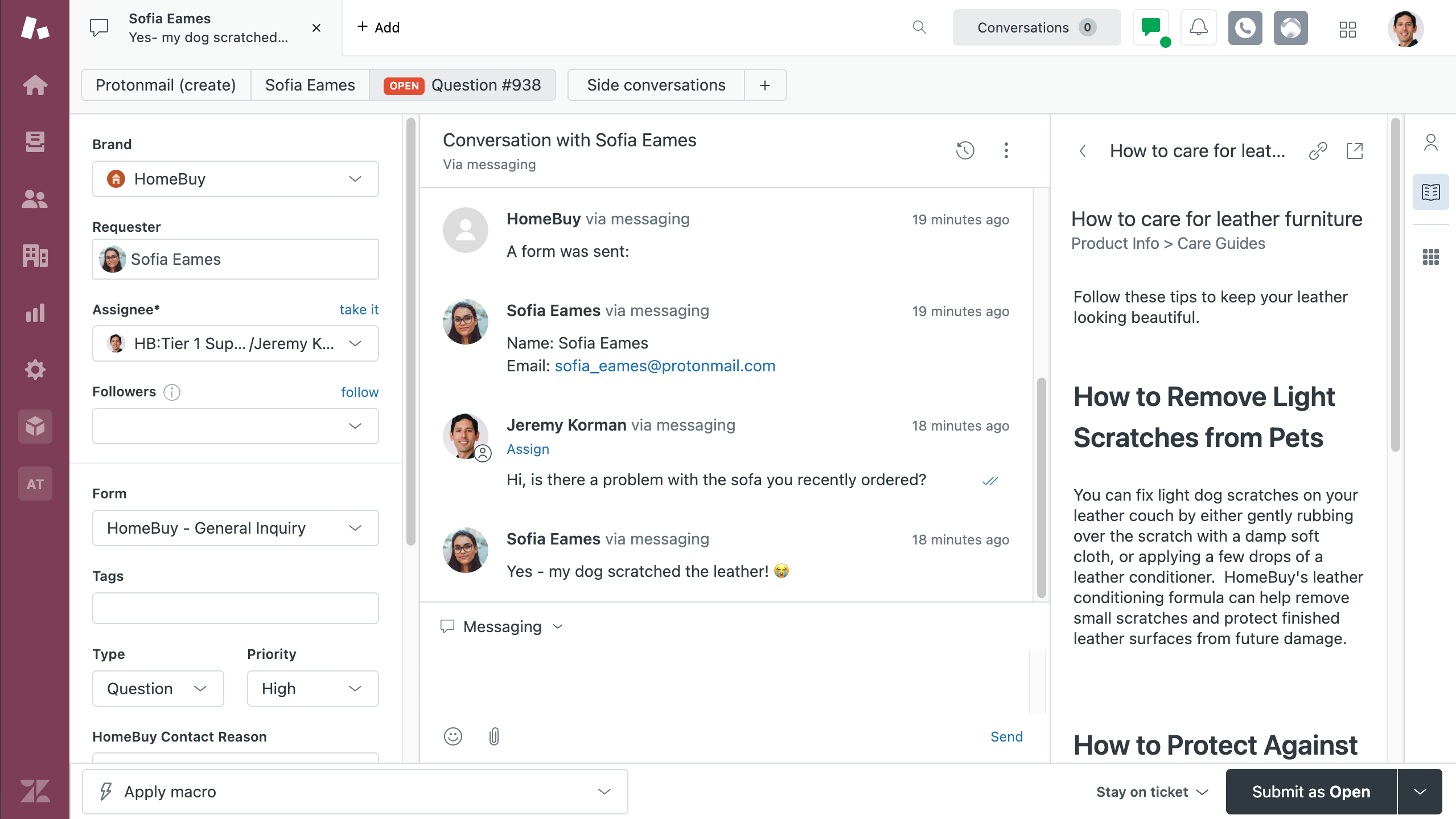
If Intercom is a conversational liaison, Zendesk is the industrial-strength resolution factory focused on closing tickets efficiently and correctly.
Zendesk's Intelligent Triage system sets the tone. Every incoming ticket is automatically enriched with intent classification, sentiment analysis, and entity extraction (like pulling order IDs or product SKUs from customer messages). That metadata then powers AI agents that can execute actual procedures—processing refunds, updating addresses, or routing escalations to specialized teams, and handling the kind of operational housekeeping that normally consumes human attention in small, costly increments.
The platform also includes workforce management tools for forecasting ticket volume and scheduling agents. AutoQA uses AI to score 100%(!!) of interactions for quality (not just a random sample). For enterprises in regulated industries or anyone running a 24/7 support operation, these governance features are table stakes.
The tradeoff, of course, is complexity. Zendesk has a steeper learning curve than Intercom, and if you're a small startup that gets three support tickets a week, it's probably overkill.
With integrations for more than 2,000 apps, the platform creates a revenue operations ecosystem that's tough to match. Extend its capabilities even further by integrating Zendesk with Zapier, allowing you to automate workflows between your RevOps processes and all your other business tools. Learn more about how to automate Zendesk.
Zendesk pricing: Free 14-day trial; Support Team plan for $25/agent/month
Best RevOps tool for data enrichment
Apollo (Web, iOS, Android)

Apollo pros:
All-in-one platform that combines data, engagement, and intelligence
Massive database of 275+ million contacts with buying intent signals
Generous free plan
Apollo cons:
The interface can feel cluttered and overwhelming
Complexity plus credit consumption may frustrate lean teams
Here's a dirty little secret about sales and marketing: most of your customer data is probably garbage. Email addresses bounce, people change jobs, and phone numbers lead to confused strangers. It's chaos out there, and Apollo exists to fight that chaos with the power of a really, really big database.
By its very nature, Apollo is a data enrichment powerhouse. You give it a sketchy lead or a partial email address, and it returns actual, usable contact information pulled from its database of 275 million contacts. And it doesn't just hand you contact info and wave goodbye. Apollo lets you build lists, launch email sequences, track engagement, make calls through a built-in dialer, and even schedule meetings—all without leaving the platform.
The platform's most powerful feature has got to be its buying intent tracking, which monitors when companies start actively researching solutions in your category. Instead of cold calling random prospects, your team can focus on accounts that are already in buying mode. Apollo can automatically trigger outreach sequences when intent surges, turning signals into action faster than a human could manually check a report and remember to do something about it.
Apollo uses a credit system for accessing contact data, where different actions consume different amounts of credits—accessing an email costs one credit, getting a phone number costs eight, and enriching a record costs anywhere from one to eight, depending on how much data you want. For high-velocity sales teams, these credits can evaporate fast, making the Organization plan's 72,000 annual credits feel less generous and more like a minimum requirement.
Connect Apollo with Zapier to gain access to thousands of integrations. Automatically add new prospects to your other tools, create tasks in your project management app, or track offline conversions. Learn more about how to automate Apollo.
Apollo pricing: Free plan available; from $59/user/month for the Basic plan
Best RevOps tool for predictive analytics
SAS Viya (Web, iOS, Android)

SAS Viya pros:
Integrates data preparation, model development, and MLOps into a single interface
Native support for Python, R, and Java
Industry-leading security, AI governance, and audit trails
SAS Viya cons:
Complex interface with a steep learning curve
It may be overkill for teams that just need lighter RevOps reporting
I'm not going to pretend I fully understand what SAS Viya does. This is enterprise-grade, PhD-level analytics software, and I'm someone who still uses a calculator to figure out a 20% tip. But here's what I do know: if you need serious predictive analytics and business intelligence for your revenue operations, SAS Viya is the Big Kahuna.
SAS Viya has evolved from its legacy mainframe roots (yes, mainframe—this company has been around since your parents were young) into a modern, cloud-native system that runs on Azure, AWS, or Google Cloud. It's now containerized and deployable open-source tools like Python and R, which is huge for data science teams who have strong opinions about their preferred coding languages.
What makes Viya relevant for RevOps is something called Intelligent Decisioning. Basically, it combines machine learning models with business rules to make split-second decisions during live customer interactions. Think dynamic discount offers that appear only for high-value, at-risk customers, or automated upsell triggers based on usage patterns and firmographic data.
The platform also offers advanced capabilities, such as synthetic data generation (for testing complex scenarios without touching production data) and zero-copy integration with CRMs like Salesforce and HubSpot via CData connectors.
Now, this is an enterprise investment with enterprise complexity. Implementation can be a multi-month undertaking with a learning curve steep enough to require supplemental oxygen. But for organizations where fractional improvements in conversion rates or churn prediction translate to millions in revenue, it's worth every penny.
SAS Viya pricing: Contact for pricing
Other tools to augment your RevOps
The tools above cover the core RevOps functions, but depending on your stack and workflow, you might need some reinforcements. Here are a few specialized platforms worth considering:
DealHub for CPQ: If you sell complex products with multiple SKUs, add-ons, discounts, volume pricing, and custom terms—basically if your sales team can't just point at a price tag—you need configure, price, quote (CPQ) software. DealHub streamlines this process with guided selling, automated approval workflows, and native eSignature capabilities.
Qualtrics for customer research: If you want to understand why customers churn (beyond "they stopped paying"), Qualtrics gives you the survey and experience management infrastructure to ask them. The insights feed directly into your RevOps strategy—assuming you're brave enough to read the feedback.
Iterable for growth and email marketing: Iterable is a cross-channel marketing platform built for growth teams who've outgrown basic email tools. Its AI-powered optimization and behavioral triggers make it a solid choice for nurturing leads and driving product adoption at scale.
Mailgun for transactional emails: Not every email is a marketing email. Mailgun handles the transactional stuff—password resets, order confirmations, usage alerts—with the deliverability and analytics that RevOps teams expect.
Chili Piper for meetings: Chili Piper routes and books meetings instantly, whether from inbound forms, outbound sequences, or handoffs between reps.
LinkedIn Sales Navigator for prospecting: The de facto standard for B2B prospecting, Sales Navigator's advanced search, lead recommendations, and InMail credits give your outbound team the targeting precision they need—especially when paired with a data enrichment tool like Apollo.
Orchestrate your RevOps with Zapier
The uncomfortable truth about RevOps tools is that none of them do everything, and the ones that claim to are lying liars who lie. Your stack is going to have gaps, overlaps, and at least one integration that technically works but requires a manual refresh that nobody remembers.
By connecting your RevOps tools with governed, centrally managed authentication, Zapier turns a collection of point solutions into something that behaves like a unified system instead of a loosely affiliated group project.
With AI-powered workflows and the ability to orchestrate across 9,000+ apps, Zapier can route, enrich, summarize, classify, and trigger actions based on what's happening in your pipeline and customer signals.
Ready to orchestrate your RevOps stack? Connect your tools with Zapier and automate the RevOps workflows that keep revenue flowing. Sign up for free and start building automations in minutes.
Related reading: