We independently review every app we recommend in our best apps lists. When you click some of the links on this page, we may earn a commission. Learn more.
You're growing your list, slowly winning the email marketing game as new subscribers trickle in every day. But then you blast out a campaign and find that open and click-through rates are actually lower. You were winning, right? So why does it feel like you're losing now?
This is the paradox of email list success. The more subscribers you have, the more diverse they become—even if they all signed up for the same thing. That welcome email that worked for your first 100 subscribers? It's now landing wrong for half your list. And as you send more and more irrelevant emails to one segment, the unsubscribes start piling up.
And that's where drip email campaigns—also known as automated email campaigns—can help. Instead of treating your list like a single audience, drip campaign software lets you create separate, automated journeys based on what each group wants. Once your drip email software is set up, it runs on autopilot.
I tested nearly 100 drip email apps to help you choose the best one to put you back on the winning track.
The best apps for sending email drip campaigns
Mailchimp for AI-powered audience targeting
ActiveCampaign for automation power users
Klaviyo for data-rich eCommerce lifecycle marketing
Omnisend for fast eCommerce automation setup
Kit for solopreneurs and creators
Brevo for affordable automation
MailerLite for simple email funnels and landing pages
Freshmarketer for omnichannel customer journeys
Mailmodo for interactive, app-like emails
Loops for product, transactional, and drip all-in-one
What is a drip campaign?
A drip campaign sends a series of automated emails to your subscribers based on a trigger—such as joining your list—and delivers them on a set schedule. Instead of sending one big blast, you "drip" messages over days or weeks to nurture people toward a specific goal (like a purchase or demo request).
Common drip campaigns include:
Free email course or lead magnet delivery. Ever signed up for a free email course? That's a drip sequence. After you opt in, you automatically receive a series of lessons or follow-up emails at the interval set by the creator. Downloading a PDF by entering your email usually triggers a drip campaign as well.
Welcome or onboarding series. When someone joins your list, you can send a short welcome sequence to set expectations, highlight your best content, and surface your products or services.
Abandoned cart sequence. In eCommerce, a drip campaign can pull in data from your store to find customers who added items to their cart but didn't check out. You can automatically send reminder emails—packing an incentive like a discount code or free shipping—to bring them back to complete the purchase.
Re-engagement sequence: If subscribers stop opening your emails, you can trigger a short series to win them back before you remove them from your list.
Drip campaigns go by other names, too: automated email campaigns, lifecycle emails, autoresponders, drip marketing, and email marketing automation. I'll use "drip campaign" as the general term for this tactic.
What makes the best email marketing app to send drip emails?
How we evaluate and test apps
Our best apps roundups are written by humans who've spent much of their careers using, testing, and writing about software. Unless explicitly stated, we spend dozens of hours researching and testing apps, using each app as it's intended to be used and evaluating it against the criteria we set for the category. We're never paid for placement in our articles from any app or for links to any site—we value the trust readers put in us to offer authentic evaluations of the categories and apps we review. For more details on our process, read the full rundown of how we select apps to feature on the Zapier blog.
Drip email campaigns are a feature of email marketing platforms. That means that all the platforms you're about to discover also let you run regular email campaigns and see analytics of the interaction of your subscribers with your content.
The simpler apps here will let you configure your drip email campaign by setting a simple trigger (say, a subscriber joins your list), and then lining up all the emails and delays between each one. More advanced platforms will offer you a wide range of drip campaign templates, ways to look into your audience with advanced analytics, or even connect your drip campaigns to other channels such as SMS or Facebook Messenger.
Here's what I looked for in the best drip email marketing apps:
Email personalization. Addressing your subscribers by their first name is much better than just "Hi, friend." These apps will let you introduce dynamic content based on subscriber data or subscriber interactions with emails.
Segmentation. Before offering a more personalized experience, you need to segment your audience into groups or lists. These drip email apps will let you do that with static lists (where you do the sorting yourself) and dynamic lists (you set sorting conditions, and your lists are updated automatically).
Analytics. Running marketing campaigns without data is like performing heart surgery with a blindfold on. These apps offer informative dashboards to let you see everything at a glance and have reports to let you look into sends, opens, clicks, and bounce rates.
Integrations. Since drip campaigns are all about automation and saving time, they need to be integrated into your tech stack. The email drip campaign software on this list has a varying number of native integrations, but all of them integrate with Zapier, raising that number to over 8,000 apps.
Affordability. I excluded platforms with subscription plans starting at hundreds of dollars per month. I want you to make bank, not break it.
To test each drip email app, I started by creating a simple welcome campaign with a conditional rule, a few delays, and three or four emails. I signed myself up for that automation to see how things went, both within the app and in my testing mailbox. I also played around with any available templates and all the other features available (including unique, advanced options).
The best drip email campaign software at a glance
Best for | Standout feature | Pricing | |
|---|---|---|---|
AI-powered audience targeting | Predictive segmentation based on purchase likelihood and lifetime value | Free for 500 contacts; paid plans start at $13/month; AI features from $20/month | |
Automation power users | Advanced multi-step automations with CRM and behavior-based triggers | Starts at $15/month for 1,000 contacts; scales by contacts | |
Data-rich eCommerce lifecycle marketing | Deep customer profiles with real-time analytics and A/B testing | Free for limited sends; paid plans start at $20/month | |
Fast eCommerce automation setup | Pre-built eCommerce workflows with product recommendations | Free plan available; paid plans start at $16/month | |
Solopreneurs and creators | Creator-focused automations with built-in commerce tools | Free up to 10,000 contacts; paid plans start at $39/month | |
Affordable automation | Multi-channel workflows (email, SMS, WhatsApp) at low cost | Free with daily limits; paid plans start at $9/month | |
Simple email funnels and landing pages | Easy-to-use automation with built-in landing pages | Free for 500 contacts; paid plans start at $10/month | |
Omnichannel drip campaigns | Customer journeys across email, SMS, WhatsApp, and web | Free plan available; paid plans start at $18/month | |
Interactive emails | App-like emails with forms, surveys, and scheduling inside inbox | Free plan available; paid plans start at $49/month | |
Product, transactional, and drip all-in-one | Product-triggered and transactional emails in one platform | Free for 1,000 contacts; paid plan at $49/month |
Best drip email campaign software for AI-powered segmentation
Mailchimp (Web, iOS, Android)

Mailchimp pros:
Intuitive and easy to use
Great templates and design options
Mailchimp cons:
Steep price scaling based on contacts
When you're diving into your audience table, you can segment people based on who they are and what they did—but that only tells you what has already happened. Mailchimp uses AI to predict what happens next: who's about to buy, who's at risk of churning, who has the highest lifetime value.
Even before getting into campaigns, Mailchimp helps you fill the gaps in your audience by predicting age and gender. Using machine learning on top of your account, it groups people by demographic data, so you can design messaging that resonates with each segment. Once you find the right words, the native lookalike audience finder can expand your list by finding similar people.
Then, once you connect your eCommerce shop, the platform's AI starts running its predictive segmentation based on signals such as email engagement and purchase history. It calculates purchase likelihood (high, moderate, or low probability they'll buy again) and estimates customer lifetime value, two metrics that provide a clear idea of who to sell to and who to nurture.
This transforms how you build drip sequences. Instead of triggering emails based only on past actions, you can create automations based on predicted behavior. Send a high-intent nurture series to contacts with high purchase likelihood. Build a VIP drip track for high-CLV subscribers with exclusive offers and early access. Launch a re-engagement sequence targeting contacts predicted to churn before they go cold. This is proactive marketing.
Increase your opportunity advantage by connecting Mailchimp to Zapier. Once you integrate it into your work apps, you can automate your email marketing workflows to free up time, connect the dots, and act faster as your audience evolves. Learn more about how to automate Mailchimp.
Mailchimp pricing: Free plan available for 500 contacts. Essentials plan at $13/month for 500 contacts, with price scaling based on number of contacts on your list. AI segmentation features only from the Standard plan ($20/month) and up.
Thinking about other Mailchimp alternatives? Here are our comparisons of Constant Contact vs. Mailchimp, HubSpot vs. Mailchimp, Kit vs. Mailchimp, Brevo vs. Mailchimp, SendGrid vs. Mailchimp, Flodesk vs. Mailchimp, MailerLite vs. Mailchimp, and ActiveCampaign vs. Mailchimp.
Best email drip campaign software for automation power users
ActiveCampaign (Web, iOS, Android)

ActiveCampaign pros:
Integrated CRM
Lots of native integrations and extensibility
ActiveCampaign cons:
Steep learning curve
When simple autoresponders feel too basic and you need more power, ActiveCampaign is the tool for the job. It lets you build multi-step campaigns from a wide variety of triggers and actions, with all the ingredients to support even the most complex drip logic.
This depth comes from 135+ triggers and actions that span email, site tracking, SMS, and its built-in CRM. For example, you can start a re-engagement drip only for contacts who view your demo video but don't book a call, or automatically route hot leads to sales when their behavior score crosses a threshold—all within the same automation. The platform includes hundreds of pre-built automation recipes covering everything from basic welcome sequences to multi-touch eCommerce recovery flows, so you're not starting from scratch.
Because the CRM and site tracking live inside the same automation builder, your drip campaigns become smarter: they can trigger based on deal stage changes, create tasks for your sales team, and adjust messaging based on actual product usage or page visits—not just whether someone opened an email. This is what ActiveCampaign means when it calls itself a "customer experience automation" platform: the drips aren't isolated from the rest of your customer journey.
The platform is super strong, but it's not an easy pick for everyone. The learning curve is real: expect a few weeks before you're completely comfortable moving around and building what you want. But you'll find it super useful if you're a SaaS company, eCommerce business, or a thriving agency: ActiveCampaign can react to anything from pipeline changes, product usage, or cross-channel behavior.
Now that you're automating your marketing, why not automate everything else? Connect ActiveCampaign to Zapier so your drip campaigns can be enriched by the rest of your tech stack. Learn more about how to automate ActiveCampaign so you can orchestrate workflows for all your business-critical work.
ActiveCampaign pricing: Starter plan at $15/month for 1,000 contacts. Pricing scales based on number of contacts on your list.
Best drip email software for data-rich eCommerce lifecycle marketing
Klaviyo (Web)

Klaviyo pros:
Strong personalization and segmentation features
Good eCommerce integrations, especially with Shopify
Klaviyo cons:
Slow customer support
Email strategy doesn't stop at cart abandonment or post-purchase thank-yous. With Klaviyo, you can turn all touchpoints into opportunities to nurture or sell, designing the relationship you want to build with your customers.
To do so, you'll need plenty of customer data. Klaviyo centralizes everything into individual profiles: site activity, purchases, engagement, consent, custom properties, and much more. Each of these signals can be used to set up a drip trigger or condition, letting you act on finer details rather than broad rules.
As your customers interact in any connected channel—with the platform supporting even SMS/WhatsApp—your automations can branch whenever people do anything meaningful. Seeing a product, starting checkout, or passing a date-based milestone can trigger an email, a text, or a coupon/promo. Your customers act, and Klaviyo reacts on time, automatically.
The real-time analytics, A/B testing tools, and campaign previews let you refine your lifecycle marketing strategy as you go. You can monitor performance as automations run, test different approaches with specific segments, and polish campaigns before launch—building the kind of personalized customer relationships that drive repeat purchases.
To get even more from Klaviyo, integrate it with Zapier and connect your drip email tool with the rest of your tech stack, so you can automatically send data to and from Klaviyo. Learn more about how to automate Klaviyo with Zapier.
Klaviyo pricing: Free plan available for 500 email sends/month for up to 250 active profiles (engaged contacts). Email plan at $20/month for 5,000 email sends/month. Pricing scales based on number of contacts on your list.
Best drip email app for fast eCommerce automation setup
Omnisend (Web)

Omnisend pros:
Responsive customer support
Supports email, SMS, and push notification campaigns
Omnisend cons:
Steep price scaling
Just launched your eCommerce shop? Well done. Let's get it selling as fast as possible: Omnisend can take you from zero to fully functional eCommerce drip automation quickly with its pre-built workflows and templates.
The automation library includes welcome series, abandoned cart and checkout recovery, browse abandonment, and post-purchase follow-ups—complete with pre-written messages, subject lines, and workflow settings for each step of the customer journey. With a few tweaks and clicks, you'll have them running in minutes.
After setting up the core flows, browse the Omnisend template gallery, filled with ready-made designs for automation emails, popups, embedded forms, and landing pages. Need to capture emails? Pick a popup template—including options like a wheel of fortune gamification—customize the discount or offer, and drop it on your site. The visual builder is intuitive, and you can go from idea to live in an afternoon.
Personalization is built in, too, without requiring complex setup. Drop product recommendation blocks into your emails (best-selling, most viewed, recently added), and Omnisend fills them with the right items for each shopper. Add conditional content blocks to show different offers based on customer segments, and each subscriber automatically gets the version that makes sense for them. Advanced but quickly configurable.
Keep delighting your customers without extra work by connecting Omnisend with Zapier, so you can get data into and out of Omnisend automatically. Zapier connects to 8,000+ apps, so you can orchestrate workflows across your entire tech stack. Learn more about how to automate Omnisend with Zapier.
Omnisend pricing: Free plan available for 500 email sends/month. Standard plan at $16/month for 500 contacts. Pricing scales based on number of contacts on your list.
Best email drip campaign software for solopreneurs and creators
Kit (Web)

Kit pros:
Good learning resources
Robust automation features
Kit cons:
Not ideal for larger or more complex businesses
ConvertKit is now just Kit. Dubbed the "email-first operating system," it caters to creators looking to start or grow an online audience. If you monetize your creativity on the web, Kit has the drip campaign features you need, along with plenty of tools to support you on the way.
There are two ways to set up automation in Kit. The first one is by using Sequences, which are a way to line up emails based on a time delay and a list filter. You can use these to deliver an online course or set a subscriber on a nurture sequence.
The real magic starts when you click the Automations tab. With 28 total templates, you can take the email sequences to new heights: promote your work on social media, welcome your podcast subscribers with personalization, or tease your new book by offering a free chapter.
These automations do more than just shoot emails and wait: you can connect landing pages, set up actions if your audience buys what you're selling, and move subscribers from one automation to another. And if this isn't enough, you can set up "if this, then that" conditional rules for subscribers clicking links on your sales channels, helping you automate and organize your lists even more.
To help with sales, Kit Commerce's toolkit lets you host your products and processes transactions without an external integration. Keeping it all on the same platform reduces transaction friction while integrating your content with payment flows more tightly. And if you have lots of generous fans, you can create a tip jar to help them contribute to your growth.
Kit has a decent set of native integrations, but you can connect it to Zapier to make it do even more for you, sending data into and out of Kit across thousands of apps and orchestrating work across your tech stack. Here are some of the most popular ways to automate Kit.
Kit pricing: Free plan available for up to 10,000 contacts. Creator plan at $39/month for 1,000 subscribers unlocks most platform features. Pricing scales based on number of contacts.
Best free drip email software for affordable automation
Brevo (Web, iOS, Android)

Brevo pros:
Deep multi-channel automations in a visual builder
Great value for money
Brevo cons:
Platform's user experience is a bit rough around the edges
The more you can automate with a platform, the more expensive it tends to be. Brevo flips this concept on its head: as it continues upgrading after its rebrand from Sendinblue, it strikes a really good balance between capabilities and cost. It's one of the best options if you value doing a lot of work costing only a few dollars.
Inexpensive doesn't mean cheap here. The new automation editor has a visual drag-and-drop canvas separating triggers, actions, and rules clearly. You can even combine multiple triggers in a single workflow (like "list added OR form submitted"), giving you a lot of flexibility for complex use cases. The range of what you can trigger on is extensive: contact/segment activity, form submissions, email behavior, eCommerce events, website tracking, and CRM/sales activity.
Once triggered, your automations can do a lot more than just send emails. You can send SMS, WhatsApp messages, and push notifications in the same workflow. You can update contact attributes, add or remove people from lists, create CRM deals and tasks, or jump to another step in the current automation—or even trigger a completely different workflow.
The free plan packs 300 free daily email sends for a maximum of 100,000 contacts. It gives you access to these automation features with basic reporting, but once 2,000 unique contacts have entered your active automations, new entrants are blocked until you upgrade. Pretty workable for small-scale testing or early-stage projects; for anything more ambitious, you'll want Standard or above, which has a fair entry price of $9/month for 5,000 email sends.
Double down on automation and connect Brevo with Zapier, so your drip email is connected to all the other apps you use. Automatically turn purchasers, form submitters, and other subscribers into contacts in Brevo. Discover more ways to automate Brevo with Zapier.
Brevo pricing: Free plan available for 300 free email sends daily. Starter plan at $9/month includes 5,000 emails. Pricing scales based on monthly email volume.
Best free drip email software for simple email funnels and landing pages
MailerLite (Web, iOS)

Mailerlite pros:
Strong deliverability stats
Includes website and form builders
Mailerlite cons:
Automation feels limited for advanced use cases
Drip campaign tools can be complex to set up, eating up hours before you can launch your first sequence. Not the case with MailerLite: loved by many for its simplicity, it offers a solid automation toolkit that doesn't overwhelm, plus landing pages that let you nurture leads beyond the inbox.
The automation editor got a nice upgrade this year. Now fully drag-and-drop, you can set up emails, delays, conditions, actions, and A/B tests. You can reorder steps, preview every email in a sequence with one test send, and even manually add subscribers mid-flow if you need to fix something or backfill customers into an existing automation.
When email sequences need somewhere to send traffic, MailerLite's landing pages fill that gap. These aren't just static offer pages: you can build multiple pages with reusable blocks, run A/B tests to refine messaging, and enjoy 10 of them on the free plan. Generous.
Speaking of, the free plan is one of the best here: 500 contacts with 12,000 monthly emails and full automation access. The main catch? You can only use one trigger type per automation (paid plans allow multiple). Great for straightforward drips like a 5-10 email welcome series for each new subscriber.
To take your automation to the next level, you can connect MailerLite to Zapier to be sure your entire tech stack is wired together. Automatically create subscribers, add them to a group, and even send a campaign based on triggers from the other apps you use. Here are more ideas for how to automate MailerLite.
MailerLite pricing: Free plan available for up to 500 contacts and 12,000 monthly emails. Growing Business plan at $10/month for 500 contacts and unlimited email sends. Pricing scales based on number of contacts.
Best drip email software for omnichannel drip campaigns
Freshmarketer (Web, iOS, Android)

Freshmarketer pros:
Good range of extra marketing features
Real-time analytics
Freshmarketer cons:
Occasionally slow app
Who said that drip campaigns have to stick to email? Freshmarketer lets you connect with your audience wherever they may be: your website, WhatsApp, Facebook, Instagram, and even Google and Apple Business messages.
The app's interface is sharp, and as you hover over the icons on the left-side menu, you'll see there's a lot to discover. You can segment your contacts into lists and associate them with accounts, if you work with that kind of setup; you can create simple landing pages starting from one of 12 templates; and if you dive into the settings, you'll also be able to show and hide buttons on the menu.
But where Freshmarketer shines is in the Marketing Automation tab. Customer journeys, the name for drip campaigns here, has 50 playbooks across multiple channels, letting you send order confirmations via WhatsApp, ask for feedback via SMS, and trigger bot campaigns on your website, to name a few. If you have something specific in mind, you can start from scratch and use the visual builder to connect with your audience through any of the supported channels.
While customer journeys cover all the channels, you can run more targeted campaigns on each of them too. There's a page to set up WhatsApp campaigns, another one for SMS, and even a place where you can run your social media accounts. You can even create a chatbot to automate parts of the conversation. There are many templates to start from, and you can edit the flow of the interaction in another visual builder. When you're done, deploy the bot by copying and pasting code to your website or directly into any of the channels you have set up.
As you're connecting all the channels, you can also connect Freshmarketer to Zapier to make sure all your contacts are where they need to be. Automatically add and update contacts in Freshmarketer based on activity in other apps, or send data to your other apps whenever contacts are added or updated in Freshmarketer.
Freshmarketer pricing: Free plan available; Enterprise plan starts at $18/month, and pricing scales based on number of contacts ($100/month for 5,000 contacts as an add-on).
Best drip email software for interactive emails
Mailmodo (Web)

Mailmodo pros:
Easy-to-use interface
Varied automation setup tools
Mailmodo cons:
Dashboard data can be inconsistent
Interactive emails let you update settings or start actions directly from within the email's body, and Mailmodo helps you use this to your advantage.
Instead of having static text and images, you can add an appointment scheduler that works within the email client. No need to open the browser and schedule it there. Everything happens inside the receiver's inbox seamlessly. It's as if you have a little website inside each email.
With so much freedom on the table, it's tough to figure out all the best uses for interactive email. Here's a shortlist of top possibilities:
Embedding a mini eCommerce shop inside an email, letting subscribers buy products directly from their inbox
Displaying an interactive survey so you can collect feedback
Adding an accordion to selectively show or hide content, improving readability and user experience
For more uses, inspiration, and setup tips, check out the full interactive email guide.
But back to the topic of drip email marketing, Mailmodo doesn't disappoint. The journey builder has plenty of settings, offering all the actions on the left side of the screen, the settings on the right side, and the tree right down the middle. Coupled with interactive emails, this tool can help you improve the user experience of your newsletter even more—and conversions are sure to follow.
While the native integration list is relatively small, you can connect Mailmodo to Zapier to send data across apps and automate your campaigns. That means you can send data into and out of Mailmodo across your entire tech stack, no matter which software you use.
Mailmodo price: Free plan available for 500 contacts and 4,000 email sending credits. Lite plan at $49/month for 2,500 contacts and 20,000 email sending credits. Pricing scales based on the number of contacts.
Best drip email software for product, transactional, and drip email marketing all-in-one
Loops (Web)
Loops pros:
Great match for early-stage SaaS startups
Developer-friendly
Loops cons:
Limited advanced automation
Someone signs up for your app or service, and the race is on. You have to guide your new user to the aha moment that turns them into a paying customer. Loops gives you the tools to shepherd users there faster, helping you send the right message at the right time.
Start by setting up the transactional messages that your app needs to send: your password resets, receipts, or 2FA confirmations. Customize the messages to fit your brand's tone with the minimalist email editor interface, including personalization with data variables and components to speed up the process of adding visual elements. Because Loops sends emails based on what users do in your product, you'll need your developers to set up API calls that trigger emails when users take specific actions—something to plan for before you dive in.
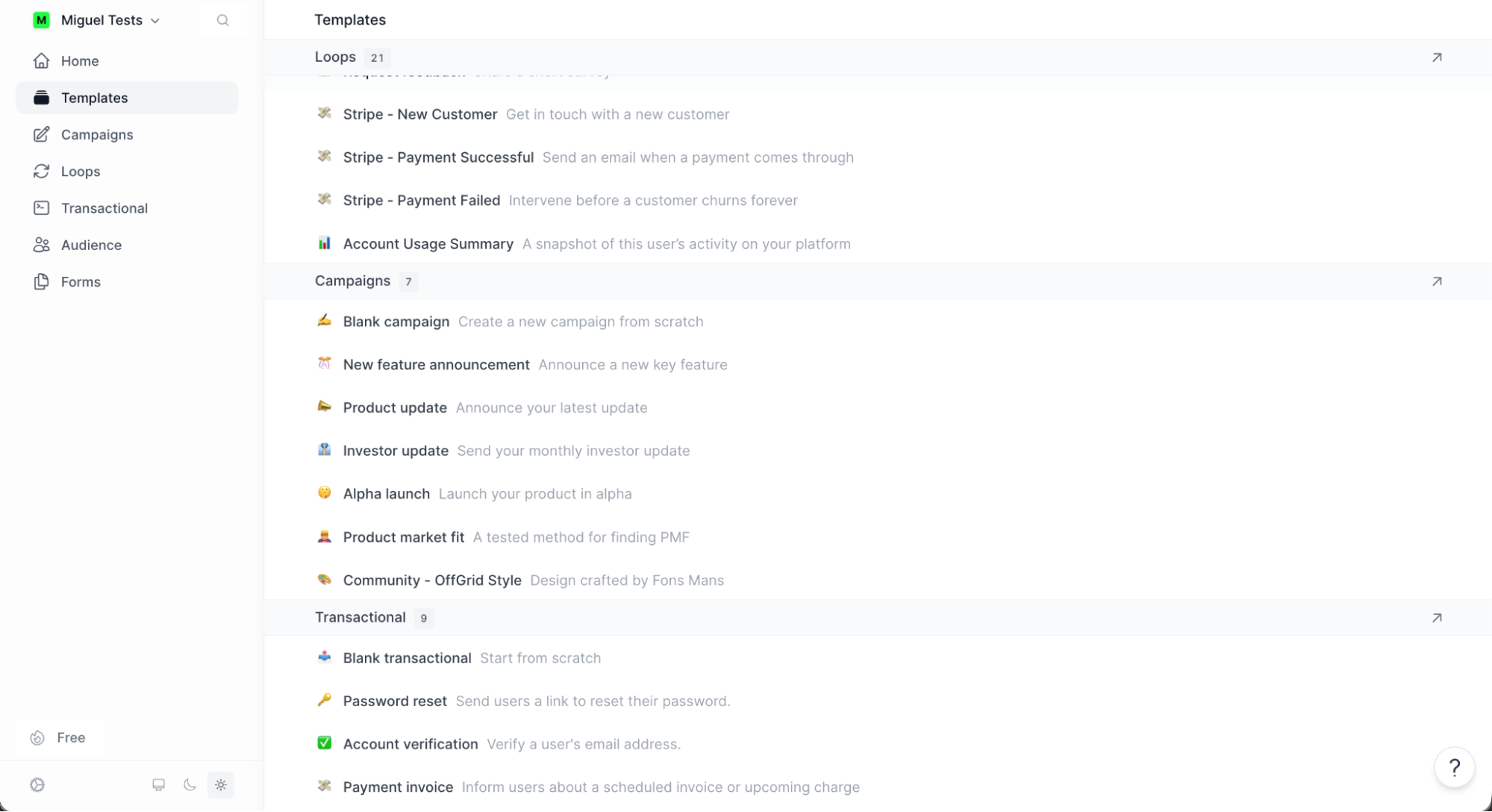
Next, set up your Loops: automated sequences that guide people through your product. Begin by introducing yourself, then follow up with an onboarding drip containing tips to enjoy a trial, and an invite to upgrade once that period is over. Loops provides 21 templates covering common scenarios like welcome sequences, nudges based on in-app activity, and re-engagement campaigns—giving you a starting point so you're not building from scratch.
Once your product-triggered emails are running automatically, layer on conventional email campaigns: sharing product updates, asking for feedback, or delivering important news about your company. All of this lives in one place, so your transactional emails, product sequences, and marketing campaigns share the same sending infrastructure and contact data.
Speaking of integrations, you can automate your email marketing flows by connecting Loops to Zapier. This is especially useful for syncing contact data from other tools into Loops, so your email lists stay current.
Loops price: Free plan available for 1,000 contacts and 4,000 emails/month. Paid plan at $49/month raises contact limits to 5,000 and adds unlimited email sends.
What is the best drip campaign software?
It's your call: do you want something affordable? A Robin to your eCommerce Batman? Something to optimize all your campaigns? There are drip marketing tools for every niche, and all of the options above have either a free plan or a free trial, so you can drive them around the block and decide if they're in for the long haul.
Related reading:
This article was originally published in February 2015 by Matthew Guay and has also had contributions from Maria Myre. The most recent update was in January 2026.