We independently review every app we recommend in our best apps lists. When you click some of the links on this page, we may earn a commission. Learn more.
Once you understand just what HubSpot can do, you start to realize that coming up with alternatives to HubSpot is a little like coming up with alternatives to the Swiss army knife. When it comes to managing your business needs, HubSpot is capable of pretty much everything you need to support your core workflows. (There's no wine opener, though, which can be disappointing.)
HubSpot's so versatile, in fact, that it's on a whole slew of Zapier's best apps lists:
Choosing a HubSpot alternative, then, means that you'll have to narrow down what exactly it is you're looking to accomplish. You're not alone in making that determination, though. Along with a whole slew of Zapier app testers, I've conducted a series of exhaustive, head-to-head tests comparing HubSpot to other competitors to see how its many features stack up.
Based on all that testing and research, I'll give you the best options so you can get an idea of which tool is the right one for your business. Or if maybe you should just stick with HubSpot.
The best HubSpot alternatives
Salesforce for an all-in-one sales and marketing CRM
EngageBay for a free all-in-one CRM
Zoho CRM for an affordable CRM with strong AI
Pipedrive for a sales-focused CRM
ActiveCampaign for marketing automation
Mailchimp for email marketing
Brevo for email marketing and sales
Zendesk for help desk software
The best HubSpot alternatives at a glance
Best for | Standout features | Website | |
|---|---|---|---|
All-in-one sales and marketing CRM | Robust AI-powered marketing features; highly customizable | ||
Free CRM | Sales, marketing, customer support, and chat features on a freemium plan | ||
Affordable CRM for scaling up a business | Project interface for viewing tasks on a Kanban board | ||
Sales-focused CRM | Intuitive dashboards, reports, and analytics for sales management | ||
Marketing automation | Drag-and-drop functionality in workflow builder | ||
Email marketing | Intuitive email builders and metric-rich reporting tools | ||
Email marketing and sales | Pre-built, goal-oriented email automations | ||
Help desk software | Advanced and granular reporting options across various channels |
The best HubSpot alternative for an all-in-one sales and marketing CRM
Salesforce

Salesforce pros:
Robust AI-powered marketing features
Heavily focused on rounding up customer data for increased clarity
Salesforce cons:
Less intuitive layout
Similar functionality as HubSpot comes at a steeper cost
Before I get into how these two tools diverge, let me start by acknowledging that Salesforce and HubSpot have a lot in common. Both offer a wide range of marketing and customer management features, including CRM, sales forecasting and analytics, customer service features, contact scoring, VoIP, and marketing features. You know, just to name a few tiny things.
At the same time, there are a number of differences between HubSpot and Salesforce that are worth considering. HubSpot's origins are in marketing, while Salesforce has always been focused on sales. While both tools now tackle both areas, it still produces differences in everything from user interface to feature availability to pricing structure.
HubSpot, for example, offers a more thorough, plan-based model of bundled marketing features, while Salesforce offers features in separate plan packages or as individual apps. As a result, Salesforce's interface is more customizable but potentially more complicated, while HubSpot offers you a cleaner, more user-friendly experience. Finally, Salesforce has the edge when it comes to sales reports and forecasting, if those are your primary needs.
Salesforce's biggest AI feature right now is Agentforce, its agentic AI platform. Unlike generative AI that drafts content on demand, Agentforce can autonomously plan, reason, and execute multi-step tasks—things like qualifying leads 24/7, resolving service cases without human prompts, or running prospect research in the background.
If you have a lot of depth and breadth in your outbound campaigns, and you're laser-focused on just marketing automation, you may want to consider Salesforce's Marketing Cloud Account Engagement (MCAE, formerly Pardot) instead. Pardot is a bit more powerful than HubSpot. And since its AI engine has been around longer, its predictive analytics and campaign insights are more flexible and granular.
Salesforce also offers more third-party apps and integrations than HubSpot. And like with HubSpot, when you connect Salesforce with Zapier, you open it to 9,000+ apps. This way you can automatically do things like add data from forms to your CRM or get notified when a new lead comes in. If you're using an AI assistant like Claude or ChatGPT, you can connect it to Salesforce through Zapier MCP—so your AI can pull pipeline data, update records, and trigger workflows without leaving your chat interface. Learn more about how to automate Salesforce.
Salesforce pricing: Sales Cloud Starter Suite starts at $25/user/month.
Read more: The best CRM software
The best HubSpot alternative for a free all-in-one CRM
EngageBay

EngageBay pros:
All-in-one with lots of extras
Automation is easy to set up
EngageBay cons:
Free plan only includes 250 contacts
EngageBay is a CRM at heart, but it's also packed with sales, marketing, customer support, and chat features, all on a freemium plan.
The robust marketing suite, for example, includes lead scoring, landing pages, pop-ups, email templates, newsletters, and tools to capture new contacts. And the service suite has basic ticketing and a live chat option that you can integrate on your website, with stats to help you see first response time, chat duration, and total chats. It's a lot—all for free.
EngageBay has been building out AI across the platform. On the marketing side, it offers AI-generated email content and subject lines, send time optimization based on past contact behavior, and AI lead scoring to surface your best prospects. The service side includes a 24/7 AI chatbot trained on your knowledge base articles. And if you want to get more custom, EngageBay has an OpenAI integration that lets you pipe OpenAI models directly into automation workflows—which is useful for generating personalized outreach using live CRM data and merge fields.
You can connect EngageBay to Shopify, a few bulk email-sending platforms, over a dozen SMS providers, Jotform, Docusign, and reCAPTCHA, all natively. If this isn't enough, by connecting EngageBay to Zapier, you can integrate it with thousands of other apps to be sure your information is flowing in and out of your CRM automatically. Learn more about how to automate EngageBay with Zapier.
EngageBay pricing: Free plan includes 250 contacts; paid all-in-one plans start at $12.74/user/month (billed biennially).
The best HubSpot alternative for an affordable CRM with strong AI
Zoho CRM

Zoho CRM pros:
Powerful AI data analysis and predictions (available only at the Enterprise and Ultimate tiers)
Easier to customize than HubSpot
Zoho CRM cons:
Unintuitive interface makes some utilities hard to find
Limited marketing and automation features
Zoho CRM competes with HubSpot on a number of levels: both provide you with a basic range of features to build workflows, nurture leads, and organize tasks; both allow you to import lists, files, and leads for ease of platform-switching or integration; and both are packed with robust AI capabilities. Zoho's AI is some of the best in the CRM world right now.
Zia, Zoho's AI layer, does a lot more than data analysis. It predicts churn for subscription customers, scores leads and deals, and recommends the best time and channel to reach each contact. There's also AI forecasting with anomaly detection—which is useful for catching when a rep's numbers are drifting off target. In the Enterprise tier, you get AI for call transcriptions (with sentiment, intent, and emotion analysis), and Vision AI that can extract and map fields from uploaded images using OCR. You also get a generative AI layer that lets you create modules, reports, and workflows by describing what you want in plain language. If you need to go even further, the Ultimate tier unlocks QuickML, Zoho's platform for building custom machine learning models on top of your CRM data.
Zoho's strength as a platform is in its simplicity—it's great if you're mostly looking for pure CRM capabilities like managing leads, customers, sales, tasks, reports, and projects. Its Project interface is its strongest feature, allowing you to view tasks on a Kanban board. Plus, with its generous free plan, it's a more viable option for smaller businesses. And as your business grows, you can connect more features by integrating other Zoho apps—which also have decent free plans.
Zoho also integrates with Zapier, making it easy to automate your CRM-related workflows, either based on triggers or directly from your AI chatbot with Zapier MCP. Learn more about how to automate Zoho CRM.
Zoho CRM pricing: Free plan includes 3 users and up to 5,000 records; paid plans, which add features like sales forecasting and custom reports, start at $14/user/month.
Learn more: HubSpot vs. Zoho
The best HubSpot alternative for a sales-focused CRM
Pipedrive

Pipedrive pros:
Easy-to-understand analytics all in one place
AI sales assistant sends you suggested actions based on your data
Pipedrive cons:
No free plan
AI features are improving rapidly but are still less mature than HubSpot's
If you're still shopping for a multi-dimensional CRM, Pipedrive is another option worth considering. As two of the most popular CRM platforms, both HubSpot and Pipedrive deliver sales tools, analytics, integrations, and a host of extra features to help you manage content, projects, and more. The key difference is that, where HubSpot offers a wide variety of services to grow your business, Pipedrive specializes in supporting your sales teams.
To be fair, Pipedrive can do a lot of what HubSpot does, just not with the same degree of functionality. For example, you can take advantage of Pipedrive's optional email marketing features at a higher-tier service plan, but it's not as deeply integrated into the nuts and bolts of the platform the way HubSpot's is. Instead, Pipedrive's value lies in the intuitive, accessible dashboards, reports, and analytics that let you build and manage a seamless sales pipeline (it turns out that Pipedrive isn't just a clever name).
Pipedrive has been investing heavily in AI, although its AI features aren't nearly as robust as HubSpot's. Pipedrive Pulse, the smart prospecting toolkit, handles data enrichment, custom lead scoring, outreach sequences, and an intelligent feed that surfaces the deals and follow-ups most worth your attention. Pipedrive also recently launched an AI Sales Assistant (currently in beta), powered by OpenAI, that can answer questions about your pipeline using voice or text, generate draft emails and notes, and summarize contact history. Longer-term, they've announced an agentic AI experience that autonomously crafts personalized email content, identifies urgent leads, and summarizes past communication threads.
Pipedrive doesn't offer a free plan (HubSpot does). But it does offer a straightforward, per-user pricing model, making it more predictable and often cheaper—especially if you need access to its advanced features. HubSpot's pricing plan, on the other hand, is complicated and prohibitive for most small and some medium-sized businesses. For a more economical, sales-focused alternative to HubSpot, Pipedrive is a great option.
When you connect Pipedrive with Zapier, you can practically set your CRM system on autopilot—or use Zapier MCP to interact with your CRM data directly from your AI chat interface. Learn more about how to automate Pipedrive.
Pipedrive pricing: Paid plans start at $14/seat/month (billed annually).
Learn more: Pipedrive vs. HubSpot
The best HubSpot alternative for marketing automation
ActiveCampaign

ActiveCampaign pros:
Huge library of multilingual workflow automations
AI functionality for email content generation, predictive email sending, and automation building
ActiveCampaign cons:
Doesn't offer templates for form creation
Predictive AI sending is limited to two highest tiers
Both HubSpot and ActiveCampaign are known best as CRM platforms, and there's actually a ton of overlap between the two tools. Both offer smooth onboarding and simple interfaces, a wide choice of templates to support your business processes, robust automation, a variety of sales and marketing features, as well as a built-in CMS.
HubSpot is a bit more customizable—for example, it allows you to update its dashboard and integrate custom reporting widgets. But ActiveCampaign doesn't slack on features: its pipeline interface is intuitive (and includes unlimited pipelines), and you can customize task types and get detailed pipeline reports across a variety of fields and metrics.
Add a nice drag-and-drop functionality in its workflow builder (something HubSpot lacks), and you have a solid HubSpot competitor, even if it's not quite as robust.
Where HubSpot leans into generative AI, ActiveCampaign bets on something it calls Active Intelligence—a purpose-built AI platform trained on billions of marketing interactions. The headliner is Predictive Content, which selects the best version of an email for each recipient based on their engagement history, but Active Intelligence has grown well beyond that. The AI Campaign Builder turns a plain-language prompt into a full campaign. AI-Suggested Segments and Automations continuously learn from your audience to surface targeting recommendations. There's also an AI Translation agent that localizes campaigns while preserving brand voice, which is useful if you're running multilingual programs. And for teams already using Claude or ChatGPT, ActiveCampaign's MCP server lets those tools talk directly to your account to pull stats, manage contacts, and trigger automations without leaving your AI tool.
With Zapier, you can also connect ActiveCampaign to thousands of other apps and automate every step of your marketing workflow. Learn more about how to automate ActiveCampaign.
ActiveCampaign pricing: Paid plans start at $15/month for 1 user and 5 actions per automation; full suite of AI features available on Pro plan, starting at $79/month.
Learn more: ActiveCampaign vs. HubSpot
The best HubSpot alternative for email marketing
Mailchimp

Mailchimp pros:
Easy to build and send emails
Offers double the number of out-of-the-box email templates than HubSpot
Mailchimp cons:
Less robust analytics and reporting compared to HubSpot
Limited customization for landing pages
If you're using HubSpot primarily for your outbound marketing, then you might consider Mailchimp as an alternative. Both apps will give you access to effective, intuitive email builders that require no design or marketing experience to use, and both provide you with metric-rich reporting tools. They even allow you to design functional landing pages for lead capture and have various other built-in tools that go well beyond email.
Mailchimp is generally a much simpler and easier-to-use tool than HubSpot, largely because it lacks all the extra features of a traditional CRM. With a narrower focus on email marketing, Mailchimp provides you with reporting to gauge how well your outreach is landing, as well as a functional landing page builder, autoresponder emails, and basic workflows that respond to customer behaviors.
Mailchimp has added AI features under the umbrella of Intuit Assist (available on Standard and above). It can generate fully designed, on-brand email drafts and handle inline editing prompts. There are also AI-powered automation Flow Templates that build journey sequences with generated email copy for specific marketing goals. Predictive segmentation (Standard and Premium only) uses purchase behavior and engagement data to surface your highest-value audiences. None of this matches the depth of a dedicated marketing automation platform, but for a tool built around simplicity, the AI additions are definitely useful.
The main drawback: Mailchimp doesn't account for much outside of marketing. So if you need a CRM that lets you tackle not only marketing, but also sales, content management, operations, and customer service, you're better off with HubSpot.
Of course, all that functionality on HubSpot comes at a price. While both Mailchimp and HubSpot offer free plans, HubSpot is going to be a more substantial investment than Mailchimp once you shift to a paid plan. With that in mind, if you're looking for a simple tool that focuses mainly on email outreach, then Mailchimp might be your best bet.
When you integrate Mailchimp with Zapier, you can automate even more of your email marketing workflows, connecting Mailchimp to your entire tech stack and accessing it directly from your favorite AI tools. Learn more about how to automate Mailchimp.
Mailchimp pricing: Free plan includes 250 contacts and 500 monthly email sends; paid plans start at $13/month, which includes 5,000 monthly email sends.
Learn more: HubSpot vs. Mailchimp
The best HubSpot alternative for email marketing and sales
Brevo

Brevo pros:
Pre-built, goal-oriented email automation
Generous automation limits on the free plan
Brevo cons:
Strict 300 email/day send limit on the free plan
Brevo has a lot of overlap with HubSpot: a full-featured CRM, centralized solutions for sales meetings, calls, and chat, and streamlined deal tracking.
Similar to HubSpot, you can build emails using dozens of pre-made templates and a drag-and-drop editor. Brevo's AI has also come a long way. Its Aura AI suite now includes three specialized agents:
AI Marketing Agent handles copy generation, smart audience segmentation, send time optimization, and dynamic product recommendations.
AI Sales Assistant automates deal creation, enriches contacts with one click, transcribes calls, and drafts outbound emails.
AI Conversations Agent summarizes live chats and helps agents refine tone and draft responses faster.
Brevo also has an MCP server, so tools like Claude or ChatGPT can connect directly to your Brevo account to pull analytics, manage campaigns, and work with your contact data—handy if your team is already AI-tool-forward.
When you connect Brevo with Zapier, you can automatically do things like create new Brevo subscribers from new Google Contacts, Mailchimp subscribers, Facebook Lead Ads leads, and more. Discover more popular ways to automate Brevo with Zapier.
Brevo pricing: Free for up 300 emails per day and 100,000 contacts.
The best HubSpot alternative for help desk software
Zendesk
Zendesk for Service pros:
Customizable chatbots
Comprehensive reporting features
Zendesk for Service cons:
Very expensive (but justified)
Heavy features lag/take time to load
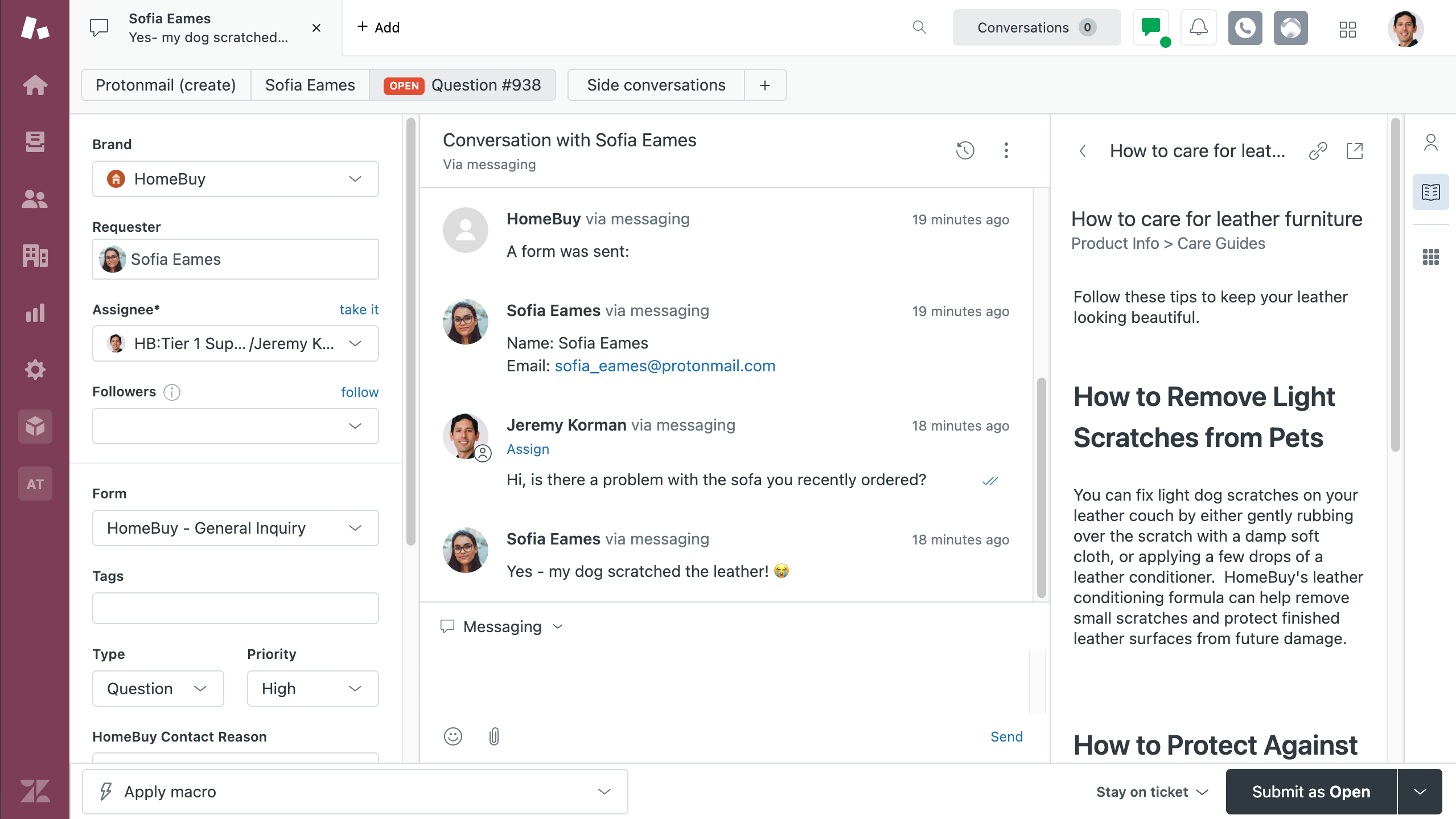
While HubSpot offers all the features you'd expect from a customer support app, it takes time to learn how to maneuver around the app comfortably. Of course, if you're already using HubSpot, this shouldn't be an issue. But if you don't, Zendesk for Service is a more user-friendly option.
Of all its impressive features, the one that stands out the most is its advanced and granular reporting options. In addition to the standard help desk metrics like average first response time and tickets created per day, Zendesk offers visual reports on metrics from every channel, including chatbot efficacy and how the quantity of ticket escalations has changed over time.
Zendesk is designed for you to help your customers across platforms like email, Facebook Messenger, SMS, and WhatsApp. You can also customize your chatbots to ensure your customers are being directed to the right type of support. For example, if they have complex questions, they can chat with live agents and custom automated bots at the same time.
Zendesk has gone all-in on AI. Its AI agents can autonomously resolve customer interactions across any channel. Copilot, which is available as a $50/agent/month add-on, is a proactive assistant built into the agent workflow. It surfaces full customer context, suggests replies, and can execute agent-approved actions without the agent switching screens. There's also an Admin Copilot that monitors your support operation, flags areas for improvement, and can make configuration changes automatically. For teams that care about quality assurance, Zendesk's AI QA tool automatically scores 100% of conversations (human and bot alike), flagging risks and coaching opportunities at scale.
If budget is an issue for you, though, Zendesk may be a nonstarter. It's pretty expensive. But between the call center, the customizations for the knowledge base, chatbot, and reporting, the pricing is absolutely justified.
Zendesk also integrates with Zapier, so you can do things like create new Zendesk tickets from form submissions or add new Zendesk tickets meeting certain criteria to your project management app. Set it up in Zapier's visual workflow builder, or take action straight from your AI chatbot. Learn more about how to automate Zendesk.
Zendesk pricing: Basic Support Team plan starts at $19/agent/month (billed annually); Suite Team starts at $55/agent/month, which includes AI agents and automated resolution reporting.
Which HubSpot alternative should you use?
Start by considering what your business really needs to nail down in its day-to-day workflows. Contact management? Email marketing? Lead nurturing? Customer support? Live chat? Sales pipelines? Content updates? All or some of the above?
Then think about your capacity (and try to be honest about your limitations—they have a way of making themselves known sooner or later). What resources can you devote to things like onboarding and troubleshooting? What sort of financial outlay makes sense for your business, both now and in your projected future? Taking all of these variables into account will give you the fullest picture of just what you need out of a CRM, and that will point you in the right direction.
If you're not sure at all where to start, I'd check out ActiveCampaign for marketing-focused teams and Pipedrive for sales-focused teams.
Related reading:
This article was originally published in March 2023. by Toby Peterson The most recent update, with contributions from Nicole Replogle, was in May 2026.