If you're using YouTube for marketing, you're competing for attention on one of the most important search engines on the internet.
And just like ranking on Google or getting cited on ChatGPT, you need to look at the data. You want to know what's actually landing with your audience, what's quietly gathering dust, and what's secretly pulling in new viewers while they watch old school Survivor highlights at 2 a.m.
Tracking the right YouTube metrics not only shows you how your content is performing, but also gives you the breadcrumbs you need to refine your YouTube strategy, improve discoverability, and ultimately create videos your audience (and YouTube's recommendation system) will love.
Here are the 14 YouTube metrics you should be focused on.
Table of contents:
What are YouTube metrics?
YouTube metrics are the data points YouTube tracks about how viewers find, watch, and interact with your videos and channel. These metrics help you understand your performance so you can improve content, optimize audience engagement, and tie your efforts back to business outcomes.

Why is it important to track YouTube metrics?
Despite my local yarn shop's best efforts, their post-and-pray YouTube content strategy isn't exactly driving herds of enthusiastic knitters through their doors. Without understanding what's working (and what's not), even the most charming content won't reach the people who'd love it.
That's why it's important to track YouTube metrics. It allows you to:
Identify what content drives results. Instead of guessing what your audience wants, YouTube metrics show you exactly which videos people connect with, which ones they ignore, and which types are worth doubling down on.
Optimize videos for discoverability. Understanding how viewers find your content and how YouTube recommends it helps you fine-tune your titles, thumbnails, and metadata. This gives your videos the best chance at being surfaced and shared.
Improve viewer experience. Metrics like impressions, click-through rate, and average view duration show where viewers drop off and what formats they stick with, giving you clues about how to structure content people want to watch all the way through.
Measure ROI. Whether your goal is leads, sales, product education, or brand awareness, analytics help you connect your content to real business outcomes instead of relying on vanity metrics.
Grow sustainably. Tracking your metrics over time gives you the feedback loop you need to experiment, learn, and refine your content strategy in a way that compounds rather than stalls.
How to access YouTube metrics
All YouTube performance data lives inside YouTube Studio. To view that directly, go to studio.youtube.com. From there, you can get a high-level overview of your channel's performance. Or you can click through the different pages and tabs to dive deeper into specific insights like content, audience, and revenue.

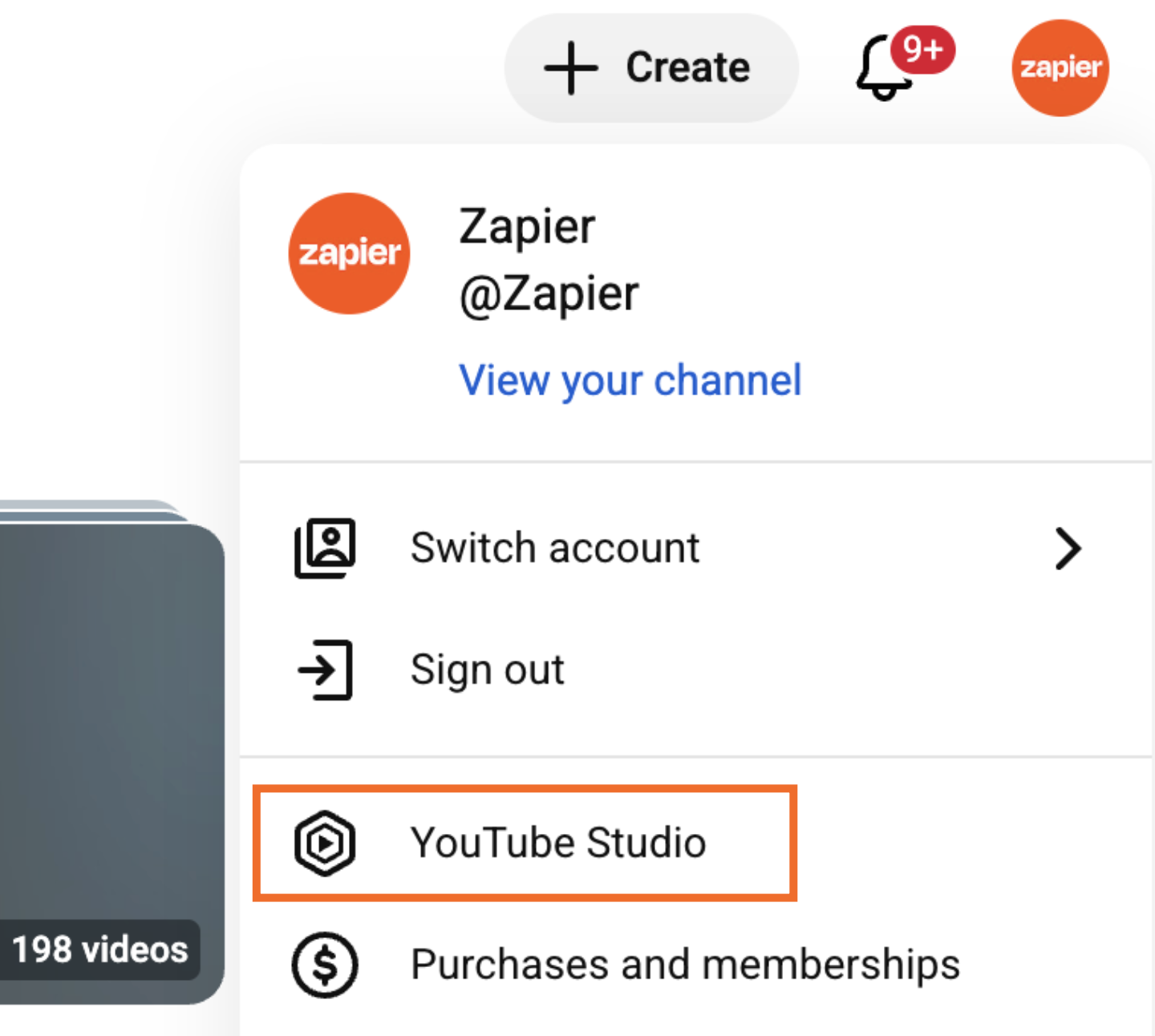
You can also access YouTube Studio from your channel page.
Click your profile icon in the top-right corner.
Click YouTube Studio.

YouTube metrics at a glance
Here's an overview of the key YouTube metrics you'll see in YouTube Studio, grouped by categories: Engagement, Audience, and Other. Keep scrolling for a deeper dive into each one.
Engagement YouTube metrics
These YouTube metrics reflect how your videos perform, including how they're discovered, watched, and interacted with.
Views: This is the number of times your video has been watched.
Watch time: This is how long (in hours) viewers have spent watching your content.
Impressions: This is how many times your content was shown to potential viewers.
Click-through rate (CTR): This is the percentage of impressions that turned into views.
Average view duration (AVD): This is the average time viewers spent watching your content before leaving.
Traffic sources: This is how viewers found your content—for example, suggested videos, Google Search, and paid ads.
Subscribers gained/lost: This is how many people subscribed or unsubscribed to your channel after watching a specific video.
Likes, dislikes, and comments: This is how many times viewers felt inspired to react or respond to your content.
Shares: This is how many times viewers shared your video with others.
Audience YouTube metrics
These metrics describe who your viewers are and how they behave across your channel.
Audience watch by behavior: This tells you how many people who watch your video are new, casual, or regular viewers of your content.
Unique viewers: This is the estimated number of individuals who watch your content. (If the same person watches multiple videos, they're counted only once.)
Audience demographics: These YouTube metrics tell you about the makeup of your audience, including their age, location, and preferred languages.
Other content your audience watches: This shows the other YouTube channels and videos your audience gravitates toward.
Other YouTube metrics
This metric doesn't fit neatly into one of the other categories but still matters for channel insights.
Revenue: These are the estimated earnings from ads, memberships, and monetization features.
14 YouTube metrics you should focus on
YouTube Studio has no shortage of data you can dig into, but these 14 metrics are the ones that consistently give you the clearest picture of how your content's performing. Think of them as your baseline dashboard. Together, they help you understand what's working, what needs tweaking, and where you have opportunities to grow.
1. Views
YouTube views measures how many times specific videos have been watched, including the total number of views for your channel.
How to access it: YouTube automatically displays your channel's total number of views on your dashboard.

To see the view count for specific videos, click Analytics (left-hand menu), and then click See more in the Views tab.

Why it's important: Your view count provides a general gauge of how effective your content is, as well as the overall health of your channel. The more people who watch your videos, the more likely it is that YouTube's algorithm will serve them to new potential viewers.
2. Watch time
Watch time measures the total number of minutes viewers spend watching your videos. Unlike views, which counts only how many times a video is played, watch time reflects the depth of engagement by showing how long viewers stay with your content.
How to access it: Go to the Analytics page. In the Overview tab, click Watch time (hours) for the total number of hours viewers spend watching your channel. To view the watch time for specific videos, click See more.

Why it's important: Watch time is one of the strongest indicators of video quality and viewer satisfaction. The longer people watch, the more YouTube interprets your content as valuable, and the more likely it is to surface your videos in search results and recommendations. Consistently high watch time can lead to broader reach, stronger channel growth, and improved algorithmic support.
3. Impressions
YouTube impressions measures how often your content is shown to potential viewers across the platform. This includes appearances on the homepage, subscription feed, search results, and suggested video panels.
How to access it: Go to the Analytics page. In the Content tab, click Impressions to view the total number of impressions for your channel. To view impressions for individual videos, click See more.

Why it's important: Tracking impressions helps you understand whether your distribution is expanding, stagnating, or declining. Higher impressions typically indicate that YouTube is recommending your videos more often, usually because your past content performed well. If impressions drop, it may be a sign to revisit your thumbnails, titles, or content strategy to increase discoverability.
4. Click-through rate (CTR)
Click-through rate (CTR) tells you the percentage of impressions that became views: how many of the people who saw your thumbnail actually clicked on it. It's calculated by dividing the number of clicks by the number of impressions.
How to access it: Go to the Analytics page. In the Content tab, click Impressions click-through rate to view the total number of impressions for your channel. To view impressions for individual videos, click See more.

Why it's important: CTR is one of the most important indicators of how appealing your content is before someone even presses play. If your CTR is high, YouTube is more likely to recommend your video to new viewers. If it's low, it could mean a number of things—for example, your keywords aren't matching the search intent of your users or your video thumbnail isn't resonating with viewers. Refine one element at a time to see what helps move that number back in a positive direction.
5. Average view duration (AVD)
Average view duration (AVD) measures the average amount of time viewers spend watching a video before clicking away. It's calculated by dividing total watch time by total views, giving you a clear sense of how long people stay engaged with your content.
How to access it: Go to the Analytics page. In the Content tab, click Average view duration. To view the AVD for individual videos, click See more.

Why it's important: AVD helps you understand whether your videos are holding attention. Higher AVD signals stronger content relevance, which YouTube weighs heavily when determining which videos to recommend. Your AVD also highlights where viewers tend to drop off, so you can pinpoint what moments viewers find less relevant.
6. Traffic sources
Traffic sources show where your viewers are finding your videos. This includes YouTube search, playlists, suggested videos, Google Search, external sites, and paid ads.
How to access it: Go to the Content page (from the left-hand menu) and find the video you want to learn more about. Hover over the video name, and click the Analytics icon. Then click the Reach tab, and scroll down to How viewers find this video. You can also click See more for a more detailed breakdown.

Why it's important: Traffic sources reveal which discovery channels are contributing most to your growth. For example, strong search traffic may indicate your content is well optimized for keywords, while high suggested video traffic tells you YouTube is actively recommending your videos. Understanding these patterns helps you refine your strategy—whether that means investing in paid ads, creating more content clusters, or optimizing your social channels to drive more external traffic.
7. Subscribers gained/lost
Subscribers gained/lost indicates how many people subscribed to or unsubscribed from your channel within a given period, or as a direct result of watching a specific video.
How to access it: Go to the Analytics page. In the Audience tab, click the Subscribers tab on the chart, and you'll find your channel's total subscribers gained or lost for a given date range.

Why it's important: Subscribers are a key ingredient to sustainable growth. Tracking this YouTube metric helps you identify which topics, formats, and styles attract your ideal audience. It also highlights videos that may be pushing viewers away, giving you insight into how to refine your content strategy over time.
8. Likes, dislikes, and comments
Likes, dislikes, and comments measure how viewers react to your videos after watching. These YouTube metrics aren't part of the top-level YouTube analytics, but you can't discuss YouTube engagement without touching on the likes and comments on each video.
How to access it: Go to the Content page (left-hand menu), and then scroll to the video you want to learn more about. Hover over the video name, and click the Analytics icon. Then click the Engagement tab. Here, you'll see how the likes and dislikes for that video compare to the rest of your channel. Click See more for more details.

Why it's important: These engagement metrics reveal how strongly viewers feel about your content. High numbers of likes and comments often correlate with stronger viewer satisfaction and can increase the likelihood that YouTube recommends your video. Comments also offer qualitative insight into audience sentiment: what viewers enjoyed, what confused them, or what they want to see next. Tracking these reactions helps you understand how your audience perceives your videos and guides you in refining your content to encourage deeper interaction.
9. Shares
Shares measure how often viewers distribute your video using YouTube's built-in sharing options. This includes copying the video link, sharing to social media, texting it to someone, or embedding it elsewhere.
How to access it: This is the only YouTube metric on this list that requires a little more effort to view.
In the Overview tab of the Analytics page, click See more beneath the chart.
Click the plus icon (+) in the table to add another metric.
Click Shares (in the Interactions section).
The share stats for all your videos will appear as the first column in your table.

Why it's important: Shares help expand your reach beyond YouTube, exposing your content to viewers who may not have discovered it otherwise. Monitoring this metric can help you identify what types of content inspire people to spread the word and naturally fuel organic growth.
10. Watch behavior: new vs. casual vs. regular
YouTube groups audiences into different types of viewers:
New viewers watched your content for the first time. This includes viewers who use a private browser, have cleared their browser history, or haven't watched your content in over a year.
Casual viewers have watched your channel at least once per month for one to five months in the past year.
Regular viewers watch your videos at least once per month for more than six months in the past year.
How to access it: Go to the Analytics page. In the Audience tab, scroll down to Audience by watch behavior.

Why it's important: This YouTube metric helps you understand the balance between audience loyalty and audience growth. Returning viewers suggest strong loyalty and ongoing interest, while new viewers indicate that your content is still reaching fresh audiences. A healthy channel typically has a mix of both returning and new viewers.
11. Unique viewers
Unique viewers estimates how many individual people have watched your content within a selected time period. Unlike total views, which counts every video play, the unique view count helps you understand the actual size of your audience by filtering out repeat views from the same person.
How to access it: Go to the Analytics page. Click Advanced mode near the top-right corner, and click the Metrics dropdown on the left-hand side. From there, check the box next to Unique viewers (under Reach), and click Apply.


Why it's important: Unique viewers give you a clearer picture of your true reach. A high number of unique viewers means your content is effectively attracting new people, while a lower number paired with high views may indicate strong repeat watching from your existing audience. Tracking this metric helps you understand whether your channel is expanding to new viewers or primarily serving your established community.
12. Audience demographics
Audience demographics tells you more about your viewers, including their age, geographic location, and preferred languages.
How to access it: Go to the Analytics page. Click Audience, and scroll down to explore the different audience demographic cards. You can also click See more on any of the cards to get more specific.

Why it's important: Knowing who your viewers are helps you tailor your content more effectively. If your audience aligns with your ideal customer profile, that's a sign your channel is reaching the right people. If not, demographics can reveal gaps or unexpected audiences you may want to address or intentionally lean into. This YouTube metric is also helpful for guiding messaging, posting schedules, and localization needs.
13. Other content your audience watches
Other content your audience watches shows the videos and channels your viewers watch outside of your own.
How to access it: Go to the Analytics page. Click Audience, and then scroll down to the What your audience watches and Channels your audience watches cards. You'll see a list of trending creators and videos among your viewers, updated regularly based on their recent activity.
Why it's important: Seeing what else your viewers watch can spark new topic ideas, reveal stylistic preferences, and highlight competitive or complementary channels in your niche. It's especially helpful for identifying unmet interests your content could fill.
14. Revenue metrics
Revenue metrics show how much your channel earns from YouTube monetization features, including ads, memberships, Super Thanks, and Premium revenue.
How to access it: Go to the Analytics page, and click Revenue. From here, you can see how much you're earning by month or content.

Why it's important: Revenue metrics help you identify which videos are valuable long after they're published. High-earning videos often have strong watch time, consistent search demand, or evergreen appeal. This can also highlight opportunities for sponsorships, product integration, or more intentional monetization planning.
Automate YouTube with Zapier
YouTube Studio is great for showing you what's happening with your content. But when it comes to everything that has to happen around your videos—like publishing them, sharing updates, and managing comments—that's where Zapier comes in.
With Zapier, you can connect YouTube to thousands of other apps and AI tools, so you can orchestrate sophisticated, multi-step workflows that span your entire tech stack. For example, when you upload a new video to Google Drive or OneDrive, Zapier can automatically share it to YouTube, complete with an AI-generated title and description that's optimized for search. It can then share your video to LinkedIn, Facebook, or any other social channel, along with platform-specific captions.
Learn more about how to automate YouTube, or get started with one of these pre-made workflows.
Send new YouTube videos in Discord channel messages


Send new YouTube videos in a channel to a Facebook Page


Zapier is the most connected AI orchestration platform—integrating with thousands of apps from partners like Google, Salesforce, and Microsoft. Use forms, data tables, and logic to build secure, automated, AI-powered systems for your business-critical workflows across your organization's technology stack. Learn more.
YouTube metrics: FAQs
Here are answers to some of the most common questions creators have about YouTube metrics.
What is considered a view on YouTube?
A view for a regular video (not a YouTube Short) is counted when someone intentionally watches it for at least 30 seconds or for the full duration if the video is shorter than that.
What counts as a view in YouTube Shorts?
For YouTube Shorts, a view is counted the moment the Short begins playing.
Note: YouTube used to count Shorts views after it played for a certain length of time, but they modified this based on community feedback. But you can still see the old version of this stat in YouTube Studio. On the Analytics page, click Content > Shorts > Engaged views.
What is a good average view duration on YouTube?
A strong AVD is typically around 50 to 60% of your total video length. The closer you get to viewers watching the majority of your video, the more likely your content is to perform well in search and recommendations.
What is a good like-to-view ratio on YouTube?
A common benchmark is roughly four to five likes for every 100 views. Hitting or exceeding this ratio suggests your audience finds your video valuable enough to actively respond, which can help boost visibility across the platform.
Related reading:
This article was originally published in January 2022 with contributions from Victor Blasco and Hannah Herman. The most recent update was in December 2025.