
Trello is a project management tool that basically works for any type of project. As a freelance writer, I use it to manage my social media calendar and client projects, and even to assign tasks to my husband to make our long-distance marriage a little less chaotic.
But here's where Trello really shines for me: as a CRM. Sure, when your schedule's not as packed, scribbling pitches on a notepad is ok-ish. But once your workload grows and warm leads start slipping through the cracks, you need something more reliable.
Use it right, and Trello becomes a full-fledged CRM that manages customer relationships, tracks your pipeline, and organizes client interactions.
To dig deeper into how to make that happen, I spoke with two experts: Brittany Joiner, author of How To Trello, and Alberto Estévez, former Chief Designer of Crmble, a CRM Trello Power-Up. Here, I'll show you how to use Trello as a CRM.
You can use Zapier's pre-built simple CRM template or sales CRM template to optimize your sales process with an elegant and personalized CRM tool that fits your business needs. The templates include a form to collect leads, a datasheet to store lead information, and a visual tracker to manage the status of each lead and initiate actions when needed.
Table of contents:
Using Trello as a CRM: Why it works
For small to mid-sized businesses, Trello offers an accessible, flexible, and affordable way to manage customer relationships. There are many creative ways to use it without the complexity or cost of traditional CRM software. Here are the reasons I think it works so well:
Integrations and automation. Trello Power-Ups bring a lot of functionality to the platform. Take the Power-Up Crmble, for example. It converts your Trello board into a CRM and sales pipeline. You can also use Zapier to connect Trello with thousands of apps so you can orchestrate multi-step workflows that expand beyond your Kanban board. For example, as lead data comes in, Zapier can use AI to enrich that data before adding it to your Trello board, and then use preset data to label that lead as high or low priority.
Familiarity and user-friendliness. Trello's drag-and-drop functionality mimics the simplicity of moving sticky notes on a board. Easily manipulate its boards, lists, and cards to show different stages of your funnel. Because it's easy to pick up on, Trello reduces the learning curve typically involved in adopting a new tool. Its Kanban-style workflows are familiar to anyone with basic project management know-how, which makes it an accessible option for any skill level.
Flexibility and customization. You can set up your Trello board in a way that suits your business and matches your unique workflow. If your potential clients jump through fewer hoops—maybe just a quick call or an email exchange—create a board that reflects that.
Cost-effectiveness. Not every business has the spare change to commit hundreds of dollars every month to a CRM. Trello's free version is packed with enough features to get you rolling, and its paid plans are also quite affordable, starting at $5/user/month (paid monthly).
How to use Trello as a CRM
How does a project management tool convert into a CRM powerhouse? You use Trello's native features and supplement them with add-ons to squeeze the most value out of the tool. Here, I'll highlight seven steps that will let you use Trello as a CRM.
1. Create Trello lists that mimic your sales funnel
Think of your Trello board as a map of your sales funnel. Each stage of your sales process becomes a separate list on the board—for example, initial contacts, follow-ups, negotiations, and closed deals.
Each customer will become a card. You move these cards from one list to another as they progress through the sales pipeline.
For example, my Trello board as a freelance writer has lists representing stages such as To contact, Contacted, and Discovery call. Each card in these lists represents an individual client or project. I also have a Resources list, which is where I store all my cold and warm message templates, making it easy to send follow-ups.

Of course, your business might have different needs. Trello expert (and fan) Brittany Joiner was kind enough to share her Trello board with me. Here's what it looks like.

It's quite simple compared to mine—and it works great.
But a Trello CRM isn't just limited to service businesses. Alberto Estévez showed me how a bakery can use Trello, too. For example, when a new order comes in, it gets added to a new card in the Order received list. That card then moves through the appropriate lists—Order review and Closed order—as the bakery progresses on the order.

Here are a couple of templates you can use to get a head start on creating your CRM on Trello:
2. Add client details to Trello cards
Create each Trello card as a mini-database for each client that gives you all the info you need at once. Include details like brief descriptions and labels that show the kind of service or product they need, and where they came from.
Attach files like invoices or proposals directly to the card, so you have everything in one place. The comments section is also handy if you want to add notes. If you want to add even more details to your cards, Crmble lets you create detailed contact cards with additional fields like email, company, job title, and deal value for a 360-degree view of your lead.

3. Automate your CRM workflows
Trello's native features allow you to automate routine tasks. For example, when a client card gets added or moved to a list, Trello can automatically send a welcome email, add a checklist of onboarding tasks, and assign a team member to the client.

With Zapier's Trello integration, you can connect Trello with thousands of apps and AI tools to extend your workflows well beyond Trello. For example, you can use Zapier Forms to create a lead form and embed it on your site. When someone submits the form, Zapier can automatically use AI to qualify the lead, create a Trello card with the right labels, and assign it to a sales rep. Zapier can then notify the rep in Gmail or Slack, complete with a lead summary and an AI-generated follow-up email.
Learn more about how to automate Trello, or get started with one of these pre-made templates.
Create Trello cards from new Google Forms responses


Create Trello cards from new starred Gmail emails [Business Gmail Accounts Only]


Zapier is the most connected AI orchestration platform—integrating with thousands of apps from partners like Google, Salesforce, and Microsoft. Use forms, data tables, and logic to build secure, automated, AI-powered systems for your business-critical workflows across your organization's technology stack. Learn more.
4. Use built-in tools to manage workflows
Trello gives you a handful of native features that make it easy to keep deals, orders, and follow-ups moving. At the card level, you can break work into actionable steps using checklists, ensuring every lead or order follows the same consistent process.

Then layer on Trello's newer features, Inbox and Planner, to pair your pipeline boards with built-in to-do management and time blocking. With Trello Inbox, you can drag and drop messages from emails and messaging apps into an existing list, turning them into actionable cards. Trello Planner gives you similar functionality on the planning front. It syncs with Google Calendar and Outlook, allowing you to see your events right inside Planner. From there, you can drag and drop Trello cards into your schedule to plan your day.

To go even further, Brittany recommends adding a few Power-Ups that smooth out operational hiccups:
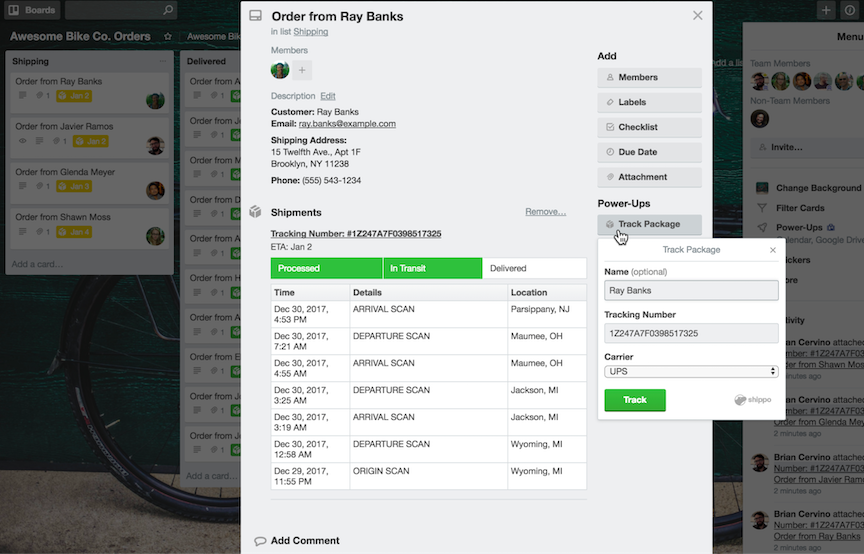
Package Tracker to attach tracking numbers and get up-to-date shipping status and expected delivery dates on the card front. It tracks orders with FedEx, USPS, UPS, DHL, and more, including international services.
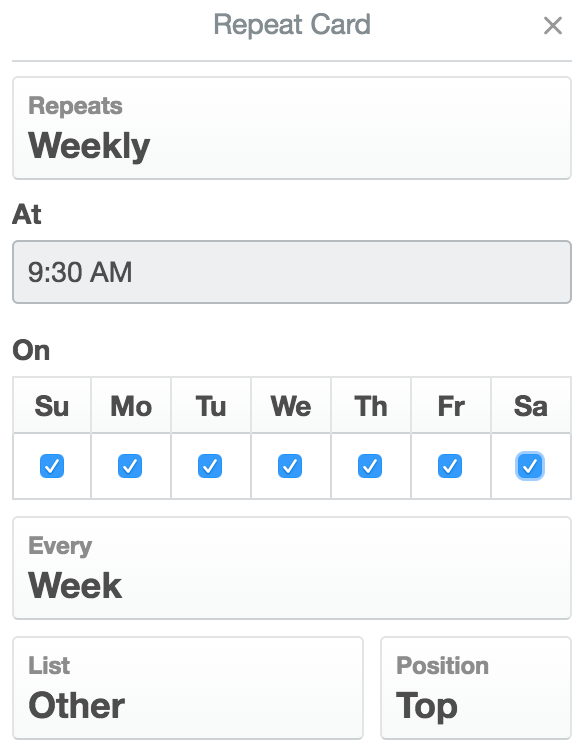
Card Repeater to automatically copy a card every day, week, month, or year. It's very useful for regular CRM maintenance tasks, like cleaning up your CRM.


5. Integrate your email to streamline client communication
Client communication is a massive part of managing a CRM. Trello Power-Ups let you send, receive, and organize emails. Here are two options.
Crmble
Crmble lets you email directly from Trello. Set up customizable templates that replace placeholders with your contact's details.

When you send an email, Crmble automatically updates the contact card with the latest communication.

SendBoard
Email for Trello by SendBoard is another Power-Up that adds email functionality to your Trello board.
Send emails and reply directly from Trello with SendBoard's rich-text editor, and connect a shared inbox to give your whole team access.

Other features, like responding instantly with auto-replies and using triggers to send automated emails, convert your Trello board into a central location for all client communications.
6. Analyze performance with reports and analytics
While Trello isn't a dedicated analytics tool, with a little setup, you get some pretty insightful reports that summarize how you're doing.
Crmble makes this especially easy. It tracks activity on your board and turns it into clear, digestible insights so you can quickly gauge the health of your sales process. With Crmble's dashboard, you get high-level metrics—like how many deals you're managing and the total value in your pipeline—along with simple visualizations, such as a funnel view that highlights conversion rates between stages.

You can also filter your data to spot trends, like which lead sources are performing best or which team members are closing the most deals. Together, these snapshots give you a reliable way to understand where momentum is building and where your attention is needed, all without leaving Trello.
When to move beyond Trello as a CRM
If you find yourself stitching together too many workarounds to keep Trello running as your CRM, it's a sign you may be ready to move beyond what Trello can comfortably support on its own.
At that point, you may want to consider purpose-built CRMs. If Trello's low, low price of free is a big draw, check out Zapier's list of the best free CRM software for more options. If you have more room in the budget to spend on a CRM, check out this roundup of the best CRM software—some of which include free plans.
Or you can build your own custom CRM with Zapier, automating end-to-end workflows across thousands of apps and AI tools. Here's an example of what that could look like:
Zapier Forms to build your lead form: Create a custom, branded lead capture form that lives on a webpage or can be embedded anywhere.
Zapier Tables to store lead data: Automatically add data from your lead form to your table, so you have a single source of truth that updates in real time. Similar to Trello, you can view and manage that data in multiple ways, including as a Kanban board.
Zapier Agents to enrich lead data and intelligently route deals: Use an AI agent to enrich lead data, add a lead score, send a summary to the right sales rep, and kick off a personalized lead nurture email sequence.
Automations across your tech stack: Connect your custom CRM with thousands of apps and AI tools to do things like schedule meetings with new leads, automatically log call notes, update sales forecasts in your spreadsheet, and hand off closed deals to your onboarding or customer success tools.
Related reading:
This article was originally published in January 2024. The most recent update, with contributions from Jessica Lau, was in December 2025.


