I canceled a subscription recently because I started questioning my experience. I'd been loyal for months, but the customer-facing AI agents felt like they were regressing, it took forever to speak to a human support agent, and all of the branding started targeting a much younger audience. They probably logged it as general churn; that's fine, I'm sure "old man yells at cloud" isn't something they would put into a report.
Every single touchpoint you have with a customer shapes their experience, from pre-purchase interactions to post-purchase support. Some customers will be your biggest cheerleaders for years, no matter how you evolve; others will jump ship after one bad support experience or a string of social media posts that make them feel like Steve Buscemi in a backwards hat ("How do you do, fellow kids?").
Customer experience software helps you understand those journeys from the first interaction to the very last so you can build lasting relationships. I tested the best tools in different customer journey categories, reviewed notes from previous testing done by the rest of the Zapier team, and read reviews from real users across industries. Based on all that experience, these are my picks for the best customer experience tools.
The best customer experience software tools
HubSpot for all‑in‑one sales and marketing
Zendesk for a unified customer portal
Freshdesk for a suite of connected customer support options
Salesforce for advanced sales reporting and forecasting
Qualtrics for customer research and feedback
Zoho (CRM, Creator) for a unified tech stack
Intercom for AI‑first customer service
What makes the best customer experience software?
How we evaluate and test apps
Our best apps roundups are written by humans who've spent much of their careers using, testing, and writing about software. Unless explicitly stated, we spend dozens of hours researching and testing apps, using each app as it's intended to be used and evaluating it against the criteria we set for the category. We're never paid for placement in our articles from any app or for links to any site—we value the trust readers put in us to offer authentic evaluations of the categories and apps we review. For more details on our process, read the full rundown of how we select apps to feature on the Zapier blog.
Customer experience (CX) software helps you answer a question that has been plaguing businesses since the beginning of economic time: "What is it like to be our customer, end to end?"
Many teams Texas two-step their way out of lifelong clients by ignoring that "end-to-end" bit; the CX doesn't start with a purchase, end with a sale, or become irrelevant after a repeat purchase or glowing review. The CX encompasses quite literally every single touchpoint—and that's hard to monitor without a dedicated tool.
Some software, like CRMs, support tools, and marketing platforms, can span a lot of that territory themselves—and you'll find a few of those varieties on my list—but not every CRM or marketing automation tool is up for the job. Here's what I was looking for as I tested and researched:
Span multiple channels: Customer experience should account for multiple touchpoints and journeys. I'm talking email, chat, phone, social, and in-product tracking without losing context between them. If the software doesn't do this natively, it should have great integration support.
Cross-silo data: The software should help you connect the "before" (marketing, sales, onboarding) and the "after" (support, retention, renewal). This also means a robust integration library, so your CX software can talk to the rest of your tech stack, either natively or through Zapier.
More than a database: The software should help you understand and act on signals about customer behavior and sentiment, not just store them. Whether that means surfacing friction points, flagging at-risk accounts, or triggering automated follow-ups, good CX software turns customer data into something you can actually do something with.
Best fit for purpose: A tool built for enterprise teams should have the depth and customization to prove it. One aimed at small businesses should work without a dedicated admin. I held each tool accountable for each of its boisterous claims.
The most important theme throughout is that customer experience software should bridge gaps between the oft-silo'd GTM teams: customer support, sales, and marketing. Sales closes a deal and runs to happy hour. Support resolves a ticket and moves on. Marketing runs a campaign and makes a success report. Customer experience software steps in to keep these handoffs moving, so a customer doesn't have to re-explain their history to a new rep, and renewal conversations don't turn awkward.
Before I dive in: to understand where CX software fits, it helps to map the broader "customer [something]" landscape. These categories overlap more than vendors like to admit, but each one asks a different question:
Customer relationship management (CRM) software asks, "Who is this customer?" It tracks contacts, interactions, and deal history, but it's built primarily around the sales cycle.
Customer support software asks, "What do they need right now?" It's reactive by design—built to field incoming tickets, complaints, and issues across email, chat, and phone. This is typically where problems go to get resolved.
Customer success software asks, "Are they getting value over time?" It's proactive and lifecycle-focused, used to track product usage, flag churn risk, and help your team step in before accounts churn.
Each product on my list may have a dash of each in its DNA, but they're also undoubtedly CX-focused.
Customer experience software at a glance
| Best for | Standout Feature | Pricing |
|---|---|---|---|
All-in-one sales, marketing, and service | Seamless data sharing across every Hub (sales, marketing, service, CMS) | Free plan available; paid plans from $15/seat/month | |
Customizable, enterprise-grade customer support | Unified omnichannel ticketing with advanced side conversations, AI voice agents, and reporting | From $19/agent/month (billed annually) | |
Affordable ticket management with fast AI setup | Pre-built vertical AI agents and one-click workflow templates that get teams up and running quickly | Free plan available (up to 2 agents, 6 months); paid plans from | |
Enterprise-scale CRM and customer lifecycle management | Customer 360 view for lead scoring, case routing, personalized outreach, and revenue forecasting | From $25/user/month (Starter Suite) | |
Voice-of-customer and experience measurement | Predictive intelligence engine that forecasts customer behavior and surfaces friction points | Custom pricing by request | |
Budget-conscious teams needing a full software suite | 80+ integrated apps covering CRM, help desk, marketing, and analytics with competitive pricing | Free plan available (Zoho CRM, up to 3 users); paid plans from $14/user/month | |
AI-first conversational customer relationships | Fully embedded AI that handles frontline support autonomously, plus proactive messaging | From $29/seat/month |
Best customer experience software for all‑in‑one sales and marketing
HubSpot (Web, iOS, Android)

HubSpot pros:
Generous free plan across all Hubs
Built-in integrations across all customer touchpoints
HubSpot cons:
High pricing jump to the Professional tier
HubSpot organizes everything into Hubs, spanning sales, marketing, support, and just about anything else you could think of in a business setting. Each Hub owns a slice of the customer experience, and they're all built on the same CRM.
It's a lot, but that's because HubSpot's specialty is bridging siloed customer functions with a single underlying CRM. In other words, all of your customer-facing teams have access to the same information, no matter which tribe they belong to. Everyone can see everything about a lead or a customer: who they've talked to, what emails they've opened, up-to-date contact details, and where they are in the pipeline.
Breeze is HubSpot's AI layer; it covers AI agents, a Copilot assistant that lives inside whichever Hub you're working in, and even a tool for tracking AI search visibility (currently in beta). The Copilot can summarize conversations, draft responses, and build workflows without making you leave your current context.
HubSpot offers a series of free tools across every category, and for small businesses, there's a bundle that gives you basic access to each Hub. Beyond that, well… I'm not saying you need to be a CPA to understand HubSpot's pricing model, but it would probably help. Picking and choosing from the Hubs and add-ons gets pricey fast.
HubSpot has thousands of native integrations, but if you need it to work with an app that's not in its library, you can integrate HubSpot with Zapier. Access all your HubSpot data directly from your AI tools and kick off CX automations across your entire tech stack. Learn more about how to automate HubSpot.
HubSpot pricing: Free plan available; Bundled hubs from $9/seat/month (paid annually); Professional tier bundled hubs from $1,300/month (paid annually).
Best customer experience software for a unified customer portal
Zendesk (Web, iOS, Android)

Zendesk pros:
Unified omnichannel customer support and ticketing
AI text and voice agents
Zendesk cons:
AI features are gated behind expensive service tiers
Zendesk sticks out a little in this list for being so specialized—it goes deeper on customer service than anything else here—but it earns a CX spot for how well it connects to everything around it. You can connect your whole data ecosystem in Zendesk without too much friction.
As the hub for all incoming service activity, Zendesk collects emails, live chats, phone calls, and social messages as tickets in one place. Your agents don't lose customers as they bounce between channels. I especially love the side conversations, which let agents loop in colleagues via Slack, email, or Microsoft Teams.
AI agents are another area where Zendesk shines. You can build agents for frontline support in multiple channels, including voice. Its Copilot can also assist human agents by suggesting responses and pulling information from knowledge bases, reducing the time they spend in the documentation mines digging out answers.
Zendesk edges out lighter support tools on unification and out-of-the-box compatibility, but that comes at a higher price. The AI features are locked behind higher tiers, so you'll have to pony up a bit to bring those advanced capabilities to your team.
You can also integrate Zendesk with Zapier to add AI-powered automation to your customer experience workflows. Access Zendesk data—and take action on it—directly from your AI tools, and kick off automated workflows across your CX stack. Learn more about automating Zendesk.
Zendesk pricing: Starting at $19/agent/month (paid annually); plans with AI features start at $55/agent/month (paid annually).
Best customer experience software for a suite of connected customer support options
Freshdesk (Web, iOS, Android)

Freshdesk pros:
Access to AI agents at a lower price tier than other software
Fast setup with low time to value
Freshdesk cons:
Less advanced customization and AI features
Freshdesk is yet another specialized support platform, but it shines in two key areas: how fast it gets up and running, and how accessible it makes AI. If you're slotting a few different apps together to build customer experience systems, Freshdesk can get your workflows purring.
The tools on the parent Freshworks platform handle ticketing, automation, SLA management, and multichannel support well. Its Freddy AI suite features AI agents for autonomous resolution, an AI Copilot that suggests replies and gauges sentiment, and AI-powered insights that surface trends in your support data.
Freshdesk Omni—the product's AI-powered, customer service capabilities—includes a unified inbox for tickets and conversations, omnichannel support, a knowledge base, rules-based workflows, and AI support agents. I tend to side-eye AI support agents by default (Are they reliable? Do people like them? Do they like me?), but Freshdesk holds up. They're excellent at gathering customer information, such as order status or past ticket history, which reduces time spent in a chat window. And I think everyone can agree that less time in a chat window is better.
Freshdesk isn't quite as unified or feature-rich as software like Zendesk and Salesforce, but it has comparable enough functionality at a better price point. For example, you can get started with AI features, including agents, for $29/agent/month. As you go up in tiers, you unlock cool customizations, like multilingual help desks and the ability to add custom support channels. But just like other seat-based software, prices can escalate quickly as you move up in plans or add headcount.
Freshdesk features a healthy ecosystem of 1,200 apps. You can extend that even further by connecting Freshdesk with Zapier, so you can build CX workflows across 9,000+ apps and access your CX data from wherever you work. Learn more about how to automate Freshdesk.
Freshdesk pricing: Freshdesk Omni, which includes chat and phone functions, starts at $29/agent/month, with access to AI features.
Best customer experience software for advanced sales reporting and forecasting
Salesforce (Web, iOS, Android)

Salesforce pros:
Unmatched breadth across the full customer lifecycle
Powerful Agentforce AI agents
Salesforce cons:
Steep learning curve, requires dedicated admin resources
If HubSpot feels overwhelming, Salesforce is like glimpsing H.P. Lovecraft's Cthulhu on the open seas. It's a full enterprise software suite with a huge breadth of products and features, built around a powerful CRM. Its products cover pretty much every customer touchpoint, including sales, marketing, support, field service, eCommerce, and customer insights.
Salesforce is great for enterprises juggling complex relationships, multiple product lines, and large cross-functional teams. Your eldritch processes, with forbidden knowledge buried in on-site IT environments, require equally esoteric software. Many deployments require a dedicated Salesforce administrator or implementation partner to reach full potential.
If you're willing to commit to building Salesforce into your organization, you get a ton out of it. Agentforce, Salesforce's AI agent layer, lets businesses build custom AI agents that can handle complexity independently, from lead qualification to sales coaching across multiple channels.
Stack it against a specialized support tool like Zendesk, and Salesforce still has the edge; it has a metric ton of specialized software like dedicated service analytics, omnichannel AI support agents, field service operations, and virtual assistance tools. The list keeps going, but you get the idea.
Pricing is a sticky point. If you've got the budget, Salesforce rewards investment, but you'll spend some time setting everything up before you see the value.
Salesforce has 6,000+ apps on AppExchange, and when you connect it with Zapier, you can access Salesforce data and take action in your CRM and beyond directly from your favorite AI tools. Learn more about how to automate Salesforce.
Salesforce pricing: Free small business suite available, pricing is per product from there, with starter suites starting at $25/user/month.
Best customer experience software for customer research and feedback
Qualtrics (Web, iOS, Android)

Qualtrics pros:
Best-in-class experience measurement and voice-of-customer capabilities
AI agents that integrate with major CRM and support platforms, including ServiceNow, Zendesk, and Salesforce
Qualtrics cons:
You'll need to pair it with other platforms, making it expensive and implementation-heavy
Qualtrics is philosophically closest to the "customer experience" definition. This is customer experience analytics, focused on customer voices and behavior across their journeys. It's the type of data that other tools on this list don't surface (and data that you may find scribbled on a Harvard chalkboard, waiting for a janitor to come and solve).
Qualtrics uses a two-pronged approach that's equal parts incredibly useful and just plain cool. People aren't consistent; they do and say different things. The app helps you analyze both so that you can proactively build better experiences.
The tools can collect feedback across multiple channels. For surveys, you can build complex logic, including branches, and support dozens of question types. Then Qualtrics uses AI-powered analytics to surface patterns and friction points.
Its Frontline Digital product analyzes customer journeys through session replays and frustration detection (think rage clicks and erratic mouse behavior) to pinpoint exactly where digital experiences suck. It also features AI agents that integrate with ServiceNow, Zendesk, and Salesforce to access full customer context.
If you're building a voice-of-customer program, this is the tool for it. The catch is that all that intelligence needs somewhere to go—Qualtrics doesn't deploy on its own, so you'll need to pair it with other platforms, which adds cost and implementation lift. The good news is that you can integrate Qualtrics with Zapier to connect your tech stack and inject that hard-earned data into your workflows. Learn more about automating Qualtrics.
Qualtrics pricing: Custom pricing only.
Best customer experience software for a unified tech stack
Zoho (Web, iOS, Android)
Zoho pros:
Outstanding value at every pricing tier
50+ apps covering the full business stack
Zoho cons:
User experience is uneven across different apps in the suite
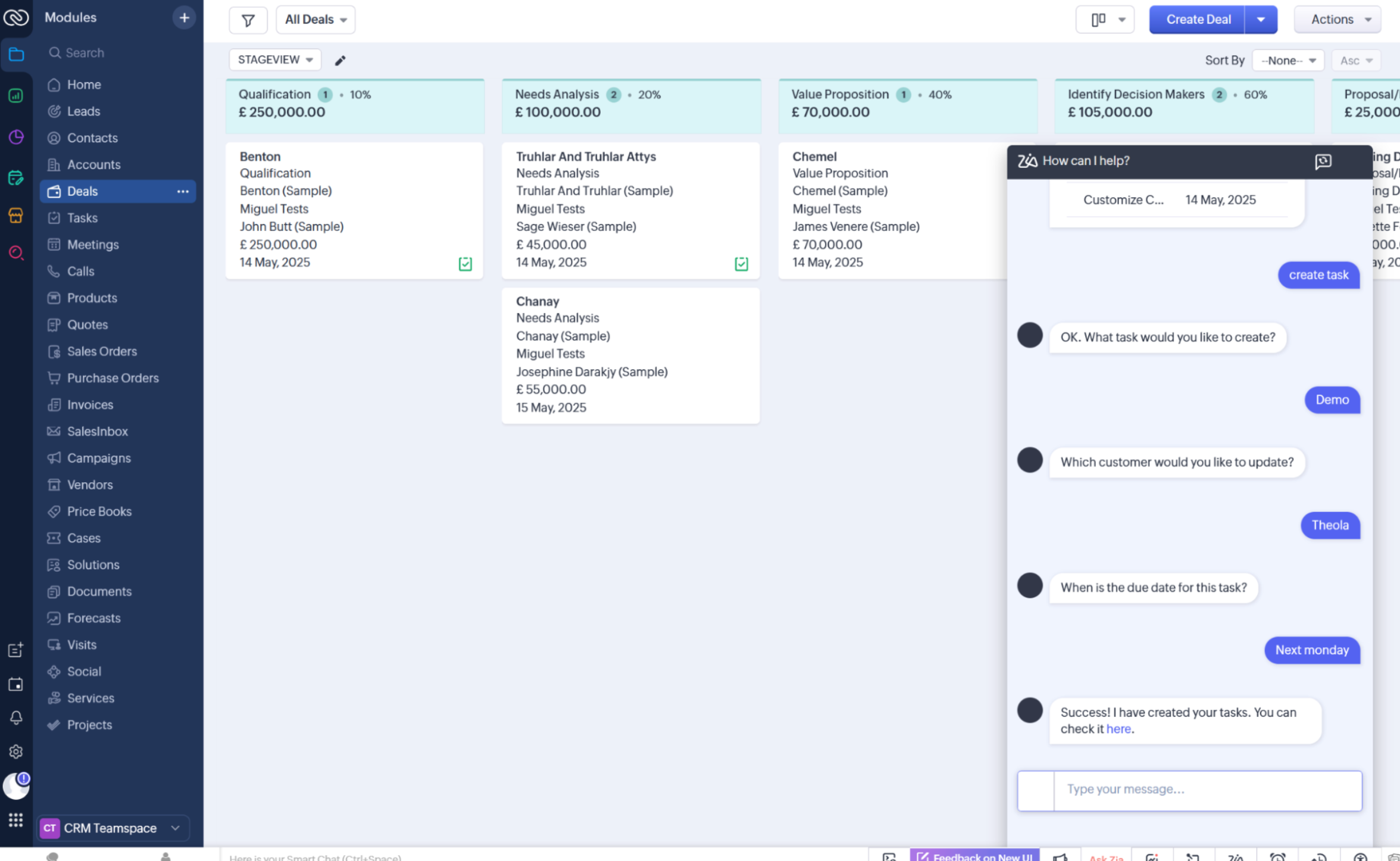
Zoho calls itself the operating system for business, aiming to let you run your entire business on a single unified platform. I learned quickly that these claims are mostly true—few vendors come close to matching this volume of software under one roof.
For customer experience management, Zoho's core CRM nails the fundamentals. For marketing, you can run webinars, social campaigns, events, and build landing pages and automations. On the sales end, Zoho has booking software and forms, voice and live chat contact products, plus data and customer insights tools.
Its AI assistant, Zia, offers a ton of capabilities from intelligent forecasting to generative tools for drafting responses. Zoho Desk rounds out the CX picture on the support side, with ticketing, a knowledge base, live chat, and its own AI-powered virtual assistant.
Zoho's lack of focus means that it can feel clunky and outdated, with fewer advanced features than competitors. I feel like I'm looking for a specific drill bit in my very messy tool bag: there's a lot of useful stuff in there, some of it is rusty but still functional, and I might pinch my finger. But if I find the right tool, I'll save myself an expensive trip to Home Depot (or in this case, Salesforce).
In addition to the massive Zoho suite, most of the Zoho tools integrate with Zapier, too, so you can access your data from your favorite AI tools and build workflows across your tech stack. Learn more about how to automate Zoho.
Zoho pricing: Free version available for the CRM; bundles starting at $20/user/month.
Best customer experience software for AI‑first customer service
Intercom (Web, iOS, Android)
Intercom pros:
Holistic, deeply embedded AI that works out of the box
Best-in-class conversational messaging across channels
Intercom cons:
You'll likely need a separate CRM
Intercom's positioning is AI-first, and unlike a lot of tools that say that, it actually means it.
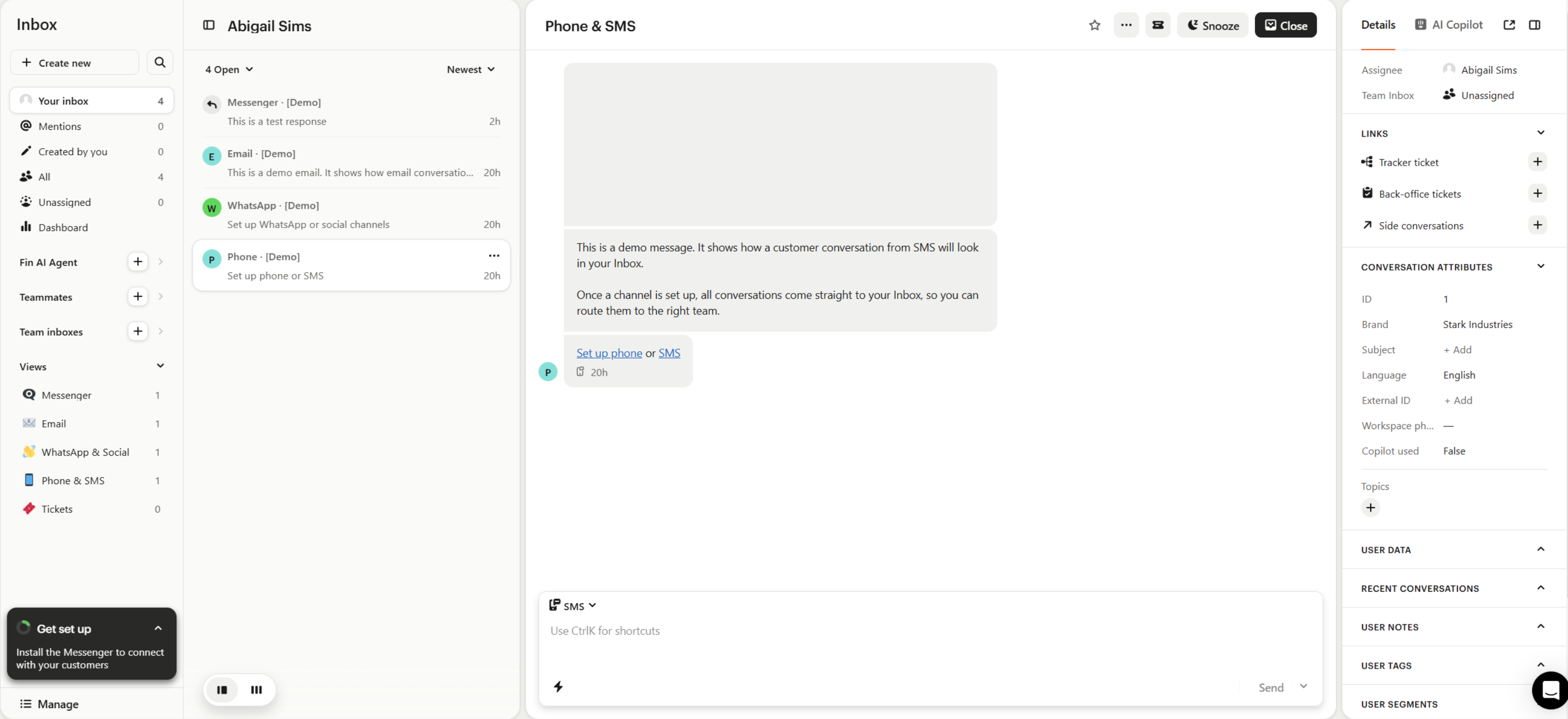
It covers the full customer lifecycle across all channels; you can bring conversations from email, chat, phone, WhatsApp, and social apps into a single inbox. The standout case for Intercom is consistency: every customer gets the same experience regardless of channel or agent. This is what takes it from just a general customer service tool to a complete customer experience software.
Intercom's Fin AI Agent handles frontline support autonomously using your knowledge base to generate responses and perform actions on behalf of customers. Fin AI Copilot assists human agents during live conversations with relevant context and suggested replies. And an AI Analyst helps leaders build reports with less data archaeology. All of these work out of the box.
The major downside is CRM depth, or lack thereof. Intercom doesn't replace a dedicated one, so you'll likely need to pair it with something else. But because Intercom integrates with Zapier, you can link it to your CRM and the rest of your apps, and build workflows from wherever you spend your time. Learn more about how to automate Intercom.
Intercom pricing: Essential plan, with Fin AI agent features, starts at $29/seat/month and $0.99 per outcome the Fin agent completes
Build customer experience workflows with Zapier
Businesses with outstanding CX know it takes collaboration. Sales, support, marketing, and the rest of your internal teams need to be on the same page to deliver the best possible customer experience. A lot of apps can help you do this—but only Zapier can get all of your tools talking to each other.
Zapier connects to 9,000+ apps across your tech stack so you can build workflows that span departments and demolish CX data silos. This interconnectivity will help you give every customer the attention they need to go from one-time purchase to long-term brand advocate.
You can take that even further with Zapier MCP. Just connect your AI client of choice (like Claude, ChatGPT, or Cursor) to your workflows, and you can do work directly from the chat window. Describe what you need in plain English—whether that's monitoring your customer support team or flagging at-risk accounts—and the AI can pull it for you. That gives you ultimate CX visibility, now with even less window switching.
Related reading: