
HR automation is the process of using technology—with or without AI—to automate human resources tasks, reducing manual work. Instead of manually tracking applicants, onboarding new hires, or managing time-off requests, you can set up automations that move data between tools and keep employee records up to date, while saving time and reducing admin headaches.
Hiring the right people and setting them up for success is one of the most rewarding parts of working in talent and people—but it can also feel like playing a (highly regulated) game of whack-a-mole. You're reviewing resumes, scheduling interviews, sending offer letters, and setting up onboarding tasks, all while keeping the human side of HR front and center.
When those day-to-day tasks pile up, it's easy for the work to feel reactive instead of strategic.
By automating HR with Zapier, you can connect the tools you already use to handle the busywork for you—automatically parsing resumes, sharing job openings, updating spreadsheets, and more. Inspired by the Zapier HR team's workflows, here are some real-world, often AI-powered automation ideas. They're organized by function so you can jump to what's most relevant. And most come with ready-to-use templates, so you can go from idea to running workflow in minutes.
Zapier is the most connected AI orchestration platform—integrating with thousands of apps from partners like Google, Salesforce, and Microsoft. Use forms, data tables, and logic to build secure, automated, AI-powered systems for your business-critical workflows across your organization's technology stack. Learn more.
Table of contents
What is HR automation?
HR automation means connecting the tools your HR team already uses—your applicant tracking system (ATS), human resources information system (HRIS), communication platforms, and more—so data moves automatically instead of manually. Instead of copying candidate information from one system to another or sending the same reminder email every Friday, you build a workflow once and let it run.
The impact adds up fast. Zapier customer Edward Tull of JBGoodwin REALTORS, which hires over 300 people a year, saw a 20–25% reduction in manual workload for recruiters after automating a few key workflows—and a 37% increase in overall recruiting productivity. "With other platforms, I wait for features," he says. "With Zapier, I build them myself."
One thing to keep in mind before you dive in: automation works best when the underlying process is already clear. If a workflow is messy or inconsistent, automating it will just make the mess happen faster. And not everything should be automated—some HR moments genuinely need a human in the loop. The goal is to offload predictable, repetitive work so your team has more capacity for tasks that require real judgment.
But what about AI automation in HR?
If traditional automation is the foundation of a well-run HR department, AI automation is the turbocharger. Instead of just moving information between systems, AI can summarize interview feedback, generate first drafts of offer letters, answer common employee questions before they hit an inbox, and surface patterns in engagement data your team might never have time to dig into manually.
That said, not every workflow needs AI to do its job well. Sometimes you just need something reliable, like creating a record from a form submission or sending a notification when something important happens. These kinds of workflows don't need any interpretation from an LLM; they just need to be deterministic and traceable.
The good news is that you don't have to choose between AI and traditional automation. Zapier supports both kinds of workflows, so you can build exactly what each process actually needs.
HR hiring automation ideas
Hiring involves more back-and-forth than almost any other HR process: between teams, across tools, and at every stage from headcount approval to signed offer letter. Here are some of the best ways to automate the busiest parts so your team can focus on candidates instead of coordination.
To get started with a Zap template—what we call our pre-made workflows—just click on the button. It only takes a few minutes to set up. You can read more about setting up Zaps here.
Get headcount approval
Before a role is even posted, there's usually a chain of approvals to work through. Getting sign-off from the right people—without chasing down emails or scheduling extra meetings—is one of those processes that's surprisingly easy to automate.
One way to do it is to have executives submit headcount requests in a shared Google Sheet, which automatically triggers a Slack message to the relevant approvers with everything they need to make a decision. Approvers can sign off directly in Slack. If the request is approved, the role gets created in your headcount planning tool automatically. It also sends a notification to recruiting managers so they can start sourcing right away.
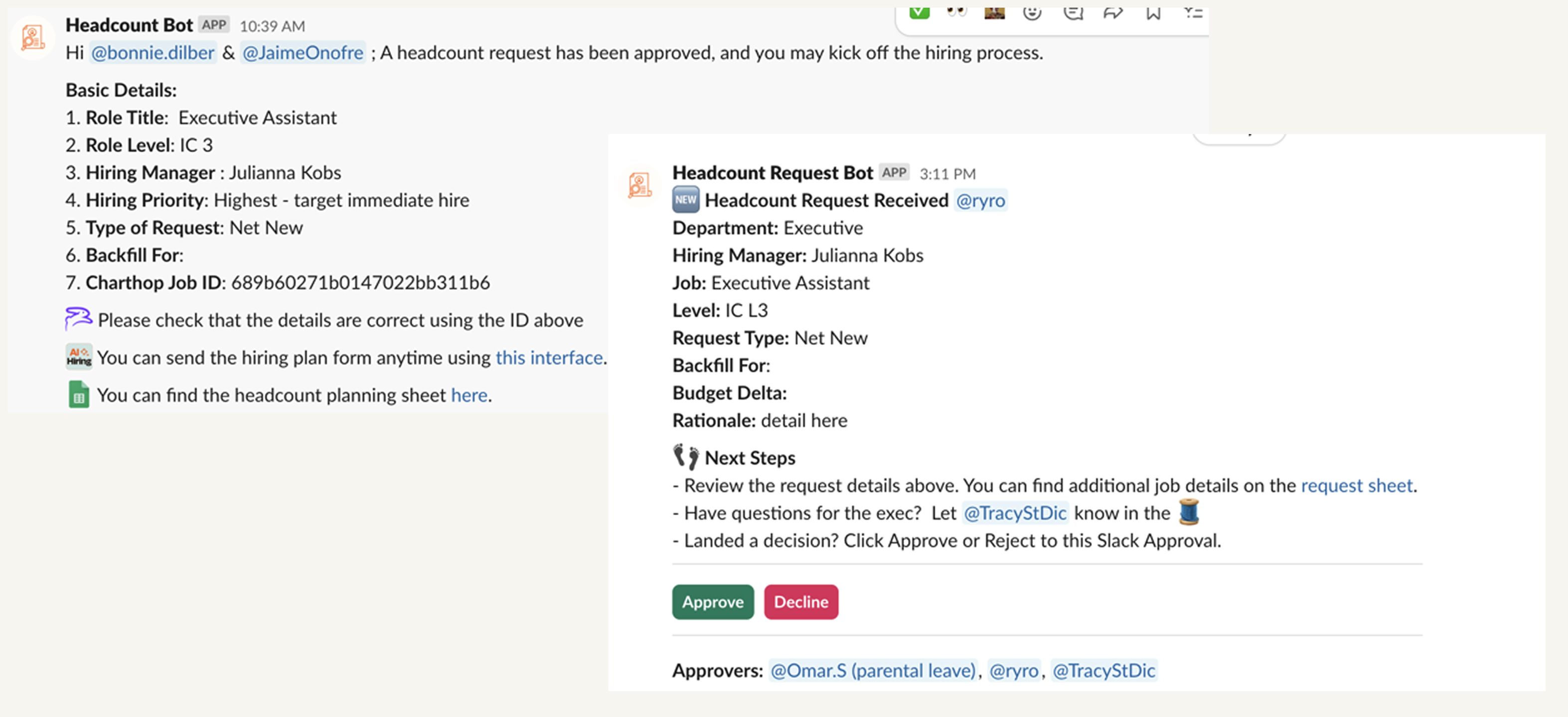
Request approval for new Google Sheets rows through Human in the Loop


Pro tip: The Zap templates throughout this post are great starting points, but Zapier's real power comes from chaining steps together into multi-step workflows. A path step lets you fork a workflow based on conditions. For example, you might route a headcount request to a different approver depending on department, or handle candidates differently based on role type. A delay step adds timed follow-ups, like automatically nudging a hiring manager who hasn't reviewed an application after three days. You'll see these building blocks show up across many of the workflows in this post.
Share job openings across platforms
Recruitment, especially at a growing company, involves a lot of juggling schedules and back-and-forth communication with candidates. But first, you have to make sure you spread the word about new job openings.
If you're a growing company, sharing those openings across various platforms can take up a good portion of your day. Instead, set up a Zap that shares that job posting on LinkedIn, Facebook Pages, or wherever your professional network lives whenever you share a job posting on your company's job board.


Update companies on LinkedIn with new jobs in Jobtoolz


Want to give your job post extra polish before it goes live everywhere? Add a formatter step to clean up or reformat your job description, like trimming character limits for LinkedIn or stripping out internal notes. You can even add an AI by Zapier step to auto-generate a catchy summary or custom caption for each platform (like "We're hiring a Marketing Manager in Chicago—come join us!").

Of course, before you can even share a job opening, you might be spending hours at a time writing job descriptions and creating interview materials. Instead, speed up the process (and avoid the headache of misaligned expectations and rushed documents) with this AI-powered hiring material template.
Make kicking off hiring a breeze with AI-generated job descriptions, application questions, and interview guides.
Get notifications for new applications
Once you post a job, you're likely to start seeing those applications roll in. But don't waste time and resources double-checking those sites every five minutes. Instead, you can use these Zaps to get notified in your team chat app every time a new application is submitted.
Send new candidate applications in Recruitee to Slack


Get Slack notifications for new Workable job applicants

Create a digest of Workable candidates in a designated stage and post to Slack weekly
Respond to candidate emails automatically
Recruiting inboxes can spiral fast. Between cold outreach, candidate check-ins, and status requests, staying on top of email alone can eat up a big chunk of a recruiter's week.
An AI-powered email assistant can help with triage: it monitors your inbox for common candidate messages, learns your tone from past replies, and drafts responses for you to review before anything goes out. You get a shortlist of ready-to-send emails—just tweak what you need and move on.

Handle reasonable accommodation requests
Accommodation requests need fast, consistent follow-through—both for the employee experience and for compliance. But when requests come in through different channels, it's easy for something to get missed or delayed. An automated request form can flag each incoming request and route it to the right team instantly, so no one's left waiting and nothing is missed.

Create Google Sheets rows for new Zapier Forms form submissions.

Create records in Zapier Tables from new form submissions in Zapier Forms

Create Slack channel messages from new Zapier Forms form submissions
Learn more about building automated forms with Zapier.
Parse and save resumes and other links
You can set up an automated workflow to move email attachments, like resumes, to an organized folder in your cloud storage instead of keeping them in your email inbox, where they could get lost or accidentally deleted.
You can also automatically parse resumes with an AI tool like Hirize to convert resume data from PDFs, texts, and images into structured, accessible formats.
Parse new Google Drive files with Hirize's resume parser


Add Google Sheets rows for new CandidateZip-parsed resume attachments in Gmail


Alternatively, you might want to easily save other important candidate information in a safe place, like a portfolio, LinkedIn profile, or elsewhere. In that case, you can use this Zap to do exactly that:

Detect fraudulent applications
With AI making it easier than ever to mass-submit polished-but-fake applications, recruiting teams are spending more time screening out candidates who were never real to begin with. An automated fraud detection workflow can catch red flags early. For example, the Zapier HR team's workflow enriches each application with IP and phone number data, flags location mismatches, and identifies internet-based phone numbers like Google Voice.
Each candidate gets categorized by risk level, a Slack alert goes to the recruiter with recommended next steps, and the outcome gets logged in your ATS for tracking. You move faster on legitimate candidates and stop wasting time on the rest.

Automatically detect suspicious applicants using IP and phone verification to protect your recruiting process.
Personalize candidate outreach with AI
Once you've identified a strong candidate, personalizing your outreach makes a real difference—but it takes time to do well. An AI-powered outreach agent can do the research for you. For example, it can review a candidate's background and experience, pull key motivations and potential concerns from interview transcripts, surface relevant content from your resource library, and draft a warm, personalized email for your review. You decide what to send, but the legwork happens automatically.

Learn how to build your own agent with Zapier.
Auto-generate offer letters
Offer letters are often a bottleneck at the end of a long hiring process—and a generic or rushed letter can chip away at a candidate's enthusiasm right when you want it highest. Instead, use automation to pull candidate data directly from your ATS to generate a personalized offer letter, complete with a clear breakdown of their compensation package. Recruiters can save roughly 30 minutes per offer, while candidates get a polished, professional experience. And there's less risk of inconsistencies or errors coming through at the last minute.
Generate offer letters with AI for updated candidate stages in Workable

Pro tip: Add additional action steps to the Zap template above to send that offer letter somewhere—like your Gmail drafts folder or a shared drive file as a PDF or Google Doc.
HR onboarding automation ideas
A new hire's first few weeks set the tone for everything that follows. The automations below help make sure the right things happen at the right time—without anyone having to remember to do them.
Schedule onboarding sessions
Coordinating onboarding calls across time zones, managers, and a rotating roster of new hires is more work than it sounds—especially when you're doing it manually each time. Zapier can automatically create calendar invites for onboarding events, account for time zone differences and availability, and send Slack reminders to participants ahead of each session. Less back-and-forth, more consistent experience for every new hire.
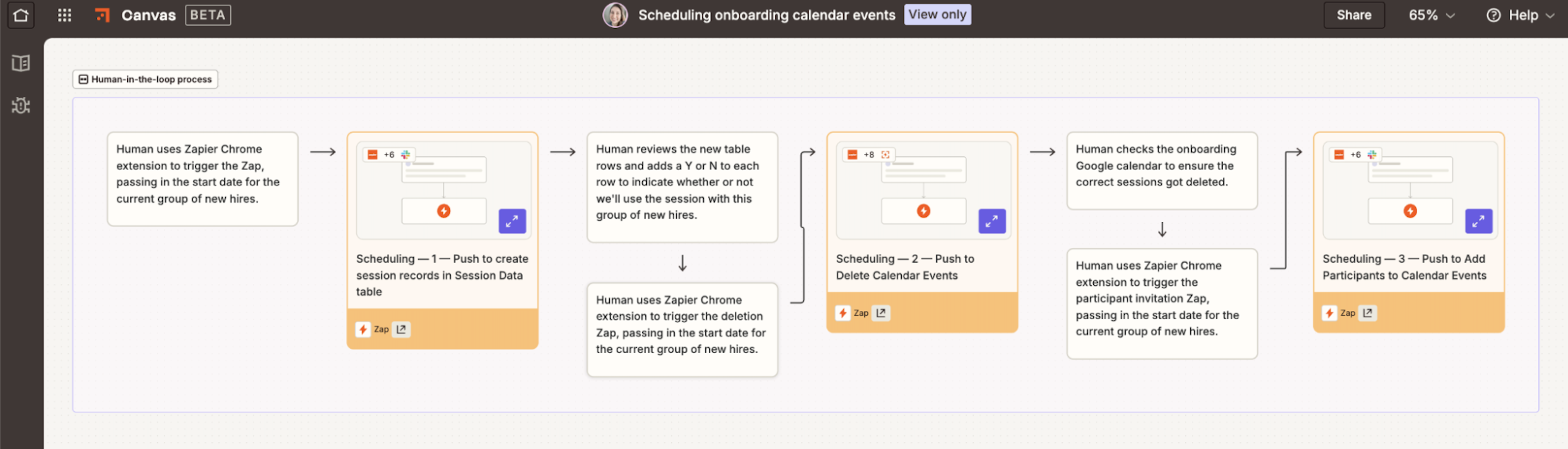
Learn more about automating your calendar and team meetings, or get started with a pre-built template.
Create Google Calendar events for new Zapier Tables records

Pro tip: Consider adding a formatter or lookup step to account for time zone differences.
Add candidates to your HR tool
Once a candidate accepts an offer, getting them into your HR system quickly keeps onboarding on track. These Zaps automatically add new hires whenever a candidate is submitted via a form or marked as hired in your ATS.
Create Workable candidates from a Google Sheets spreadsheet
Create Recruitee candidates from new Facebook Lead Ads leads

Create Recruitee candidates from new Perspective leads via funnel

Create Breezy HR candidates with new entries in Typeform


Create Zoho Recruit candidates from new Gravity Forms submissions


Add new hires in BambooHR from new rows in a Google Sheet

Sync your ATS and HRIS automatically
One of the most common pain points in onboarding is manually copying candidate data from your applicant tracking system into your HRIS. It's repetitive and error-prone—and it's almost always happening when your team has the least bandwidth. Zapier connects your ATS and HRIS so information flows automatically. For example, when a candidate is marked as hired in your ATS, a workflow can update your HRIS instantly, kick off onboarding workflows, and notify relevant teams. All without copy-pasting or time delays.
The Zapier HR team's hiring handoff workflow has become a thing of beauty (or monstrosity, or both? You decide):
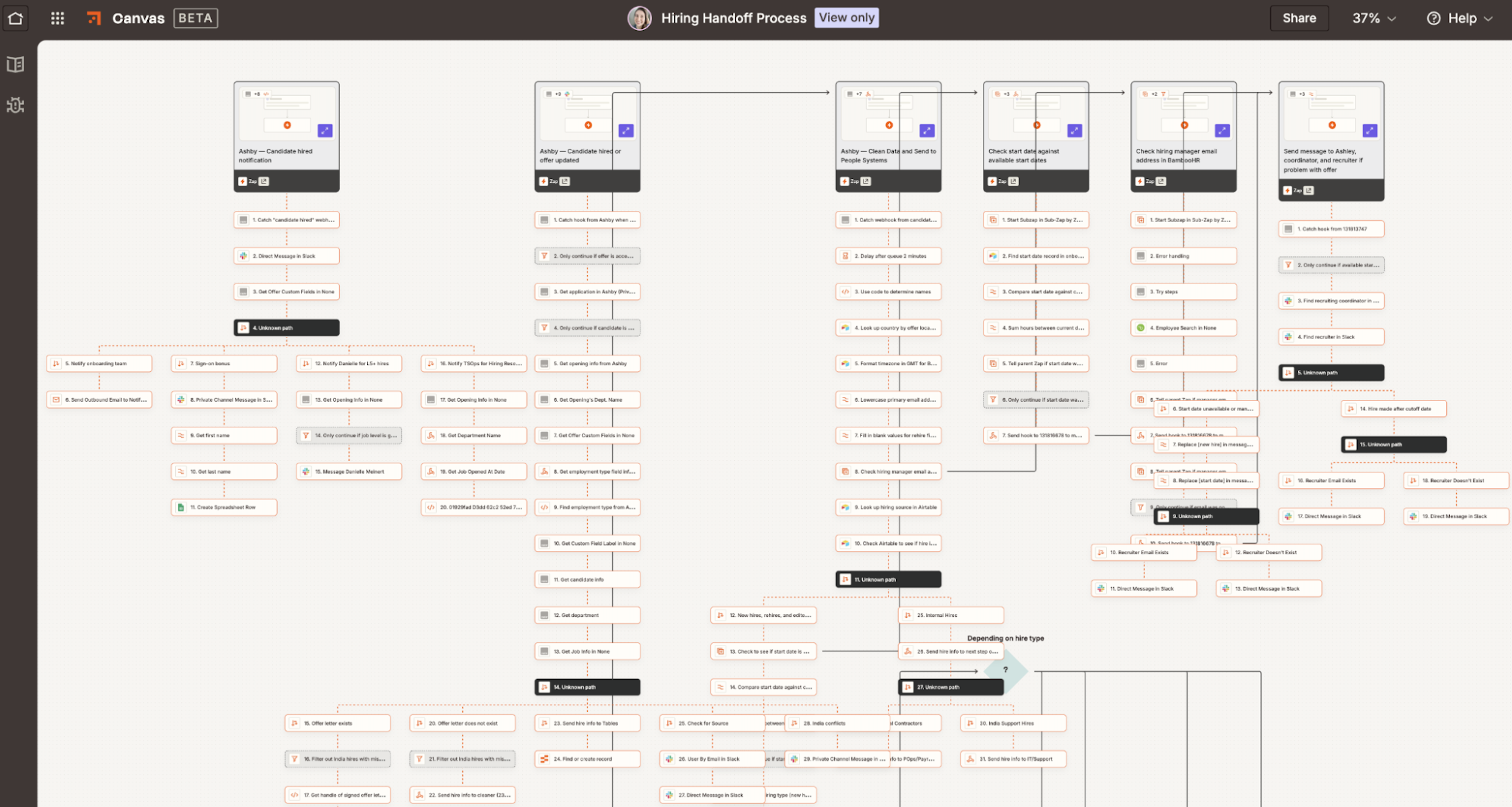
But your automation doesn't have to be as complex as ours. Just start with one of these templates, and build out from there.
Create new Airtable records instantly when new candidates are hired in Ashby


Create employees in BambooHR from Workable candidates in a stage
Onboard and train your employees
Effective, streamlined onboarding can shape the way your employees experience their first few weeks at a new company. With automation, you can make sure every new employee receives the right training materials at the right time throughout the entire process.
"add new YouTestMe users for training from new Google Sheets rows"

Assign new BambooHR employees a Seismic Learning lesson

Create GoTo Training registrants from new employees in BambooHR

You could even set up Zaps that automatically invite them to a new Slack channel once they've completed certain onboarding steps.
Invite users to a Slack channel when new Seismic Learning paths are assigned
You can also set up a workflow that helps new hires create personalized "Read Me" documents that clearly communicate their work styles and make it easier to integrate into a new team. Or, give them access to an employee onboarding chatbot that can answer FAQs and make new hires feel supported without stretching your HR team too thin.
Automate team ReadMes to strengthen team relationships and streamline onboarding.
Empower your HR team with an OpenAI-powered chatbot for a seamless onboarding experience.
HR culture automation ideas
Culture gets built in the small moments, like introductions, check-ins, and all the other little things that help people feel seen and connected. A lot of those moments become more consistent (and more likely to actually happen) when there's automation behind them.
Pair employees for connection and belonging
Starting a new job can feel isolating, especially in remote or hybrid environments. A buddy program—where new hires are matched with experienced teammates who can answer questions and offer informal context—goes a long way toward helping people settle in. The problem is that matching people manually takes real time, and it's easy for this work to fall by the wayside when other things feel more urgent.
Zapier can automate the matching process based on whatever criteria matter most to your team, like role, interests, location, or work schedule. And it's not just for new hires—you can set up a similar workflow that automatically pairs any employees with shared interests into small group chats on a recurring basis. Think of it as a fully customizable connection program, built on tools you already use.
Did you know? You can ask Copilot, Zapier's built-in AI assistant, to brainstorm, build, configure, and maintain cross-product automated systems.

Run employee pulse surveys without the enterprise price tag
Most employee engagement survey platforms are expensive and inflexible. They lock you into preset question banks, rigid cadences, and analytics dashboards that don't quite match how you work. If you want more control, you can build your own automated survey system with Zapier using Forms, Tables, Slack, your HRIS, and AI to synthesize results.
You control the questions, the frequency, and how insights get surfaced. It costs a fraction of what dedicated tools charge, and you can evolve it as your team's needs change.
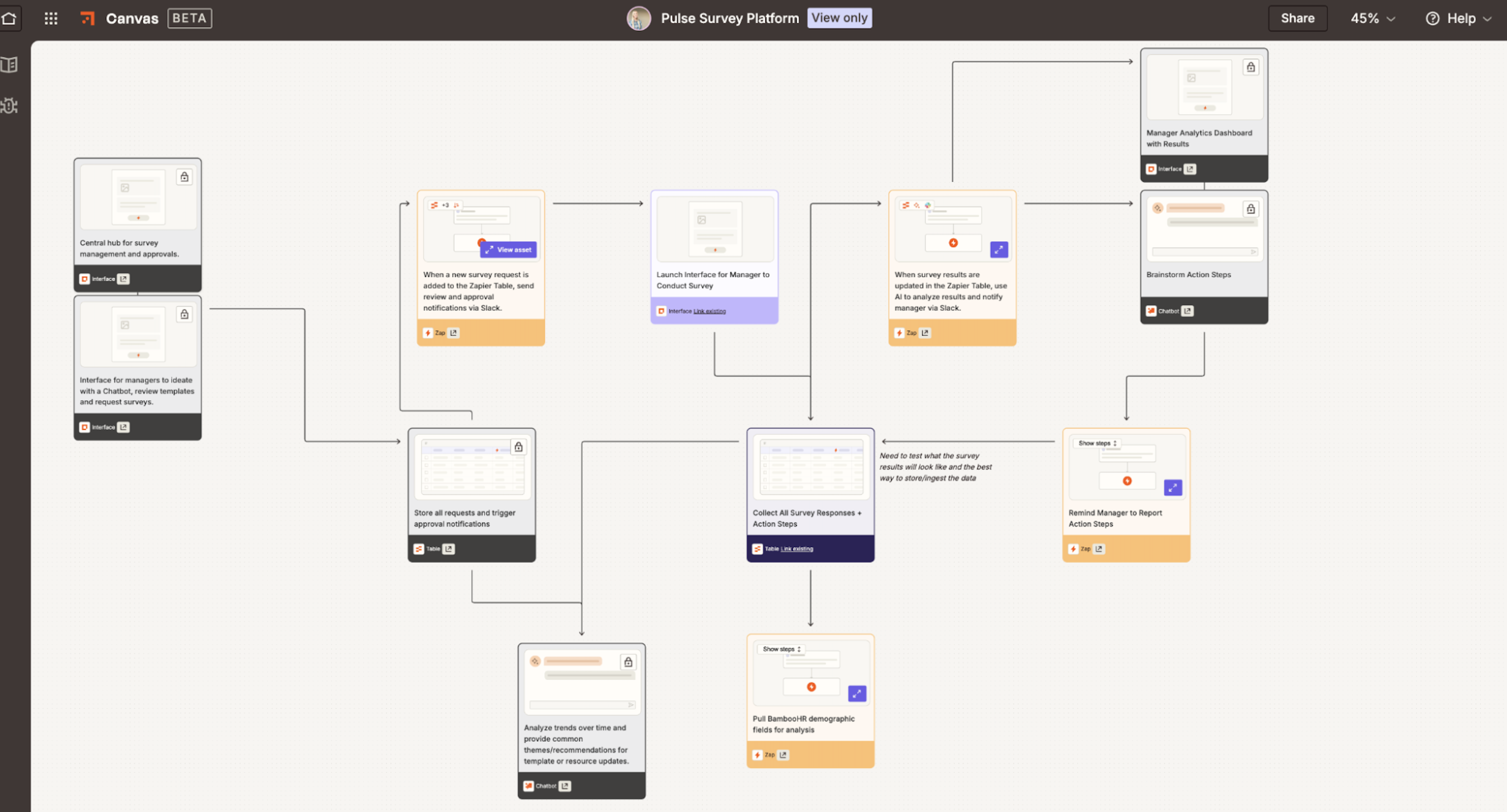
Want to try it yourself? Start by building your survey in Zapier Forms, then log responses in Zapier Tables. From there, you can add steps like sending surveys on a schedule, notifying teams in Slack, or using AI to summarize results.

Manage time off and birthdays
It can be pretty difficult to keep track of everybody's OOO time, especially if you're part of a big team.
While managers typically stay on top of their employees, you can make their lives easier by automatically posting summaries of those absent in your team chat app. You could even set up an automated workflow that sends them well-wishes on their birthday.
Get a BambooHR summary of who's out in a private Slack channel message everyday

Get a BambooHR summary of who's out in a private Slack channel message weekly
Send team members birthday wishes on Slack via Zoho People

You can also use an agent like this one that scans your Google Sheets roster for birthdays and anniversaries, then sends a personalized Slack message to employees on your behalf.
HR performance automation ideas
Supporting your team's growth—and catching problems before they become crises—doesn't have to mean more manual work for HR. These automations help you stay ahead of attrition, support better goal-setting, and make the performance review cycle less painful for everyone involved.
Predict employee attrition before it happens
The warning signs of disengagement are often there well before someone hands in their notice. But they're hard to see when you're looking at each signal in isolation. By pulling together data from across your tools (team activity, survey responses, performance patterns, and more), Zapier can automatically flag employees who may be at risk and trigger the right workflow for HR or their manager to follow up. It's a way to get ahead of turnover instead of scrambling to respond after the fact.
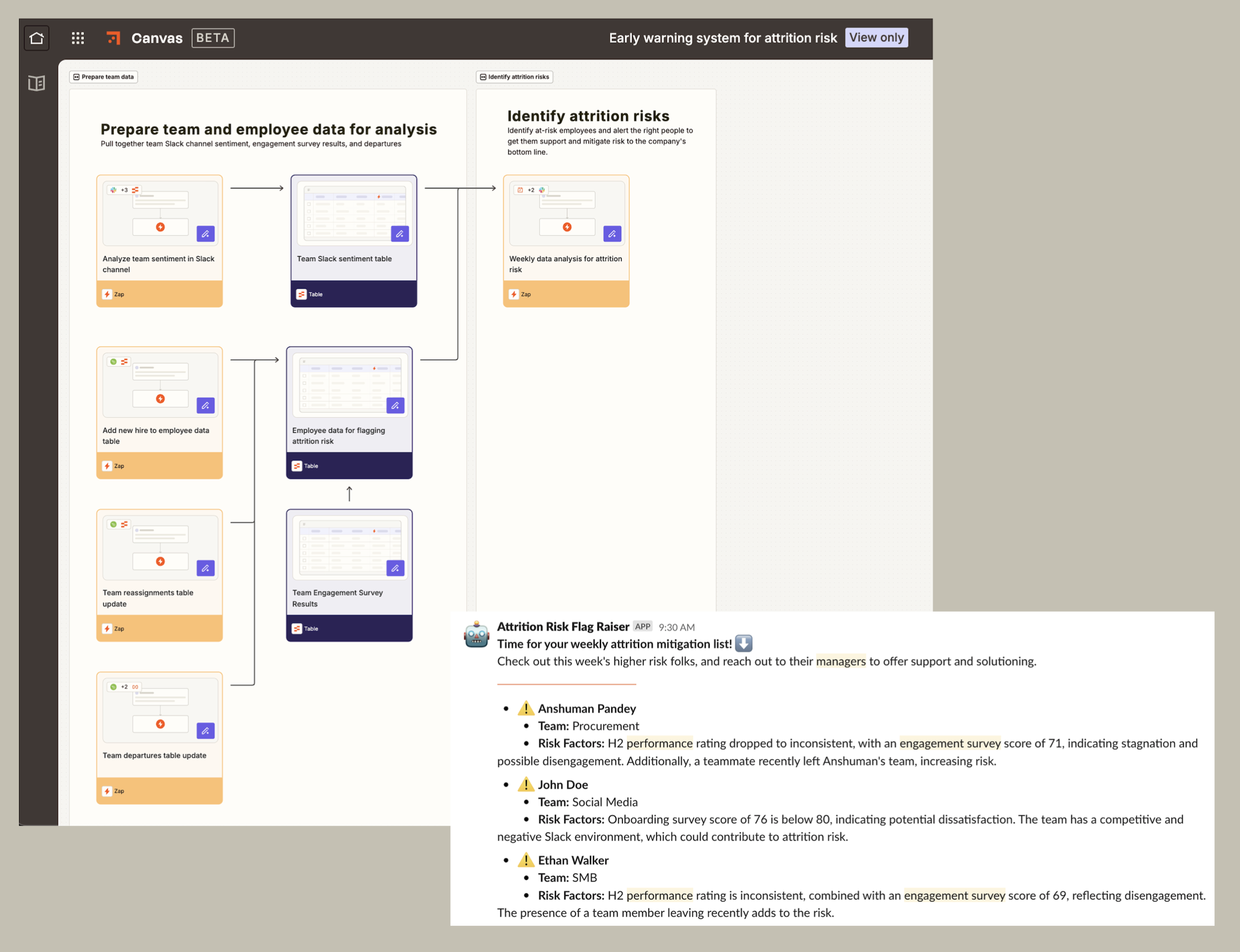

Predict employee turnover and boost retention with automated risk analysis and alerts.
Support goal-setting and performance reviews with AI
Writing clear goals and useful performance reviews takes longer than most people expect—and the output is often inconsistent. A couple of AI-powered tools can speed up and improve the process for everyone.
For goal-setting, you can build an AI chatbot to guide employees through turning vague intentions into specific, measurable, trackable objectives. Instead of staring at a blank page, employees can answer a few prompts and walk away with goals that are actually actionable.

An AI-powered chatbot coaches employees through your goal-setting framework step by step, captures every conversation, collects feedback, and gives HR the data to improve the process over time.
For reviews, you can build similar chatbots for both managers and direct reports. Have your chatbot prompt them with tailored questions, provide examples, and help them write focused, meaningful feedback. That way, reviews will get done faster and with more consistency across the organization.

Learn how to build your own HR chatbot with Zapier.
Coach managers with AI-powered one-on-one summaries
One-on-ones are some of the highest-value time a manager spends. But it's hard to be fully present when you're also trying to take notes and make a mental note to reflect on your communication style later (which, let's be honest, rarely happens).
Instead, build an AI-powered workflow that automatically generates meeting summaries from your Zoom recordings, analyzes your coaching patterns, and delivers actionable feedback to Slack after each session. Over time, you get a clearer picture of how you lead and what to work on—without carving out extra time to figure it out.

HR operations automation ideas
Some of the most time-consuming HR work lives at the edges of the employee lifecycle: the documentation requests, the offboarding checklists, the administrative tasks that have to be done carefully and consistently. Here's how to automate the ones that eat up the most time.
Streamline employee offboarding
Offboarding touches IT, legal, finance, and HR—often with tight deadlines and zero room for missed steps. When something inevitably gets missed, the consequences range from security risks and compliance gaps to a poor final impression on someone who's leaving on otherwise good terms.
A single-form offboarding workflow can kick everything off at once. For example, you might send notifications to stakeholders, generate documents, and update your HRIS in one go. You can even automatically launch an exit interview process, with AI-analyzed feedback surfaced for HR to review. Every departure follows the same process, every time.
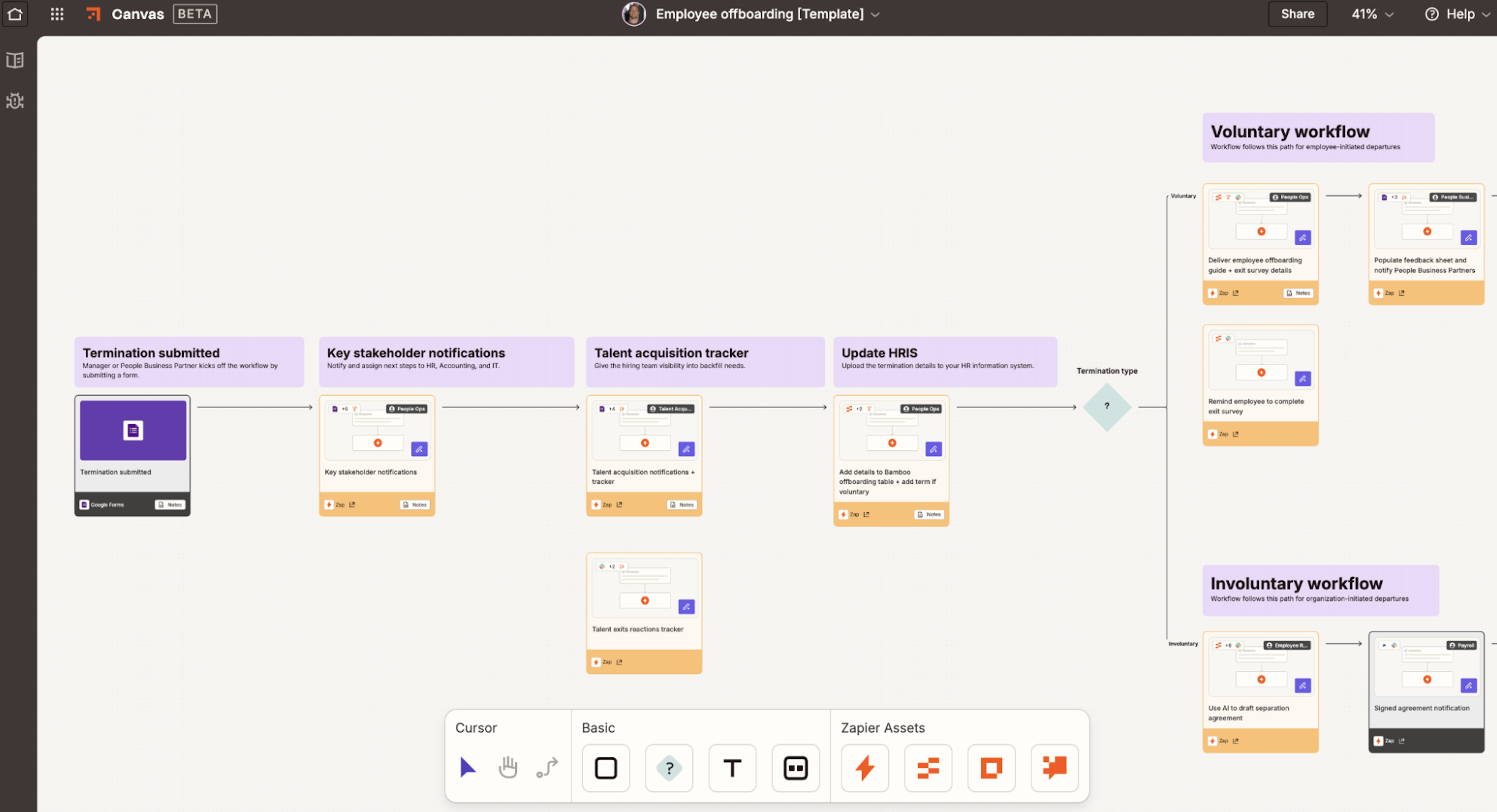

Make employee departures easy with automated notifications, document generation, and feedback collection.
Automate employee documentation requests
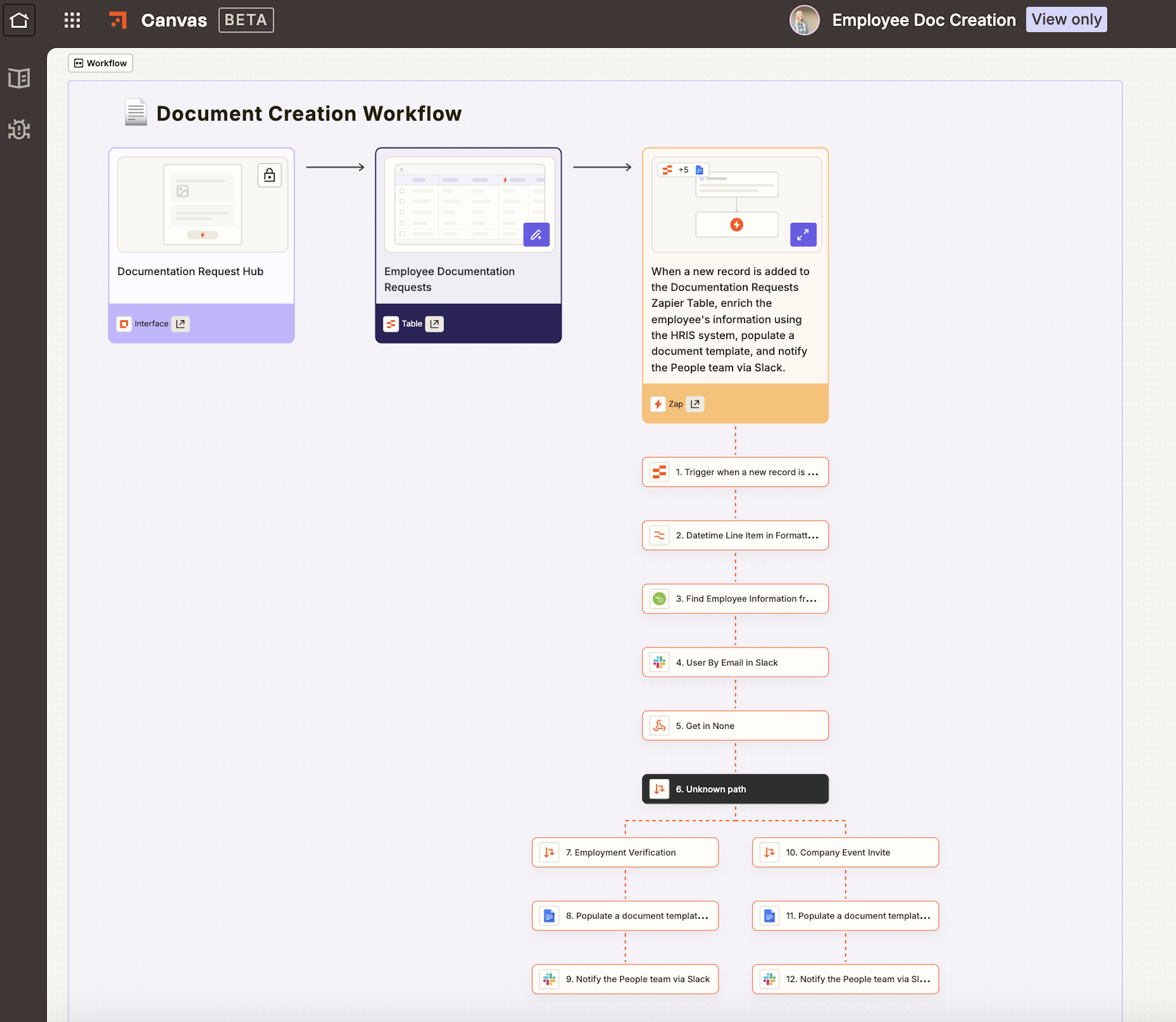
Employment verifications, event invitations, benefits summaries—documentation requests are frequent, time-sensitive, and almost always handled manually. An employee documentation hub changes that.
Say an employee submits a simple form, and Zapier pulls the relevant data from your HRIS. Then, a formatted, review-ready document lands in Slack for HR to approve and send. No chasing down information or formatting documents from scratch.

Streamline your HR processes with automation
A successful human resources department plays a key role in a positive work environment with happy, productive teams. You use your judgment to find quality candidates, your creativity to build engaging and effective onboarding processes, and your insight to support employees and help them navigate difficult situations.
By adding automation into the mix, you can spend more time focusing on the human side of HR and leave the admin to the bots.
Related reading:
This article was originally published in March 2017, with previous contributions from Elena Alston. It was most recently updated in March 2026 by Nicole Replogle.


