
Capturing ideas, recording interviews and lectures, or just catching a cute quip from your kid has never been easier, thanks to a variety of voice recording apps available for your iPhone. But with so many iPhone recording apps available—each with its own distinct advantages and pitfalls—it can be tough to find the ones that work.
That's why I set out to find the best iPhone voice recording apps on the market. After ruling out a bunch of less-than-stellar options, I did in-depth testing on over 25 apps. Based on that experience, these are the six best iPhone recording apps that make recording audio easier, cleaner, and more efficient.
The best iPhone recording apps
Apple Voice Memos for convenience
CocoonWeaver for organizing audio notes
MOTIV Audio for sound quality
Voice Recorder & Notes Pro for advanced editing features
Voice Record Pro for customization
Voice Recorder, Audio Memos for smart recording
What makes the best voice recorder on iPhone?
How we evaluate and test apps
Our best apps roundups are written by humans who've spent much of their careers using, testing, and writing about software. Unless explicitly stated, we spend dozens of hours researching and testing apps, using each app as it's intended to be used and evaluating it against the criteria we set for the category. We're never paid for placement in our articles from any app or for links to any site—we value the trust readers put in us to offer authentic evaluations of the categories and apps we review. For more details on our process, read the full rundown of how we select apps to feature on the Zapier blog.
Today's tech landscape is dominated by AI-driven tools, but voice recording apps stand out for being a little more human. These apps capture the essence of our spoken words (stuttering, emotions, and all) and preserve them in their original form. Unlike AI meeting assistants and transcription tools that process conversations into summaries or action items, voice recording apps record your human voice and keep it human.
I started my search for the best iPhone voice recording apps by scouring the internet and Apple's App Store for well-rated apps. I skipped any apps geared toward music production or podcasting since my goal was to test apps that the average person would use for everyday purposes, like voice memos. But I did think about other potential uses as I tested, like recording voiceovers for social media, capturing lectures for class, documenting meetings, or conducting an interview that you'll want to review later.
As I performed my tests, these are the main things I was looking for in each app:
Ease of use. Voice recording on iPhone shouldn't be a hassle—that's the opposite of the point. Any iPhone sound recorder on this list had to be easy to navigate and record with.
Sound quality. I kept an ear out for how clean and crisp the audio was. (I also looked for different options for enhancing the quality or adjusting the sound, like changing sample rates, bit depths, or even the option to record in stereo or mono.)
Audio export options. I looked at the number of formats (e.g., WAV, MP3) and platforms (e.g., Dropbox, Google Drive) available for saving and directly exporting audio.
Note-taking capabilities. The ability to jot down notes on recordings or use markers to flag specific places in audio clips was a big bonus.
Transcription. This wasn't a huge factor for me, but given that almost all of the apps I tested offered some form of transcription, naturally, I took note of the differences in performance.
Editing features. Even if you're just using these apps casually, you may want to at least trim whitespace at the beginning of your recording, or cut out the six minutes of pocket sounds you accidentally recorded when you thought you'd pressed stop. Other editing features, like splitting, pitching, merging, or reducing noise, were a bonus.
Value. Most of the apps on this list are free, have free plans, or are relatively affordable for the features they provide.
Active development. There are a lot of voice recording apps out there, and that means there are also a lot of abandoned voice recording apps. Some apps I really enjoy, like AudioNote 2 and Say&Go, haven't had recent updates. In order to make this list, the app had to be under active development—every app on this list has been updated within the past few months, most of them much more recently.
I tested each app in two different environments: one in a space with very little background noise, and the other in a space with a bit of background noise, like people talking in another room or cars passing by. After all, when you record audio on iPhone, it's very likely you'll be doing so in a variety of environments.
I recorded myself speaking for about 30 seconds at a time to get a solid and accurate feel for each app's recording capabilities.
In the apps that had a range of levels, I played around with the quality, looking for minor and major changes in sound. Some of the apps had sound enhancement features, so I applied those to see if there were any differences in background noise, ambient sounds, and overall vocal clarity.
Note: I only used the microphone already embedded in my iPhone, as well as the microphone within my AirPod Pro earbuds—no other mics or special equipment beyond what many iPhone users already have.
Based on all my testing, here are my picks for the best iPhone recording apps.
The best iPhone voice recording apps at a glance
Best for | Pricing | |
|---|---|---|
Convenience | Free | |
Organizing audio notes | $6.99/month; $69.99/year; or $89.99 for lifetime access | |
Sound quality | Free | |
Advanced editing features | Free version available; $12.99/month; $99.99/year | |
Customization | Free version available; one-time $8.99 fee for ad-free access | |
Smart recording | Free version available; Paid version is $49.99/year or $9.99/mo |
Best iPhone recording app for convenience
Apple Voice Memos

Apple Voice Memos pros:
Convenient and free for iPhone users
Basic voice-enhancing features
Skip silences feature
Apple Voice Memos cons:
No note-taking capabilities
No customizing file formats or sample rates
Apple's own Voice Memos app is a great option for the casual recorder. For one, the app comes pre-installed for iPhone users. And even then, there's no signing up or logging in to use it—just open the app, and start recording.
While there aren't any options as far as controlling sound quality, such as changing sample rates or file formats, so long as you're in a fairly quiet environment, the sound you get will be clear and crisp. Even with distant background noise, I was able to hear my voice come through without any distracting sounds or ambient buzzing. For even better sound, I often toggle on Enhance Recording, and this removes the already barely noticeable white noise in a recording. There are also basic editing features: you can slow down or speed up the playback speed, skip silences, and trim.
The app comes with some decent transcription capabilities, too. I used it to record a 17-minute meeting, and not only was the transcription nearly flawless, but it was also practically instantaneous.
If you have an iPhone 16 Pro or Pro Max and want to do some basic mixing, you can add a second recording (layer) to an existing recording and listen to the combined result as one audio clip. This could be useful if you're doing music and want to add vocals, or if you simply want to add commentary over an existing recording.
Organizing recordings is straightforward too—you can create custom folders to separate your recordings out, or simply click the heart icon next to a recording to put it in a Favorites folder.
The app is perfect for a minimalist like me, which is why I often use it to record meetings and even voiceovers. But if you're looking for another free app that gives you more control over file formats and sample rates, I suggest Easy Voice Recorder as an alternative. This app does require a one-time $1.99 fee for transcribing over the five-minute mark, but all other features are free.
Apple Voice Memos pricing: Free
Best iPhone recording app for organizing audio notes
CocoonWeaver

CocoonWeaver pros:
Intuitive, modern interface
Top-notch sound quality
Speech-to-text option
CocoonWeaver cons:
No basic audio editing features
No freemium option
CocoonWeaver is a great choice for someone like me who prefers speaking thoughts out loud. It's not just great for taking notes; it also doubles as a neat voice journaling app. The app includes a speech-to-text feature, and the transcription is impressively quick and accurate, making it super easy to revisit and organize my thoughts later.
The design of the app really stands out—it's futuristic and engaging, with a cool cocoon-shaped icon to start voice recordings. It just feels nice to use. Plus, the sound quality is top-notch, way clearer than most apps I tested with much less white noise in the background of my recordings.
The app organizes recordings into color-coded lists that are similar to folders: you click one, record, and any recordings you make go into that list, but you can also move clips around if you change your mind. This way, you can save multiple thoughts in one note and keep related ideas together. New lists are created by simply saying "Cocoon" first and then the name of the list when you start a recording. Plus, with everything transcribed, I can just search for specific entries quickly, no matter when I recorded them.
The app comes with a trial period where you can record a limited amount of recordings for free. Afterward, you'll have to subscribe to continue recording, but the subscription gives you access to CocoonShop, where you can add some optional "upgrades", including exporting PDFs or taking photos while recording.
The only downside is that there aren't any audio editing features, like basic trimming or splitting—but overall, it's a solid voice recording app.
CocoonWeaver pricing: $6.99/month; $69.99/year; or $89.99 for lifetime access
Best iPhone audio recorder for sound quality
MOTIV Audio

MOTIV Audio pros:
Great sound quality
Intuitive to use
Ability to place markers within recordings
MOTIV Audio cons:
No note-taking features
MOTIV Audio's parent company, Shure, offers multiple microphone options for purchase to go with the app. But you won't need to use any additional hardware to get great sound out of this one.
There are multiple sound quality levels, with the lowest at 16-bit/44.1 kHz and the highest at 24-bit/48 kHz. You can also record in AAC (96, 128, and 256 Kbps), FLAC, WAV, and even Apple Lossless. I tried a range of different sample rate and file format combinations and found them to be consistently clear and crisp, with hardly any background noise or audio spikes.
One drawback is that only WAV files appear to be editable, but you can get around this by simply converting any other file type to WAV within the app. It only takes about ten seconds. Editing features include trimming, splitting, placing markers, and even a fade curve.
As far as exporting, MOTIV gives you the typical iPhone sharing options, but you can also save your audio to your camera roll as a video with an app-provided graphic to go along with it. I thought that was a nice extra perk.
MOTIV audio pricing: Free
Best iPhone recording app for advanced editing features
Voice Recorder & Notes Pro

Voice Recorder & Notes Pro pros:
Plenty of vocal modifications
Speech-to-text feature
Upload directly to Dropbox
Voice Recorder & Notes Pro cons:
Expensive upgrade
Noise reduction feature slightly decreases quality
Out of all the apps on this list, I liked the interface of Voice Recorder & Notes Pro the most. It's simple, sleek, and most of all, inviting. And it backs it all up with some great features.
One of my favorites, if only for the entertainment factor: you can put voice filters over your audio—17 different filters, to be exact, which range from deepening your voice to making you sound like a robot. I'll admit, the filters aren't that great: they can get distorted and fuzzy (except for the echo filter), but they're fun to play with. You can also choose from 11 ambient sounds to add to the audio, like metro noise or raindrops, to really set the mood or for a little extra razzle-dazzle. And you can do basic pitch changes using a slider to deepen or raise the pitch of your voice.
There are plenty of other editing options, too, including pitching, cropping, splitting, merging, and inserting audio. It lets you set a time to stop playback within a certain period, loop the audio, and even reduce noise—though when I tried that last option, I did notice a slight reduction in quality. But overall, the sound is pretty clean without any enhancements or filters.
One last bonus: Voice Recorder & Notes Pro has an audio-to-text transcription feature that's quite accurate and quick. You get two transcription options: Apple and Google. If you choose Apple, it's free. If you choose Google, you get a limited amount of transcriptions (five on the free plan). I tried both, and Apple is perfectly speedy and correct. But if you're interested in more apps specifically for transcribing, there are plenty of other options.
This app also uses AI to generate study notes, which I found surprisingly neat. When I tried it, I couldn't remember the name of a psychologist I was referencing and it actually found the name and included it in the notes for me.
Voice Recorder & Notes Pro pricing: Free version available; $12.99/month; $99.99/year
Best iPhone voice recorder for overall customization
Voice Record Pro

Voice Record Pro pros:
Plenty of customization
Abundance of export/sharing options
Only one-time payment for ad-free version
Voice Record Pro cons:
Might feel overwhelming initially
This app is unique in that it unapologetically leans into a retro, analog-inspired UI, but don't be fooled because it's a powerhouse when it comes to the amount of customizations you can make. In fact, the wealth of features may feel overwhelming at first, but overall, the app is still very easy to maneuver.
Before recording, you can adjust the file format, sample rate, bit rate, bit depth, mono/stereo channels, and encode quality, providing you with a wide range of sound quality options. But if this feels like too much, just opt for the Low, Medium, or High presets. I found the Low option best for quick, low-storage recordings, but there's a significant positive difference in quality with the Medium and High presets. You can also see a real-time file size estimation (MB per minute) before you record, which is helpful for storage planning.
You also have a ton of export and sharing choices, including Google Drive, Dropbox, SoundCloud, YouTube, Bluetooth transfer, email, and SMS. You can even export recordings as video files to your Photos app, along with customizable background templates for visuals.
Like the other apps on this list, transcription is available, fairly quick, and most of all, accurate. When it comes to actual note taking, you can adjust the font size and automatically insert metadata, like the date, time, address, location coordinates, and device.
Last but not least are the many effects. Most apps give you basic trimming and splitting options, but this app also lets you add effects and filters, like echo, equalizer, reverb, and fade curves. Plus, you can adjust the intensity of each effect.
One more thing: if you love all the features the app offers, but don't love the old-fashioned look, the developers have created a much sleeker app called Voice Record Pro 7. It has the same features and layout, just with modern visuals.
Voice Record Pro: Free; $8.99 one-time fee for ad-free
Best iPhone recording app for smart recording
Voice Recorder, Audio Memos by Xiaoling
Voice Recorder, Audio Memos pros:
Simple interface
Unique recording capabilities
Sharp sound quality
Voice Recorder, Audio Memos cons:
Sensitive to handling noise
No file format or sample rate customization
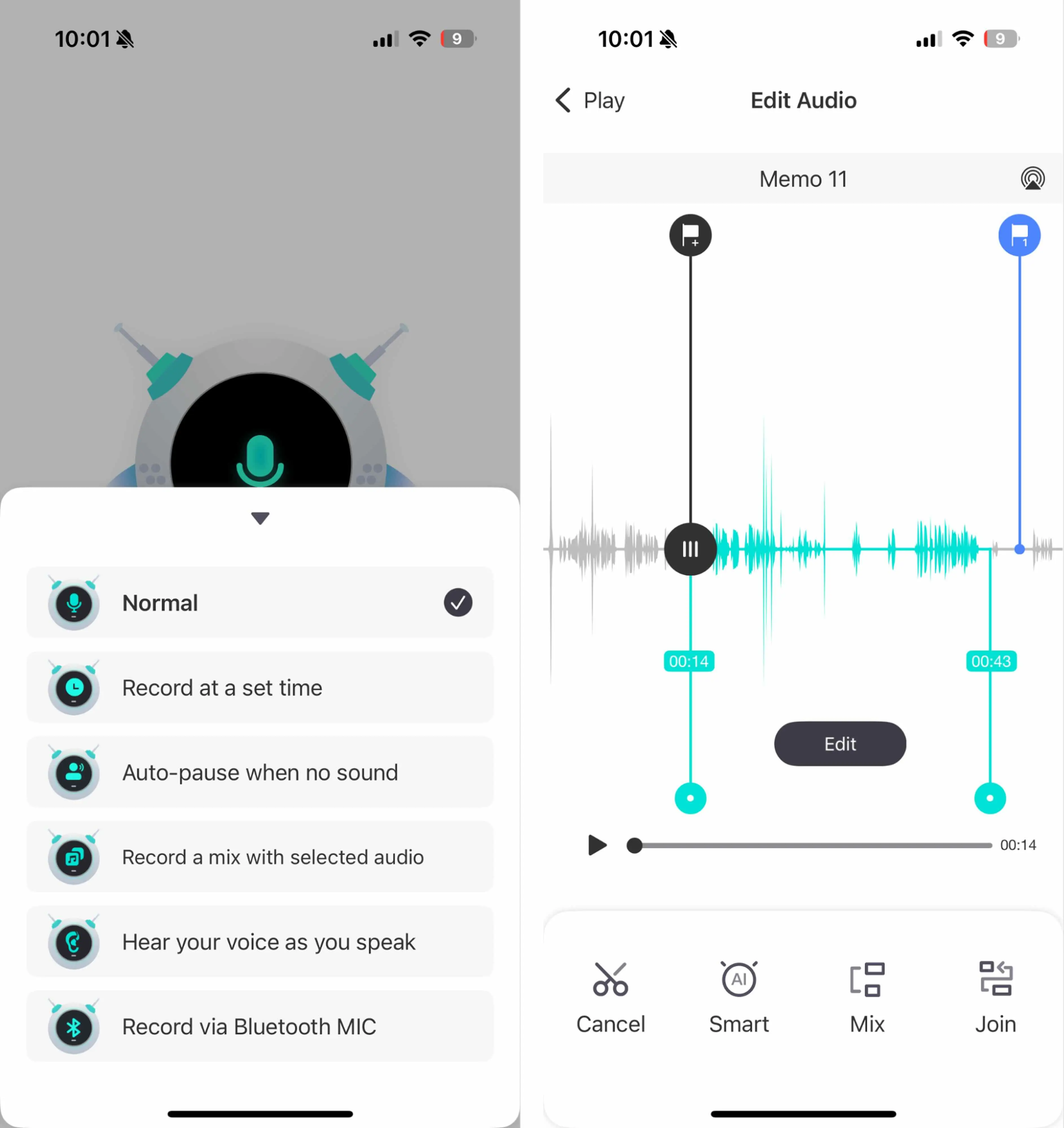
This app provides a clean interface with a focus on some unique recording features. For example, most apps offer some kind of skip silence capability during playback, but this one allows you to skip silences in real-time by auto-pausing when there's no sound. I was pleasantly surprised by how accurate it was at picking up on silences, pausing, and recording again without cutting off my voice.
My favorite feature was the live voice monitoring, which allows you to hear yourself as you record. The app lets you adjust the feedback delay so that you hear your voice in real-time or within a second of speaking. This is useful for getting immediate feedback as you record so you can catch any issues in the recording process sooner rather than later. You can also schedule the app to record at a specific time or connect a Bluetooth mic for external recording setups.
As far as sound quality, I found it to be clear with minimal white noise. However, I noticed audio spikes and transient sounds were more apparent when recording handheld, but disappeared when I set my phone down, so you'll likely get the best results from placing your phone on a stable surface.
While you can't take free-range notes, you can add metadata to recordings, including a cover photo, title, and author. Editing features allow you to trim or join clips together, import and mix external audio files with recordings, remove silences post-recording, and revert clips back to their original state.
Overall, I'm a fan of the emphasis on the recording process with this app, especially since it offers some distinctive features compared to other voice recording apps.
Voice Recorder, Audio Memos: Free; $9.99/month or $49.99/year
How to record audio on iPhone
Instead of frantically searching for that elusive notepad, only to end up scribbling on the back of your sushi receipt, it might be time to switch to voice recording.
All six of these apps allow you to capture everything from informational interviews to nuggets of wisdom—and even nuggets of nothing-close-to-wisdom. But each one caters to a slightly different type of user, so pick the two or three that seem like they might work for you, and take them for a spin. Because in the end, the best way to record audio on iPhone is the one that feels the most natural to you.
Related reading:
This article was originally published in April 2023. The most recent update was in April 2026.


