Running a thriving YouTube channel comes with endless responsibilities. And unless you have eight arms, managing your channel, your content calendar, your influencers—let alone optimizing your workflow—can get overwhelming quickly.
Fortunately, you don't need to be an octopus or employ a team of assistants to keep up with the job's demands. With Zapier, you can set up Zap workflows—what we call automated workflows—to handle everything from notifying your team about new video uploads to auto-generating transcripts for content repurposing. Interested? Then keep scrolling for Zap templates you can start using right now.
New to Zapier? It's workflow automation software that lets you focus on what matters. Combine forms, data tables, and logic with thousands of apps to build and automate anything you can imagine. Contact sales for more info on how to use this app, and thousands more, with Zapier.
Table of contents
To get started with a Zap template—what we call our pre-made workflows—just click on the button. It only takes a few minutes to set up. You can read more about setting up Zaps here.
Send notifications for new videos
If a video posts to YouTube and no one clicks on it, does it make a sound? Yes, and it sounds like crickets. Your first mission is to make sure people click your videos. A great way to do that is to share your latest videos as soon as they're live in your community Discord or Slack channel.
Send new YouTube videos in Discord channel messages


Or send a Gmail message, if that's how you typically communicate with your audience.
Send notifications via Gmail for new YouTube channel videos

These workflows are also a great way to keep your internal team in the loop if they need to keep on top of your production schedule. If a separate team handles social promotion—or you just want your team members to share your company's latest video with their connections—a quick Slack ping or email can do the trick.
Automatically upload your new YouTube videos
You know how it feels to burn daylight while you're waiting for a video to upload. After so many hours of planning, scripting, filming, and editing videos, you still have to do the manual work of getting the video on your channel.
Let Zapier handle this part. All you have to do is choose where you want to save your videos, then the following Zap workflows will automatically upload a video once you've saved it to a specific Google Drive or Dropbox folder. These can also double as a backup "archive" of your YouTube videos.


Read our full tutorial on how to automatically add new videos to YouTube from Google Drive.
If you want to add AI to this system to make it even easier, you might consider Jasper. For example, you can save a new video file to your selected Dropbox folder. The Zap will then send that info to Jasper, which can use AI to come up with the appropriate meta tags on your new YouTube video. Finally, the third step will send the new file directly to YouTube.
Upload new Dropbox files to YouTube as videos with Jasper generated content

But there's another sneaky way to get more videos onto YouTube with minimal effort: Zoom. If you record podcasts where you regularly interview guests on a webcam, you can move a new Zoom recording to YouTube with a Zap. That means no editing, no extra manual labor—just the direct movement of a file from one platform to another.

Cross-post YouTube videos on social media
Engagement from your internal teammates is great, but a good YouTube channel will eventually rely on the interest of strangers, too. You need to get the word out. You can set your YouTube channel to automatically cross-post on social platforms your company has a presence on. Think of it as multiplying your YouTube audience every time a video uploads…just without the extra work.
Facebook, public shares on LinkedIn, new posts on a WordPress blog—they can all be a part of your automated YouTube ecosystem. Ideally, you'll set it so every new YouTube upload creates a cascade of downstream promotional effects.
Simply sending new YouTube videos to Webhooks by Zapier, for example, can create an automated system by itself. You can use Webhooks to send someone an email, send Slack channel messages, or even post new Facebook lead ads.
Send new YouTube videos in a channel to a Facebook Page

Post webhooks with new videos on a YouTube channel


Turn your YouTube videos into an automatic archive
Imagine where we'd be as a civilization if an earthquake hadn't taken out the Library of Alexandria. Even in modern times, we have to be on the lookout for imminent disaster when it comes to our digital files. If the wrong folder gets corrupted, we may not have any digital files.
The effect is even worse if you have a great idea that becomes a hit on YouTube…but receives a strike against it. Maybe you'll want to re-upload the same file after some edits. If you don't have a great backup, you're stuck. You have to start all over.
The larger your YouTube following gets, the more detailed you'll want your archives to be. If you save your YouTube file names in a spreadsheet, for example, you can do a quick keyword search to find any file you need.
Create Google Sheets spreadsheet rows for new YouTube videos in a channel

Create Airtable records for new YouTube videos in a channel

Create new database items in Notion for new YouTube videos

Generate transcripts for content repurposing
Your YouTube videos are goldmines of content waiting to be repurposed. A single video can become blog posts, social media snippets, email newsletters, or even podcast episodes—but only if you have a transcript to work with.
Instead of manually transcribing your videos (or paying someone to do it), automate the process by sending your newly published video to a transcription service like Rev. Once the transcript is ready, you can feed it into your content calendar, turn key quotes into social posts, or use it to create SEO-friendly blog content. It's like getting five pieces of content for the price of one video.
Create automated transcription orders in Rev for new YouTube videos

Want more help? Get step-by-step instructions for auto-creating transcripts then sending them to Google Docs with this tutorial.
Foster community engagement
Comments are where your YouTube community lives—but they're easy to miss when you're juggling everything else. Miss too many, and your audience might feel ignored.
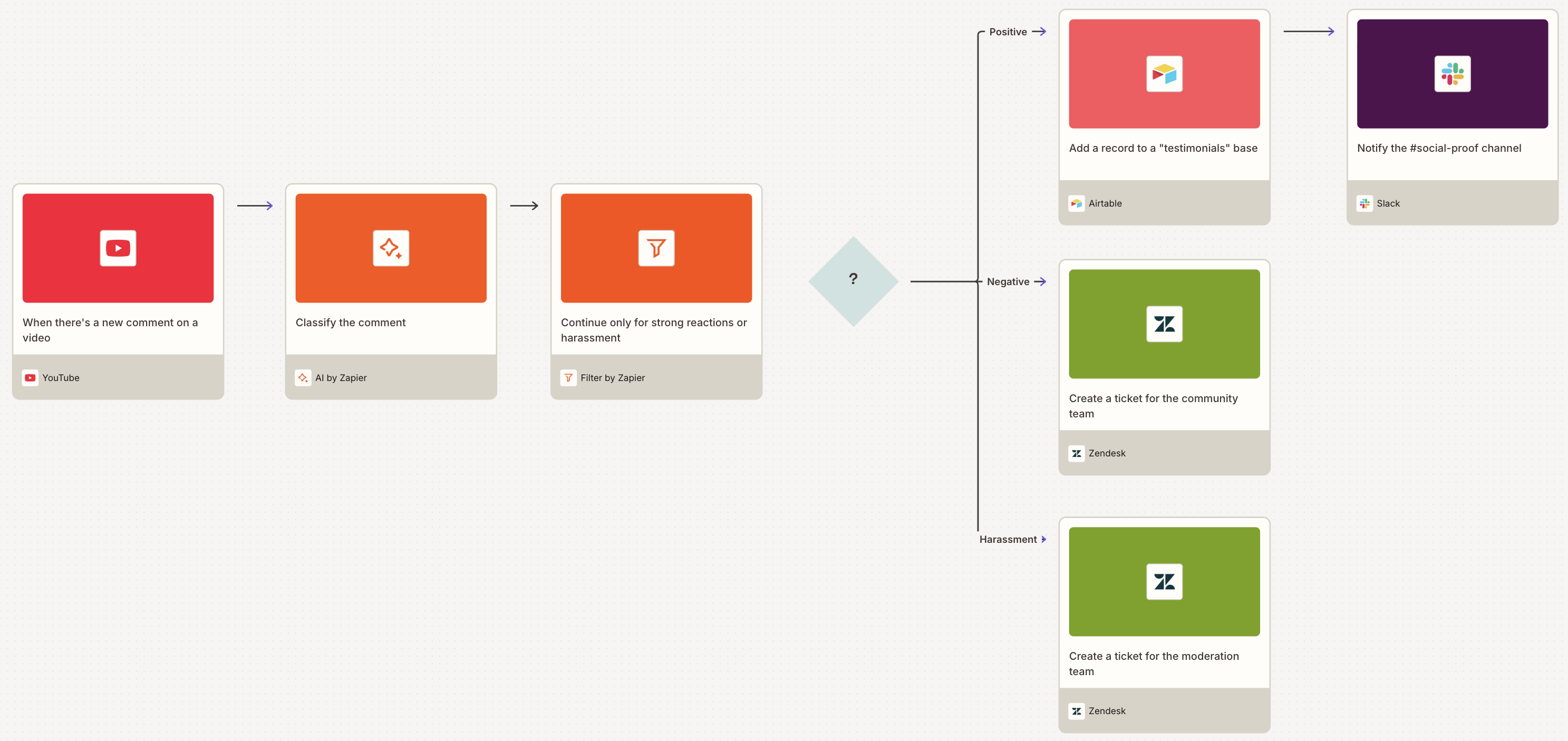
Of course, not every comment needs the same kind or same level of attention. These Zap workflows use AI by Zapier to automatically classify new YouTube video comments, flagging ones that actually require follow-up actions, and sending them to your project management app of choice. You can even log comments in Google Sheets to track feedback trends, or create Zendesk tickets for comments that need detailed follow-up.
Create Asana tasks from important YouTube comments using AI filtering


Add relevant YouTube comments to Trello as cards with AI filtering

Create ClickUp tasks for actionable YouTube comments using AI

Log important YouTube comments to Google Sheets with AI classification
Create Zendesk tickets from support-related YouTube comments with AI

Pro tip: You can build a single Zap using AI and path steps to carry out different actions based on the comment type. Go to the Zap editor to create this workflow.

Track and report on YouTube analytics
If you're not tracking your YouTube performance, you're flying blind. But logging into YouTube Studio every day to check your stats? That's a time-suck. These Zap workflows automatically pull your YouTube analytics on a schedule—daily or weekly, though you can easily customize the interval—and send them wherever you track metrics.
Set these up once, and you'll have a running record of your channel's performance without lifting a finger. Whether you're reporting to stakeholders or just keeping tabs on growth, automated analytics make it effortless.
Add daily YouTube analytics reports to Google Sheets automatically

Log weekly YouTube reports to BigQuery for data analysis

Create weekly YouTube analytics entries in Notion databases
Turn YouTube into a productivity machine
Do the work of multiple video team members with a fleet of thoughtfully picked Zap workflows. All you have to do is set up these workflows once, then let automation handle the repetitive tasks that used to eat up your day. The boring stuff will run on autopilot while you focus on what actually matters: making great content.
So, what will you automate first?
Related reading:
This article was originally published in June 2023 by Daniel Kenitz. It was most recently updated in February 2026.