Over the last few years, text-to-image AI art generators have gone from closed betas to being literally everywhere. What started with DALL·E 2 has grown into a huge movement with AI-generated work appearing on magazine covers, in Hollywood movies, and all over social media. Pretty much everyone is generating amazing, hilarious, downright weird, and plain awful images just by typing in a prompt.
If you want to get in on the text-to-image action but aren't sure where to start, this list will help you out. It's a broader list than my picks for the best AI image generators in order to show off all the different angles that folks are taking with AI art generators. I'm assuming that you want to use the apps for good personal and professional reasons, but not everyone is, so be warned: some of the apps on this list may occasionally feature far more extreme content.
Still, this isn't an exhaustive list of every app that can make AI art. AI image generation is increasingly a feature and not a product.
The category is also changing so fast that by the time you read this, there might be even more great apps available. But for now, it's a pretty good overview of the biggest AI art apps available at the moment.
The top AI art generators
How does AI art work?
The first time you enter a prompt into an AI art generator and it actually creates something that perfectly matches what you want, it feels like magic. But it turns out AI art generators don't work using magic. They use computers, machine learning, powerful graphics cards, and a whole lot of data to do their thing.
Let's break it down.
AI art generators take a text prompt and, as best they can, turn it into a matching image. Since your prompt can be anything, the first thing all these apps have to do is attempt to understand what you're asking. To do this, the AI algorithms are trained on billions of image-text pairs. This allows them to learn the difference between dogs and cats, Vermeers and Picassos, red and crimson, and everything else. Different art generator models have different levels of understanding of complex text, depending on the size of their training database, and some models are trained for specific purposes or only using licensed content, which affects the kinds of things they can generate.
The next step for the AI is to actually render the resulting image. There are two leading kinds of models:
Diffusion models, like FLUX, DALL·E 3, and Midjourney, which work by starting with a random field of noise, and then editing it in a series of steps to match its understanding of the prompt.
Autoregression models, like GPT Image 1.5 and Nano Banana 2, which work by generating chunks of the image at a time, predicting the next chunk based on what they've already created. These are the current state-of-the-art models.
There's also a third, older kind of model called generative adversarial networks (GANs), but no modern art generator uses them.

While some apps are very open about which models they use, others obscure it. It's not that important as you can get great results with most modern models, but the best ones are most likely to be autoregressive models. There are also other apps that use their own data to custom-train various open source models to give better results.
In reality, many AI art generators are essentially just different user interface skins for the same art-generating algorithms. Even apps that have their own models often integrate other models. Where possible, I've listed what models each app uses. When it isn't declared, I've speculated, based on my experience with all these different generative AIs.
How to use AI image generation at work
Interested in AI, but not quite sure how you'd use it at work? Here are a few of the ways people are turning to AI image generation in their roles:
Generating hero images for blog posts
Creating social media posts
Generating slide decks and storyboards
Creating personalized images for customers
Learn more about how to use AI image generation at work.
What are the main AI image models?
While hundreds of image models have been released over the last few years, there are only a handful of top-tier models. For most AI art generators, it makes more sense to use one or more of these models rather than to build their own.
Here's a non-exhaustive list of the AI model families that most AI art generators use.
Lab | Models |
|---|---|
OpenAI | GPT Image 1.5, GPT Image 1, GPT-4o Image, DALL-E 3, DALL-E 2 |
Nano Banana 2, Nano Banana Pro, Nano Banana, Imagen 4, Imagen 3 | |
Black Forest Labs | FLUX.2, FLUX 1.1, FLUX.1 |
ByteDance Seed | Seedream 5, Seedream 4.5, Seedream 4, Seedream 3 |
xAI | Grok Imagine Image Pro, Grok Imagine Image |
Alibaba | Qwen Image, Wan 2.6, Z-Image Turbo |
Recraft | Recraft V4 Pro, Recraft V4, Recraft V3 |
Tencent | HunyuanImage 3.0 |
KlingAI | Kolors 2.1 |
Ideogram | Ideogram 3 |
Stability.AI | Stable Diffusion 3.5, SDXL |
All of these models are available as an API, and some are open models that any art generator can install on their own servers. There are some standalone models on the list below, but many of the art generators rely on these models (and their variants).
21 AI art generators you can use right now
GPT Image 1.5 (ChatGPT)

AI art models: GPT Image 1.5
Platform: Web (via ChatGPT)
Pricing: Free; from $8/month as part of ChatGPT Go
After OpenAI's DALL·E model kicked off the AI image generation boom, it seemed to take a backseat to the company's language models. But now GPT Image 1.5 is back at the top of many leaderboards.
GPT Image 1.5 is one of the best quality image generators available, and it's super easy to use: just tell ChatGPT what you want to see, and it'll create the image. What people seem to love the most is that, if you upload a photo and direct it to create the image in the style of an artist (or, yes, Studio Ghibli), it will do an exceptional job. The only real drawback is that it's a little slow because of the technique it uses to create the images.
You can also use Zapier's ChatGPT integration to connect it with thousands of other apps, allowing you to orchestrate workflows that extend beyond your chat. For example, you can kick off conversations with ChatGPT from Slack or Gmail—this includes prompting it to generate an image. When you save an AI-generated image to Google Drive, Zapier can also automatically copy it to other cloud storage apps or send the file as an email attachment. Learn more about how to automate ChatGPT.
Zapier is the most connected AI orchestration platform—integrating with thousands of apps from partners like Google, Salesforce, and Microsoft. Use forms, data tables, and logic to build secure, automated, AI-powered systems for your business-critical workflows across your organization's technology stack. Learn more.
Reve
AI art models: Reve Image
Platform: Web
Pricing: Free for limited images per day; from $20/month for Pro with more usage
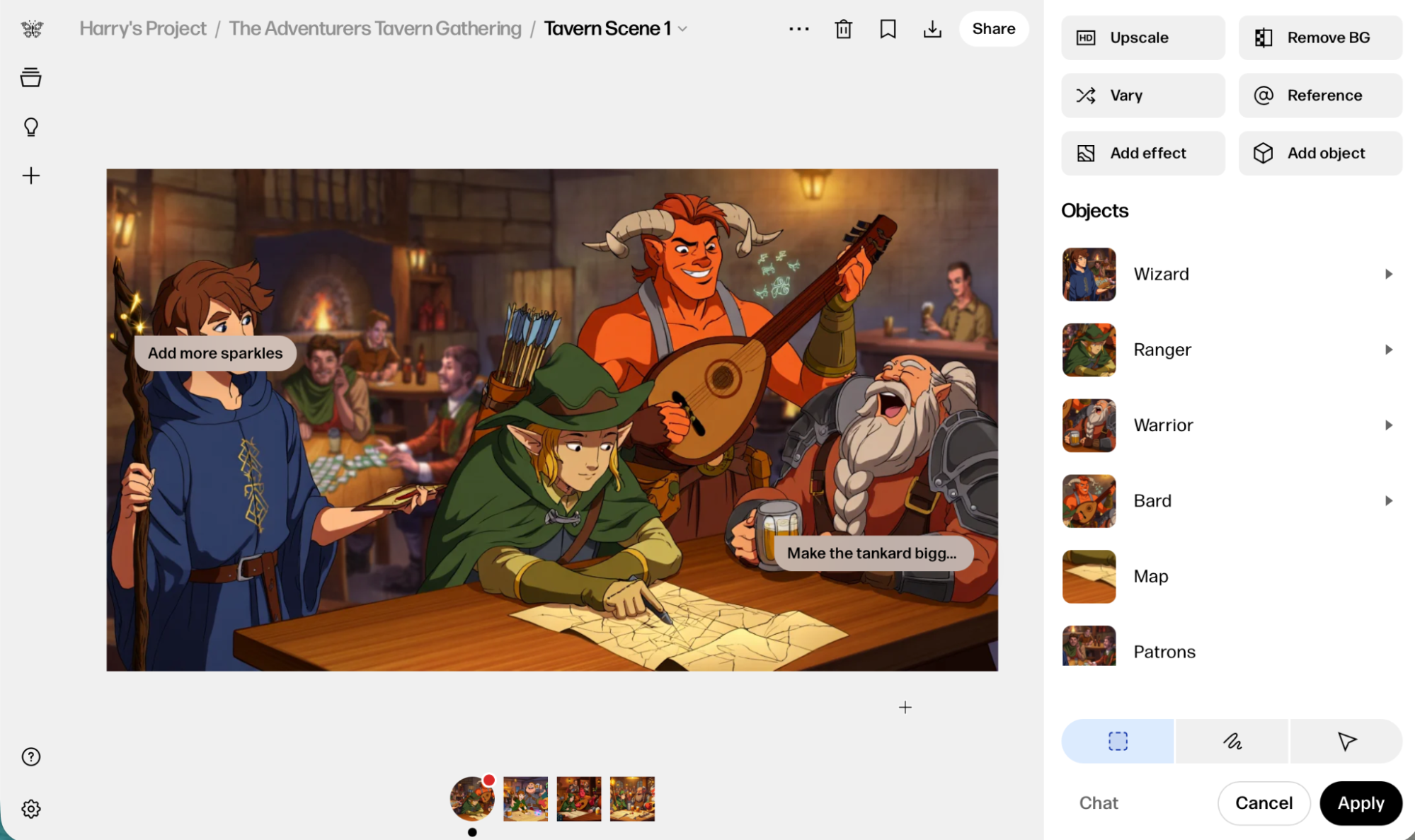
Reve Image 1.0 came out of nowhere in March 2025, and its biggest draw is that it sticks to the prompt really closely. This has been tough for image generators, especially as prompts get longer and more complicated, but I was consistently impressed by just how many details Reve can manage. Its editing features are also second to none.
Bing Image Creator
AI art models: GPT-4o, DALL·E 3, MAI-Image-1
Platform: Web
Pricing: Free
Bing Image Creator started as a result of Microsoft's partnership with OpenAI, though it now lags behind with the models it uses. It has GPT-4o and DALL·E 3, which are both out of date. It also offers the newer MAI-Image-1, which was developed in-house.
Nano Banana (Google Gemini)

AI art models: Nano Banana 2, Nano Banana Pro
Platform: Web
Pricing: Limited free usage; Included in Google AI Plus Plan at $8/month and some Google Workspace plans.
Despite the silly name, Nano Banana is Google's answer to OpenAI's GPT Image models—and it's also excellent. If you already use Google's Gemini chatbot, it's the first art generator you should try. Otherwise, it's worth checking out in any art generator that enables it through its API—you might also see it listed as Gemini 2.5 or 3 Flash.
You can add Nano Banana to the rest of your AI workflows with Zapier's Gemini integration, so you can create images in Gemini based on triggers in all your other apps.
Grok (Grok Imagine)
AI art models: Grok Imagine
Platform: X, web
Pricing: Included with SuperGrok Lite from $10/month and X Premium from $8/month
Grok is a good AI art generator with a terrible reputation. Because of its integration with X, the service formerly known as Twitter, it's been used to generate a lot of deepfakes, harassing caricatures, and much worse. It's on the list because it's a decent tool if used correctly, but be warned: a lot of people don't.
When you connect Grok to Zapier, you can create images from inside the rest of your tech stack. Zapier lets you trigger Grok from all the other apps you use at work. Learn more about how to automate Grok.
StableAssistant (Stable Diffusion)
AI art models: Stable Diffusion
Platform: Web (through Stable Assistant)
Pricing: From $9/month for 900 image credits
Stable Diffusion was one of the most important open model families, though it's since been usurped by FLUX. The official way to access the latest version is through Stable Assistant, but I don't recommend it. The company is going through some major difficulties. Having said that, Stable Diffusion models are available in a lot of other AI art generators (a lot of which I've listed here), and it's well worth using in those.
Midjourney

AI art models: Midjourney
Platform: Web and Discord
Pricing: From $10 for 3.3 hours of GPU time per month (enough for ~200 prompts with 4 image options each)
Now that the Midjourney web app has matured, its place as one of the best AI art generators is even more secure. If you're interested in the art and community side of AI art, it's the app to use. It's long been one of my personal favorites because it produces some of the best-looking and most realistic results. The company is currently being sued by Universal and Disney, which may put a dampener on things, but for now, it's still operating.
Read more: Midjourney vs. ChatGPT.
Ideogram
AI art models: Ideogram 3.0
Platform: Web
Pricing: Free plan with limited credits/week. From $20/month for 1,000 credits/month
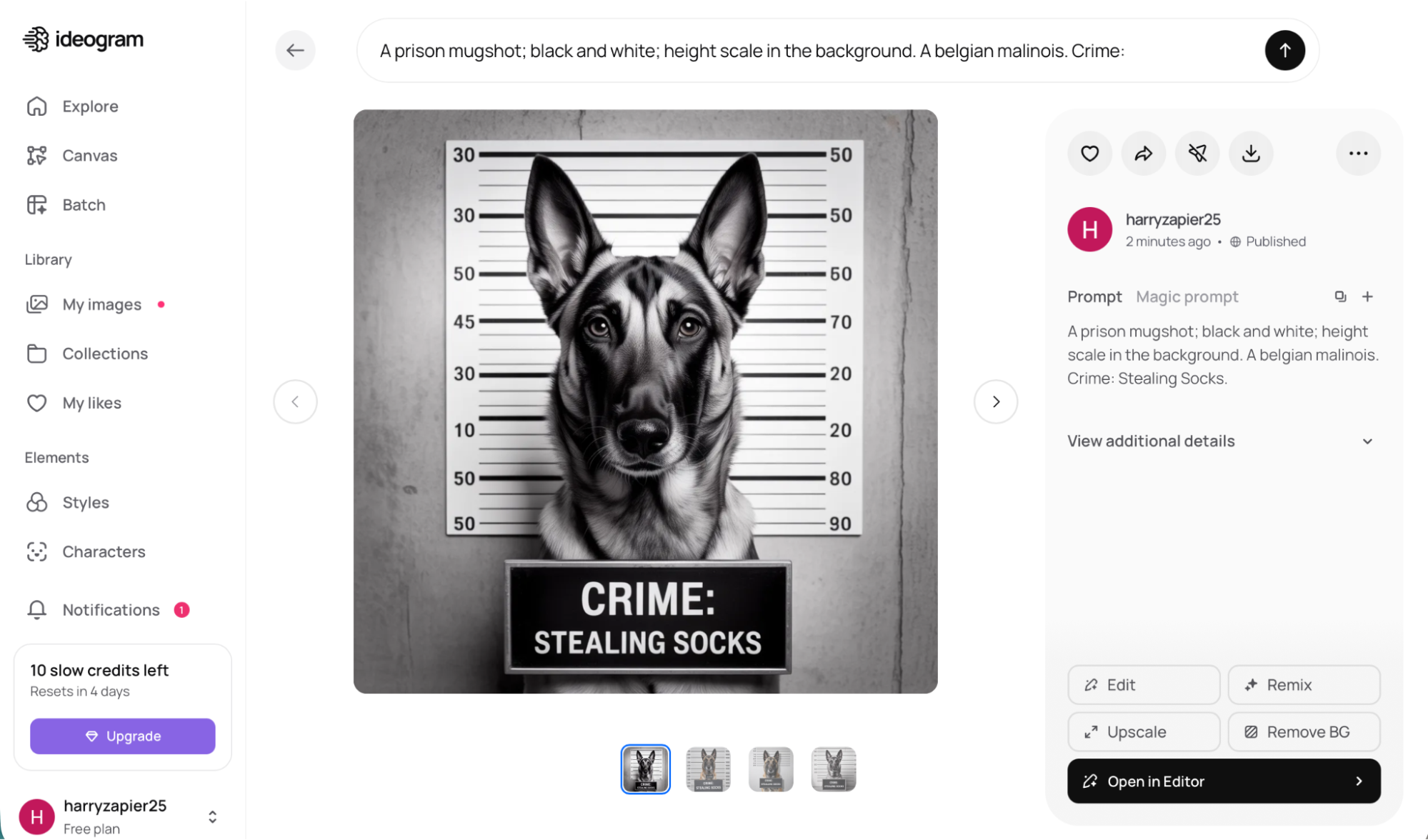
Ideogram is one of the most powerful AI art generators around. Its app is enough for professionals to create and combine AI and real elements into incredible designs. But Ideogram has one big superpower: it's one of the best AI art generators at rendering text.
Leonardo.Ai
AI art models: Origin, Phoenix, FLUX.2, Nano Banana, and more
Platform: Web
Pricing: Free plan with 150 tokens/day; from $12/month for 8,500 image credits/month
Another powerful art generator, Leonardo.Ai has its own models called Origin and Phoenix, as well as a range of other top models. It's now owned by Canva and is aimed at professional creatives and businesses. It's a fast, fully-featured, constantly improving art generator that even allows you to fine-tune your own models, or edit images as they generate in real-time on the canvas.
Recraft

AI art models: Recraft
Platform: Web
Pricing: Free for 50 credits/day; from $12/month for 1,000 credits/month
Recraft is an AI art generator for professional graphic designers. In addition to having one of the best AI models around, it's packed with features that make it easy to keep AI generations consistent, export them to other apps, and even create mockups. If you're a pro, it's the app for you.
Dream Machine (Luma Photon)

AI art models: Luma Photon, GPT Image 1.5, Seedream, Nano Banana, and more
Platform: Web
Pricing: Free for limited use and watermarks; from $30/month for Individual plans with more usage
Luma Photon is a great model. Its Dream Machine app is a little offbeat and also includes video generation, but you can try it out for free to see if it works for you.
Playground
AI art models: GPT-4o, Nano Banana, Seedream, and Playground v3
Platform: Web, iOS
Pricing: Free plan with limited generations and designs; from $15/month for unlimited premium designs and 75 images every 3 hours
Playground's art generator app is very clever. Instead of just working from a prompt, you choose a template from a huge library of designs and then use AI to edit it so it meets your needs. It's a great way to get the benefits of both human design ability and the speed of AI. You get a limited use of third-party models and essentially unlimited use of Playground's own model.
Canva

AI art models: Leonardo Lucid Origin and Phoenix
Platform: Web, iOS, Android
Pricing: Free; from $18/month for Pro with more AI features
Canva is a design app, but it also includes a text-to-image art generator. They acquired Leonardo.Ai last year, so it's almost certainly using those models. It integrates perfectly with the rest of the template-based app, so you can add AI-generated art and graphics to anything from social media posts to birthday cards.
With Zapier's Canva integration, you can build intelligent, multi-step workflows that automatically turn ideas and data into polished designs. For example, when a new task is added to your to-do list, Zapier can create a new Canva design, pull in details from the task, and use AI to generate layouts or visuals. Discover more ways to automate Canva.
NightCafe

AI art models: FLUX.2, Nano Banana, Seedream, GPT Image 1.5, and more
Platform: Web
Pricing: From $12.50/month for 200 fast credits, 600 slow credits, and unlimited access to some models
NightCafe pulls together some of the best AI models, like FLUX.2, Nano Banana, GPT Image 1.5, and loads more (including obscure ones that aren't in other art generators), then adds loads of extra features, like styles and model fine-tuning. On top of being a great AI art generator, NightCafe is a community for AI art enthusiasts that includes challenges, a Discord server, and a gallery.
OpenArt
AI art models: FLUX.2, Nano Banana, Seedream, GPT Image 1.5, and more
Platform: Web
Pricing: Free for 40 trial credits; from $14/month for 4,000 credits
Like NightCafe, OpenArt gives you access to powerful open models like FLUX.2 and Seedream 4.5. It also gives you more control over the specifics of the images you generate than a chatbot-based tool would, and it adds some nice extra features like a bulk generator.
Adobe Firefly

AI art models: Firefly, Nano Banana, and more
Platform: Web, Adobe Express, Adobe Photoshop, and other Adobe tools
Pricing: Free for 25 credits per month; from $9.99/month for 2,000 credits per month (and included with various Adobe subscriptions)
Adobe has been an AI company for over a decade, and it shows with its custom AI art generator called Firefly. While you can use it online, it's now being integrated directly into Adobe products like Express and Photoshop. It's also started to add other models.
Perhaps Firefly's best feature is that you can use it to create custom text effects using a written prompt. AI art generators often struggle with text, and Firefly is really the only one that can do this well.
getimg.ai
AI art models: FLUX.1, Stable Diffusion, and other open models
Platform: Web
Pricing: Free for 100 images per month; from $12/month for the Basic plan, with 3,000 images/month and the ability to train your own models
getting.ai is an AI art generator app with more than 20 open models, including FLUX.1 and Stable Diffusion (and models built from it, like OpenJourney). The biggest feature, though, is that with a paid plan, you can train your own models.
Shutterstock AI Image Generator
AI art models: Nano Banana 2, GPT Image 1.5, and more
Platform: Web
Pricing: From $29/month for 100 credits/month
Stock image company Shutterstock obviously recognizes the existential threat that generative AI poses to its business—so instead of fighting, it's joining. While the Shutterstock AI Image Generator was originally powered by DALL·E 2, it now uses Nano Banana 2, GPT-Image 1.5, and other powerful models.
Generative AI by Getty Images

AI art models: Custom model developed with NVIDIA
Platform: Web
Pricing: From $49 for 25 generations
Like Shutterstock, Getty Images has developed an AI art generator.
Generative AI by Getty Images and Generative AI by iStock are trained on Getty and iStock's collections of stock images. This makes them good for generating weirdly specific stock photos, but not as competent or creative at other things.
Best of all, though, Getty claims that its models are free from intellectual property issues, so you're indemnified against any legal claims resulting from using the images you make with its tool. If your company has a legal department, one of these might be the AI art generator you need.
Deep Dream Generator
AI art models: Nano Banana, GPT Image 1.5, open models, custom-trained models, and more
Platform: Web
Pricing: Free for limited images/day; from $9/month for the Basic plan, which allows for hundreds of images per month
Deep Dream Generator is one of the oldest AI art generators online. It was originally designed to use Google's DeepDream algorithm but has added text-to-image algorithms like FLUX.2, Nano Banana, and custom-trained Stable Diffusion models.
Fotor
AI art models: Doesn't say, but probably based on Stable Diffusion
Platform: Web
Pricing: Free for 4 images; from $8.99 for 100 credits
Fotor is a popular online image editing app, and it's recently added a text-to-image art generator that integrates with its editor.
Picsart
AI art models: Seedream, GPT Image 1, and more
Platform: Web, iOS
Pricing: Free for 5 credits/week; from $15/month for 400 credits/month, no watermarks, and premium features
Picsart is an online image editing app. The AI art generator integrates with the rest of the editor, so you can combine AI-generated elements with text, stickers, and other images. Although it's free to use, you have to pay to download images without a watermark.
Picsart also connects with Zapier, allowing you to power intelligent, multi-step image editing workflows that run automatically in the background. For example, when new images are added to Dropbox, Zapier can send them to Picsart to remove or replace backgrounds, use AI to enhance quality or apply edits, and then upload the finished files back to your cloud storage app.
Freepik
AI art models: Seedream, Nano Banana Pro, Ideogram, FLUX.2
Platform: Web
Pricing: From $10/month for 8000 credits/month
Freepik is a stock photo service, graphic design tool, and AI image generator. If you want a tool that can manage your whole design flow, it's worth a look.
Other categories of AI art generators
This list is focused on text-to-image art generators, but there are entire other categories of AI art makers out there. Some examples:
I didn't include API services, like Replicate and fal, but they're useful if you're building your own AI art generator or want to integrate one into another tool.
Lensa's Magic Avatars and MyHeritage's AI Time Machine both take a series of selfies and return AI-generated portraits.
Many chatbots and text-generating apps, like Merlin, Jasper, Writesonic, and Rytr, also include AI art generators. If you use one of these, check it out—they mostly use the same models as dedicated apps.
I was only looking at web apps in this list, but there are mobile-only art generators like ArtOut, if you just want something on your smartphone.
And then there are others, like Palette, that can colorize photos.
And these are just the AI art generators that are available now. Other companies are certainly testing their own art generators, and you could always train your own using one of the apps I mentioned that allows for that.
Make the most of your AI art
You might be generating AI art for fun—in which case, have at it (and check out these AI photo editors to help make your masterpieces extra pretty). But if you're thinking about using an AI art generator at work, there's plenty you can do with it. Here's some inspiration:
You should also take a peek at Zapier's tips on how to write effective AI art prompts, so you can get the results you want quicker.
Which AI art generator should you use?
With so many AI art generators to choose from, it can be hard to know where to start. So let me break it down:
Midjourney and Recraft are my favorites. Midjourney is the more fun app, but Recraft is more professional and has a free trial.
GPT Image 1.5 and Nano Banana 2 are great if you use ChatGPT or Gemini. You can also find them pretty much everywhere.
FLUX.2 is the leading open model; it's used in lots of different apps.
Seedream 4.5, Kling Kolors 2.1, and other Chinese open models are increasingly widely available.
Firefly's text effects are awesome, as is its integration with other Adobe tools.
NightCafe and OpenArt are the best apps if you want to play around with different models, including some of the older GAN models.
Otherwise, just scroll through the list and try whichever ones strike your fancy. You can't go too far wrong.
Related reading:
This article was originally published in May 2023. The most recent update was in April 2026.