
We independently review every app we recommend in our best apps lists. When you click some of the links on this page, we may earn a commission. Learn more.
I have a pond close to my house that's controlled by a gang of rogue ducks. Sometimes, they'll waddle two blocks with their little ducky families and make camp in my yard. They're cute, but they poop everywhere, so I frequently have to shepherd them out of my yard and into my neighbors'.
Herding a gaggle of defiant ducks is hard, but it's still easier than managing a sales pipeline. Prospects aren't webbed-toed waterfowl, but they're just as unpredictable, and getting them moving down your sales funnel in the right direction can be maddeningly difficult. That is, unless you have the right tools at your disposal.
I used my herding skills—and my years of experience digging into sales software—to round up a flock of the best sales tools on the market. I researched, tested, and talked to experts to surface the apps you need to know to improve your pipeline and turn more of your prospects into happy customers.
The 8 best sales tools
Zapier for AI orchestration
HubSpot for integrated sales and marketing
Salesforce for enterprise-scale sales
Gong for sales calls and conversational intelligence
Pipedrive for visual pipeline management
Zoho CRM for budget-friendly CRM
Clay for AI lead enrichment
Manychat for social media sales automation
What makes the best sales tool?
A "best sales tools" list can almost be too broad to be useful. A conversation intelligence platform and a social media chatbot are both technically sales tools. So is a CRM. So is a lead enrichment engine that waterfall-queries 150 data providers to find a phone number.
I hedged that a bit by including tools that address different sales functions, so there should be something here for everyone, whether you're an enterprise-level team that needs a high-visibility CRM or a small business that wants to improve social media conversions.
In addition to my general methodology, I also evaluated each platform against the same primary criteria:
Workflow automation: Does the tool reduce manual work in the sales process? The best tools automate the repetitive, high-friction tasks, like lead routing, follow-ups, data entry, and stage progressions, so reps spend more time selling and less time babysitting.
AI capabilities: Does the AI actually move the needle, or is it a chatbot someone threw together to make the investment board happy? I was looking for AI that drives real outcomes in lead scoring, conversation analysis, and deal risk detection, not just a text generator wrapped in a "copilot" label.
Integration and data connectivity: A sales tool that lives in a silo is a liability. Every platform on this list needed to connect cleanly with the rest of a modern sales stack, either natively or through an orchestration layer.
Ease of adoption: Sales reps are famously resistant to new tools, and for good reason—many products are built for administrators, not the people who actually use them day to day. I weighted heavily toward tools that reps will actually open in the morning.
The Zapier team, myself included, has spent countless hours testing sales tools across dozens of categories. Based on that testing—along with extensive research and conversations with experts about what matters—these are my picks for the best sales software.
The best sales tools at a glance
| Best for | Standout feature | Pricing |
|---|---|---|---|
AI orchestration | AI automation that connects to 9,000+ apps | Free plan available; paid plans start at $19.99/month | |
Integrated sales and marketing | Breeze Prospect Agent for AI-assisted research and SDR | Free plan available; paid plans start at $20/seat/month | |
Enterprise-scale sales | Agentforce AI agents that perform automated, multi-step actions | Plans start at $25/user/month | |
Sales calls and conversational intelligence | Revenue Graph that automatically captures customer information and maps it out | Contact Gong | |
Visual pipeline management | Visual Kanban-style interface with color-coded deal indicators | Plans start at $14/seat/month | |
Budget-friendly CRM | Blueprint process enforcement | Free plan available; paid plans start at $14/user/month | |
AI lead enrichment | Waterfall lead enrichment | Free plan available; paid plans start at $167/month for 30k data credits per year | |
Social media sales automation | AI reply automation that chats with customers on social media | Free plan available; paid plans start at $14/month for 250 active contacts |
Best sales tools for AI orchestration
Zapier (Web)
Zapier pros:
Advanced AI capabilities, including MCP (access from AI tools)
9,000+ app integrations
Massive library of pre-built templates
Zapier cons:
Not a standalone sales tool; requires other apps to connect
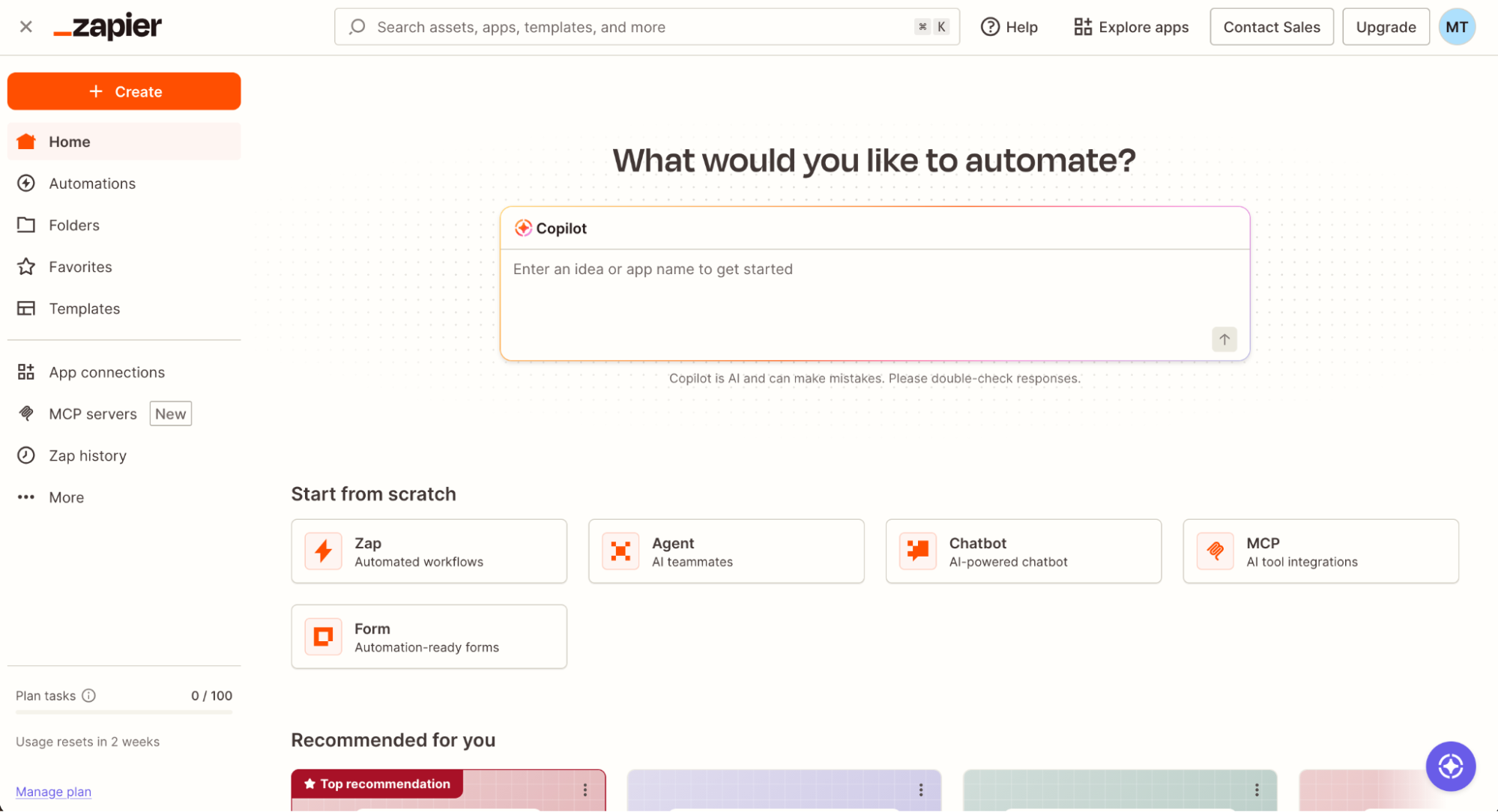
Zapier isn't a CRM, a dialer, or a prospecting database; it's an AI orchestration platform that connects to 9,000+ apps, helping you set up end-to-end sales automations across your entire tech stack. That means you could use it to build your own sales system, or to make any other tool on this list work better.
Creating your very first workflow is easy. Either build it from scratch, tweak a pre-built template, or use Zapier Copilot to create exactly what you need in plain English. For example, you could build a workflow that:
Triggers every time a sales rep closes a deal in HubSpot
Generates an invoice in your billing system
Pings a member of your finance team on Slack
Enrolls the new customer in an onboarding email sequence
And that's just a simple example. You can add agentic behavior at any point in the process and build complex sales workflows that run themselves.
You can also trigger all of that straight from your AI tool of choice using Zapier MCP. So if you were in Claude or ChatGPT, you could prompt it, "How many deals are pending?" or "Give me a summary of the attendees in my sales calls this afternoon," and the AI client can provide that information. You can also take action straight from the chat window ("Enrich those leads and add them all to our Mailchimp list").
This is all wrapped tightly in Enterprise-grade security, including SOC 2 Type II compliance—with role-based permissions and OAuth-managed authentication for every app in your tech stack. That means you can connect your sales tools and know that your data is secure.
Zapier pricing: Free plan available; paid plans start at $19.99/month.
Best sales tools for integrated sales and marketing
HubSpot (Web, iOS, Android)

HubSpot pros:
A single data model connects marketing, sales, and service teams
Breeze Prospecting Agent
HubSpot cons:
Email sequences aren't available in lower-tiered plans
Professional and Enterprise plans carry mandatory one-time onboarding fees of $1,500 and $3,500
HubSpot is basically a child actor. Those in tune with the sales and marketing world watched it grow from a young, relatively simple pipeline tool into a full-cycle sales platform, with branches that include Marketing, Service, Content, and Data. But unlike most child actors, there weren't 48-hour binges, trips to rehab, or unfortunate run-ins with hair clippers.
One of HubSpot's biggest strengths is context. When a sales rep opens a contact record, they can see every marketing email, every sales conversation, what content the prospect has downloaded, and the name of their prized labradoodle. For teams that use other HubSpot Hubs—or those who would like to—this gives a farm-to-table view of prospect management that can keep RevOps teams on the same sentence, let alone the same page.
One of my favorite features is the Breeze Prospecting Agent. It's an AI sales assistant that acts like a researcher and SDR rolled into one: it can scan for buying signals, surface relevant company news, suggest next steps, identify contacts at target accounts, and send personalized outreach. It's not entirely perfect (not everyone wants to be contacted by an AI salesperson), but it can replace a significant chunk of manual prospecting.
Where HubSpot frustrates people is with its pricing architecture. The free plan is excellent; Starter is affordable; the jump to Professional is aggressive (roughly $100/seat/month plus a required onboarding fee). Teams evaluating HubSpot should calculate their full year-one cost before committing.
That said, HubSpot is a sales and marketing mainstay for a reason, so if you can afford the price point, it's absolutely worth a look. And, if you'd like to take its capabilities even further, you can integrate HubSpot with Zapier to build sales and marketing automations across your entire tech stack. Learn more about automating HubSpot.
HubSpot pricing: Free plan available; paid plans from $20/seat/month.
Best sales tools for enterprise-scale sales
Salesforce (Web, iOS, Android)

Salesforce pros:
Agentforce AI agents
9,000+ integrations
Very generous free trial (30 days with no credit card required)
Salesforce cons:
Useful AI and automation capabilities require the Enterprise tier or the Agentforce add-on at $125/user/month
Enterprise deployment could require a dedicated admin or certified consulting partner
Salesforce is another industry Goliath that everyone has heard of, half have used, and most have a complicated opinion about. Regardless of your personal biases, it runs laps around similar tools in enterprise complexity—it can handle multi-region territory management, custom approval flows, and multi-unit revenue forecasting without breaking a sweat. I'd be booed off the stage if I made a list of the best sales tools without including Salesforce.
Its rise to fame and subsequent Matthew McConaughey-led commercial campaigns can all be tied back to one boring (yet extremely important) aspect: the foundation. At its core, Salesforce is a highly customizable CRM that tracks every account, contact, opportunity, and activity with unbelievable detail. Pipeline visibility is strong, forecasting tools adjust based on historical close rates and deal velocity, and collaboration is now baked in via Slack integration and shiny new AI capabilities.
Agentforce is one of those new capabilities that's driving most of the momentum and McCounaughey lines. These are AI agents that can take multi-step actions inside the CRM without being prompted; they can qualify leads, advance pipeline records, generate outreach drafts based on account history, and log all activity automatically. At Enterprise and above with the Agentforce add-on, it's a meaningful capability that will have your team feeling alright, alright, alright.
The main caveat here is that it's not cheap. Basic Agentforce add-ons start at $125/user/month, and that's on top of whatever plan you decide to pay for. And depending on how many credits your business needs, you could even shell out $550/user/month.
Overall, Salesforce is a beast that can take you anywhere you want to go in the sales world—if you have the financial stomach for it. If you want to get the most out of your money, connect Salesforce to Zapier to integrate your entire tech stack, access your Salesforce data straight from your favorite AI tools, and build end-to-end workflows across your operations. Learn more about automating Salesforce.
Salesforce pricing: Plans start at $25/user/month
Best sales tools for sales calls and conversational intelligence
Gong (Web, iOS, Android)

Gong pros:
Revenue Graph automatically captures every customer interaction and maps it to the relevant deal and account
Gong AI Agents
300+ integrations
Gong cons:
Annual contracts only; seat reductions not permitted mid-term
Forecast and Engage modules are separate add-ons that can increase per-user cost
Gong is a lot like Roz, the slug secretary in Monsters, Inc. They both have short, memorable names, keep a keen eye on the details, and are "always watching…"
The tool offers several sales capabilities that streamline data entry and help managers get a clearer view of the nitty-gritty of team performance. Teams can record every sales call and generate automated transcripts, analyze every email, and structure meeting notes into easy-to-access resources. It gives you a full picture of your sales pipeline that reflects what's actually happening, not just the haphazard information your rep logged on a Friday afternoon.
The Revenue Graph is a living, connected map of every customer interaction across your organization. Managers can see which deals are genuinely progressing versus stuck, which reps are struggling with specific objections, and where forecast submissions are likely to be wrong. This surfaces coaching opportunities and strategy pivots before you wade into code red territory.
Gong Agents are useful technological teammates that can take action on conversation insights. They can help your reps out by drafting follow-up emails, updating CRM fields based on what was discussed on a call, flagging deals that have gone quiet, and correcting forecast submissions when pipeline signals diverge from what a rep reported.
Just keep in mind that the platform is built for and priced for organizations with a real, hearty budget, and you're guaranteed a call with its sales team just to set up a plan.
Gong integrates with Zapier, so you access Gong data straight from your favorite AI tools, incorporate it into your workflows, and take action automatically across your tech stack.
Gong pricing: Contact Gong
Best sales tools for visual pipeline management
Pipedrive (Web, iOS, Android)

Pipedrive pros:
Visual Kanban interface with color-coded indicators
Built-in sales pipeline AI
500+ marketplace integrations
Pipedrive cons:
Workflow automation requires the Growth plan
Marketing automation is limited to a basic add-on
Pipedrive doesn't try to be a jack-of-all-trades like some other sales tools with a gaggle of secondary functions; it does pipeline management well and stays out of the way. So teams that have night terrors of complicated CRMs that moonlight as marketing-slash-accounting-slash-ERP tools may be relieved by the relative simplicity of this one.
I was wooed from the start by the visual pipeline. It's an eye-catching, Kanban-style interface where all of your deals are organized by stage and color-coded by status. A manager can scan the board in 30 seconds and know which deals need attention, which reps are behind on follow-ups, and where the pipeline is less than stellar. Just as useful: dragging a deal to the next stage can trigger automated actions (a task, a sequence enrollment, a Slack notification), keeping the process moving without relying on reps to remember every next step.
The Lite plan (the entry-level tier) is nice, but the Growth plan is where Pipedrive becomes a full sales tool. Here, you'll find full email sync with open and click tracking, a workflow automation builder, AI-assisted deal recommendations, and a few other features that will really make you think you've made it to the big time. The AI assistant is pretty useful as well—it surfaces deals that have gone quiet, flags activity gaps, and suggests next steps based on historical deal patterns. It won't knock your socks off compared to other AI sales tools, but it's a useful system.
In all, Pipedrive is great for teams that want a laser-focused sales tool with a useful visual management element. If you'd like to supercharge its capabilities, you can integrate Pipedrive with Zapier to sync your lead generation tools, billing systems, and other apps, and access all your CRM data from your existing AI tools. Learn more about automating Pipedrive.
Pipedrive pricing: Plans start at $14/seat/month
Best sales tools for budget-friendly CRM
Zoho CRM (Web, iOS, Android)

Zoho CRM pros:
The free plan is surprisingly useful
Multiple pipelines, sales forecasting, and workflow automation
Zia AI agents for automated sales processes
Zoho CRM cons:
Many of the AI features are locked behind higher pricing tiers
The interface can feel cluttered
Zoho CRM gives you great features at an even better price point, so at first glance, it almost seems too good to be true. But if you're willing to sacrifice a little polish, it's a solid all-in-one sales tool.
The feature depth is so broad that I really need to spotlight it right off the bat. It gives you (*takes a deep breath*) multi-pipeline management, multi-channel communication, deal tracking, custom modules, workflow automation, sales forecasting, and a full API—all before you hit the midpoint of Zoho's pricing structure. One standout that deserves a special callout is Blueprint—a process enforcement mechanism that requires reps to complete required activities before advancing a deal. This is the type of feature that you typically see in enterprise-tier plans, and Zoho is just out here giving it to you for peanuts.
Zia, Zoho's AI assistant, is one of the platform's most compelling differentiators. In the Enterprise tier and above (i.e., you'll need to pay a little more for this), Zia provides predictive lead scoring, conversion probability estimates, anomaly detection on stalled deals, and a natural-language interface for pulling CRM insights without building a formal report.
The "too good to be true" moment is the user experience. Zoho CRM has more features than most teams may ever use or need, and the interface reflects that bloat. Navigation can be overwhelming, and new users could find the sheer volume of options discombobulating.
That said, if you're looking to invest in a sales tool that can give you the most bang for your buck, stop here. To give you even more value, you can integrate Zoho CRM with Zapier to bring end-to-end workflow automation to your entire app list and access your sales data directly from your AI tools. Learn more about automating Zoho CRM.
Zoho CRM pricing: Free plan available; paid plans start at $14/user/month.
Best sales tools for AI lead enrichment
Clay (Web)

Clay pros:
Waterfall enrichment across 150+ providers
Cost scales with usage, not headcount
Claygent AI for autonomous lead research
Clay cons:
Some important sales integration features aren't available at lower tiers
Credit-based pricing could lead to unpredictable charges
Outbound sales teams know the pain of lead enrichment. Sure, you have a list of target companies, but now you need verified contact data for the decision-makers to actually start the sales process. That leads to the nightmarish task of crawling through LinkedIn pages and business websites, all while trying to pull out as few of your follicles as possible.
Clay was built to solve that problem; it connects to 150+ data providers—like LinkedIn, Apollo, and Clearbit—and instead of forcing you to choose one and accept its gaps, it waterfalls them. So you start with provider A; if there's no match, go to B; still nothing, try C. The result is much better coverage than most tools can deliver, especially in niche industries, international markets, or smaller companies.
The product's AI agent, Claygent, can run autonomous research tasks like pulling recent funding news, job postings that signal buying intent, LinkedIn data, and technographic profiles; from there, it can synthesize those signals into structured attributes or personalized first lines for outreach emails. A recent happy shake-up in pricing brought Clay's native sequencer down to the free plan, so teams can now send outreach emails directly from Clay without needing a separate tool.
Clay has a spreadsheet-style interface that's pretty clever once you get the hang of it: every row is a record, every column is an enrichment step, and you can inspect exactly what each provider returned and what it cost. However, that same layout makes Clay a bit convoluted for the average sales rep—it's built for RevOps teams and GTM engineers, not someone who needs a clean lead list by Thursday afternoon.
You might never need to actually go into the Clay interface, though. Clay integrates natively with Salesforce and HubSpot to continuously enrich CRM data; it also integrates with Zapier, letting you trigger enrichment workflows from external events, push enriched records into tools beyond your CRM, and access your data straight from your AI tools. Learn more about automating Clay.
Clay pricing: Free plan available; paid plans from $167/month for 30k data credits per year.
Best sales tools for social media sales automation
Manychat (Web, iOS, Android)

Manychat pros:
Natively supports social media channels, SMS, and email
AI-powered reply automation
Models are trained on your business context
Manychat cons:
No native CRM
API access for custom integrations only exists in higher-priced plans
Many sales tools take an archaic approach to lead management; they assume most prospects arrive through your website, CPC ad, or a lead magnet. Manychat lives in the here and now, where a meaningful chunk of your buyers are already in your Instagram DMs, WhatsApp threads, and TikTok comment sections.
Manychat can be the golden goose for businesses running eCommerce, creator-driven sales, or social-first lead generation. Picture this: whenever a prospect comments on one of your social media posts, Manychat can automatically slide in their DMs with a product link or discount code. If they have a follow-up question, the AI—trained on your catalog and brand voice—replies with a relevant answer. If they want to buy, Manychat walks them through checkout or books a discovery call, all without a rep getting involved.
The platform offers five pricing tiers, with billing tied to active contacts per month rather than total subscriber count. This is an ideal model for businesses with large but lower-engagement followings: you only pay for the conversations that actually happen, not the dormant accounts sitting in your contact list.
Manychat's biggest drawback is everything that happens after the initial conversation. It captures leads and drives purchases inside the messaging layer, but it doesn't segment it into email nurture sequences, sync with outreach tools, or push that data to a CRM without some extra legwork on your part.
That handoff requires integrations, and luckily, you can connect ManyChat to Zapier to bridge that gap to route new contacts to your CRM or trigger follow-up sequences. Learn more about automating Manychat.
Manychat pricing: Free plan available; paid plans start at $14/month for 250 active contacts.
Orchestrate your sales data and tools with Zapier
Every tool on this list is a piece of the sales puzzle, but having all the pieces and having a completed puzzle are two very different things. Data stranded in one system, manual handoffs between platforms, reps chasing down updates that should have happened automatically—those are problems that Zapier can solve.
Zapier acts as the connective tissue between every tool in your sales stack. You can build end-to-end automations that route leads, trigger follow-ups, update CRM records, and alert the right people at the right time. And you can access it all from your AI chat apps with Zapier MCP, from your AI coding tools with Zapier SDK, from your terminal with Zapier CLI, or using Zapier's visual workflow builder.
The security piece matters here too: Zapier uses OAuth-managed authentication for every app you connect. Your credentials are never exposed to the model, and you can control and revoke access from one place.
So the right sales tool for you depends on where your gaps are, but whatever you choose, connecting it to Zapier means it works harder—and plays better with everything else.
Related reading:
This article was originally published in September 2023 by Melissa King. The most recent update was in June 2026.


