
We independently review every app we recommend in our best apps lists. When you click some of the links on this page, we may earn a commission. Learn more.
I've been automating small business tasks for over a decade. First, for a small law firm I worked for, and then for my own freelance business. And I can confidently say if you're looking for one tool that does it all, the answer is Zapier. It connects every app you could possibly use, works across every function of your business, and scales from a free plan to enterprise-grade workflows without requiring you to switch tools as you grow.
But if you're looking for a more purpose-built automation tool—say, accounting automation or HR automation, you might be looking for something different. The best tools for each of those jobs have automation baked into the core of what they do. Then Zapier gets layered on top to connect them all.
So this list I put together starts with Zapier as the connective tissue that ties everything together. But below it are six tools, one for each niche that tends to eat the most time in a small business: project management, CRM, marketing, accounting, payroll, and hiring. My picks were based on hundreds of hours of testing by the Zapier team, including me, so you know they've been human-vetted.
The best automation tools for small businesses
Zapier for workflow automation across your entire tech stack
Asana for project management automation
HubSpot for CRM and sales automation
Brevo for marketing automation
Wave for accounting automation
Gusto for payroll and HR automation
Breezy HR for recruiting and hiring automation
What makes the best automation tool for small businesses?
How we evaluate and test apps
Our best apps roundups are written by humans who've spent much of their careers using, testing, and writing about software. Unless explicitly stated, we spend dozens of hours researching and testing apps, using each app as it's intended to be used and evaluating it against the criteria we set for the category. We're never paid for placement in our articles from any app or for links to any site—we value the trust readers put in us to offer authentic evaluations of the categories and apps we review. For more details on our process, read the full rundown of how we select apps to feature on the Zapier blog.
Small businesses need tools that solve problems without requiring a six-week implementation or a five-figure annual contract. Given that, here's what I was looking for as I vetted small business automation tools:
Accessible pricing. With one exception, every app on this list offers a generous free plan, so you can test it out before you invest. Once you decide it's a good fit, they all have affordable pricing structures that can scale with your business, so you won't need to switch as you grow.
Built-in automation. Zapier will connect your entire small business tech stack, but every other app needs to have automation features baked in. That means automated workflows inside the product and the ability to connect to the rest of your apps with a tool like Zapier.
Easy setup and time-to-value. You shouldn't need a developer or IT team to get value from your small business tools. Each of my picks let you get started in minutes or hours, not weeks, so you can quickly see if it's a good fit.
A lot of these tools can scale to serve enterprises, too, but I wasn't focused on that as I reviewed them. These apps are the ones that will work for your small business right now.
The best automation tools for small businesses at a glance
Best for | Standout feature | Pricing | |
|---|---|---|---|
Workflow automation | Securely connect 9,000+ apps and build AI-powered workflows without code | Free plan available; from $19.99/month | |
Project management | Flexible views and easy automation flows | Free for up to 2 users; from $10.99/user/month | |
CRM and sales pipeline | Full inbound funnel in one platform | Free plan available; from $20/user/month | |
Payroll and HR | Automated tax filing across federal, state, and local levels | From $49/month | |
Marketing automation | Automates email and SMS even on the free plan | Free plan available; from $9/month | |
Accounting and invoicing | Automated transaction categorization and recurring invoices | Free plan available; from $19/month | |
Recruiting and hiring | AI-powered Candidate Match Score that auto-prioritizes applicants | Free plan available; from $157/month |
Best AI workflow automation tool for small business
Zapier
Zapier pros:
Connects 9,000+ apps across your small business
Built-in AI steps for drafting, classifying, and enriching data mid-workflow
Zapier cons:
Free plan limited to two-step workflows
No mobile app
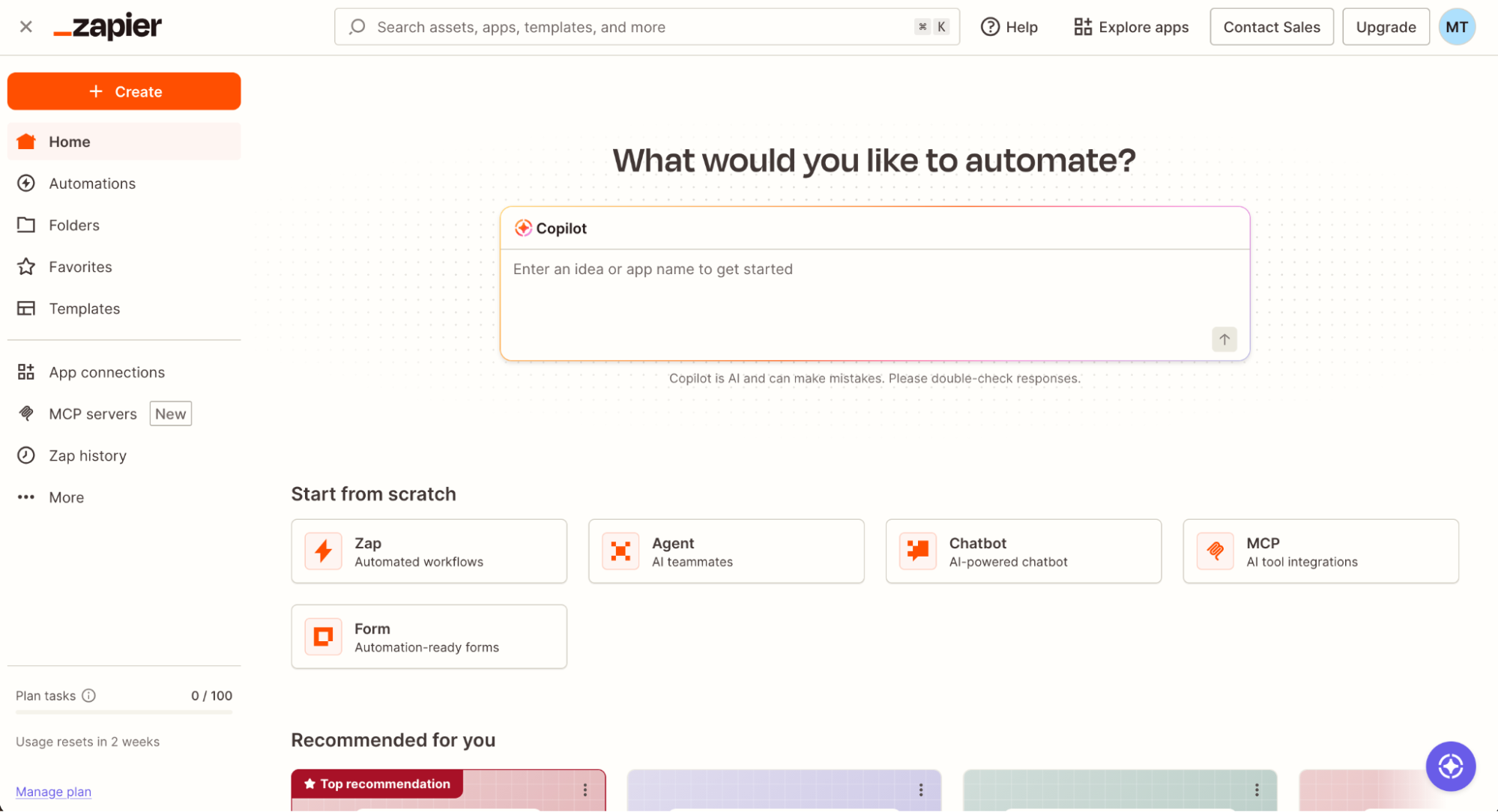
If you've ever caught yourself copying data from a form submission into a spreadsheet, pasting it into an email, and then updating your CRM by hand—congratulations, you've identified a Zapier workflow. That entire sequence can run automatically, in the background, while you do something that actually requires your brain.
Zapier connects with 9,000+ apps, which is more than any competing automation platform and roughly three times what most others offer. That breadth is key for small businesses, because your stack is almost certainly a mix of whatever tools you've cobbled together over time. Zapier makes them work together without forcing you to replace any of them.
It's easy enough to get started in minutes, but you can build complex automations that run themselves. You can even add AI steps directly into your workflows—use them to draft email replies based on incoming form data, classify leads by industry from free-text fields, summarize long customer messages before routing them, or enrich contact records in real time as they come in.
Zapier integrates with almost every other tool on this list—and every other tool in your tech stack—which means once you set up Zapier, it becomes the connective tissue between your project management software, your CRM, your payroll tool, and your marketing platform. For example: when a deal closes in HubSpot, Zapier can automatically create an invoice in Wave, add a task in Asana for the onboarding team, and send a Slack notification—all without anyone touching a keyboard. And you can even access all those other apps directly from an AI assistant like Claude or ChatGPT.
This is Zapier's blog, so take our word for it with appropriate skepticism and get a second opinion from some of our customers.
Zapier pricing: Free plan available; paid plans from $19.99/month (billed annually)
Best small business automation software for project management
Asana

Asana pros:
Flexible views
AI teammates that can find blockers, update overdue tasks, and generate subtasks
Asana cons:
Free plan limited to 2 team members
Paid plans are pricier than some alternatives
There's a particular kind of small business chaos that project management software is built for: the "I thought you were handling that" moment, the deadline that sneaks up because it lived in a Slack thread, and the onboarding checklist that exists only in one person's head. Asana solves those problems, and it does it without forcing you into a rigid methodology.
What distinguishes Asana from most project management tools is its flexibility. There's no prescribed way to set up a project—you can work in a list, a Kanban board, a timeline, or a Gantt chart, and switch between them at will. The only required field on any task is a title. Everything else—due dates, assignees, custom fields, descriptions, tags—is optional and layered in as your team needs it.
The workflow features are some of the most comprehensive you'll find in a project management app. You can create workflows from scratch via custom rules or use one of Asana's pre-made templates and go from there. The Forms feature allows you to standardize work requests, and the Bundle capability helps you edit a whole mess of related workflows without parsing through each one by one.
Asana's AI takes things further. You can prompt it with "Find blockers in this project" or "Update all overdue tasks to next week," and it executes those changes across the project directly. You can also build AI agent templates for recurring workflows—like automatically generating subtasks when a new project is created, or flagging tasks that have sat untouched for more than a week.
For connecting Asana to the rest of your tools, Asana's Zapier integration lets you build workflows that span your whole stack. New form submission? Create an Asana task. Task marked complete? Notify your client in Gmail. New hire added in Breezy HR? Spin up an onboarding project automatically. Learn more about how to automate Asana.
Asana pricing: Free for up to 2 team members; from $10.99/user/month (billed annually) for the Starter plan, which includes AI features, custom fields, and timeline views
Best small business automation tool for CRM and sales pipeline
HubSpot

HubSpot pros:
Full funnel in one platform
AI-powered contact enrichment and Breeze Copilot for workflow building
HubSpot cons:
Pricing scales sharply depending on which features you need
Free plan capped at 1,000 contacts
Most small businesses don't have a sales team. You have a founder, maybe one or two people who sometimes do sales, and a pile of leads that are either getting followed up with inconsistently or not at all. HubSpot was built, in many ways, to solve that exact problem—and specifically for businesses that want leads to come to them rather than chasing them cold.
The core idea is inbound: you create content, set up forms and landing pages, and HubSpot captures interested visitors and turns them into tracked contacts. From the moment someone submits a form, HubSpot knows what pages they've visited, which emails they've opened, and when they've been on your pricing page three times in a week (which is usually a good sign it's time to call). The whole point is that the CRM fills itself up with context, so you spend less time entering data and more time talking to people who are actually ready to buy.
And that's all before you even get to automation, which works across the platform: email sequences fire off automatically based on lead behavior, meeting scheduling links eliminate the back-and-forth, and chatbots qualify visitors on your site while you're asleep. The Breeze AI platform adds generative tools for writing outreach emails, a Copilot for interacting with your workspace via prompts, and agents that can handle customer service or manage social posting without manual effort.
For small businesses that haven't systematized sales at all, HubSpot is a great starting point. And when you connect HubSpot to Zapier, you can route leads from any source—Facebook Lead Ads, Typeform, your website—directly into the CRM, trigger sequences automatically, and sync deal data back to your other tools. Learn more about how to automate HubSpot.
HubSpot pricing: Free plan available for up to 1,000 contacts and 2 users; Customer Platform Starter from $20/user/month. Pricing varies significantly by feature set, so review the pricing page carefully (and grab a drink first).
Best marketing automation tool for small business
Brevo

Brevo pros:
Automates email, SMS, and WhatsApp natively
Workflow builder with conditions, delays, A/B splits, and webhooks
Also includes a lightweight CRM and meeting scheduler
Brevo cons:
Free plan capped at 300 emails/day
Advanced features like A/B testing and predictive sending require higher tiers
Most small businesses treat marketing automation like it's something they'll get to eventually, once they have more time, more budget, and more staff. Brevo makes a fairly convincing case that you don't need any of those things. Its free plan automates across email and SMS out of the box, before you've paid a cent.
The workflow builder is really flexible. You can set up a workflow that sends a welcome email immediately when someone subscribes, waits 24 hours, and then branches: if they opened the email, send them a follow-up offer; if they didn't, send a different nudge. You can add delays, A/B splits to test variations, webhook triggers to sync data to other systems, and CRM updates to log what's happening. For about $16/month, that's a lot of automation per dollar.
It also helps that Brevo isn't just a marketing tool. The platform includes a lightweight CRM and a meeting scheduling feature, so you can capture leads, follow up automatically, and book calls without adding another app to your stack. It's not as deep as HubSpot's CRM—don't expect it to replace a dedicated sales platform—but for a small business that needs to start nurturing leads without overcomplicating things, it's a solid starting point.
Connecting Brevo to Zapier extends it further: you can pull new customers from Stripe into Brevo automatically, add leads from Facebook Lead Ads to your email lists without manual imports, or trigger Brevo campaigns based on activity in your CRM. Here's a guide to automating Brevo with Zapier to get you started.
Brevo pricing: Free plan available (unlimited contacts, up to 300 emails/day); Starter plan from $9/month (billed annually) for 5,000 emails/month
Best accounting automation tool for small business
Wave

Wave pros:
Free plan with unlimited invoicing
Automated transaction categorization imports
Recurring invoice setup and automatic payment reminders
Wave cons:
No customer support on the free plan
May feel restrictive as you scale beyond solo or small-team use
Wave was purpose-built for small business accounting. The free plan includes unlimited invoicing and no usage caps, which is rare in accounting software. You can create and send invoices, set up recurring billing for regular clients, and connect your bank account so Wave pulls in and categorizes transactions automatically. When a client is late, Wave can send an automated follow-up reminder without you having to notice it happened or remember to send it.
The automation features won't blow your socks off compared to something like QuickBooks with a full accounting team behind it. But that's not who Wave is for. It's for the freelancer who needs to look professional, the two-person shop that's been tracking expenses in a spreadsheet, or the small retailer who wants to stop wondering whether they're profitable. For those use cases, Wave delivers meaningful invoicing automation at a price that's hard to argue with.
Connect Wave to Zapier and you can extend it even more: new Stripe sales create Wave transactions automatically, new invoices trigger Slack notifications to your team, and customer data syncs across your stack without manual entry. Learn more about how to automate Wave with Zapier.
Wave pricing: Free plan available (unlimited invoices, accounting, bank connections); Pro plan from $19/month. Online payment processing fees apply separately.
Best small business automation tool for payroll and HR
Gusto

Gusto pros:
Automated tax filing at federal, state, and local levels
Unlimited payrolls on all plans
Self-service portal for employees to access pay stubs and benefits
Gusto cons:
Full HR feature set requires upgrading beyond the base plan
No Zapier integration yet
When you have one employee, maybe you can keep payroll straight. At five, you're making spreadsheets. At ten, you're Googling "what is FICA" at 11 p.m. before your first quarterly filing. Gusto exists to eliminate that entire category of stress.
The automation features here are unglamorous but necessary: Gusto calculates, files, and pays your federal, state, and local taxes automatically. Michael Nemeroff, co-founder of RushOrderTees, told us that, before Gusto, he was "manually processing payroll and constantly worrying about whether we were filing taxes correctly." After switching: "We reduced payroll time by at least 75%." For a small business owner, that's huge.
Beyond payroll, Gusto covers benefits administration, time and attendance tracking, and a self-service portal where employees can access their own pay stubs and health insurance information without having to ask you for them. The onboarding flow is smooth enough that new hires can complete their own paperwork—things like tax forms, direct deposit setup, and I-9—before their first day.
The main caveat: Gusto doesn't yet integrate with Zapier directly, which limits how easily it connects to your other tools. But it integrates natively with Xero, QuickBooks, Clover, and nearly 150 other apps, which covers a lot of the connections a small business is likely to need.
Gusto pricing: From $49/month for the Simple plan (unlimited payrolls, automated tax filing for one state, employee self-service)
Best small business automation tool for recruiting and hiring
Breezy HR

Breezy HR pros:
Free plan that's not a feature-stripped preview
AI-powered Candidate Match Score automatically ranks applicants for open roles
Automated emails, text messages, and scheduling built in
Breezy HR cons:
Can be glitchy at times
Interface isn't the most polished in the category
Hiring is the part of running a small business that sneaks up on you. You need someone, you post a job, and suddenly you have 80 applications and no system for dealing with them. Breezy HR's free plan is built specifically for this moment—and it's one of the few applicant tracking systems with a solid free plan.
The Bootstrap plan gives you unlimited users, a visual pipeline in Kanban view where you can drag candidates between stages, custom application forms, and integrations with job boards like LinkedIn and Indeed. That's more than enough to run a serious hiring process for a single open role without spending anything.
As applications come in, Breezy scores each candidate against your job description automatically and surfaces the strongest matches at the top. Instead of reading 80 resumes, you start with the ten that actually fit. While you could technically do that by hand, it won't realistically get done carefully when you're also running a business.
Automated emails and scheduling are also baked in: Breezy can send personalized messages to candidates at each stage, schedule interviews without email back-and-forth, and notify your hiring manager in Slack when a strong candidate applies. Breezy also integrates with Zapier, so you can extend those workflows further—routing hired candidates directly into your HRIS, sending onboarding tasks to Asana, or syncing new hires to your email marketing tool.
Breezy HR pricing: Free Bootstrap plan for one active job opening; from $157/month (billed annually) for the Startup plan, which includes unlimited job postings and more advanced automation features
Which automation tool should you choose?
The best automation setup for a small business is usually one AI automation layer (Zapier) that connects a handful of best-in-class tools for each function.
If you're just getting started, pick the one that solves your most urgent problem. Losing track of leads because nothing is organized? Set up HubSpot's free plan. Marketing to the same list every month with no automation? Give Brevo a try.
For workflow automation across all your tools, Zapier is where I'd start, regardless of what else you're using. Once it's in place, connecting your other tools gets dramatically easier, and you start seeing automation opportunities in places you didn't even notice were slowing you down.
Related reading:


