If your company's idea of "using AI" is keeping ChatGPT open in a browser tab—congrats, you're doing the bare minimum. You're also missing out on the real efficiency gains AI can deliver.
Ad hoc prompting is great for one-off requests ("draft this email," "explain this bizarre spreadsheet formula"), but it doesn't scale—and it definitely doesn't count as integrating AI into your workflows. AI workflow automation is what happens when you build AI into repeatable processes instead: tasks like drafting follow-ups or routing support tickets run on their own, no prompting required.
Here, I'll cover everything you need to know about AI workflow automation, including what it is, real examples, and tools to help you get started.
Table of contents:
What is AI workflow automation?
AI workflow automation is the use of AI models inside automated workflows to handle steps that require judgment. Instead of following only if/then rules, the software can interpret context and decipher vague inputs that are too messy for rules-based logic. In other words, it's automation with a brain.
In practice, this looks like:
Reading an email and deciding whether it's a customer issue, a sales lead, or something you can safely ignore until next Tuesday
Drafting personalized replies whenever a new lead comes into your CRM, with the tone matched to the lead's message
Summarizing long documents that come through your inbox (no human has time for 47 pages of "context") and sending the results to Slack
Even in heavily automated companies, AI handles only a slice of the workflow. Zapier's analysis of 375 leading mid-market and enterprise companies found that AI accounted for just 18% of workflow steps. The rest ran on conventional automation—rules, filters, and plain old data moving between apps. That division of labor is also dramatically cheaper: workflows that reserve AI for the steps that need reasoning cost 71% less to run than workflows that route everything through a model.
AI workflow automation examples and use cases
AI workflow automation looks different depending on which team is running it, but the same few jobs show up everywhere. Across the 375 companies analyzed, AI in a workflow is almost always doing one of four things: drafting something for a human to read, filling in records from messy input, making the call on where work goes next, or turning a request into a task someone owns.
Here's what those jobs look like in practice across three business functions, including real examples from Zapier customers.
AI workflow automation examples for sales

Sales is where speed and judgment collide. Leads come in faster than anyone can qualify them, but qualifying is judgment work ("Is this a real buyer, or a vendor trying to sell you something?") that rule-based automation can't handle on its own.
AI workflow automation covers both sides: the moment a lead comes in, an AI step reads the actual message, scores the lead against criteria like region and company size, fills in missing details (like company data pulled from the email domain), and routes it to the right rep.
Here are a few examples of AI workflow automation for sales and lead management.
As Popl grew, their team was handling hundreds of daily form submissions across HubSpot and Salesforce. They built AI workflow automations that triage inbound emails, filter out spam, identify qualified sales opportunities, and route each lead to the right rep. Over 100 workflows later, they're saving $20,000 a year.
Rush Home went a step further and built a custom AI agent that scores a database of 11,000+ leads, sends the team daily briefs, and manages the broker's calendar.
Learn more: How to streamline your sales pipeline with AI
AI workflow automation examples for customer support
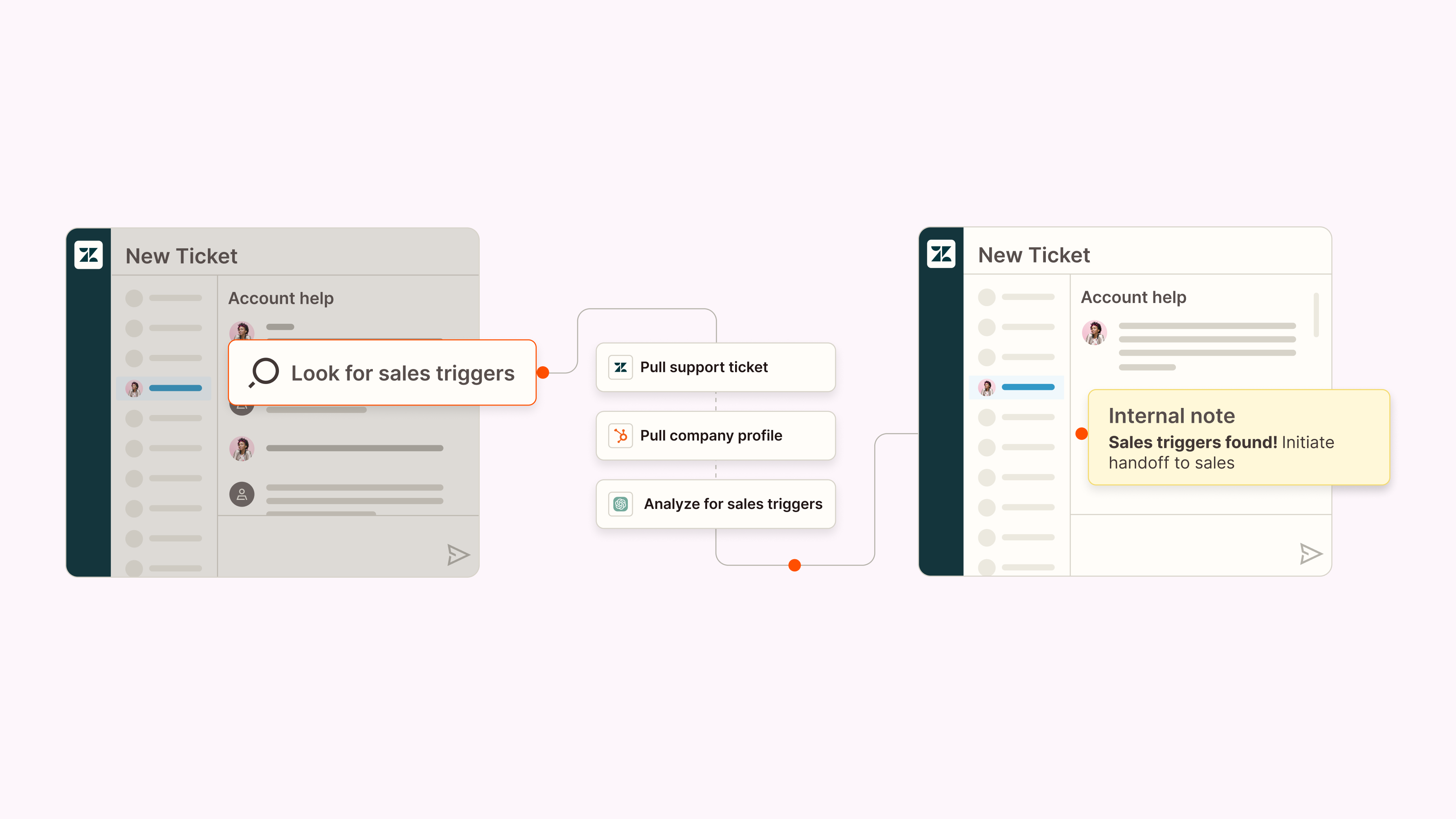
Customer support has the same volume problem as sales, but with an extra wrinkle: customers don't write tickets to fit your categories. AI workflow automation reads each ticket the way a support lead would—interpreting tone and intent, not just matching keywords—then classifies it by topic and urgency, drafts a first-pass reply, and escalates anything that can't wait. The same judgment layer works proactively, too. AI can watch for signals like dropping usage or negative sentiment and flag at-risk customers while there's still time to save the account.
Here are a few examples of AI workflow automation in customer support.
At Erewhon, a multi-step AI workflow kicks off whenever a customer email lands in Help Scout. It checks the customer's membership status, pulls their purchase history, and has ChatGPT draft a reply grounded in a knowledge base of store policies. A manager reviews each draft before it goes out—and 70% get sent without a single edit, saving about 1,500 support hours a year.
Healthie uses AI agents built on Zapier to get ahead of churn: every week, an agent scans Salesforce, HubSpot, Vitally, and Help Scout for warning signs and posts a summary to Slack, giving the customer success team a head start on at-risk accounts.
Learn more: AI in customer service (a complete guide)
AI workflow automation examples for IT and internal operations

Most requests that get routed to IT teams have been answered before. The fix for a VPN error or an access request is sitting in a past ticket or a runbook somewhere, but an employee describing their problem as "my laptop is being weird" will never find it (neither will keyword-based routing).
AI workflow automation closes that loop: when a request comes in through Slack or email, an AI step interprets what the employee actually needs, classifies and prioritizes the issue, searches past tickets for a proven fix, and either replies with the solution or routes the ticket to the right person with context attached. The team stops re-answering the same 20 questions and gets its time back for the problems that are actually new.
Here are a few examples of AI workflow automation in IT operations.
When Remote employees ask for help through Slack, email, or a chatbot, the AI workflow pulls the requester's details from Okta, uses ChatGPT to classify and prioritize the issue, searches past tickets to suggest a fix, and posts updates back in Slack. 28% of tickets are now handled automatically, saving the team 600+ hours every month.
At Palo Alto Networks, demo accounts and access requests all came through one Slack channel, phrased a hundred different ways ("Would the bot be so kind as to please reset my password?"). Now, an AI workflow interprets each request, then creates the account, assigns licenses, and grants permissions across multiple systems before replying in Slack. Requests that need sign-off become interactive Slack messages he can approve with one click—and the system serves 3,000+ internal users while saving the company $150,000 a year.
Learn more: How to automate IT operations
The best AI workflow automation tools
Here's the fun thing about AI workflow automation tools: no one can quite agree on what belongs in this category. Depending on who you ask, it might mean an AI orchestration platform, an AI-native workflow builder, or enterprise software with AI bolted on the side.
Instead of crowning a single winner (I don't need the internet coming after me), I've picked the best tool for five different scenarios based on the experiences of the Zapier team, myself included. Match the category to the way your team works, and you'll land in the right place.
Best for | Standout feature | Pricing | |
|---|---|---|---|
Building safely with AI | Securely connects with 9,000+ apps | Free plan available; paid plans from $19.99/month | |
Data processing | AI-first workflows for extracting, classifying, and enriching unstructured data | Free plan available; paid plans from $30/month (billed annually) | |
Self-hosting | Self-hosted Community edition with full control over data and infrastructure | Free Community edition; paid plans from $22/month (billed annually) | |
A personal AI assistant | Runs over iMessage and SMS | Plus plan at $49.99/month | |
Enterprise workflow orchestration | Recipe library with governed agent skills and role-based access control for AI agents | By request |
The best AI workflow automation tool for building safely with AI
Zapier

Zapier pros:
Multiple install paths, including Zapier MCP, let you build wherever you already work
OAuth-managed credentials mean your AI agents never see raw API keys
Securely connects with 9,000+ apps—more than triple what most competing platforms offer
Zapier cons:
Free plan limited to two-step workflows
Most AI tools are good at the specific thing they were built to do. The harder problem is getting them to work together safely—passing context between steps, triggering real actions across your stack, and doing it all without handing raw API keys to an agent that might do something unpredictable with them. That's the problem Zapier solves.
Zapier meets you where you build: Describe the problem you're trying to fix, and the built-in AI assistant will brainstorm and configure AI-powered workflows for you across your entire tech stack. Or install Zapier MCP in your AI assistant, like ChatGPT or Claude, to take action across your apps without leaving the chat window.
With thousands of app integrations, an AI workflow built on Zapier can pull data from your CRM, update a spreadsheet, file a ticket, and route the edge cases to a human—all without you knowing what an API key is. And the governance layer is the real differentiator: credentials are OAuth-managed, permissions are granular, and every action is traceable, so you always know what your AI did and who authorized it. Zapier's products also meet essential enterprise requirements like SOC 2 Type II certification (excluding Zapier SDK, currently in beta), GDPR compliance, and SSO with SAML 2.0.
You're on the Zapier blog, so a grain of salt is reasonable—which is why it's worth exploring how other teams use Zapier for AI workflow automation and judging the results for yourself. And because every tool in this category ends up measured against Zapier sooner or later, we've already done the side-by-side work for the rest of this list:
Zapier pricing: Free plan available; paid plans start at $19.99/month
Zapier is the most connected AI orchestration platform—integrating with thousands of apps from partners like Google, Salesforce, and Microsoft. Use forms, data tables, and logic to build secure, automated, AI-powered systems for your business-critical workflows across your organization's technology stack. Learn more.
Learn more: The best AI orchestration tools
The best AI workflow automation tool for data processing
Gumloop

Gumloop pros:
Agent-first platform
Built around AI-powered actions like extraction, classification, and summarization
Strong at processing unstructured data like documents and text
Gumloop cons:
Not built for end-to-end business process automation
Relatively small library of pre-built integrations
Gumloop is a newer automation platform built with an AI-first mindset, and it shows most clearly in data-heavy workflows. Instead of treating AI as one step inside a larger automation, Gumloop centers the whole experience on agentic actions: extracting, classifying, summarizing, and enriching information. You build on a visual canvas using modular nodes that mix standard actions with AI-driven logic—no wiring up models manually or managing API keys yourself.
That focus makes Gumloop a solid pick when the primary job of your AI workflow automation is processing information, especially unstructured inputs like documents, transcripts, or scraped web pages. If your workflow starts with "take this pile of messy data and make sense of it," Gumloop will feel purpose-built.
Gumloop's strength is intelligent data transformation, not orchestrating processes across your whole stack. Its integration library is small, and workflows often stop once the data is processed rather than continuing across downstream tools and teams. If you're scaling AI workflow automation across an organization, you may outgrow it quickly.
Gumloop pricing: Free for 2k credits/month, one seat, and one active trigger. Paid plans start at $30/month (billed annually) for 10k credits/month, unlimited triggers, and webhooks.
Learn more: The best AI automation tools
The best AI workflow automation tool for self-hosting
n8n

n8n pros:
Free self-hosted Community edition gives you full control over your data and infrastructure
Deeply customizable
n8n cons:
Requires technical knowledge to set up, customize, and maintain
"Free" isn't really free—the total cost of ownership can be high
"Open source" isn't a phrase you hear much in automation circles. n8n offers a self-hosted Community edition you can download, configure, and run on your own infrastructure—full control over your workflows and your data. It's not strictly open source (commercial use comes with limitations), but if your team cares deeply about data ownership or privacy, n8n's model is compelling.
That control comes at a cost: you run the platform yourself. Self-hosting n8n means installing it via Docker or npm (or managing it on a virtual private server), then owning the infrastructure upkeep, security patches, and troubleshooting from there. For AI workflow automation specifically, n8n appeals most to technically inclined teams that want to customize exactly how AI behaves inside a workflow—you can call models via API and stitch together logic precisely the way you want, with no guardrails, but no safety net either.
The other tradeoff is integration breadth. n8n comes with around 1,500 "nodes," most of them community-maintained, and not every node is an app integration; some are utilities like HTTP requests or error-handling steps. For anything not covered, you'll wire up connections yourself via HTTP request nodes. If self-hosting sounds like more responsibility than you want, n8n's hosted plans remove the infrastructure burden—but at that point, you're choosing n8n for its code-first flexibility, not ease of use or ecosystem breadth.
n8n pricing: Free Community edition available; paid plans start at $22/month (billed annually).
The best AI workflow automation tool for a personal AI assistant
Lindy

Lindy pros:
Runs over iMessage and SMS (no dashboard required)
Learns from your corrections and style over time
Lindy cons:
Built for personal agents only, not org-wide workflows
No branching logic or fallback paths, so complex workflows are out
Lindy covers a different slice of AI workflow automation than the other tools on this list: the workflows are personal. You're not connecting business systems or automating a team's processes—you're configuring an AI assistant that manages your inbox and meeting logistics, and takes requests over text.
What Lindy does, it does really well. You text it the way you'd text a chief of staff ("prep me for my afternoon meeting," "draft a reply to Deb"), and it pulls context from your email and calendar while maintaining memory over time. It's built for the high-frequency personal admin that's too small to justify a full workflow builder but too repetitive to keep doing by hand.
The fit is specific: executives, founders, and anyone else who lives in iMessage and wants an AI that works proactively instead of waiting for a login. There's a flow editor under the hood, but without branching logic or fallback paths, Lindy won't stretch into business-wide AI workflow automation. For that, you'll want one of the other tools in this list.
Lindy pricing: Paid plans from $49.99/month (7-day free trial, credit card required); Enterprise plan available with SSO, SCIM, audit logs, and HIPAA compliance
Learn more: The best AI agent builder software
The best AI workflow automation tool for enterprise workflow orchestration
Workato

Workato pros:
Role-based access control for AI agents built on enterprise governance principles
1,200+ connectors, including deep integrations for SAP, Oracle, Workday, and Salesforce
Workato cons:
Requires dedicated IT resources to implement and maintain
Time-to-value is measured in months, not days
Workato's foundation is "recipes": automation workflows that connect your apps, handle conditional branching, manage error-retry logic, and map data across systems at a scale built for multiple departments. Its agentic layer, Workato ONE, builds on that foundation: Agent Studio lets you build custom AI agents with enterprise context, while Decision Models centralize the business rules those agents follow.
The third piece, Enterprise MCP, lets external AI systems invoke your Workato recipes as callable skills. If your organization has already built a deep library of pre-approved automations, that's a powerful way to expose all of it to AI. If you're starting from scratch, though, the value only kicks in after you've invested months in building that recipe library. By contrast, Zapier MCP gives you access to 9,000+ apps with no prior building required.
Workato's pitch is control: every agent skill is pre-approved and every action traceable, with agents operating under the same role-based access structure as human users. For a large organization that needs that level of governance in its AI workflow automation, Workato delivers—just go in with clear eyes about the implementation timeline and resourcing.
Workato pricing: By request
Learn more: The best automation software
How to set up AI workflow automation without coding
You don't need a team of machine learning engineers or a secret underground lab to get started with AI workflow automation. In reality, most businesses get the biggest wins by combining the tools they already use with a bit of AI-powered decision-making. And with Zapier's no-code platform, you can build surprisingly sophisticated systems without using a single line of Python (unless you want to, which—live your life).
The trick is to treat AI workflow orchestration like any other operational rollout: start small, experiment quickly, and iterate your way into something robust.
At Zapier, that's exactly how we've woven AI into our own processes. We didn't have all the answers upfront, but by documenting what worked and ruthlessly learning from what didn't, we were able to scale AI thoughtfully and drive 97% adoption across teams. Here's a step-by-step playbook to help you do the same.
1. Identify high-impact workflows
The best candidates for AI workflows are repetitive tasks that still require a pinch of human reasoning. These are the tasks that normally cause people to sigh deeply before diving in. Think:
Triaging support tickets by tone or topic
Summarizing customer feedback
Drafting first-pass content
Enriching or evaluating leads
Routing messages based on intent
They're predictable enough to automate, but nuanced enough to benefit from AI's pattern recognition or language-processing skills.
You're not trying to automate everything. Just start with the work where AI removes friction or adds consistency without breaking your processes—usually the judgment calls people make over and over, or the tasks that bottleneck the team no matter who's assigned to them. A few early wins go a long way in building momentum.
2. Evaluate data quality and compliance
Before you let AI loose on your workflows, take a hard look at your inputs. AI can handle a certain amount of messiness, but garbage in is still garbage out. If your data is inconsistent, scattered across tools, or written in a dialect only your team understands, fix that first.
Then think about what the AI is allowed to touch, on both ends of the workflow.
On the way in, that's privacy and compliance: Know where customer data is going, how it's stored, who has access, and whether the tool uses it to train future models. (When in doubt, keep sensitive content out of your prompts.)
On the way out, match the guardrail to what the output does next: A drafted message just needs a reader, a CRM write needs validation, and an AI that's deciding what happens next needs a clear line for when a human steps in.
Learn more: A practical guide to AI-ready data
3. Pilot and validate your workflows
Before rolling anything out widely, run a pilot. This is where you make sure your workflow adds real value (not just vibes) and catches edge cases.
Use this stage to:
Test with real inputs
Get feedback from the people doing the work
Adjust prompts, criteria, guardrails, or fallback logic
Document what's working and what's not
4. Train and onboard your team
Even the smartest AI system won't help if no one uses it—or worse, if no one trusts it. Spend time showing your team how the workflow works, what decisions it's making, and where humans still play a role.
Keep documentation simple, and give people a place to ask questions or report weird behavior. (There will be weird behavior. That's part of the charm.) The more your team understands the "why," the more likely they'll be to adopt—and improve—the system.
Learn more: AI adoption: A practical guide
5. Monitor, measure, and optimize
AI workflows are living systems. They get better over time, but only if you keep an eye on them. If something starts slipping, you'll know to adjust prompts or add guardrails.
Track metrics like:
Time saved
Accuracy or completion rates
Manual interventions
User satisfaction and adoption
Error or drift patterns
AI workflow automation doesn't have to be complex. With the right tools and a little experimentation, you can build systems that scale across your business and give humans back the time they need for work that actually matters.
AI workflow automation: FAQ
What's the best AI workflow automation tool?
For most teams, it's Zapier: it connects with 9,000+ apps, lets you add AI-powered steps to any workflow, and keeps everything behind a governed connection layer—whether you build in a visual editor, a chat window, or code.
That said, the right pick depends on your situation: Gumloop specializes in agentic data processing, n8n suits teams that want to self-host, Lindy handles personal admin, and Workato fits enterprises with dedicated IT resources. See the full breakdown above for how they compare.
What's the difference between AI workflow automation and traditional automation?
Traditional automation follows fixed rules and does exactly what you tell it ("when a form is submitted, create a task") even if the form is obviously spam or written in Klingon. AI workflow automation adds judgment: it can interpret what a message actually means and make the routing decisions you'd otherwise spend hours encoding into 27 brittle filters.
What's the difference between AI workflows and AI orchestration?
AI workflows are individual automations with AI-powered steps. AI orchestration is the coordination layer above them, connecting your tools, AI models, and AI agents so everything runs with governance and control. Think of it as the conductor: it's what keeps a dozen AI workflows from becoming a tangle of mystery errors and rogue automations that swear they ran correctly even though they absolutely did not.
What's the difference between AI workflows and agentic AI workflows?
A standard AI workflow follows a defined set of steps, even when some of those steps involve intelligent decisions. On the other hand, agentic AI workflows pursue a goal. In practice, a regular AI workflow can classify a lead and log it in your CRM, while an agentic one could decide the lead needs enrichment, fetch the missing data, and change its approach if the first outreach gets no reply.
Why does AI workflow management matter?
AI workflows aren't set-it-and-forget-it machines. Without guardrails and the occasional review from an actual human, you end up with a pile of experimental automations and at least one rogue AI step mysteriously firing at 2 a.m. Managed well, AI workflows allow you to complete repetitive workflows that require judgment at scale.
Related reading:
This article was originally published in December 2025 by Nicole Replogle. The most recent update was in July 2026.