Ad automation is the process of running your ad and campaign management tasks without manual intervention. For example, instead of manually adjusting bids throughout the day, you can set up automation to shift budgets to your best-performing ads automatically.
If there's one form of advertising that can drive high-quality leads, it's pay-per-click (PPC) ads. How it works is fairly simple. You place ads on search engine results pages, social media, and other platforms, then pay a fee each time the ad is clicked.
There are a ton of handy tools you can use to manage these ads (think Google Ads, LinkedIn Ads, or Facebook Lead Ads), and they all have incredible potential to be high-converting. But they can also be a lot of work. Fortunately, you can use automation to streamline every aspect of your campaigns. Take a look.
Zapier is the most connected AI orchestration platform—integrating with thousands of apps from partners like Google, Salesforce, and Microsoft. Use forms, data tables, and logic to build secure, automated, AI-powered systems for your business-critical workflows across your organization's technology stack. Learn more.
Table of contents
To get started with a Zap template—what we call our pre-made workflows—just click on the button. It only takes a few minutes to set up. You can read more about setting up Zaps here.
What is ad automation?
Ad automation handles the repetitive tasks in your ad campaigns. And there are plenty. Think about it: Every ad and campaign needs to be carefully monitored, including pausing or starting the campaign, making adjustments to improve performance, and tracking data. You'll also need to worry about purchase tracking, incoming lead forms, and messages—all across multiple platforms.
Instead of manually tweaking campaigns throughout the day, you can set up an automated workflow (we call them Zaps) that takes care of the work for you. That way, you're more involved in other strategic projects that need human input.
Track new leads and subscribers in your ad campaigns
You can run the cleverest, most compelling ad campaign on the planet, but if the wrong audience sees it, you won't get far. The best way to see a return on your PPC investment is to make sure the right people see your ad content in the first place.
If someone has already subscribed to your email list or been added as a lead in your customer relationship management (CRM) tool, they're an ideal audience for your ad campaign. Sending those new leads to your Google Ads customer list or Facebook Conversions account lets you make smarter, targeted campaigns that actually see results.
These Zaps take care of that information transfer automatically, so your contact lists can stay consistently up to date—even as your online presence grows.
Add new Mailchimp subscribers to Google Ads customer lists


Add new HubSpot contacts to Google Ads customer lists

Share new updates in HubSpot as Facebook Conversions funnel events

Turn new HubSpot form submissions into LinkedIn Conversion events

Send lead events in Facebook Conversions with new ClickFunnels contact activity

Subscribe new leads to your marketing tools
Your pay-per-click ads are there to capture leads. But once you've collected them, you'll want to add them to your other apps so you can nurture, and hopefully convert, them into customers.
But taking those next steps can often take a back seat to your other tasks. Fortunately, you can use Zapier to add the leads you gather straight to your other marketing tools (think Mailchimp, HubSpot, and so on).
That way, you can automatically process new leads from your successful ad campaigns and reach out to them in an engaging way.
Subscribe new Facebook Lead Ad leads to a Mailchimp list

Create contacts in HubSpot for new leads from Google Ads
Subscribe new leads in LinkedIn Lead Gen Forms to Mailchimp


Note: Adding leads from your CRM to your ad campaigns and adding leads from your ad campaigns to your CRM are reverses of each other. If you use them both, just make sure to set up your Zaps in a way that avoids a loop (two Zaps triggering each other repeatedly from the same data). For more information, check out this help article.
Add leads to your CRM
Without automation in place, information from lead forms on platforms like Facebook Lead Ads, Google Ads, and LinkedIn Ads will sit in the database until you manually download it and then upload it to your CRM.
This can cause significant lags in response times, which can impact your ability to convert those users into customers. Since you've paid money to acquire that lead information, this is the last thing you want to do.
Keep the sales funnel moving quickly by automatically adding the leads you acquire through your campaigns directly to your CRM. That way, your sales team can strike while the iron's still hot.

Create Pipedrive deals from new Facebook Lead Ads leads

Add LinkedIn Lead Gen Form leads as new contacts in ActiveCampaign

Alternatively, if a deal falls through or a prospect loses interest, you can retarget them by adding them to a list or an audience in your ads tools, like so:
Add new Salesforce leads to Google Ads customer lists with emails
Add email addresses to Facebook Custom Audiences when new ActiveCampaign contacts are added to lists

Create LinkedIn Ads audiences from new or updated Zoho CRM module entries

Pro tip: Multi-step Zaps can help clean up and enhance your automated lead management workflows. You might use a filter step to filter out incomplete entries like a missing phone number or freemium email address. Or, you could add a formatter step to reformat raw data to fit your company's terminology (like converting the company size from "10,001+" to "Enterprise").

Vendavo cut their lead response time by 90% just by automating follow-ups with Zapier. Learn how they did it. →
Organize your leads in a spreadsheet
Even if you already use a CRM to store and manage your lead data, having a spreadsheet that also mirrors this up-to-date information can be vital if you need to share this with other teams—without them logging into your CRM.
Of course, manually updating your spreadsheet doesn't work if you're managing a huge influx of leads (the dream!), so these Zaps can do the heavy lifting for you:
Add new Facebook Lead Ads leads to rows on Google Sheets

Add new leads in LinkedIn Ads to Google Sheets rows
Create Google Sheets rows for new Google Ads leads
If you're using spreadsheets to not only store but act on lead data, it's worth considering switching to a spreadsheet tool that was actually built for automation. Zapier Tables lets you build complex, scalable automated systems with your database as a central source of truth.
For example, you could use this template to easily track your leads and send custom outreach emails with a click.
Track offline conversions
Offline conversions can be tricky to track. And what about in-store purchases? Or customers who attended a live event? Or users who made a phone call to book a time with you? These actions can all be driven by ads. While it's more difficult to track those metrics, it's important to do so.
Tracking offline conversions (and sending it to your ads tools) lets you see which search ads result in sales. With that data, you can better understand which ads are performing well and which ones you can cancel.
With Zapier, you can shave hours off of this task by automatically uploading conversion information to Google Ads or Facebook Lead Ads from your CRM or other tools.
Trigger offline conversions in Google Ads with new caught webhooks

Log Google Ads offline conversions from new rows in Google Sheets
Register offline conversions in Google Ads when new contacts are updated in HubSpot
Track online conversions
But what about conversions that happen online? While easier to track than offline conversions, you should still make sure you're automatically processing that data with a tool like LinkedIn Conversions. Tools like this allow you to understand which actions your leads are taking and help you measure the ROI of ad campaigns.
From sales you make in Shopify to transactions that take place in Stripe, these Zaps will automatically track every event, keeping everything up to date across your platforms:
Send LinkedIn Conversions events from new HubSpot form submissions
Send LinkedIn Conversion events when new Stripe events occur

Trigger LinkedIn Conversions events for new Teachable sales

Send new paid orders in Shopify to Facebook conversions as purchase events

Send LinkedIn Conversions events when new HubSpot contacts are created
Send immediate emails to new leads
You can streamline every part of your marketing campaigns, but it won't make much difference if you're not engaging with your leads. Reaching out to them the moment they show interest in your business can mean the difference between a missed opportunity and a sale.
Of course, the more leads you collect, the harder it is to scale your output. In fact, it can even be impossible to manually reach out to every new prospect.
That's why you can use these Zaps to send leads a welcome email the moment they express interest in you, setting them up for success:
Send emails via Gmail for new LinkedIn Lead Gen Forms leads

Send Mailchimp Transactional emails to new Facebook Lead Ads leads

How to automate your ad campaigns with AI
Adding AI steps to your Zaps can help you run smarter campaigns from end to end.
For example, you could use AI to enrich leads before adding them to your CRM. Use this template to get started—just be sure to add a third step that sends all that lead information to whichever CRM you use.
Parse and manage new Google Ads lead form entries with AI by Zapier

Or you could build a Zap that auto-summarizes new leads, scores intent, and recommends next steps. AI can then draft a tailored outreach email, schedule it in your email platform, and update the lead’s lifecycle stage in your CRM—all while adding the contact to the right retargeting or exclusion audience in your ad platform.

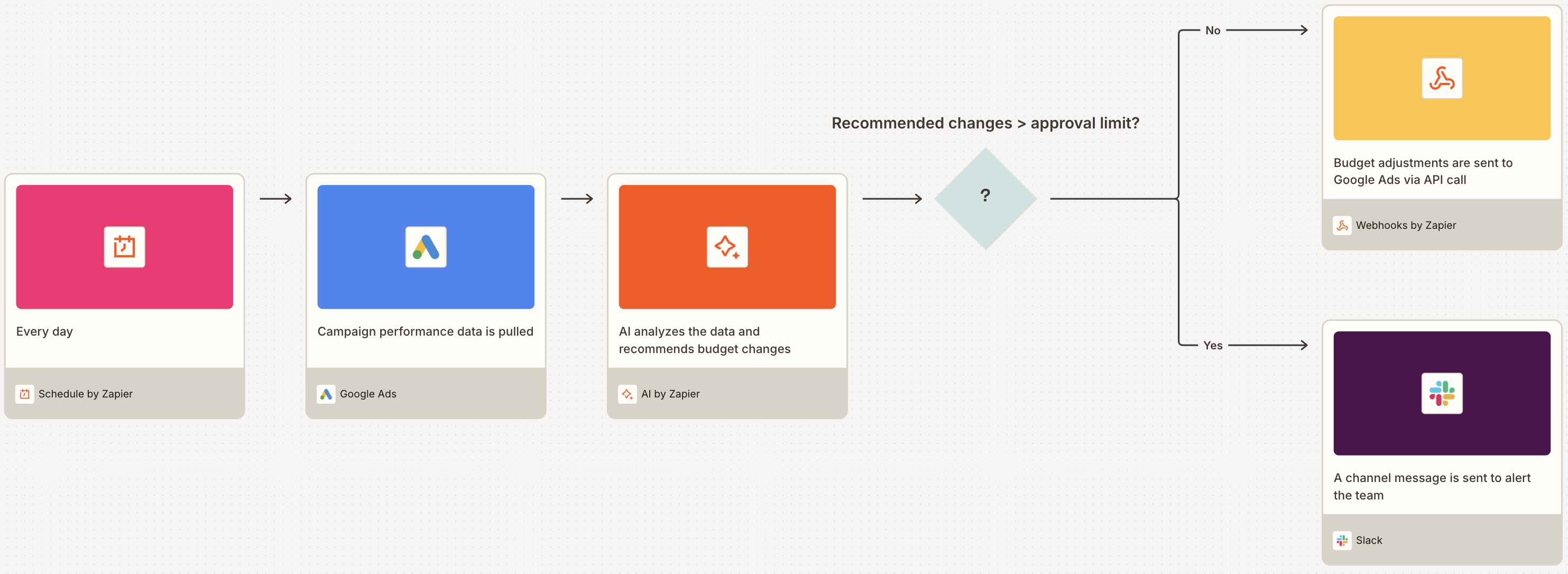
Media buyers, you can build a budget optimizer Zap that pulls performance data every day from your ad platforms, uses AI to analyze trends and calculate smart budget adjustments, then applies the updates automatically. You can even build in approval gates for major changes, so your team scales efficiently without losing control.

Zaps aren't your only option for AI-powered ad automation. You can also build Zapier Agents to handle more complex processes—like a multi-source lead capture and engagement agent (which we've got a template for).
Use AI and automation to power your ads
When you fully automate your ads workflows, you can streamline your entire ad management process while keeping your team on the same page and preventing valuable leads from falling through the cracks. Start automating today and see how Zapier can impact your ads—and your sales.
Related reading:
This article was originally published in May 2021, written by Ana Gotter, with previous contributions by Elena Alston. It was most recently updated in November 2025 by Steph Spector.