
When ChatGPT first hit the scene, Zapier didn't just dabble here and there. We went all in. For the past three-plus years, people across the company have been building, breaking, and scaling AI into just about every corner of how we work.
That means I've had a front-row seat to the whole lifecycle playing out in real time: the clever experiments that unexpectedly became critical tools, the workflows that actually stuck (and the many that absolutely did not), and the lessons you learn only after an idea that sounded great turns out to be an exercise in deep breathing and not hurling your laptop out the nearest window.
After a while, the same patterns start showing up again and again. Here are six mistakes that keep teams spinning their wheels—and what to do instead.
Table of contents:
1. Letting AI live in individual toolkits instead of shared workflows
At most companies, AI adoption starts organically. People find AI tools they like, build their own workflows, and get genuinely useful stuff done. The problem is that none of these workflows are connected.
When we first started rolling out AI at Zapier, this is exactly what happened. Everyone was experimenting, but people were building the same things in parallel without realizing it. A lot of energy was going into reinventing wheels that already existed two Slack channels over.
How to avoid this:
Share AI workflows in public channels. Encourage people to post their AI workflows in public Slack channels (or wherever your team communicates) so others can see what's been built, ask questions, and learn from it. The point isn't to micromanage what people build. It's to make sure good work compounds instead of getting siloed.
Create a shared library of reusable AI resources. Maintain a central place where teams can find and contribute AI agent skills, workflow templates, and proven AI prompts. When someone solves a problem well, the whole organization should be able to pick it up and run with it.
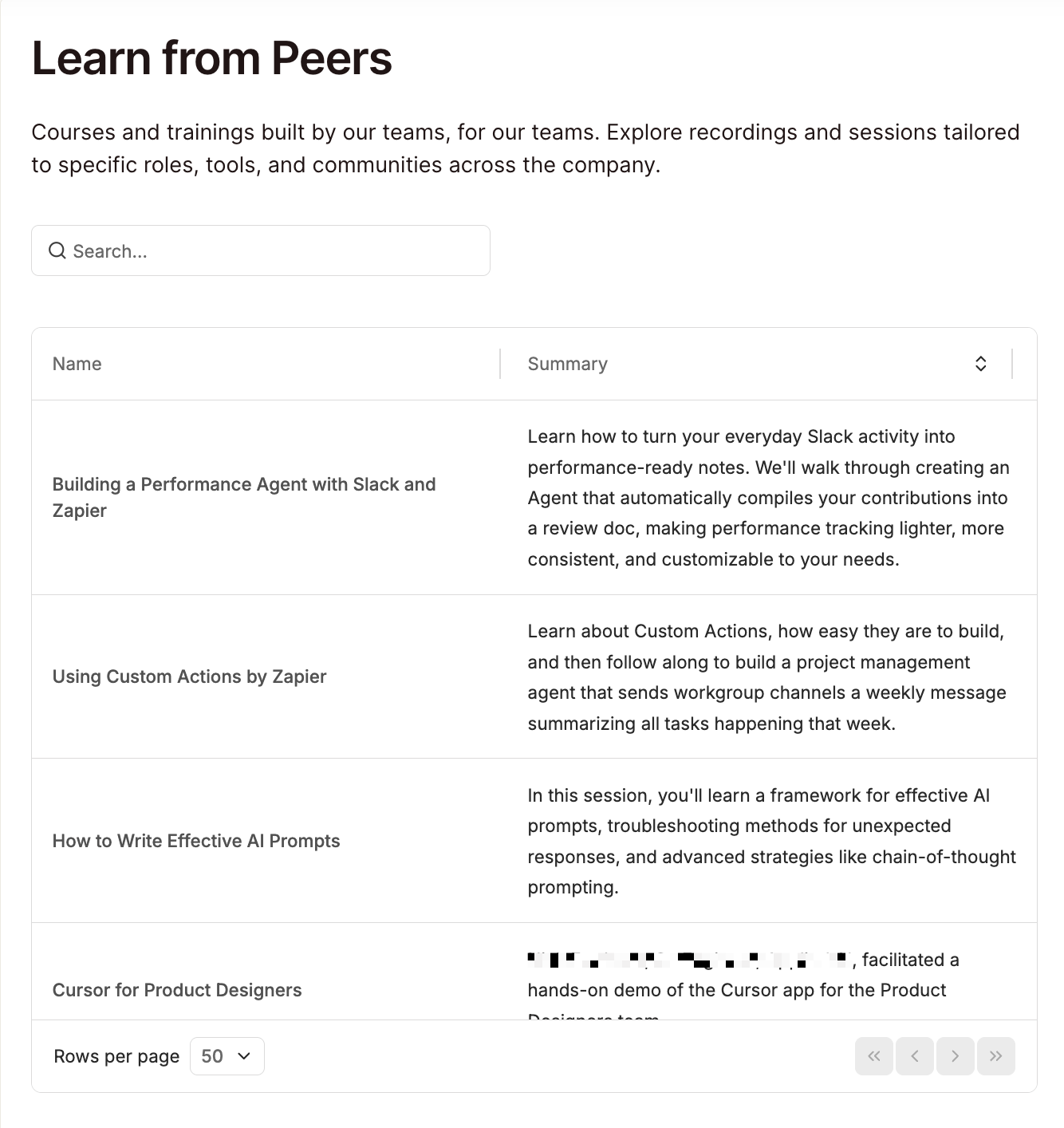
Invest in peer-to-peer AI learning. People learn fastest from colleagues who've already solved their exact problem. Create an internal resource where teams can share their wins (and failures) so that others can build on them. At Zapier, we built a searchable database called "Learn from Peers" for this. A support team member can find a track on building with AI in automation, for example, or a sales rep can learn how to demo AI features.

2. Skipping the ownership conversation
AI workflows have a funny habit of existing in an ownership vacuum. Someone builds a lead scoring workflow, for example. It runs well for a few weeks, and then quietly degrades because nobody was explicitly responsible for monitoring it. The ownership conversation just never happened.
How to avoid this:
Give AI transformation a dedicated owner. Someone in your organization needs to be accountable for how AI scales across teams. At Zapier, that's our AI Transformation Officer, Brandon Sammut. But no single person—not even Brandon—can do it alone. That's why we also have cross-functional AI Transformation Pods embedded within the core parts of our organization, each staffed with four roles: AI Transformation Manager, AI Fluency Champion, AI Builder, and AI Innovation Lead. That level of specificity means nobody's guessing who's supposed to do what.
Name a business owner and a technical owner. Each high-impact AI workflow needs a business owner—the one accountable for the outcome the workflow influences—and a technical owner—the one accountable for the system itself, which includes clean data and relevant prompts. Document both somewhere your team actually checks, and make sure each person has the access they need to do their job.
3. Treating every AI use case with the same level of scrutiny
One of my teammates built a scrappy little app that ranks how transparent your Slack communications are based on your ratio of public channel messages to private DMs. You can even see how you compare to our CEO. It's goofy and low-stakes, and nobody's running a formal governance review on it. Nor should they.
Now compare that to an AI agent that auto-responds to customer support tickets. If that thing starts confidently giving wrong answers, customers notice, and trust erodes. The stakes are completely different, and the oversight should be too.
The problem is that most teams either apply the same heavy process to everything (and slow down the harmless stuff) or apply almost no process to anything (and let the high-stakes stuff fly without guardrails).
How to avoid this:
Tier your AI workflows by impact and match oversight accordingly. Not sure where something falls? Here's a simple framework you can use.
Low-impact: This usually applies to personal productivity AI workflows like meeting summaries, first drafts, and that Slack transparency app. You can spot-check these occasionally, but you definitely don't need to build a review committee around them.
Medium-impact: This usually applies to decision-making workflows. Think: reporting automations, prioritization tools, and resource allocation workflows. You don't need to do a full-on daily review of these—a monthly review will do. It's also worth it to set up automated alerts for anomalies.
High-impact: This is reserved for customer-facing, financial, or compliance-related workflows. This includes AI agents responding to customers, automated approval flows, and anything that touches revenue or regulatory obligations. Establish formal review cadences, documented escalation paths, and audit trails.
If you're not sure what tier a workflow falls in, ask yourself this: If this AI workflow broke silently for two weeks, what's the worst that could happen? If the answer is "some meeting notes would be slightly off," leave it alone. If the answer involves angry customers, lost money, or lawyers in fancy suits, treat it accordingly.
4. Not defining where AI decides vs. where humans decide
Most AI workflows start like this: the AI recommends and a human approves. But when the AI gets it right 50 or so times in a row, people naturally go into cruise control. Recommendations start getting approved without a close look, and eventually, something slips through that probably shouldn't have. For a low-stakes internal workflow, that's a shrug. For anything medium- or high-impact, it's a risk that's not worth taking.
How to avoid this:
For each AI workflow, classify what the AI is actually doing.
Informing: AI generates outputs (a summary, score, or draft) that a human reviews and acts on.
Recommending: AI suggests a specific action that a human must first approve before the AI can continue on to next steps.
Executing: AI takes action on its own based on defined rules or thresholds.
Once you've classified each workflow, take an honest look at how it's actually running. A workflow where every recommendation gets approved without review is functionally in execute mode, even if it wasn't designed that way. For those, make sure you've defined what triggers escalation to a human and what the override process looks like.
5. Measuring AI adoption instead of AI impact
I could spend all day asking AI to generate increasingly unhinged portraits of my dogs, and that would technically count as active AI usage. Fun? Absolutely. Business impact? Absolutely…none.
A lot of teams fall into this trap at a less ridiculous scale. For example, they might report that 80% of employees use AI or that their workflows generate 100 monthly blog articles. Those numbers feel good in a slide deck. They tell you absolutely nothing about whether AI is improving anything.
How to avoid this:
Establish a baseline first. Before you deploy an AI workflow, document what performance looks like without it. Snapshot your current conversion rates, resolution times, CSAT scores—whatever the relevant metric is. You'll need this to prove (or disprove) that AI actually moved the needle.
Define the target impact metric and build it into the workflow. A lead-scoring model should be measured against conversion rates, while a support automation should be measured against resolution time and CSAT. If you can't name the business metric, take a step back and figure out what success looks like before you ship it.
6. Rolling out AI without policies or guardrails
Seventy percent of employees say their organization has no guidance or policies for using AI at work. And only 15% say their company has communicated a clear plan for integrating AI. So you've got a situation where leadership is excited about AI and employees are curious about AI, but there's a massive vacuum in between where nobody's told anyone what's ok and what isn't. The result is predictable: cautious people don't touch AI at all, and less cautious people go wild with it. Neither is great.
How to avoid this:
Create a clear AI roadmap, including policies and guidelines. You don't need a 40-page document. Answer a few basic questions, at a minimum, and make the answers easy to find.
What tools are approved? Give people an explicit list of AI tools they can use. If there's a preferred platform, say so. This alone eliminates a huge chunk of shadow AI.
What data can and can't go into AI tools? Be specific. Customer PII? Off limits. Internal revenue numbers? Depends on the tool. Draft marketing copy? Go for it. Most employees will make smart decisions here. They just need you to draw the lines.
What review is required before an AI workflow goes live? For low-impact stuff, maybe none. For anything customer-facing, define an approval process.
Scale AI across your team with Zapier
The pattern behind all of these mistakes is the same: teams treat AI as a collection of tools rather than part of how they operate. Zapier gives you a platform to connect thousands of tools and actually build the structure around it.
Here are a few ways Zapier makes it easy to securely scale AI across organizations:
Share workflows across teams. You can share Zaps (automated workflows) at the individual or team level. From there, anyone with access can duplicate or iterate on them. This way, useful automations spread across the organization instead of staying buried in one person's account.
Give leadership visibility. The Admin Center puts role-based permissions, approval settings, and connection controls in one place. IT and leadership can oversee high-impact workflows and manage who builds what, without slowing down the teams doing the building.
Add human sign-off wherever the stakes call for it. Built-in approval steps let you require a human review at any point in a workflow. So when an AI workflow graduates from "recommend" to "execute," it's because someone made that call deliberately.
Scale with confidence. Zapier's enterprise-grade security includes SOC 2 (Type II) and SOC 3 certifications, AES-256 encryption at rest, audit logs that track every user action and automation change, and model training opt-out so your data stays yours. Admins also have full control over which AI-powered apps are allowed in their account, so your team can move fast knowing the guardrails are already in place.
Zapier is the most connected AI orchestration platform—integrating with thousands of apps from partners like Google, Salesforce, and Microsoft. Use forms, data tables, and logic to build secure, automated, AI-powered systems for your business-critical workflows across your organization's technology stack. Learn more.
Related reading: