ChatGPT subscription tiers are the new streaming packages. Free, Go, Plus, Pro—each one unlocks a different slice of features, and if you're not careful, you're either overpaying for stuff you never use or hitting a usage wall at the worst moment.
OpenAI's ChatGPT Go is the tier that sits between a free account and ChatGPT Plus, but it's not just a cheaper version of Plus—there are real trade-offs. So what exactly is ChatGPT Go, and when does the math work in your favor?
Here's what you get with ChatGPT Go, how it stacks up against your other options, and how to decide if it's worth the subscription.
Table of contents:
What is ChatGPT Go?
ChatGPT Go is the lowest paid ChatGPT subscription available. At $8/month, it gives you more of ChatGPT's most-used features, including better model access, expanded messaging limits, and more image generation, without the higher price of ChatGPT Plus ($20/month) or Pro ($200/month).
ChatGPT Go vs. free vs. Plus at a glance
With three tiers that share a lot of the same features at different limits, it's not always obvious which plan gives you what. Here's an overview of the key features you get access to (or don't) with each plan. Keep scrolling for more details.
| Free | ChatGPT Go | ChatGPT Plus |
|---|---|---|---|
Pricing | Free | $8/month | $20/month |
Default model | Eventually gets the newest models with lower limits, but you might have to wait longer to access them | Eventually gets the newest models with lower limits, but you might have to wait longer to access them | Immediate access to the newest models as soon as they drop |
Message limits | Up to 10 messages every 5 hours | Up to 160 messages every 3 hours | Up to 160 messages every 3 hours |
Image generation | Limited access | Access to image generation, but lower caps and slower | Higher caps than Go, plus faster generation speeds |
Reasoning (thinking) models | Not included | Limited access | Expanded access |
Deep Research | Limited access | Limited access | Significantly more queries |
Codex agent | Not included | Not included | Standard access with set usage limits |
Voice conversations | Limited access | Expanded access | Expanded access |
Voice with video | Not included | Limited access | Limited access |
Video generation | Not included | Limited access | Limited access |
Custom GPTs | Use only (can't create) | Create, customize, and publish | Create, customize, and publish |
Ads | May include ads | May include ads | Ad-free |
ChatGPT Go benefits that make it worth considering
ChatGPT Go isn't trying to compete with ChatGPT Plus. Instead, it offers features designed to cover the gaps that free-tier users feel most. Here's a deeper look into what you actually get for the price.
Unlimited chat access to OpenAI's instant model
Users on a free and Go plan both get access to OpenAI's instant model (a fast, everyday chat model optimized for speed and conversational quality). But Go subscribers get expanded access and higher messaging limits—up to 160 messages every three hours. That's a significant jump from the 10 messages you get every five hours with the free plan and gives you far more flexibility to refine your prompts while still accessing the best models.
If you hit that cap, your chats drop down to a mini version of the model until the limit resets. You'll still get answers, but the mini model is noticeably not as powerful when it comes to nuanced or complex tasks like detailed analysis. Still, the Go plan lets you run longer threads, analyze more documents, and generate more images than the free one.
Extended access to image generation, file uploads, and advanced data analysis

ChatGPT Go lets you upload and work with more files (think: spreadsheets, PDFs, and images) and use tools like Python-based data exploration more often than the free tier allows. Image generation caps are higher, too, so if you use ChatGPT to generate AI images, you'll hit the wall less often.
That said, "more" is doing a lot of heavy lifting here. OpenAI doesn't publish exact limits for Go's image generation or file uploads, so it's hard to say exactly how much more you're getting. If your workflow leans heavily on any of these tools—for example, if you use ChatGPT to run weekly data reports—you'll notice the extra headroom. But if you only dabble, the free tier might already cover you.
Larger context window
ChatGPT can remember set instructions—like your company's positioning and writing style guidelines—as well as other preferences across conversations.
The free plan gives you a 16k context window to work with, while Go bumps that to 32k. That means more room to hold longer conversations before ChatGPT starts losing the thread. Just keep in mind that more context doesn't automatically mean better results. Large language models can still lose track of details buried deep in a long conversation, so being deliberate about what you include still matters.
If you mostly use ChatGPT as your replacement Google, the extra memory probably won't change much for you. But if you use it to iterate on projects or you're tired of re-explaining yourself every time you start a new chat, this is where Go starts to feel noticeably different.
Build your own custom GPTs

With a ChatGPT Go subscription, you can build and share your own custom GPTs (tailored assistants designed around your specific needs). You can use one of OpenAI's prebuilt GPTs, like Data Analysis, or create one from scratch, tuned to your company or workflow. Free users, on the other hand, can only use existing GPTs.
That said, if custom chatbots are the main reason you're considering upgrading, you can build them for free using Zapier Chatbots. So this feature alone may not be worth the subscription.
Access to reasoning (thinking) models
Go includes access to reasoning models, which is great when you want the model to slow down and work through a problem step by step instead of firing off an instant response. But you get only so many messages using this model with a Go plan. As of this writing, Go users get 10 reasoning messages every five hours. At this rate, it's not something you could leverage in every conversation, but it's really valuable when you're tackling something that requires actual logic, like debugging code or comparing complex options.
For everyday tasks like drafting emails or brainstorming, the instant model that you get with both the free and Go plan is fine. But having the option to shift into a deeper thinking mode when you need it, even sparingly, is a genuine upgrade from free.
Is ChatGPT Go worth it?
For most people who use ChatGPT regularly but don't need its most advanced features, yes, ChatGPT Go is worth the $8/month subscription. Go solves the most common frustrations with the free tier, like losing the thread mid-conversation and limited file uploads, without asking you to pay $20 for tools you may never touch. That said, it's not for everyone.
ChatGPT Go is worth it if:
You regularly hit the free tier's message or image limits and have to pause or stop mid-task.
You're happy with the instant model and occasional access to reasoning models.
You're on a tight budget but want a step up from free.
ChatGPT Go may not be worth it if:
You barely touch the free limits because you use ChatGPT for the occasional quick question.
You need more advanced features like AI video generation via Sora; autonomous, AI-generated research reports via deep research; or AI agents that can write and execute code across your projects via Codex. These features are reserved for Plus plans or higher.
You care about an ad-free experience (OpenAI has said it may test ads on the Go tier).
How to get ChatGPT Go
Assuming you're already a ChatGPT Plus subscriber, here's how to upgrade to ChatGPT Pro.
Log in to ChatGPT at chat.com.
In the side panel of the ChatGPT home page, click your profile, and then click Upgrade plan.
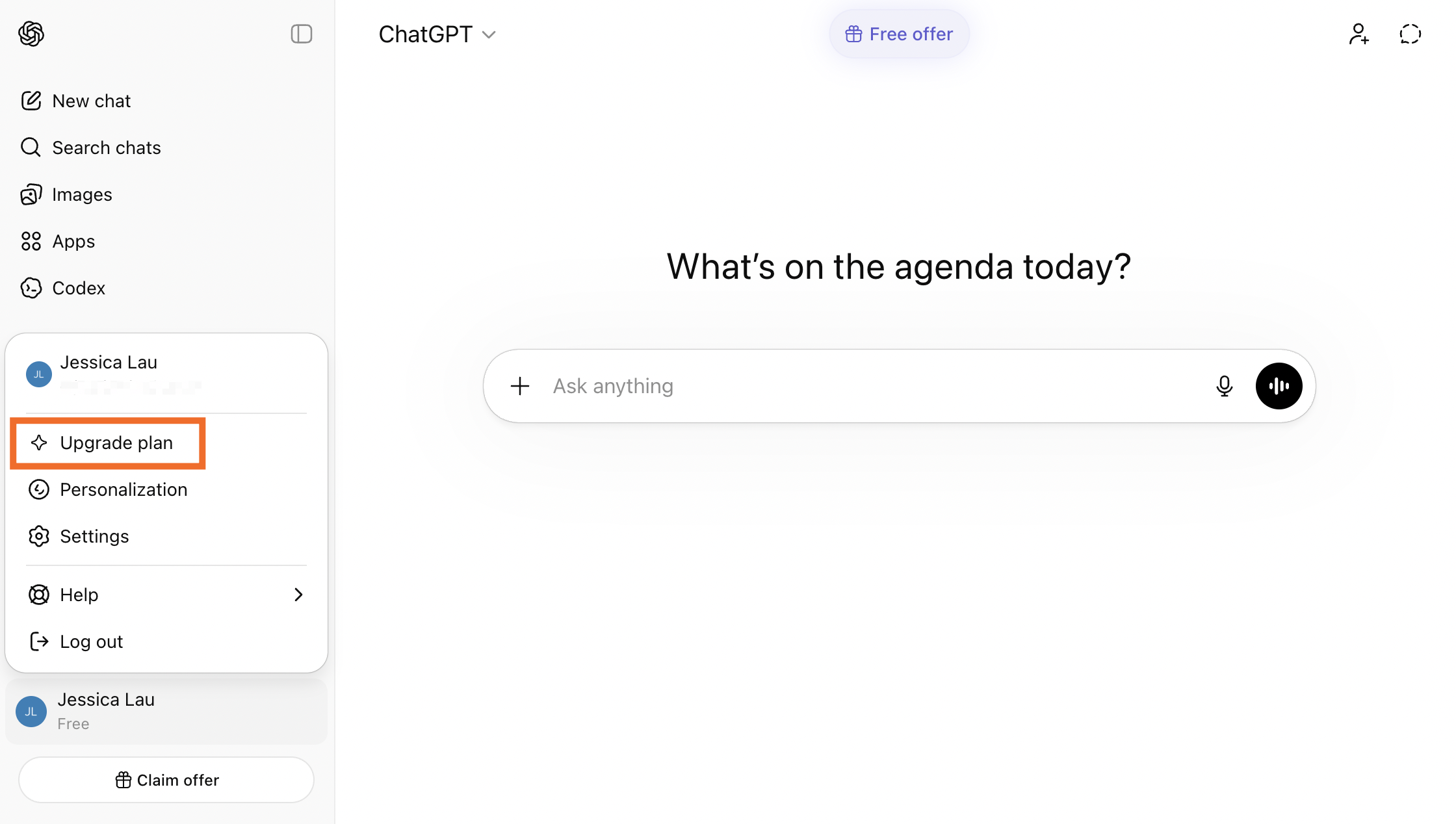
On ChatGPT's pricing page, click Go.
Complete the subscription process.

Automate ChatGPT with Zapier
If ChatGPT has become a regular part of how you work, it's worth putting some of that work on autopilot.
Zapier's ChatGPT integration lets you plug ChatGPT into any automated workflow, allowing you to build sophisticated, AI-powered workflows across thousands of apps. For example, you could set up Zapier to track competitor pricing pages through an RSS feed, have ChatGPT analyze what changed and what it means for your positioning, and then send a summary with recommendations straight to your team in Slack or email.
And with Zapier MCP, you can go the other direction: instead of ChatGPT being one step in a workflow, it gets direct, secure access to your tools so it can take intelligent actions on the fly from inside the chat. Learn more about how to automate ChatGPT.
Zapier is the most connected AI orchestration platform—integrating with thousands of apps from partners like Google, Salesforce, and Microsoft. Use forms, data tables, and logic to build secure, automated, AI-powered systems for your business-critical workflows across your organization's technology stack. Learn more.
ChatGPT Go FAQs
How much is ChatGPT Go?
ChatGPT Go costs $8/month.
What's the difference between ChatGPT free vs. ChatGPT Go?
There are a lot of differences between ChatGPT free vs. ChatGPT Go. But most of the differences—at least when it comes to key features like model access and messaging caps—comes down to how much access you get. For example, users on a free plan are capped at 10 messages every five hours using the default model, whereas Go users get up to 160 messages every three hours with messaging caps using OpenAI's reasoning model.
For a detailed breakdown of all the differences, check out OpenAI's pricing page.
Related reading: