A daunting writing assignment is less intimidating when you have a strong AI tool in your corner, especially when that tool is Jasper. It's an AI writing platform built specifically for marketers. Unlike a general-purpose tool, it comes with specialized agents and an AI context layer designed to come up with words that capture the heart of your brand.
No matter what kind of marketing your team uses Jasper for, automating that work with Zapier can help you produce polished assets even faster. If you're wondering how, keep scrolling. I'll show you a few Jasper workflows that are ripe for automation along with pre-built templates for Zaps, what we call automated workflows.
New to Zapier? It's workflow automation software that lets you focus on what matters. Combine forms, data tables, and logic with thousands of apps to build and automate anything you can imagine. Contact sales for more info on how to use this app, and thousands more, with Zapier.
Table of contents
To get started with a Zap template—what we call our pre-made workflows—just click on the button. It only takes a few minutes to set up. You can read more about setting up Zaps here.
Generate blog posts from a content calendar
Picture your content calendar at the start of the quarter. You've got 30 blog topics lined up, each with a target audience, tone, and keyword strategy mapped out. The strategy work is done. What's left is the part that eats up your week: turning each row into an actual draft.
You're hopeful you can weave in clever, creative turns of phrase throughout, but by the time you've muscled through the fourth post, it's not uncommon to feel like you're never going to get through the others. Not that I'm speaking from experience...
When you reach this point, Jasper can step in and write a first draft for you. But it'll be even more powerful if, instead of copying topics out of your calendar and pasting them into Jasper by hand. you automate the process. Try letting your content calendar trigger each new draft instead. That way, the moment you mark a topic as ready to write, Jasper receives the info, creates a draft based on your specified tone and audience, and sends the post wherever your team prefers to review it—whether that's a Google Doc, your CMS, or somewhere else.
Generate Jasper blog posts from new rows and create Google Docs


Create Jasper blog posts from new Airtable records and publish to WordPress


Generate Jasper blog posts from new Notion items and create Contentful entries


Draft Jasper blog posts from new Trello cards and save them to Google Docs

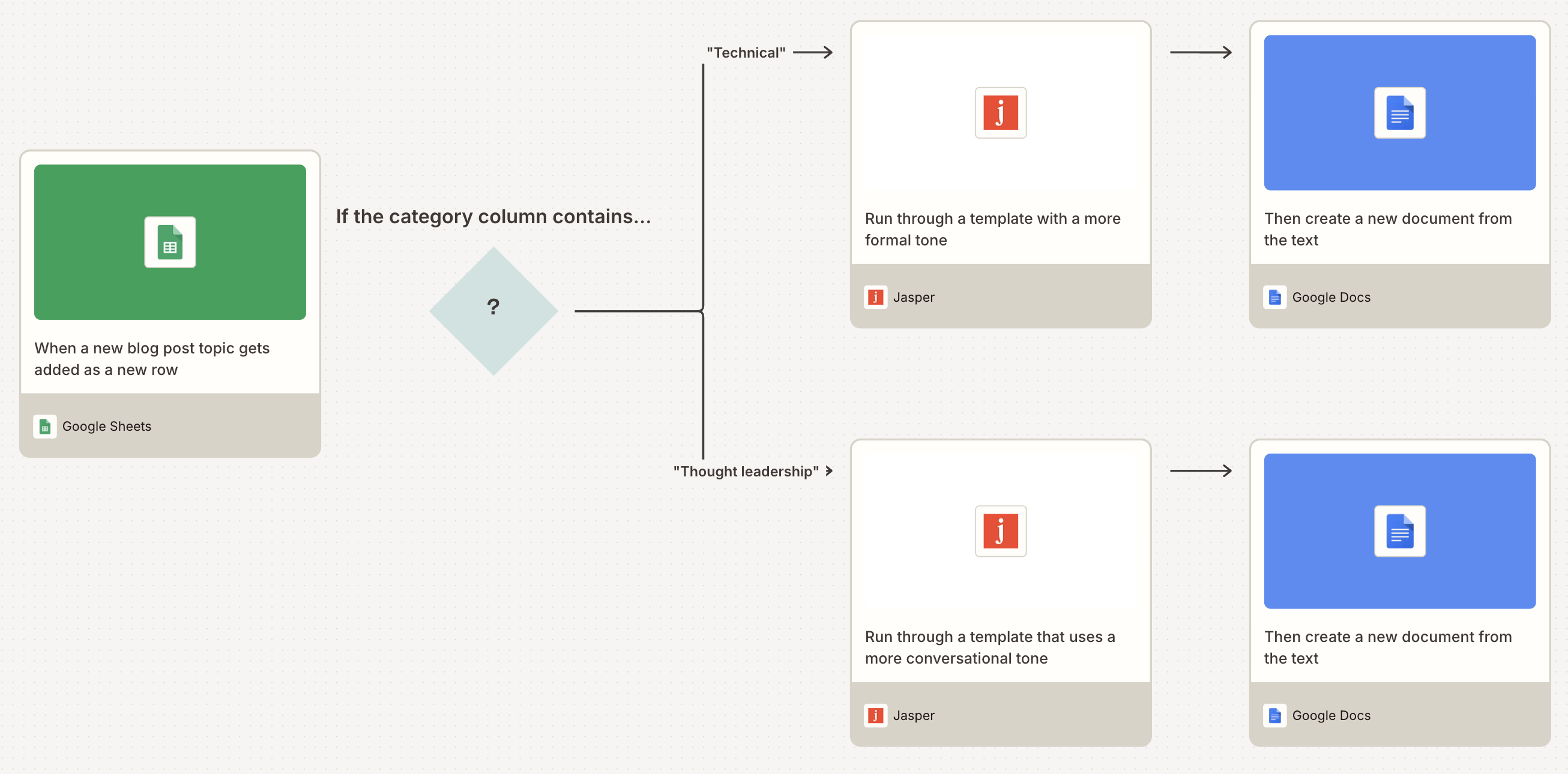
Pro tip: Want different blog topics to follow different drafting workflows? Try adding a path step to your Zap to send each topic down the right route based on category, author, or some other field in your content calendar.

Write product descriptions for new eCommerce products
When your store launches a few new SKUs a month, writing product descriptions by hand is doable. But if you're adding hundreds of products at a time for something like a seasonal collection or dropshipping catalog, that workload becomes overwhelming.
You can't just phone it in, speeding through the writing process. For the copy to be effective, each description needs to sound on-brand, hit the right keywords, and convert browsers into buyers. Multiply that work by hundreds of items, and you've got a time-consuming project on your hands.
With these Zaps, the moment you add a product to your store or your product database, Jasper generates a description aligned with your brand voice. Then it writes that back to the product record, so it's ready for review or publishing. You handle the strategy and the merchandising. Jasper handles the more tedious writing work.
Write Jasper product descriptions for new Shopify products and update the listings automatically

Generate Jasper product descriptions for new WooCommerce products and update the listings

Create Jasper product descriptions for new Airtable records and update the same records
Generate Jasper product descriptions from new Google Sheets rows and update the same rows
Write Jasper product descriptions for new Notion database items and update the items
Turn long-form content into summaries for distribution
Let's say you spend two weeks writing a 2,500-word pillar post. It gets published. Now your social team needs LinkedIn copy for it, your email team needs a newsletter blurb, and your CEO wants three bullet points to reference in an internal Slack post. Each request requires you (or someone) else to reread the piece, pick out what matters, and rewrite it for a new format.
The Zaps below eliminate all that work. As soon as a new post publishes, you can have Jasper extract the key points and reformat them for whatever channel needs them next. Your social team can get a Buffer-ready post. Your email team can receive a tight blurb to drop into their newsletter draft. And your CEO can get bullets for Slack.
Summarize new WordPress posts with Jasper and add them to your Buffer queue

Summarize new RSS feed items with Jasper and post them to a Slack channel


Summarize new Ghost posts with Jasper and share them as LinkedIn company updates


Summarize new RSS feed items with Jasper and schedule them as Hootsuite posts

Personalize outreach copy for new leads
A new lead lands in your CRM. Her name is Priya, she works at a mid-sized SaaS company, and she downloaded your pricing guide. Your sales rep needs to send a follow-up email today, but the templated "Hi {first name}, thanks for your interest!" message gets the open rate it deserves, which is to say, basically zero. Really personalizing the message by referencing her industry, company size, and the specific resource she downloaded takes several minutes, though, and across 40 leads a week, that work fills up your day.
Instead, build the personalization logic once into a Jasper template. Then let Zapier call it for every new lead. With the Zaps below, you can automatically pull in specific lead information, then run your Jasper template to produce a tailored draft. From there, you can either draft an email or automatically send it, or even reach out to the lead by text.
Send personalized emails to new Facebook Lead Ads leads using Jasper templates


Draft personalized emails for new HubSpot contacts using Jasper templates

Draft personalized Outlook emails for new form submissions using Jasper templates


Send personalized WhatsApp Business messages for new Calendly invitees using Jasper templates


Pro tip: Whenever you receive a new message from a lead, you can build a multi-step Zap to reply to the original sender using Jasper alongside Human in the Loop. This lets you engage in personalized, automated two-way communication. Jasper drafts the reply using details from the incoming message, then Human in the Loop pauses the Zap so you or a teammate can review and edit the draft before it goes out.

Put Jasper to work with Zapier
Jasper simplifies your team's marketing processes. And Zapier makes sure any drafts it creates show up exactly where they need to go. All you have to do is build these Zaps once, then watch your content engine run in the background. You, in the meantime, can use the reclaimed time to focus on strategy, editing, and other work that only you can do.
And that's just the start of what you can automate with Jasper and Zapier. What workflows will you build first?
Related reading:
This article was originally published in June 2023 by Elena Alston. It was most recently updated in April 2026.