
We independently review every app we recommend in our best apps lists. When you click some of the links on this page, we may earn a commission. Learn more.
For some jobs, you can get by purely on your own cunning, physical abilities, or ambition alone. SEO marketer is not one of those jobs.
Marketers like me can't do what they do without the right tools—tools that help us track performance metrics, diagnose problems, suggest improvements, report on progress, and automate the little things we don't have time to do a hundred times a day.
I sifted through a ton of SEO software options (including ones I use regularly) to find what I think are the best SEO tools around. Here's what I found.
The best SEO tools
seoClarity for enterprises
Surfer for AI search visibility
Mangools for beginners
Semrush for SEO rank tracking
SEOptimer for SEO audits
Ahrefs for competitor research
Clearscope for SEO content optimization
BuzzSumo for SEO content ideation
AnswerThePublic for content research on a budget
SE Ranking for local SEO
Screaming Frog SEO Spider for technical SEO
What is an SEO tool?
I define an SEO tool as any software you can use to improve some aspect of a search engine optimization campaign. These tools can serve many different functions, including search query analytics, reporting automation, AI-driven content optimization recommendations, and website performance analysis. More recently, they've picked up a new job: telling you whether your brand shows up in AI-generated answers.
This gets tricky when you consider how many types of software marketers use for specific aspects of SEO. To try to keep some semblance of a level playing field, I excluded products that are narrowly focused on just one or two niche SEO use cases, like Moz's handy title tag tool. Instead, I focused on products that could fit into one of four distinct SEO product categories.
SEO audit tools: These tools are designed primarily to perform analysis of one or more metrics related to search engine optimization efforts.
Keyword research tools: The primary purpose of these tools is reporting on the search metrics of keywords or helping identify keywords to target. These don't necessarily measure ranking performance for specific webpages or domains.
Rank trackers: Nearly all SEO rank trackers can perform general keyword research, but their main function is monitoring how well specific webpages or domains rank for individual keywords. They also tend to include suites of other tools for SEO-related tasks, though not as many as all-in-one tools.
All-in-one tools: Similar to rank trackers, all-in-one SEO tools have many features, but their range of tools is more comprehensive. They can make tools from the other categories redundant and tend to include advanced features like automation and AI. You'll find many of the tools on my list fall into this category; that's just the way the SEO tool market is headed.
I was able to dig into a lot of these tools myself (and others of them I use every day), but I wasn't able to personally test each of the dozens of options I considered. When I couldn't, I looked to firsthand accounts from real users, software demos, aggregated reviews, and Reddit forums to fill in the blanks.
What makes the best SEO tool?
How we evaluate and test apps
Our best apps roundups are written by humans who've spent much of their careers using, testing, and writing about software. Unless explicitly stated, we spend dozens of hours researching and testing apps, using each app as it's intended to be used and evaluating it against the criteria we set for the category. We're never paid for placement in our articles from any app or for links to any site—we value the trust readers put in us to offer authentic evaluations of the categories and apps we review. For more details on our process, read the full rundown of how we select apps to feature on the Zapier blog.
Since SEO tools can fall into distinct categories, nailing down what makes them great is a little complicated. To score them as objectively as possible, I reviewed dozens of products and whittled down a list of quality criteria that could apply to any category.
SEO-centric functionality: Each tool has to have functionality that relates to some element of search engine optimization. They should fit into one of the categories above by specializing in a function like keyword analysis, on-page performance troubleshooting, website performance reporting, content ideation, or competitor analysis.
Value: How well does the price represent the quality of the product? Tools with specific use cases should be effective enough to justify subscriptions for users with more comprehensive tools, just as comprehensive tools should have extensive feature suites, and paid tools in general should be more useful than free options.
User experience: How easy is the tool to integrate, learn, and use? The learning curve should be low enough for users to reliably access any feature they need in complex tools without resorting to more familiar, less functional tools.
Integrations: Since digital marketers tend to use many different software products, integration is key for SEO tools. Users should be able to integrate these tools readily into common platforms for related tasks like meetings, scheduling, reporting, and customer relationship management. Some also expose their data to an AI assistant through an MCP server, which matters if that's where your team already works.
AI search visibility: Ranking in Google is only part of the job when a chunk of your audience is getting its answers from an AI assistant instead. A tool should be able to show you whether your pages are being cited in AI-generated answers, which engines it checks, and which competitors are getting mentioned when you aren't.
The best SEO tools at a glance
Best for | Standout feature | Pricing | Website | |
|---|---|---|---|---|
Enterprises | Native generative AI assistant | Custom | ||
AI search visibility | AI-powered content and SERP insights | From $49/month | ||
Beginner SEOs | Clear, easy-to-understand metrics | From $37.70/month | ||
Rank tracking | Customizable, modular dashboards | From $117/month | ||
SEO audits | Actionable diagnostic recommendations | From $29/month | ||
Competitor research | Content Gap tool | From $29/month | ||
Content optimization | AI-driven content optimization | From $129/month | ||
Content ideation | Content Generator tool | From $199/month | ||
Content research on a budget | Unique keyword data grouping | From $13.33/month | ||
Local SEO | Comprehensive local marketing dashboard | From $129/month | ||
Technical SEO | Extensive configuration and filtering options | Free plan available; paid plans from $279/year |
Best SEO tool for enterprises
seoClarity (Web)
SEO tool category: All-in-one
seoClarity pros:
Generative AI assistant
Extensive suite of SEO analysis tools
Rich content optimization tools
Tracks brand citations across nine AI engines
seoClarity cons:
Custom or unclear pricing at every tier
AI search tracking costs extra on top of the platform
Fairly bare-bones interface
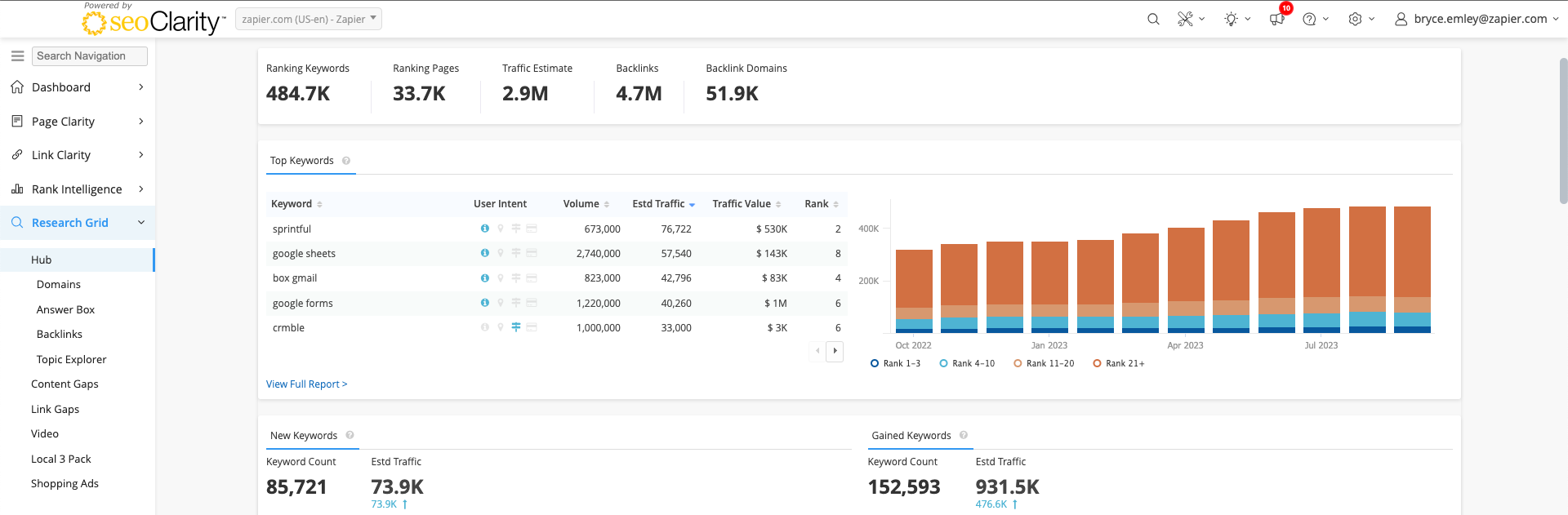
In a sea of niche SEO products, seoClarity is about as close to an all-in-one tool as it gets. With a wide range of both general SEO and content optimization features and an AI assistant, it can likely replace several other tools for many users.
On the SEO analysis end, seoClarity does a lot of what these other tools do. It offers rank monitoring, search trend insights, actionable diagnostic insights, performance scoring, page error and inefficiency detection, competitor analysis, traffic potential projections, topic exploration, and a whole lot more. For the specific use case of analysis, Ahrefs and Semrush are a little more robust because they're almost entirely dedicated to it. But seoClarity still holds its own, particularly by adding the kinds of on-page analysis utility you get from audit-centric products like SEOptimer and Surfer.
In addition to all those tools, seoClarity has an equally impressive suite of content creation and optimization tools. Like Clearscope, you can turn keywords identified by research and ideation features into blog posts within the interface. The Content Fusion feature allows you to either load an existing URL or start content from scratch with a keyword. From there, you can generate a brief for another writer, and then access the content management module.
What's really impressive about seoClarity's AI is Sia (not that Sia, though she's also very impressive), or seoClarity Intelligent Assistant. Sia is a generative AI feature that helps writers create optimized content. You can use Sia to automatically generate optimized post titles and meta descriptions backed by existing seoClarity search data. It (she?) can then generate outlines and expand individual sections into full text with the click of a mouse. All this is on top of the interface's existing AI, which scores on-page metrics and suggests keywords as you write. Beyond the writing stage, Sia can even assist with bulk tasks like translating keywords, grouping keywords into segments, and creating page titles and descriptions en masse.
Sitting alongside the SEO platform is a separate product line called Clarity ArcAI, aimed squarely at getting cited in AI answers. It tracks brand mentions across nine AI engines, including ChatGPT, Perplexity, and Gemini, starting at 500 tracked prompts. From there, you can research the prompts people actually ask, analyze how AI describes your brand, flag responses that get facts about you wrong, and see which AI crawlers are hitting your pages. There's also an MCP server that pipes all of that into an AI assistant, so you can interrogate your own search data by asking questions instead of building reports.
All this makes seoClarity one of the more expensive tools on this list, but it's undoubtedly comprehensive. This tool isn't for every company, but for those that can afford it, it effectively combines multiple SEO tool types into one platform.
seoClarity pricing: Rankings (custom), Research & Content (starts at $2,500/month), Technical SEO (starts at $3,200/month), Enterprise (starts at $4,500/month)
Best SEO tool for AI search visibility
Surfer (Web)

SEO tool category: SEO audit
Surfer pros:
Simple AI integrations
Unique SEO insights
Exports content directly to WordPress
Sells AI visibility tracking as a standalone product
Surfer cons:
Fairly expensive
Requires credits that don't roll over
Document allowance caps how much you can write and optimize
Surfer is one of the more distinctive tools on this list. It's primarily an SEO auditing tool, but its depth of insights makes it very useful for keyword research, too. But the big draw for many users will be its compelling AI features.
Surfer offers a deceptively simple suite of tools: Keyword Research, Content Editor, Audit, Topical Map, Content Audit, a cannibalization report, and SERP Analyzer. On the surface, these are basically the same types of tools you'll find in many other products. But Surfer makes them more actionable by readily integrating AI.
For example, Surfer's Keyword Research tool separates topic ideas into clusters organized by user intent, which you can then load into the AI-driven Content Editor. Here, you can use Surfer AI to drop in an outline, write the article, and optimize the copy. You'll also see real-time structure ratings, related term suggestions, and content scoring, so you can tinker with on-page SEO strategies as you go. There's also a nifty outline tab that suggests questions and heading ideas. When you're done, you can collaborate with team members or export straight to WordPress.
The SERP Analyzer is also miles ahead of comparable tools from many competitors. I love the interactive chart that shows what links in the top 48 positions average for metrics like word counts, character counts, keyword density, and partial keywords. Below that, you can sort SERP links to see how competitors stack up for elements like popular phrases, keywords, common backlinks, and other keywords.
Where Surfer separates itself is the AI Tracker, which watches for your brand in ChatGPT, Perplexity, Gemini, Google's AI Mode, and AI Overviews. You get a visibility score, a share-of-voice figure against competitors, sentiment on how you're described, and a mention gap that shows which prompts your competitors get cited in, and you don't. If AI visibility is the only thing you need, Surfer sells the tracker on its own for $158/month, which is a reasonable entry point compared to the enterprise platforms that bundle it.
If all that AI utility isn't enough, Surfer comes with built-in AI writing capabilities via an assistant called Surfy, plus an AI detector and humanizer for cleaning up draft copy.
Surfer is definitely a premium tool, but one that's absolutely worth it. And you can get even more value when you integrate it with Zapier to sync your tech stack and call actions in Zapier MCP—like creating a Surfer AI article or calling the content editor directly in the chat window.
Surfer pricing: Discovery ($49/month), Standard ($99/month), Pro ($182/month), Peace of Mind ($299/month), Enterprise ($999/month), all billed annually; AI Search Analytics available standalone from $158/month
Best SEO tool for beginners
Mangools (Web)

SEO tool category: Keyword research
Mangools pros:
Clear, easy-to-understand metrics
Intuitive, beginner-friendly interface
Quick setup with a gentle learning curve
Mangools cons:
Daily limitations in lower tiers
Less comprehensive than enterprise tools
Rank tracking only updates weekly unless you're on the top plan
No site crawler or technical audit
If you're just getting started with SEO and find yourself overwhelmed by the complexity of heavy hitters like Ahrefs or Semrush, Mangools is a good way to get your feet wet. It's a suite of five integrated tools that manage to simplify SEO without dumbing it down:
KWFinder strips away the overwhelming data dumps you get with some keyword research tools and focuses on basics like search volume, keyword difficulty, and suggestions for longtail keywords.
SERPChecker allows you to gauge how tough the competition is for your targeted keywords. It offers insights into metrics like domain authority, page authority, and backlink profiles of the top-ranking pages.
SERPWatcher tracks how your positions change over time and sends you alerts for any significant movements, so you're always in the loop about your SEO performance. Updates land weekly on most plans and daily on Agency, so it's better for spotting trends than reacting to a sudden drop.
LinkMiner lets you dissect your competitors' backlink profiles to uncover valuable linking opportunities for your own site.
SiteProfiler provides a comprehensive overview of any website's SEO metrics, including domain authority, trust flow, and Facebook shares.
What really sets Mangools apart for beginners is its interface. Unlike some tools that seem to wear their complexity as a badge of honor, Mangools presents everything in a clean, intuitive layout that makes SEO feel approachable. The learning curve is gentle, but you're still getting solid data and actionable insights.
The free tier deserves a special callout. You can create an account without a credit card and keep it indefinitely, and there's a set of free mini-tools that sit outside the paid suite entirely: a SERP simulator for previewing titles and descriptions, a location changer, a Reddit thread finder, a share-of-search calculator, and an AI Search Grader that scores how visible your brand is inside ChatGPT.
For anything more than a snapshot, Mangools runs a separate LLM tracker called AI Search Watcher. You feed it prompts your audience might actually type (it'll suggest some if you'd rather not start from scratch), and it reports back visibility scores, average positions, and citations across seven AI engines. It runs each prompt several times and averages the results, which matters because AI answers change between runs.
That said, you may bump into some limitations. The daily search limits can feel restrictive if you're managing multiple sites, and you won't find some of the advanced features that power users might want. But for beginners who want to improve their visibility without getting lost in a sea of complex features, these limitations rarely matter.
Mangools pricing: Basic ($37.70/month), Premium ($52.70/month), Agency ($97.70/month)
Best SEO tool for rank tracking
Semrush (Web)

SEO tool category: All-in-one
Semrush pros:
Massive suite of high-end rank and keyword tracking tools
AI Visibility Toolkit tracks brand mentions, prompts, citations, sentiment, and competitor visibility in AI answers
Enterprise-level functionality
Semrush cons:
Premium pricing compared with lighter SEO tools
More platform than you need if you want only basic rank tracking
Extra seats start at $45/month each
Semrush is basically synonymous with SEO. Its insights and features are deep and scalable enough to handle virtually all performance monitoring needs for SMBs and enterprises.
There's very little Semrush can't do, but most of its utility caters to keywords, SERP analysis, page ranking metrics, and performance reporting. Its highly detailed dashboard with customizable widgets gives a thorough overview of how well a tracked domain is performing in terms of metrics like authority, backlinks, traffic, organic keywords, and average time on site. You can drill down deeper into these within their dedicated widgets, or turn them into reports.
I don't have the space here to break down all of Semrush's additional tools, but here are a few highlights:
Keyword Gap: Compares webpages or domains to see missed keyword opportunities
Backlink Gap: Compares backlink profiles of separate webpages or domains
Keyword Magic Tool: Automatically suggests keywords related to a given search term
Position Tracking: Monitors daily ranking changes across keywords, locations, competitors, and SERP features
Semrush also offers its AI Visibility Toolkit bundled with the SEO tools as Semrush One, which lets you track how your brand appears in AI-generated answers. You can monitor important prompts, review brand mentions, compare competitor visibility, analyze sentiment, and see which sources AI platforms cite when they mention your brand or competitors.
Alongside an AI Visibility Score, you get share of voice as a slice of your category, a breakdown of which URLs the models actually cite when they mention you, a list of the sources that mention competitors but not you, and a Perception report that tells you what the models say about your product and why. Prompts get checked daily across ChatGPT, Google AI Mode, Gemini, and Perplexity.
There's also an AI-ready mode in Site Audit that checks whether your pages are legible to AI crawlers in the first place, and an MCP server so you can query the data from inside an AI assistant instead of building a report. If you only want a rough read on where you stand, the free AI Search Visibility Checker runs without a signup.
Plus, Semrush integrates with Zapier, allowing you to connect it with 9,000+ apps and orchestrate AI-powered workflows across your entire tech stack. The connector is built around Site Audit, so a few easy options are firing off a Slack message the moment a crawl finishes, opening a Jira or Asana ticket for each new audit task, and scheduling recrawls on a cadence. Learn more about how to automate Semrush.
Semrush pricing: SEO plans start at $117/month (billed annually)
Best SEO tool for SEO audits
SEOptimer (Web)

SEO tool category: SEO audit
SEOptimer pros:
Simple, effective SEO diagnostics
Wide range of tools for testing specific SEO elements
Reasonably priced
AI visibility checks are included on every plan
SEOptimer cons:
Limited suite of tools to fix issues
Many tools aren't particularly complex
Lead-capture audit forms only on the top plan
SEO audit tools are like therapists: they can help you figure out what's wrong, but it's mostly up to you to fix it. SEOptimer specializes in diagnosing SEO-related performance issues with a website or individual webpage that comes, and it comes with a few basic tools for helping address them.
Just plug a webpage into SEOptimer's dashboard, and you'll see a tidy sequence of performance grades on the A+ to F scale, usually in just a minute or so. This gives you a snapshot of where your page might be losing traffic based on-page SEO indicators, backlinks, user experience, overall performance, and social media connectivity. You'll also see a list of recommendations for solving these problems and getting your grade up (which may give serial overachievers like me flashbacks to asking their AP History teacher how they can raise their 93% A- one more point to an A). Separate audit types cover Google Business Profile and local SEO if that's where your traffic comes from.
These recommendations are largely insightful, specific, and actionable, which is the recommendation trifecta. That A- social presence, for example, stems from lacking a linked Instagram profile and missing Facebook Pixel code, which enables Facebook ad retargeting (not applicable fixes for that blog post, but still good to know). The Performance score is especially helpful, showing detailed load speed insights and noting specific elements like image compression, JavaScript errors, and image optimizations that may be keeping those speeds down.
The audit also runs a set of GEO checks for AI search (four worth knowing about), and they're available on every plan. The first tracks how much traffic you're getting from AI Overviews and lists the specific queries where you got cited, with position and estimated traffic for each. The second looks for an llms.txt file at your site root (useful for pointing AI models at your important pages). The third measures how much of your content only appears after JavaScript runs, since AI crawlers tend to read raw HTML and skip whatever your framework renders later. The fourth checks for Organization, Local Business, and Person schema, the markup that tells an AI which business you actually are when several share your name.
Once you have your marching orders for fixing your page, SEOptimer has a few native tools you can use to help out, like code minifiers and meta tag, keyword, and XML sitemap generators. Beyond that, it also has a suite of additional tools for testing and analyzing specific SEO features like favicons, font sizes, noindex tags, canonical tags, SERP presentation, and even keyword ranking. Many of these tools aren't quite as sophisticated as they are in platforms dedicated to actionable SEO solutions—the ranking tool doesn't track keywords like a rank tracker, instead showing which 10 keywords a specific page is ranking for. But for fast, actionable diagnostics, it's a really useful product.
SEOptimer pricing: DIY SEO ($29/month), White Label ($39/month), White Label & Embedding ($59/month)
Best SEO tool for competitor research
Ahrefs (Web)

SEO tool category: All-in-one
Ahrefs pros:
Accurate, deeply historical ranking data
Detailed keyword analytics
Tracks brand visibility in LLMs on every plan
Ahrefs cons:
Reporting is capped unless you add the $99/month Report Builder
Rank tracker refreshes weekly, even on Enterprise
If Semrush isn't your speed, Ahrefs occupies a very similar space in the SEO tools ecosystem as a premium platform, but with a cheaper way in (its Starter plan is $29/month against Semrush's $139). It's also my go-to tool for competitor analysis.
Ahrefs has many of the same features as Semrush. You can monitor specific webpages or domains to see how they rank for keywords over time, perform site audits, and explore historical ranking data with customizable charts (that go back five years on the Advanced plan and even further on Enterprise). It's also got some appealing bonus features, like Web Explorer, which shows you ranking statistics for pages across the web for given keywords. That said, the rank tracker updates weekly on every plan, so if you need to catch a ranking drop the same day it happens, this isn't the tool for it.
As a competitor analysis tool, Ahrefs is much more useful than tools on this list that cater to content optimization and keyword research, and I think it gets a slight edge on Semrush here as well. Its Content Gap tool can show you a detailed comparison of keywords specific competitors are ranking for, as well as which SERP features they're winning, like Google image packs. I also like the Link Intersect tool, which shows you which pages are linking to your competitors.
When you find potential competitors using one of these tools or by exploring who's ranking for targeted keywords, you can drill down into those domains and webpages further. By seeing which pages in a given domain earn the most backlinks, which earn the most traffic, and which keywords bring in the most value, you can get valuable insights into the kinds of content that wins for your industry. The Ahrefs traffic value metric is also really useful here, showing you in real dollar terms how successful keywords can be if you can rank for them.
Competitor research now extends to AI answers through Brand Radar, which is included on every paid plan and tracks whether LLMs mention your brand or someone else's. It's built on a database of 271 million organic prompts, so you can research any brand's AI visibility without setting anything up first, then add your own prompts to monitor daily. Beyond that, Bot Analytics shows which AI crawlers are actually hitting your site, and there's even an MCP server on every plan, so you can ask an assistant about a competitor's backlink profile instead of building the report yourself.
Like Semrush, Ahrefs isn't likely to be a one-stop shop for all your SEO and content needs. But it's a powerful ranking tool with some really effective competitor analysis features.
Ahrefs pricing: Starter ($29/month), Lite ($129/month), Standard ($249/month), Advanced ($449/month), Enterprise ($1,499/month)
Best SEO tool for content optimization
Clearscope (Web)

SEO tool category: SEO audit
Clearscope pros:
Highly detailed content insights
Keyword discovery tool
Page performance tracking
Unlimited users and projects on every plan
Clearscope cons:
AI prompt tracking covers only ChatGPT and Gemini
Premium price
Monthly credit allotment
If you like Surfer's AI-powered content editor, you'll love Clearscope. One of the most focused SEO tools on this list, Clearscope's utility is dedicated almost exclusively to content optimization.
Clearscope's dashboard is organized a bit differently than most products. Its primary asset isn't keywords or links, but reports. You start by feeding a keyword into a report, which brings up the content optimization interface. Within that space, you can load a template, start writing, drop in the text from an existing post, or extract content from a URL. From there, you instantly get an overall content grade, readability rating, and an extensive list of related keywords (which you can add to, rank, group semantically, and export). Clearscope rates each of these options by relevance and how often they appear in posts that rank for your target keyword.
The content editing interface is pretty nice, featuring the usual text editing options, integrating with WordPress and Docs, and highlighting your target keyword within the body. You can also toggle the keyword tab with a research tab for additional questions and citations, as well as an outline tab that breaks down the post structure for competing posts. The term map interface is extremely interesting, giving a visual representation of the related keywords your competitors use.
Outside the flagship content optimization feature, Clearscope has a few useful performance analysis tools. The page stats, position tracking, and content decay modules show you how well your website as a whole and individual webpages are performing on key metrics like traffic, links, and a very useful "SEO Value" stat that renders page success into an estimated dollar value. Meanwhile, Clearscope's keyword discovery tool uses AI to identify viable keyword options based on topic ideas or URLs.
Clearscop has an AI visibility layer, too. It puts your Google clicks, impressions, and positions on the same screen as your mentions and citations in AI answers, then works out your share of voice for a given topic so you can see whether you own a subject or just happen to rank for a page. Prompt tracking runs on ChatGPT and Gemini, which is narrower coverage than most tools here, so this is more useful as a directional read than a comprehensive audit.
Overall, Clearscope has broadened from a single editor into seven modules covering topic discovery, writing, optimization, content monitoring, local content, and internal linking. It still isn't cheap, but it's got massive potential for scaling content optimization efforts.
Clearscope pricing: Essentials ($129/month), Business ($399/month), Enterprise (custom)
Best SEO tool for content ideation
BuzzSumo (Web)

SEO tool category: Keyword research
BuzzSumo pros:
Rich keyword data
Unparalleled content idea tools
Robust suite of content analysis tools
BuzzSumo cons:
Premium price
Limited reporting features
No AI search visibility tracking
BuzzSumo is a keyword research tool that offers better search trend reporting, topic idea generation, and search engine results page (SERP) monitoring than most all-in-one products with keyword research functionality. It's more feature-rich than AnswerThePublic but comes at a price tag comparable to all-in-one suites.
While you can do decent keyword research on all-in-one and rank tracking platforms, BuzzSumo gives you what you pay for with a much richer suite of keyword tools. BuzzSumo's keyword tool is better than average: you get a list of basic CPC and volume metrics, along with a handy "Articles Published" metric to see how much competition it has, along with a cute little line graph of volume trends. Each keyword suggestion below comes with its own profile, which lists question concepts, article ideas, and detailed search volume charts.
What I really like is the Content Ideas Generator. Just enter a topic, and you'll get evergreen topic concepts with engagement scores and linking domain stats, along with common questions related to the topic. Next, you'll see detailed projections for what your content will need to succeed based on ranking posts, including word count, content format, and post type (like "What Post" vs. "Why Post"). Finally, you get suggestions for publishing times and social media platforms to share it on. A companion Brief Generator turns any of those ideas into a content brief with a click.
Additional features include robust content monitoring, social media influencer ideas across Twitter, YouTube, Facebook, and TikTok, outreach resources, automatic content brief generators, and content analyzers for webpages, YouTube posts, Facebook pages, and backlinks.
One other nice touch: you can hand the tool a prompt about your campaign, and it drafts a press pitch, then walks you through personalizing it, journalist by journalist, surfacing each one's beat, recent articles, and social posts as you go.
With all that, for pure content research, ideation, and general content monitoring, BuzzSumo is worth its subscription price, even if you already use rank trackers or all-in-one platforms.
BuzzSumo pricing: Content Creation ($199/month), PR & Comms ($299/month), Suite ($499/month), Enterprise ($999/month)
Best SEO tool for content research on a budget
AnswerThePublic (Web)

SEO tool category: Keyword research
AnswerThePublic pros:
Unique data visualization
Search trend monitoring and alerts
Pulls from AI assistants, social platforms, and marketplaces, not just search engines
AnswerThePublic cons:
Limited to keyword research data
Interface is mid-migration, with a legacy version still running alongside the new one
The self-proclaimed tool for discovering what people are talking about, AnswerThePublic (ATP) gives users access to uniquely useful search insights for a fraction of the cost of high-end keyword tools.
What I like about ATP is that it boils keyword research down to its real essence: user search behavior. Typical keyword research tools tend to feel somehow divorced from the real users who drive the metrics, with the usual keyword difficulty (KD) and cost-per-click (CPC) making search terms feel more like website assets than user signals. ATP reports on all those metrics, too, of course, but its data presentation and segmentation help marketers get closer to the core of user intent.
When you enter a search query in ATP, you get an instant overview of volume and CPC, as well as a handy visual breakdown of how well the query ranks in terms of volume potential and transactional intent. Instead of charting out related queries in a basic line-by-line grid, ATP offers highly dynamic wheel visualizations based on frameworks for questions (how, are, will), prepositions (can, for, without), and comparisons (vs, and, like). Below that, you'll see longtail variations organized by letter, followed by one more visualization for related terms. Each term includes color-coded volume and CPC metrics, and you can switch any visualization to standard data table views, all of which can be exported as CSV files or downloaded as hi-res images.
Where ATP has stretched beyond keywords is its AI Models section, which pulls the prompts people actually type into ChatGPT and Gemini rather than the queries they type into Google. Those get sorted by intent (informational, navigational, commercial, transactional) so you can see whether someone asking about your category is learning or buying. Hit "Get AI Response" on any prompt, and you'll see the answer the model generates, the sentiment behind it, and which brands turn up in it.
The keyword wheel has been rebuilt around this, too, drawing on autocomplete from Google, Bing, YouTube, Instagram, TikTok, Amazon, and AI tools in one view. The older dashboard is still available while ATP migrates people over, so you may land on either depending on your account.
I also like how you can organize searches into projects, hide irrelevant keyword trees, take and save data insights to compare them with historical data, and enable search trend alerts so you don't miss out on timely opportunities. All of this sits at the bottom of the price range for this category. So, for the price, I don't think you can beat AnswerThePublic for raw keyword research.
AnswerThePublic pricing: Starter ($13.33/month, billed annually), Growth ($66/month, billed annually), Business ($132.66/month, billed annually)
Best tool for local SEO
SE Ranking (Web, iOS, Android)

SEO tool category: All-in-one
SE Ranking pros:
Comprehensive local marketing dashboard
Multi-location rank tracking
Responsive and helpful support team
SE Ranking cons:
Somewhat basic reporting
Data depth may not match that of premium tools
If you're trying to rank for "best pizza near me" instead of "best pizza recipes," you need a tool that understands the nuances of local SEO. SE Ranking is an all-in-one SEO platform perfect for small to medium-sized businesses focusing on local search optimization. It hits that sweet spot of being both comprehensive and approachable—something that's surprisingly rare in the local SEO space.
The platform includes a location-specific rank tracker that lets you set up multiple tracking points on a map and monitor how your rankings vary by location. I really like how you can specify common keywords that track across all locations and point-specific keywords for monitoring particular areas. This is essential for businesses targeting multiple service areas, as you can see precisely how your rankings shift across different regions. The grid goes down to street level, so you can see the blocks where you show up and the ones where a competitor owns the map.
Another feather in SE Ranking's cap is its Google Business Profile monitoring. This feature keeps tabs on essential metrics like search appearances, website visits, direction requests, and phone calls all in one place. Plus, any profile updates you make in SE Ranking sync directly to your Google Business Profile, which saves a ton of time when managing multiple locations. You can also schedule GBP posts from inside the platform, and auto-sync your business details out to 100+ directories worldwide (in the Plus tier), which fixes wrong listings and clears out duplicates as it goes. Expect that to take anywhere from a day to a month to propagate, depending on the directory.
The Reviews Management feature aggregates online reviews from platforms like Google, Facebook, Yelp, Foursquare, and Tripadvisor. You can monitor what people are saying about your business, and the AI-powered semantic analysis helps identify common topics and sentiment patterns in customer feedback. SE Ranking even allows you to reply to Google and Facebook reviews directly from the platform, making it easier to engage with your customers.
The Google Location Changer tool deserves special mention here. While it's available for free, it's a fantastic way to spot-check your SERP rankings from different locations without the need for a VPN or incognito browsing.
On the AI side, SE Ranking includes daily prompt tracking across five LLMs, unlimited AI source tracking, and competitor research on AI answers. The deeper version lives in the $71.20/month AI Search add-on, which includes an AI results tracker covering AI Overviews, Google's AI Mode, Perplexity, and ChatGPT, plus access to SE Visible, a companion dashboard for brand mentions, citations, and sentiment trends.
While SE Ranking may not have the exhaustive data sets of some premium tools, its comprehensive local SEO features make it an invaluable resource for businesses aiming to strengthen their local presence without overspending. Plus, SE Ranking integrates with Zapier, so you can orchestrate AI-powered workflows across all the other apps you use.
SE Ranking pricing: Core ($129/month), Growth ($279/month), Enterprise (custom)
Best tool for technical SEO
Screaming Frog SEO Spider (Windows, MacOS, Linux)

SEO tool category: SEO audit
Screaming Frog SEO Spider pros:
Extensive configuration and filtering options
Incredibly detailed technical analysis
Integrates with Google Analytics and Google Search Console
Screaming Frog SEO Spider cons:
Steep learning curve
Occasional glitches or errors during crawls
Licenses expire after a year and have to be renewed
Screaming Frog may sound like the last thing Miss Piggy sees before launching into a karate chop, but it's actually an extremely valuable SEO tool for quickly analyzing and detecting website errors. It's not the prettiest or most intuitive tool on this list, but it's indispensable for technical SEO, whether you're doing a deep dive into your own site or scoping out the competition. It checks for over 300 issues in a single crawl, each with an in-app explanation and a priority estimate.
This desktop application's core function is crawling websites to identify technical issues, but calling it just a crawler is like calling Michelangelo just a guy who paints ceilings. Its four distinct modes provide different ways to unearth technical issues that could be hindering your SEO performance:
Spider: Crawls websites to analyze onsite elements like meta tags, headings, and status codes
List: Helps you analyze a predefined list of URLs for targeted crawling
SERP: Allows you to upload a list of page titles and meta descriptions to check character lengths
Compare: Lets you compare two crawls to identify how data has changed between audits—incredibly useful for troubleshooting after site updates or migrations
The spider mode is where most users spend their time, crawling through sites to find everything from broken links and redirect chains to duplicate content and missing meta descriptions.
What I particularly appreciate is how granular you can get with the analysis. Want to find all your pages with title tags longer than 60 characters that also have H2 tags containing specific keywords? Screaming Frog SEO Spider can do that in seconds. The custom extraction capability is also fantastic for pulling specific elements from pages, which comes in handy for large-scale audits and content inventories. Segmentation lets you slice any of it by template, subfolder, or whatever grouping matches how your site is actually built, which is what makes a 50,000-URL crawl legible instead of overwhelming.
The AI features here are aimed at a different problem than the visibility trackers elsewhere on this list. Rather than telling you whether ChatGPT recommends you, Screaming Frog lets you point a model at your own pages. You can set up custom prompts with OpenAI, Gemini, Anthropic, or a local model through Ollama and run them against every URL in a crawl, which is how you'd classify a few thousand pages by intent or flag thin content at scale.
You can also crawl as an AI bot rather than Googlebot, so you can see your site the way those crawlers do, and there's an embeddings-based check that surfaces semantically similar pages and content that drifts from whatever the rest of the site is about. If you want the diagnostic layer under AI search rather than a dashboard reporting on it, this is probably the tool for it.
While the interface might seem a bit dated and intimidating at first glance, it doesn't take long to get the hang of it. The sheer depth of data it provides more than makes up for any initial clunkiness.
Screaming Frog SEO Spider pricing: Free (limited to 500 URLs), Paid ($279/year)
SEO tools I liked but didn't crack the list
Am I saying there are only 11 great SEO tools on the market? Definitely not. Below are some of the products I really liked but didn't quite make it into the list. Each of these has at least one standout feature or use case for SEO marketers.
RankIQ: Unique keyword research platform that packages queries into hundreds of preset topic niches, organized by difficulty versus volume
BrightEdge: Enterprise SEO platform, built for teams managing SEO and AI search visibility at scale
SISTRIX: Comprehensive SEO platform with a unique visibility rating and Amazon search optimization features
Moz: High-end rank tracker with a ton of useful free tools (like the aforementioned title tag previewer)
Jasper: Generative AI writing tool with a suite of SEO-centric tools
Majestic: Industry-leading backlink analysis tool offering unique metrics like Trust Flow and Citation Flow
Similarweb: Traffic and market-share data alongside rank tracking, with white-label agency reporting
What about Google's SEO tools?
The SEO sun rises and sets on the Google empire. Obviously Google's own search optimization tools are powerful, accurate, and indispensable—they just don't fit neatly onto this list. Even if you spend up on every product on this list, you'll probably still use these free tools.
Google Trends: Lets you explore global search trend data to capitalize on timely queries
Google Keyword Planner: Simple Google Ads tool for discovering cost-per-click keyword ideas and researching search query statistics
Google Analytics: Links to your domain to deliver detailed performance insights
Google Search Console: Diagnostic and reporting tool that helps you optimize your connected website's content. It also has a generative AI report showing how often your pages turn up in AI Overviews and AI Mode, though it's still rolling out to a subset of sites and reports impressions rather than clicks
Google PageSpeed Insights: Analyzes your website's speed and offers suggestions for improvement
Google Rich Results Test: Checks if your structured data is properly implemented so your pages can appear as rich results on Google Search
Google Lighthouse: Provides a comprehensive audit of your website, including performance, accessibility, best practices, and SEO, with actionable recommendations
Even the best SEO tools do more with automation
Nailing down the single "best" SEO tool isn't really possible since there are so many different classes of SEO software to choose from. Picking the right product for your needs depends on factors like your budget, your organization's size, whether you need to see how you're showing up in AI answers and search results, and the tool's ability to integrate with other software you depend on.
Zapier can help you with that last bit. With Zapier MCP, you can connect your SEO tools to the AI assistant you're already working in (like Claude, ChatGPT, or anything else that supports MCP) and work with your data by asking for it. That might look like pulling your Semrush rankings into your chat window and asking which pages slipped last week, brainstorming topic clusters off that keyword data without leaving the conversation, or kicking off a site audit and getting the issues back sorted by priority.
Zapier offers enterprise-grade governance capabilities like app access controls, action restrictions, and AI Guardrails, so your credentials are never exposed to the model, and access stays centrally managed.
Related reading:
This article was originally published in October 2023 and has also had contributions from Allisa Boulette. The most recent update, with contributions from Ben Lyso, was in August 2026.


