
I'll never forget the first time my childhood dog betrayed me. Before the incident, she was completely fine alone, knew every trick in the book, and only barked at the mailman and other potential serial killers.
Then came that fateful night. I left for two hours, returning to shredded magazines, ripped couch cushions, destroyed dog toys, and a wagging tail.
Let my canine misfortunes be a lesson for your AI endeavors. AI can be useful, fully functional, and your best friend—until the day it isn't. At a moment's notice, one of your models could drift, hallucinate, absorb biases, disregard regulatory compliance, or rip up your favorite books. What I needed back in the day was a camera; what you need is an AI governance tool.
AI governance is a tricky topic. It's (relatively) young, and often, no single tool can do everything you need from pre- to post-deployment. So I researched, tested, and pored over the best AI governance tools you should consider to safeguard your business against the off-the-rails moments I know far too well. Which one (or ones) you use will depend on what aspect of AI governance you're looking to optimize.
The 6 best AI governance tools
Zapier for building safely with AI
Microsoft Purview for Microsoft users
OneTrust for enterprise-level governance
Credo AI for regulation management
Fiddler for real-time observability and runtime guardrails
ModelOp for regulated industries
What makes the best AI governance tool?
How we evaluate and test apps
Our best apps roundups are written by humans who've spent much of their careers using, testing, and writing about software. Unless explicitly stated, we spend dozens of hours researching and testing apps, using each app as it's intended to be used and evaluating it against the criteria we set for the category. We're never paid for placement in our articles from any app or for links to any site—we value the trust readers put in us to offer authentic evaluations of the categories and apps we review. For more details on our process, read the full rundown of how we select apps to feature on the Zapier blog.
A CISO, a compliance officer, and a data scientist walk into a bar—and give the bartender three different definitions of AI governance.
The data scientist says AI security is about unsafe tool use and data leakage. The CISO officer says it's about quality, lineage, and data ownership. The compliance officer says legal and privacy compliance sit on top of AI governance.
Buried in that half-hearted, despicable attempt at a joke is one of the biggest takeaways here: at this moment in time, AI governance isn't necessarily a single product category. It's more of a discipline that spans the entire AI lifecycle, from the moment someone decides to build or buy an AI tool to the moment it gets retired. So, as you can imagine, it's hard to pin down.
If you want to get really granular, software in this space typically focuses on three distinct areas:
AI automation and workflow governance: This category zooms in on how employees use AI across business applications, including monitoring shadow AI usage and controlling the data that external LLMs can access.
Enterprise GRC and compliance: This software category helps you comply with regulatory frameworks (e.g., EU AI Act, NIST AI RMF), while offering key features such as audit trails and legal risk assessments.
Observability and runtime guardrails: This group of tools focuses on the near-post-deployment environment of real-time prompt injection filtering, data leakage prevention, and model drift/bias detection in production.
I included at least one tool from each category to create a well-rounded list. But in addition to weighing those subcategories, I also had a few additional criteria to make sure I brought you the best options possible:
AI visibility: A governance tool can only govern what it can see. I was looking for platforms that could map, track, and catalog an organization's full AI footprint from internal models to third-party SaaS tools to the products employees probably shouldn't use but are using anyway. Shadow AI detection, centralized model registries, and third-party SaaS tracking all factor in here.
Data privacy and policy enforcement: It goes without saying that sensitive information isn't meant for everyone's eyes. For this category, I evaluated active guardrails like real-time data redaction, runtime LLM firewalls, and production monitoring.
Automated governance workflows: Every tool on this list was evaluated on whether governance occurs automatically or requires a human to step in (obviously, I prioritized the former). That includes execution-layer enforcement, automated risk tiering and approval chains for new AI projects, and identity and access controls.
Compliance auditing: Regulators and auditors don't want to hear about your governance philosophy; they just want the documentation. I prioritized tools that pre-map AI use cases to specific regulatory frameworks (EU AI Act, NIST AI RMF, ISO 42001), automatically compile audit trails, and continuously score third-party AI vendors against data residency and security compliance.
One final disclaimer before diving in: no single tool on this list checks every single box. That's not a flaw in my list (says me); it's just a representation of how broad and scatterbrained AI governance is in 2026.
The best AI governance solutions at a glance
| Best for | Standout feature | Pricing |
|---|---|---|---|
Building safely with AI | Access via MCP, SDK, or CLI with built-in governance across 9,000+ apps | Free plan available; paid plans from $19.99/month (enterprise plans available) | |
Microsoft users | Data Security Posture Management identifies AI usage | Variable pricing based on use case and data processing estimates | |
Enterprise-level governance | Regulatory pre-mapping to map AI frameworks and approval chains | Contact OneTrust | |
Regulation management | GAIA AI-powered governance assistant | Contact Credo AI | |
Real-time observability and runtime guardrails | Task-specific Centor Models for guardrail evaluation | Free plan available; paid plans start at $0.002 per trace | |
Regulated industries | Integrations with 50+ enterprise systems | Contact ModelOp |
Best AI governance tool for building safely with AI
Zapier (Web)

Zapier pros:
Zapier MCP, SDK, and CLI connect to AI tools with built-in governance
AI Guardrails runs automated safety checks directly inside workflows
Enterprise-grade security: SOC 2 Type II, SOC 3, GDPR, and CCPA compliance
Zapier cons:
Not HIPAA-compliant
Zapier is an AI orchestration platform that connects to 9,000+ apps, backed by 13+ years of OAuth-managed authentication behind the scenes. This means anyone at your company can securely build end-to-end processes across your entire tech stack. In just a few clicks, you can:
Create an agentic workflow—either from scratch, a template, or by using Zapier Copilot to make what you need in plain English.
Connect Claude, ChatGPT, and other AI assistants to your entire tech stack with Zapier MCP.
Install Zapier SDK in Cursor, Claude Code, or your favorite AI coding tool, or access it all via the terminal with CLI.
It's easy for anyone in your organization to create systems and sync data in a flash—but therein lies a new problem. Without the proper systems in place, new ideas can outrun the guardrails around them; Zapier helps ensure that doesn't happen.
Zapier's broader AI governance strategy rests on three pillars:
Control enforces your rules down to the action, model, and connection level. Enact initiatives like action restrictions, managed app connections, and Bring Your Own Model (BYOM) infrastructure.
Delegation gives your team a space to build without waiting for approval for every third line of code.
Visibility helps you understand every workflow with event logs, built-in documentation, and safeguards. A key standout here is AI Guardrails—a system of automated safety checks (like PII detection, prompt injection filtering, and configurable safeguards) that runs directly within your workflows. This ensures AI doesn't bypass your governance, it runs on it.
All of these capabilities are wrapped up in security and compliance packaging that adds another layer of safety to your data. Granular permissions limit shadow IT, connection event logs track every workflow, and VPC Peering enables secure access to internal data sources. Also, enterprise-grade security, including SOC 2 Type II, SOC 3, GDPR, and CCPA compliance (for workflows and MCP), is available every step of the way.
Zapier pricing: Free plan available; paid plans from $19.99/month; Enterprise pricing available.
Best AI governance tool for Microsoft users
Microsoft Purview (Web)

Microsoft Purview pros:
DSPM for AI automatically discovers AI app usage and surfaces policy recommendations
Sensitivity labels travel into AI interactions
Pre-built templates for the EU AI Act, NIST AI RMF, and HIPAA
Microsoft Purview cons:
Coverage is tightly bound to the Microsoft stack
AI DLP and DSPM features require Microsoft Purview Suite licensing or pay-as-you-go Azure pricing
Dipping your big toe into AI governance can be overwhelming, so why not keep things as familiar and comfortable as possible? If your team is deeply entrenched in the Microsoft ecosystem, Microsoft Purview can be your Snuggie and cup of hot cocoa in front of a raging fire.
Purview governs data as a unified layer across Microsoft 365, Azure, Fabric, and connected AI apps. The centerpiece of it all is the unified Data Security Posture Management (DSPM)—which, as of 2026, merges traditional data security and AI-specific posture management into a single solution.
It's a continuously updated map of where your organization uses AI and whether that creates a risk. The framework then translates those risk signals into outcome-based guided workflows, so you can actually resolve issues rather than just notice them.
Another supremely handy use case is the sensitivity label integration. You likely have a gaggle of internal documents, files, and/or emails that are labeled "highly confidential" or "this message will self-destruct in 30 seconds." If one of these pieces of content is accessed by Copilot or another AI app, it won't surface an AI-generated summary of that confidential information to anyone who doesn't have the necessary permissions or access.
Alongside that, Purview captures every AI interaction (prompts and responses) in a unified audit log, supports eDiscovery for AI prompts and responses, and includes communication compliance policies that can flag risky usage, such as prompt injection attempts.
Purview's trade-off is as obvious as semi truck headlights on an empty highway. It's a wonderfully powerful AI governance tool if you live in the Microsoft ecosystem, but nowhere near as effective if you don't.
Third-party AI tools, non-Azure model deployments, and cross-platform data pipelines all fall outside its specialty—although it is possible. Not to mention, the initial configuration is far from simple. For organizations deeply embedded in Bill Gates' ecosystem, the investment probably pays off. For everyone else, it may be the wrong starting point.
Microsoft Purview pricing: Variable pricing based on use case and data processing estimates
Best AI governance tool for enterprise-level governance
OneTrust (Web)

OneTrust pros:
Pre-built assessment templates for the EU AI Act, NIST AI RMF, and ISO 42001
Agent Detection for AWS Bedrock, Azure AI Foundry, and Google Vertex
Runtime guardrails for prompt/output filtering, sensitive data redaction, and policy-based actions
OneTrust cons:
The platform's AI governance breadth can make it hard to know where to start
Teams without established AI policies could spend considerable time on setup
I don't envy compliance teams in the AI governance space. Just when they've updated documentation and internal compliance, a handful of new rules and frameworks get released. It's a never-ending battle, like when Hercules was fighting that hydra. OneTrust does its best to make that fight a little easier, with plenty of features that aid enterprise-level compliance-forward work like registering AI systems, mapping controls to laws and frameworks, and assessing risks.
One of my favorite features of OneTrust is the regulatory framework pre-mapping. When a new AI project enters your intake workflow, OneTrust automatically maps it to the EU AI Act's risk classification structure, NIST AI RMF functions, and ISO 42001 controls. After the system is risk-tiered, OneTrust kicks off automated approval chains, tracks attestations and sign-offs, and compiles evidence outputs already structured for auditor consumption.
For a compliance officer prepping for, say, an EU AI Act review, that's like fighting a newborn hydra instead of a full-grown monster.
OneTrust's monitoring capabilities are just as impressive. Agent Detection can automatically discover AI agents deployed on AWS Bedrock, Azure AI Foundry, and Google Vertex, centralizing their activity, datasets, and risk signals into a single report. Continuous monitoring tracks drift, quality, safety, and performance signals in real time, while runtime guardrails enforce prompt and output filtering at the execution layer.
The data and pipeline policy controls also extend to sensitive data masking and redaction, with native integration with cloud data platforms such as Snowflake and Databricks.
OneTrust is probably overkill for a team that just needs to track a handful of internal models with no regulatory exposure. The platform was designed for the complex, multi-framework, heavily audited enterprise compliance world—and the product scope reminds you every second you're using the app. But if your problems are Hydra-level big and regulatory-sensitive, OneTrust is built exactly for that fight.
OneTrust pricing: Contact OneTrust
Best AI governance tool for regulation management
Credo AI (Web)

Credo AI pros:
The Governance Knowledge Graph automatically contextualizes controls to a regulatory environment
Shadow AI Discovery
GAIA (Govern AI Assistant) automates evidence retrieval, risk assessment, incident response, and governance plan generation
Credo AI cons:
Teams in early AI governance may find it overwhelming
Typically requires professional services or dedicated internal admin resources
Credo AI is a fairly unique entry in this tool class; it started with AI governance as its focus, not as a secondary use case. That distinction shows up in how it works. Credo understands how AI systems drift, carry contextual risks, and need a different set of tooling for governance.
One of the most impactful features, to me, is the Governance Policy Intelligence—a proprietary layer that connects regulations, business context, and AI system configurations into a unified policy framework.
Your team can use it to, say, apply different controls to a model deployed in EU healthcare versus one running in US financial services—without a thousand Slack pings asking the legal team to manually configure each version. This contextual intelligence allows GAIA, Credo's AI-powered governance assistant, to retrieve evidence, conduct risk assessments, generate governance plans, and respond to incidents.
Credo also dives deep into AI visibility. Shadow AI discovery can scan your business for unapproved systems and build structured Agent Cards for each one, including a list of what exists, documented records of each agent's purpose, the tools it uses, the data sources it accesses, and the guardrails currently in place.
Dependency graphs map relationships among agents, sub-agents, models, and tools, giving governance teams a clear picture of how these AI systems interact.
Credo AI is built for enterprises with active AI programs that justify the investment. If you need to manage hundreds of AI systems across business units and vendors, Credo AI is a worthy choice.
Credo AI pricing: Contact Credo AI
Best AI governance tool for real-time observability and runtime guardrails
Fiddler (Web)

Fiddler pros:
Fiddler Trust Service delivers guardrails for hallucinations, toxicity, PII/PHI, prompt injection, and jailbreaks
Developer plan pricing is published at $0.002 per trace
Agentic Observability provides trace-level root cause analysis via LangGraph and OpenTelemetry support
Fiddler cons:
Trace-based Developer pricing is hard to forecast at high volumes
I can usually tell if a product is worth my time by looking at its customers. If it serves a bunch of small-time businesses, I may look elsewhere. But if it serves Mastercard, Nielsen, and the United States Navy (like Fiddler does), my ears start to perk up.
Fiddler focuses on the post-deployment side of AI governance—as in, the "what are our models doing, and are they secretly wreaking havoc on my systems?" line of thinking. It shows that right away with its Trust Service capability.
Rather than using a general-purpose LLM to evaluate other LLMs (an overly meta and way too common practice), Fiddler built its own task-specific Centor Models optimized for guardrail evaluation.
What you get is real-time detection of hallucination, PII/PHI exposure, prompt injection attempts, toxicity, and jailbreaks at under 100ms latency. Of course, that depends on various factors like input size, system load, or infrastructure variability. But because Centor Models run locally in your environment with no external API calls, there are no additional latency, fees, or data exposure risks. The Trust Service can also be deployed entirely within a VPC or on-premise environment, which matters considerably for regulated industries.
Beyond guardrails, Fiddler's Agentic Observability module addresses the growing, never-ending challenge of understanding what's happening inside multi-agent systems. Trace ingestion via LangGraph and OpenTelemetry allows teams to drill into each step of an agent's execution chain, tracking faithfulness, PII exposure, and drift at the individual action level rather than just monitoring the final output.
Fiddler's main limitation is that it's a production layer, not a complete governance stack. It won't generate your EU AI Act documentation, run your risk-tiering workflows, or maintain a record of model approvals. Teams that need those capabilities will need to pair Fiddler with another tool (e.g., Credo AI or OneTrust), with Fiddler handling the runtime enforcement and monitoring layers.
Fiddler pricing: Free plan available; paid plans start at $0.002 per trace.
Best AI governance tool for regulated industries
ModelOp (Web)
ModelOp pros:
Integrates with 50+ enterprise systems
Network-level proxy service
Deployable on-premises, in private cloud, public cloud, or hybrid
ModelOp cons:
Complex implementation
Not a first choice for modern-LLM app development—some capabilities like LLM guardrails and prompt-response filtering aren't well-versed
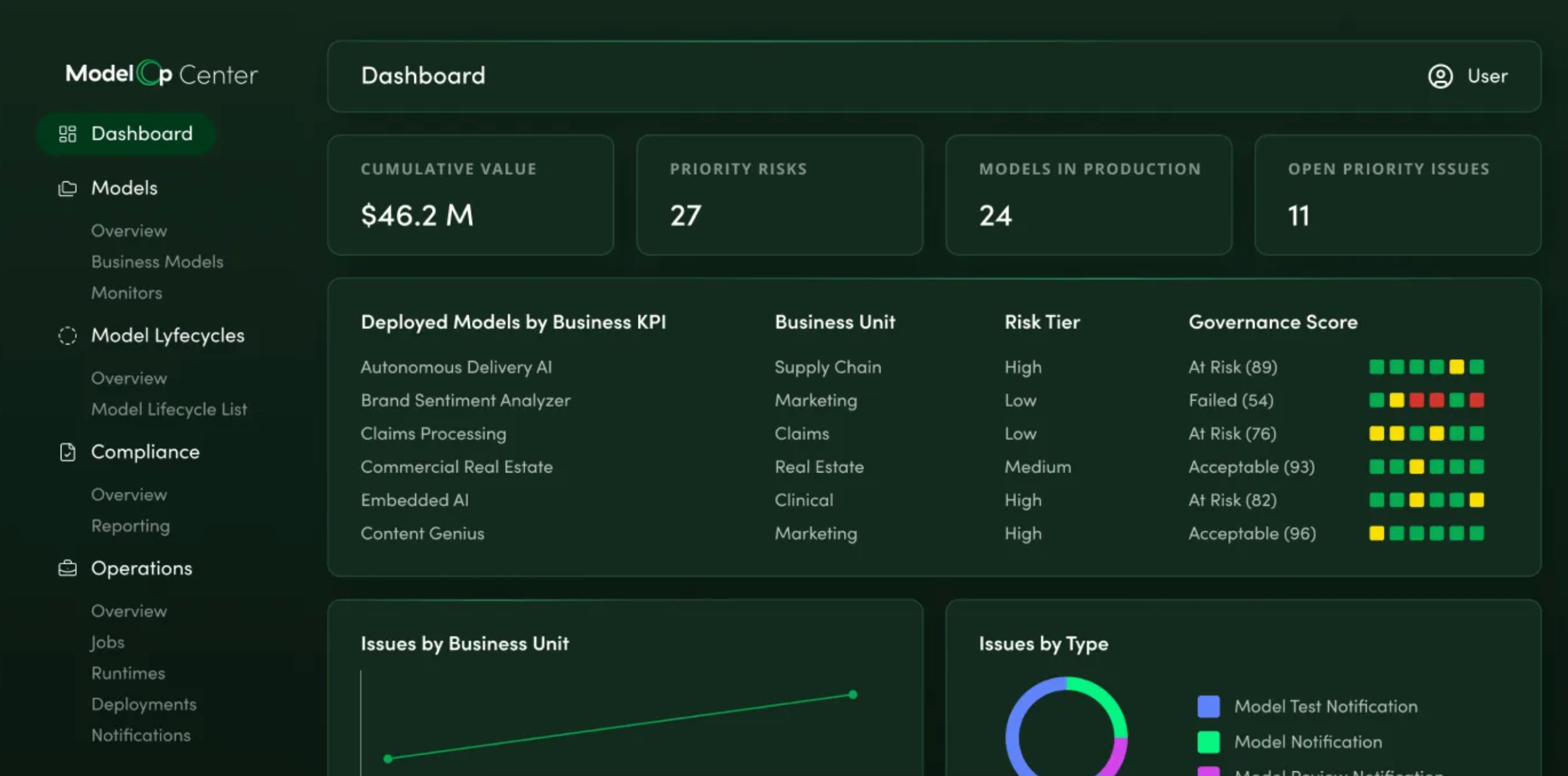
Every other tool on my list is more or less concerned with how models perform, which policies apply, or what data flows through them. ModelOp's viewpoint is more fundamental. The app governs the AI portfolio as a set of business assets, each with a lifecycle, risk profile, approval chain, cost, and retirement date.
It's a little easier to introduce what ModelOp can do with a few different scenarios. When a new AI use case is submitted, ModelOp automatically calculates a risk tier, maps relevant controls, and routes it through the appropriate approval workflow. When a model is deployed, it enters continuous monitoring for drift, bias, and performance violations. If a policy changes, ModelOp propagates those changes through automated workflow updates rather than requiring manual review of every affected system.
The integration layer is a pleasant surprise that makes ModelOP deployable at enterprise scale. It connects to 50+ existing enterprise systems—MLflow, Databricks, Snowflake, ServiceNow, Jira, Power BI, and more—without requiring data to be copied or extracted (which is a big plus for regulated industries). Deployment options cover on-premises, private cloud, and hybrid configurations, which matter for financial services, healthcare, and government customers who cannot operate fully in SaaS environments.
Overall, ModelOp is for businesses that are already managing hundreds of AI models at scale—especially in regulated environments. It's not designed for teams launching their first governance program, and it's not a runtime guardrails tool.
ModelOp pricing: Contact ModelOp
Lead your AI governance with Zapier
AI governance is a fairly new discipline, but that shouldn't make it any less important to your business. Teammates are likely using shadow AI, and your own internal AI tools could turn on you at any moment with hallucinations, drift, and compliance infringements.
Zapier is the best option for applying AI governance across your workflows. With key features like AI Guardrails, BYOM infrastructure, action restrictions, and enterprise-grade compliance, you can build end-to-end systems that don't set off security alarms.
Related reading:


