No matter how open-ended your productivity software is, there's always an underlying mentality you're buying into. That's fine if you're growing: no time to design a system from scratch, and a little structure keeps things moving. But if you're optimizing, you need a tool that maps tightly to how your team actually works and pushes you to find the next 1% gain.
Reading the marketing pages, Airtable and Smartsheet can look interchangeable—but they aren't. They're built on different assumptions, so you'll find yourself growing in an entirely different direction depending on which you subscribe to.
I spent weeks inside both apps, testing all the available features and tinkering with them, and dug into the customer stories. Based on my experiences and research, here's my comparison of Airtable vs. Smartsheet.
Table of contents:
Smartsheet follows the spreadsheet experience; Airtable is more customizable
Airtable is database-oriented; Smartsheet focuses on project management
Airtable is better if you want to build apps on top of your data
Airtable AI for building apps and agents; Smartsheet AI for work optimization
Both apps connect to Zapier so you can integrate your entire tech stack
Airtable has a free plan; Smartsheet's paid plans start at a lower price
Smartsheet vs. Airtable at a glance
| Smartsheet | Airtable |
|---|---|---|
Ease of use | ⭐⭐⭐⭐ Files-and-folders; spreadsheet experience | ⭐⭐⭐⭐ Crisp, intuitive interface with multiple views |
Automation | ⭐⭐⭐⭐ Spreadsheet-oriented; step-by-step workflow builder; integrates with Zapier | ⭐⭐⭐⭐⭐ Database-oriented; step-by-step workflow builder and interactive extensions; integrates with Zapier |
Reporting and dashboards | ⭐⭐⭐⭐⭐ Multiple reporting, dashboard, and insights tools | ⭐⭐⭐⭐ Flexible no-code report builder |
Workflow optimization | ⭐⭐⭐⭐⭐ Portfolio and resource management add-ons available | ⭐⭐ No other optimization tools apart from reports |
Customer support | ⭐⭐⭐⭐⭐ Offers 24/7 phone support on some plans | ⭐⭐⭐ No phone support |
AI | ⭐⭐⭐⭐ Generative AI, charts and formula creation tools, data analysis | ⭐⭐⭐⭐ Generative AI, AI-powered workflows, and AI app builder |
Smartsheet follows the spreadsheet experience, while Airtable is more customizable
The spreadsheet revolution is in the past, but the skills we learned are still with us. Anyone can open Excel or Google Sheets and intuitively create anything useful in less than an hour. This is why Smartsheet focuses so much on this user experience, adding extras around it to optimize the way you work. There are three types of documents you can create.
Regular sheets. As if you're opening a baseline version of Excel, you can format and customize the columns and rows. There are formulas and formatting tools, as well as space for attachments and comments. One unique feature here is how you can create sub-items by simply indenting them, useful for adding tasks and subtasks, for example.

In addition to the default spreadsheet view, you can see your data in Gantt, card, calendar, and timeline views. Still, the spreadsheet feels more powerful due to the number of controls and settings at your disposal.
Reports. You can customize reports to take a look at specific sheets. Create a report including one or more sheets, and choose which columns to display. When you use the summarize data tool—for example, adding a column that counts the number of complete tasks—you can also add them to these reports, offering a high-level view of all your items.
Dashboards. Dashboards take reports up a notch. You can add widgets on an open canvas to display graphics, lists, and statistics—an even higher-level view. Since you can also add text and links here, dashboards are great to collect all the information about the project, the entry point where everyone starts and goes back to.

You'll navigate dashboards with a files-and-folders experience, another familiar way of organizing information, especially if you've used computers since before Windows 95. If your team struggles with adopting new tools with unique user experiences, Smartsheet's learning curve will feel just right.
Airtable also has a spreadsheet view called grid. With crisp visuals and good spacing, it's slightly easier to read and interact with: the first click on any cell immediately opens the dropdown to make changes (whereas in Smartsheet, you'll have to hover and click an icon in most cases).

But grids are just the beginning of the Airtable views. Kanban, gallery, list, timeline, and Gantt views are just some of the ways you can look at your data. All of them are well-designed and can hold their own—you don't have to switch back to spreadsheet view if you don't want to.

As you create these new views, they'll be stored on the left side of the screen, making it easier to switch from one to the other. This agility makes your work easier and helps you act on ideas faster: if you want to quickly check how many content pieces you have coming up in the pipeline, you can create a new view in less than 30 seconds.
The quality of each view and the independence from the spreadsheet experience make Airtable more customizable, a place to accumulate your data and then create all the angles you need to add, edit, or view records.
In terms of ease of use, Smartsheet and Airtable both belong in the easy-to-learn, hard-to-master collection. The difference isn't in the apps themselves: rather, it's in their users. Since Smartsheet builds upon more classic concepts of files-and-folders and spreadsheets, users who favor that mindset will have an easier time. Airtable feels a better match for tech-forward users who prefer more modern user experiences, even if that means interacting with interfaces that introduce lots of new elements.
Which one are you? What about your team? Take these factors into account: a good decision here can remove a lot of friction when adopting a new tool.
Airtable is database-oriented, while Smartsheet focuses on project management
Let's get a bit technical. Most of the apps you use today run on a database to store and retrieve your data. The most common type is the relational database: these let you connect records together, making it easy to reference them in the future. This means they're easier to find and run operations like counting, averaging, or comparisons.
Airtable has relational database features, so you can organize and connect your records, unlocking new ways of processing data. This is much more robust than a VLOOKUP function because you're not just pulling data from another sheet: you're actually connecting records from two databases together, and that link remains even if other fields in any record change.
For example, if you have an inventory database in Airtable, once you set up a relational column with your warehouse location database, you can quickly see which items are in each location. This makes it easier to filter records to create views or perform operations such as counting or averaging, something that would take a lot more manual work in spreadsheet-oriented software.
It's easy to overlook how powerful this is. When you start applying these principles to your work, you'll feel as if struck by lightning: what used to take hours to figure out now takes minutes. These don't come easy, though: you'll have to constantly be on the lookout for ways to connect and optimize your data. This is a nearly endless process, so if you love it like I do, Airtable gives you a lot of freedom to try out new strategies.
Aside from supporting formulas, Smartsheet doesn't have these features, keeping it closer to traditional spreadsheet software. What it does have, instead, is an impressive set of business and project management tools.
In the Control Center, you'll find tools to manage your portfolio: a collection of all the projects and initiatives in your business. This helps you see what's happening, who owns which processes, and puts approval flows in place that help upper management interface with teams on the ground.

With the Dynamic View, you can manage your business processes. List all tasks that a team member needs to complete to finish a workflow, and then track output over time. Could you remove some steps? Maybe rework others? This visibility lets you edit your SOPs and repeatable processes, so you can find hidden efficiencies and keep work as simple as possible. These features have role-based access control, so you can choose who can read and interact with them.
Closely connected to the above, you'll have access to work insights, a tool to analyze your processes. You can browse reports to identify bottlenecks and recurring issues in your projects, so you can brainstorm ways of removing them.
And with the resource management enterprise add-on, you can manage your teams, see how high their workload is, track time, and plan future projects with higher accuracy.
Doesn't feel like traditional spreadsheet software anymore, does it? Smartsheet may miss the data organization that Airtable offers, but makes up for it with tools that help coordinate teams, manage resources, and improve project management at a business level.
Airtable is better if you want to build apps on top of your data
Both Smartsheet and Airtable let you build apps on top of your sheets or bases, respectively. By "apps," I mean internal tools you can use with your team or external vendors, not apps you can launch to regular users.
Smartsheet's toolkit is called WorkApps. When you create a new app, you can bring in a collection of sheets, reports, and dashboards. Once you share this app with your team, they can access it from their workspace or a link, and they'll only have access to the files available there. This is great for sharing data while filtering out sensitive information, to round up all materials for a project or team, or to create a streamlined user experience for an important workflow.

But in visual terms, your apps on Smartsheet may feel like you spent a lot of time formatting an Excel sheet. To top off these difficulties, Smartsheet's WorkApps are only available on the Enterprise Advance Silver tier, a high financial entry requirement if your software budget is tight.
Airtable is better all-around, both in terms of aesthetics and functionality, thanks to its relational database features. It used to be a nightmare to build an app, but the process has improved a lot since I used it many years ago for the first time, and it's even easier now with AI—which we'll get into a little later in this article.

To add a new page:
Choose the type of view, report, or form that you want to add.
Choose the data source from any of the bases in your workspace.
Customize the elements on the page; you can add views into any other base, charts, or buttons to trigger workflows or actions.
As you add new pages, they'll sit on the left-side menu. Once you publish, it'll feel like a standalone tool, especially if you include forms to add new data, pages to display, and buttons to transform it in some way.
While Airtable is already robust as far as internal tool-building goes, it's also become a sort of standard as a data source. Apps like Stacker and Softr use Airtable as a database, so you can build more advanced apps on those platforms on top of your Airtable data.
Airtable AI for building apps and agents; Smartsheet AI for work optimization
Airtable landed on its most powerful AI app building tool version yet: Omni works from an English prompt all the way to all the screens, forms, and navigation, so you walk away with a ready-to-use tool. After you enter what you want, it asks you a couple of questions to understand exactly what you need. Once it starts working, it looks a bit like magic: you can see the Airtable editor interface rearrange itself progressively, as all the visual elements come into view and get configured.

After Omni finishes tinkering, you can try your app in the preview window right away. If something doesn't work as it should, the chat tab remains open so you can ask for an explanation or for any changes. You can publish your new app when you're ready: the entire process from prompt-to-done takes less than 10 minutes.
As you use your new app, you can try out Airtable's AI agents for working on your data and filling out your cells. Previously, these would run just a simple prompt—say, summarize another field in the same base—but now they can run more complex loops. For example, the web research agent can run an LLM-powered deep dive, synthesize the results, and place them in the appropriate field. There are others for image generation, document analysis, and even custom ones for more complex tasks.
Smartsheet is going a different way: its AI features cover work optimization and data analysis, with targeted tools for specific use cases rather than a broad approach.
It packs a smart agent for project management that flags risks and offers recommendations based on industry best practices.
Smart flows help you set up multi-step workflows faster.
Smart columns bring AI-powered analysis into the fields of your sheets, so you can summarize or correlate data points.
Scenario planning helps you explore alternative futures: you use AI to explore how a decision would change your circumstances, with predictions based on your data.
There's a catch here. Most of these features are in early access or private beta, which isn't great if you want to start using AI right now. But the upside is that a prudent release cadence can mean that you get tools that are more polished and ready for real-world problems.
Smartsheet leans enterprise, but Airtable is catching up
After crossing the $1 billion annual recurring revenue threshold and boasting a client portfolio containing 85% of Fortune 500 companies, Smartsheet was acquired in 2025 for $8.4 billion. Vanity metrics only, or is there something else here? When choosing a new platform, longevity is important if it's meant to be the core of your business operations. These stats show how well Smartsheet is doing, which is a strong signal that it's here for the long run.
With clients as wide-ranging as the NASA Jet Propulsion Lab and Domino's, Smartsheet is the trusted platform to manage anything from rockets to delicious meals. It has high certification, compliance, and security standards. In addition to its Enterprise plan, it offers Smartsheet Advance, a collection of features that unlock all the reporting and optimization you need to go all the way up to the top:
Advance Silver unlocks WorkApps, data connectors, and portfolio management.
Advance Gold adds enterprise-grade data storage, CRM integrations, and cross-platform workflows.
Advance Platinum adds only one thing, but it's a critical one: top security and governance features to protect company data.
With all these process optimization tools, it's easy to see why it's a better fit for larger companies. Smaller organizations may not feel the rewards of implementing a small process change. But when you reduce friction in teams of dozens or hundreds of people, the gains may be so big that Finance will wonder, "how did revenue increase so much this year?"
On the other side of the fence, Airtable is also a trustworthy platform. It's been in business since 2013 and has a respectable client roster composed of brands like Shopify, Time Magazine, Zapier, and Levi's. It looks like it'll be here for the long run, too, but it doesn't have a track record as long and as successful as Smartsheet. This shouldn't matter much for small and medium businesses, but may hold sway with larger ones.
In terms of features, Airtable feels closer to the action on the ground. It has good reporting and filters to see things big-picture, even if they lag a bit behind Smartsheet's. These insights are deep enough and will take you far. The relational databases are great to cook up new ways to improve productivity, solve problems quickly, and endlessly adapt, no matter what your work throws at you.
Over time, the gap in enterprise readiness between Smartsheet and Airtable has narrowed. Airtable now has SSO/SCIM for user/identity lifecycle management, includes enterprise audit logs for governance, and data residency options spanning the US, EU, and Australia. Still, Smartsheet edges ahead with public-sector compliance with the FedRAMP Moderate authorization.
Both apps connect to Zapier so you can integrate your entire tech stack
Smartsheet and Airtable both connect to Zapier, so they can talk to and sync with thousands of other tools, automatically. This is huge, since you're likely using Smartsheet or Airtable as a source of truth, and you want to be sure everything is up to date—without the manual work involved.
With their Zapier integrations, you can automatically send information to and from Smartsheet and Airtable, building fully automated systems around your data. Learn more about how to automate Smartsheet or how to automate Airtable, or get started with one of these pre-built workflows.


Add rows to sheets in SmartSheet with new Jotform submissions
Add Smartsheet rows for each new Formsite form entry

Add subscribers to Mailchimp via new Airtable records


Import new events from Google Calendar into Airtable

Zapier is the most connected AI orchestration platform—integrating with thousands of apps from partners like Google, Salesforce, and Microsoft. Use forms, data tables, and logic to build secure, automated, AI-powered systems for your business-critical workflows across your organization's technology stack. Learn more.
Airtable has a free plan and Smartsheet's paid plans are economical, but that's not the end of the story
Starting at the bottom: Smartsheet used to have a free plan, but that's no longer on the table, now offering a 30-day free trial instead. Airtable sticks to its generosity here, with a free plan that supports 1,000 records per base of up to 5 collaborators and unlimited read-only users. If your budget is zero, Airtable is the best place to start.
When you're ready to buy a subscription, the tune changes. Airtable is more expensive than Smartsheet across both paid plans, starting at $24 for Team and $45 for Business per user, per month—with discounts available for annual billing. These plans now include AI features, using a credit budget that refills every month, which justifies the higher price tags.
Smartsheet starts at $12 for Pro and $24 for Business, also per user/per month. Cheaper, yes, but this is where things get tricky: buying these plans gets you into the ecosystem, but doesn't unlock AI or any of the premium features such as Dynamic View, Resource Management, or Brandfolder. The path to unlocking everything goes through speaking to sales and negotiating contract terms for the enterprise plans, so the total cost for Smartsheet may end up actually being higher.
What's the takeaway here? Airtable may end up being more predictable in terms of pricing, as the offering is less fragmented with the free plan, two paid plans, and the contract-based enterprise tier. Smartsheet may be more economical for basic features, but when you want to unlock what's special about it, that's when the pricing pressure begins.
Airtable vs. Smartsheet: Which is best?
Smartsheet is better if you're looking for a future-proof platform with plenty of enterprise-focused features, a perfect fit for medium-to-large businesses looking to optimize workflows and collaboration. It optimizes your processes, has the familiar spreadsheet experience at heart, and offers plenty of progression tracks as you grow from a simple spreadsheet to running a fully optimized portfolio. While it's affordable to start out with, wielding its full power may turn out to be heavy on your budget. AI is slowly being added in, offering tools to empower project managers as they manage work, staffing, and alignment.
Airtable caters to the more tech-forward crowd who loves to build their own solutions. With its powerful relational database, you can store any kind of data and manage anything from projects and clients to content calendar or applicant tracker. You can build apps natively or bring your bases into other app builders to create exactly what you want—with or without AI. While it's pricey for larger teams right at the outset, unlocking everything may prove easier and more affordable.
Or why not use both?
There's a case for using both Smartsheet and Airtable. You can use the former to run all your critical operations and workflows, keeping your teams aligned at every step of the way. Airtable can be a good tool to create vendor- or customer-facing tools, or to use for smaller projects or departments where you need a bit more flexibility—things like marketing, design, or content creation come to mind.
I know, this could make updating everything a nightmare: how do you keep all of it synced between both apps without a lot of repetitive work? This is why Zapier exists: so you can leverage the best of every app and automate all the actions to keep everything up to date, no matter where it is. Here's how you can connect Airtable and Smartsheet.


Update Smartsheet rows with new or updated Airtable records
Another option: Zapier
If Airtable and Smartsheet aren't quite what you're looking for, Zapier can cover a similar "database + app layer" in a single platform.
At its core, Zapier connects over 9,000+ apps together, so you can move data and automate actions. But there's more around this main capability.
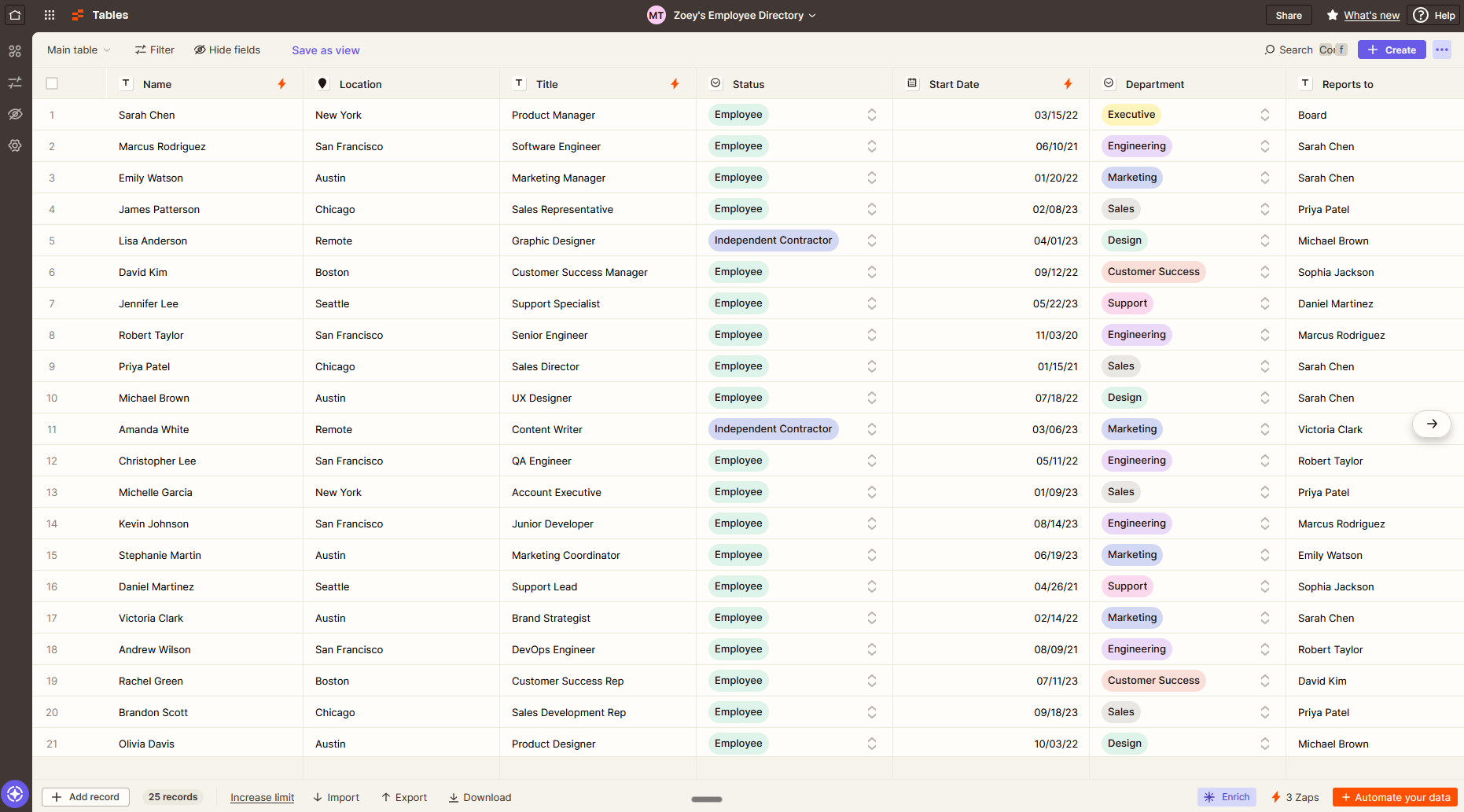
Zapier Tables is a place to store records and serve as a data source to your automations and apps.
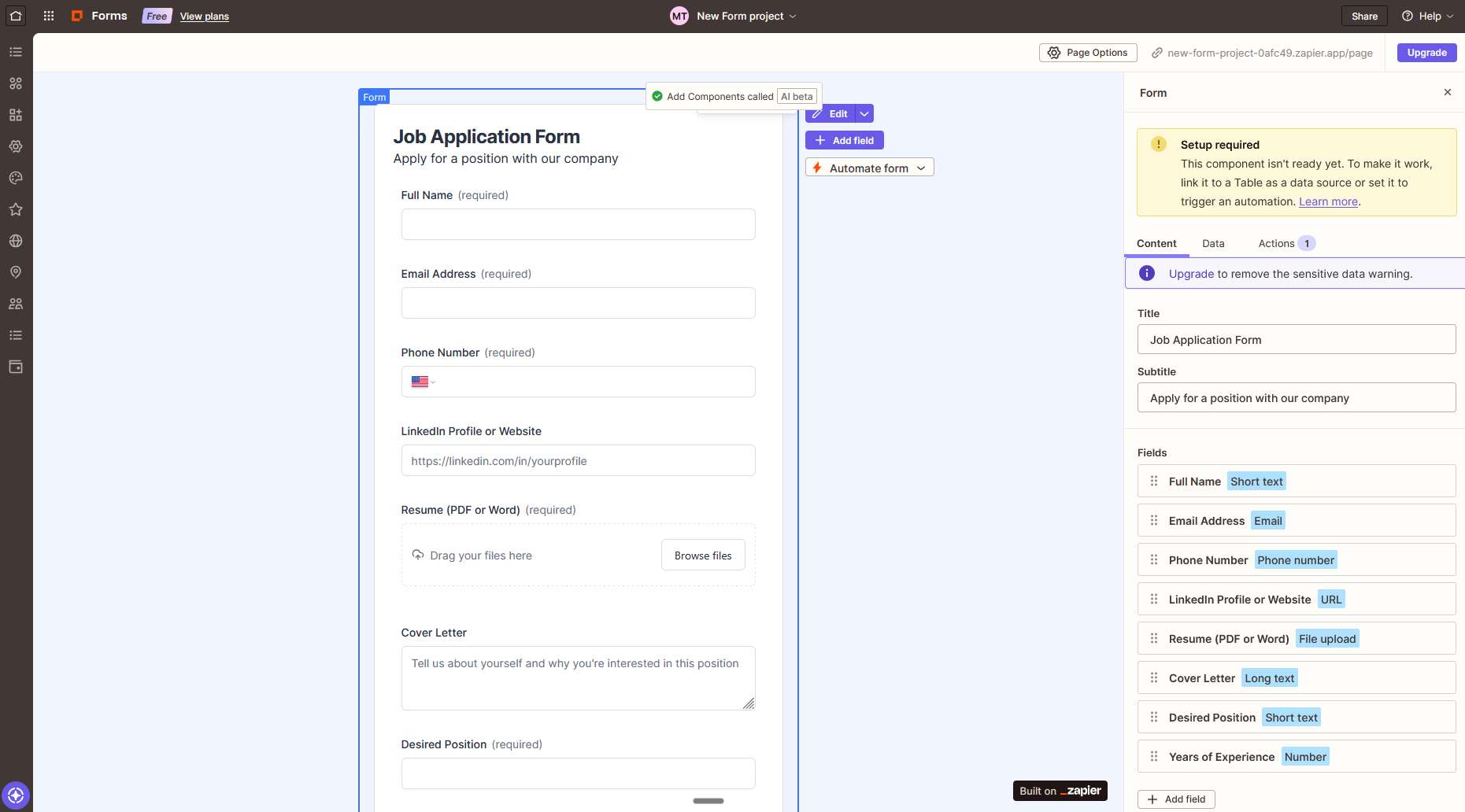
Zapier Forms lets you build interfaces for data intake, so you can fill your Tables with data.
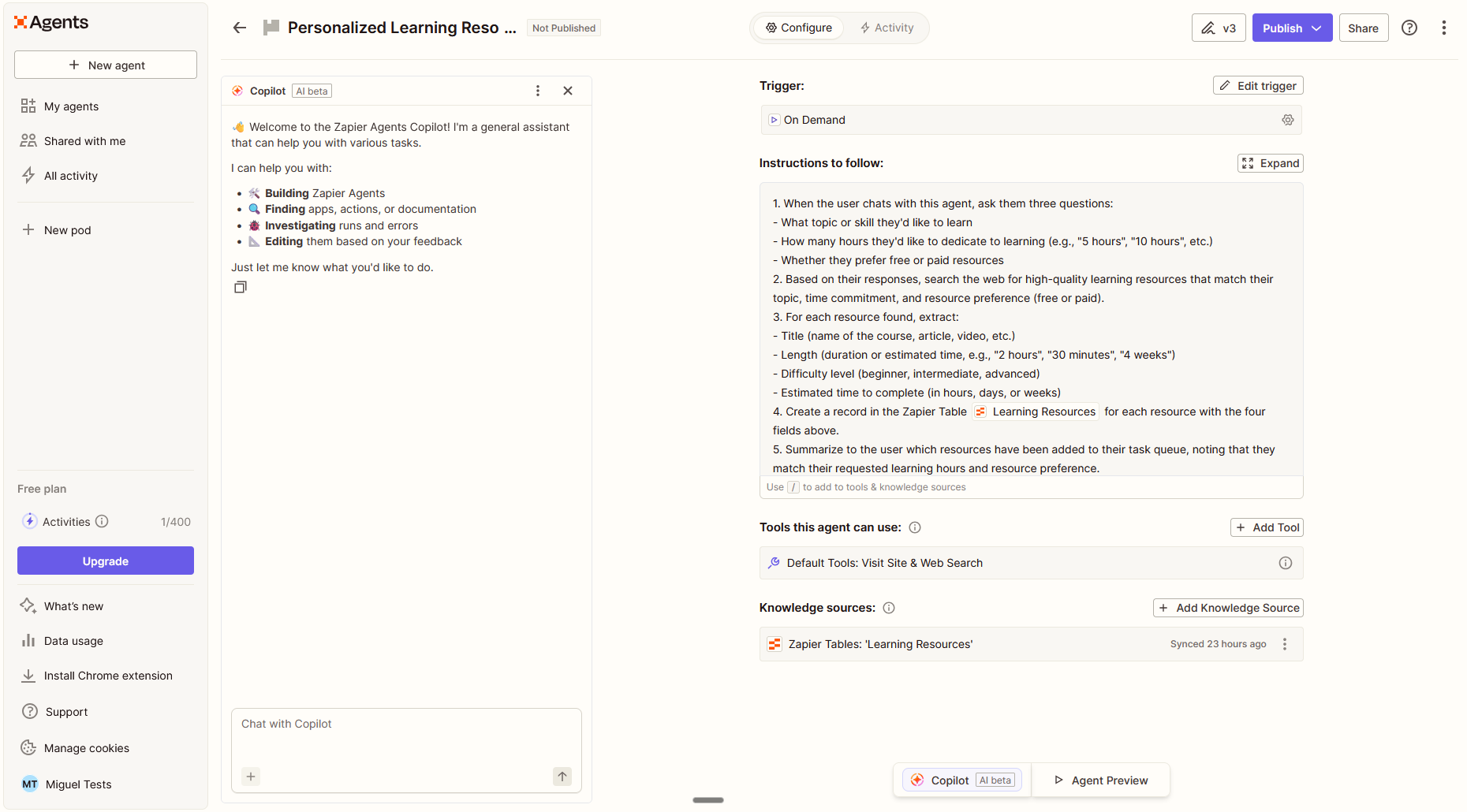
And Zapier Agents helps you get answers about your data or run complex multi-step actions that automate more of your work.


Related reading:
This article was originally published in February 2024. The most recent update was in March 2026.