When it comes to team project management, it's hard to go wrong with monday.com. Built to be an all-in-one WorkOS tool, the platform lets your team manage tasks and workflows seamlessly across departments.
But even with a robust WorkOS tool, your team probably still uses other apps to get your work done. And the more you're switching back and forth between tools, the more inefficient (and distracting) your workday becomes. Zapier's monday integration lets you create automated Zap workflows—that streamline processes for yourself and your team. Here are a few ways to connect monday to your other most-used tools.
New to Zapier? It's workflow automation software that lets you focus on what matters. Combine forms, data tables, and logic with thousands of apps to build and automate anything you can imagine. Contact sales to learn more.
Table of contents
To get started with a Zap template—what we call our pre-made workflows—just click on the button. It only takes a few minutes to set up. You can read more about setting up Zaps here.
Send form submissions to monday boards
Forms are a great way to collect data quickly from customers, leads, other departments, and even your own team. For example, you might use a simple form to collect feedback, feature requests, or bug fixes. Or maybe your team uses a bookmarked form in their browsers to quick-add task ideas and notes to a monday board.
While monday's WorkForms let you create custom forms that directly sync with your boards and workflows, you may prefer the flexibility of other form builders like Typeform or Google Forms. If that's the case, Zapier can help funnel that information to monday. Whenever there's a new submission of the form of your choice, one of these Zap workflows will automatically send that information to your chosen monday board.
Create monday.com items on boards for new form submissions in Gravity Forms


Add new responses in Google Forms as items on monday.com boards

Create new items in monday.com for each new form submission created in Zapier Forms

Create items on monday.com boards for new Typeform entries

Create monday.com items from new Squarespace Forms form submissions

Use webhooks to connect monday.com to almost any app
Zapier lets you integrate thousands of apps, but there's still a chance your favorite tool isn't (yet!) on the list. If you want to connect monday.com to an app that doesn't have a Zapier integration, you can use webhooks to send information from one app to another.
For example, say your team uses an obscure calendar app to schedule meetings and delivery dates. If this tool doesn't integrate directly with Zapier, you can use the template below to create a catch hook that pushes information to monday whenever your chosen action—like a new event—is triggered.
Use webhooks to trigger item creation in monday.com

You can set up a webhook in the other direction, too. With this workflow, you can send information to the app of your choice whenever a new item is added to your monday board.
Create Webhooks by Zapier posts when new items appear in a monday.com board
Collect leads
Given monday.com's flexibility and abundance of customizable features, teams use it for everything from simple project management to event planning to a customer relationship management (CRM) database. If your team does the latter, it's useful to be able to collect leads from multiple sources without doing any manual data entry.
For example, when a lead books a Calendly appointment, clicks on a Facebook ad, or sends you an email inquiry, you'll want to add them to your monday CRM board. These Zap workflows take care of that busywork for you. That way, you can follow up on opportunities without any leads falling through the cracks.
Add items in monday.com for new invitees created in Calendly

Create items in monday.com from new leads in Facebook Lead Ads

Generate monday.com items for new emails in Email Parser by Zapier

And once you add a lead or customer to your monday board, you can use this Zap to copy their information into your email list. Keep your contacts up to date across all your platforms, no copying or pasting required.
Add or update Mailchimp subscribers from new monday.com items

Create or update Flodesk subscribers from new items in monday.com boards

Create Constant Contact contacts from new monday.com board items

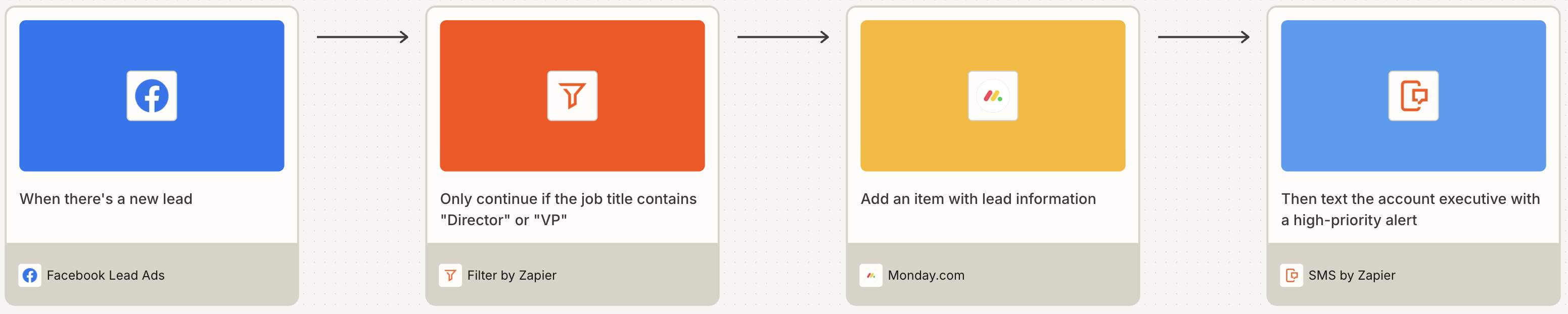
Pro tip: Equip your Zap with conditional logic to improve your lead management workflows. For example, Filter by Zapier can help you add monday.com items and send alerts for high-priority leads. Learn more about filters in our Filter by Zapier feature guide.

Keep your team in the loop
In a perfect world, everyone would have their project management app open at all times—just waiting for important notifications to pop up so they can take action. But your team is only human (and that's a good thing).
It helps things run more smoothly to send your team notifications of important events via Slack or email. But remembering to send a Slack message after you update a task in monday is easy to forget. Take the manual effort out of the equation with one of these Zap workflows. That way, everyone will stay informed of project updates.
Send emails in Gmail for new changes to specific column values in monday.com boards

Post messages to Slack channels for new items created on Monday boards

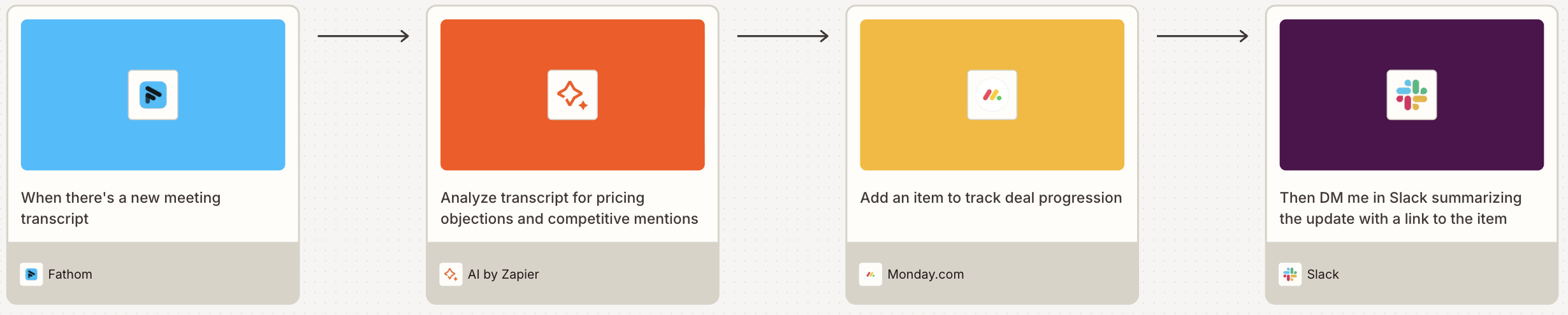
Pro tip: If you use an AI meeting assistant like Fathom, try using AI to analyze transcripts for the insights that matter to you, then create a monday.com item with action items—and DM yourself in Slack with the update. To learn more, read our feature guide for AI by Zapier.

Connect monday to your spreadsheets
Using a spreadsheet as a single source of truth is a great idea for keeping your organization on the same page. Every department may not use the same project management app, for example. Or maybe you just find it easier to feed information through Google Sheets for simpler reporting and data analysis.
But copying and pasting items from spreadsheet rows into your task management app (or vice versa) can get old quickly—not to mention it creates countless opportunities for manual error.
To keep items from slipping through the cracks, use these Zap workflows to automatically move information between a spreadsheet built on Google Sheets or Zapier Tables and monday.com.
Create records in Zapier Tables for new items in monday.com boards

Create items on a monday.com board for new rows on Google Sheets

Create monday.com items from new or updated spreadsheet rows in Google Sheets
Add new items in monday.com boards to Google Sheets rows
Add new specific column values changed in monday.com boards from Google Sheets rows
Pro tip: When you connect Zapier MCP to ChatGPT or Claude, you can perform 30,000+ actions right from your chat interface. Want to execute commands like the one below? Learn how to set up Zapier MCP in our feature guide.

Streamline your work processes with monday automation
There's no wrong way to automate your work with monday and Zapier; it all depends on your team's unique workflows and communication style. To decide where to start with automating monday.com, think about what routine tasks you do almost every day. If that task involves moving information from one tool to another, you can probably offload that monotonous work to a Zap.
And the beauty of Zap workflows is that once you set up the automation, the hard work is over. They'll run in the background, feeding information into the right tools, sending notifications at the right times, and sharing data across apps and departments. And you're free to spend all that saved time on your most important tasks instead.
Related reading:
This article was originally published in June 2023. It was most recently updated in December 2025 by Steph Spector.