My friend once raved about an AI tool he used for meeting summaries—until I asked what the tool had access to. It was only then that he realized he'd never actually looked into it. For all he knew, his AI tool could've had access to customer profiles with personally identifiable information (PII).
You never know how low-stakes a tool truly is until you've investigated its connections and mapped out what it does with those connections.
Here's how to conduct a security audit of your AI agent workflows, so you can reduce risk and improve oversight.
Table of contents:
Why is it important to do an AI agent security audit?
AI agents can reason, make decisions, and operate across multiple tools with minimal human input. That level of autonomy is kind of the whole point. But it also means the consequences of a misconfiguration are harder to contain. That includes:
Leaked PII and credentials: AI agents often need access to sensitive data to do their jobs. But the more data an agent can touch, the more there is to lose if something goes wrong. That includes leaked PII, credentials stored insecurely, or sensitive information passed to external tools without proper controls.
Prompt injection and jailbreaks: Agents that process external inputs are vulnerable to prompt injection, where a malicious instruction is embedded into the prompt that gets the agent to bypass guardrails and act outside of its intended scope.
Irreversible autonomous actions: These are failures in how the agent executes tasks autonomously—for example, misinterpreting ambiguous instructions or making decisions in edge cases it wasn't designed to handle. The risk isn't always malicious; sometimes it's just the agent doing exactly what it was told, in a situation where that's the wrong call.
Shadow AI: Employees using unsanctioned AI tools or building unofficial workflows outside your visibility creates weak spots in your security posture. You can't audit what you don't know exists.
An AI agent security audit gives you visibility into these risks, so you can correct them before something goes wrong.
AI agent security audit: a step-by-step guide
As you add tools, adjust prompts, or expand what your agents can do, your risk profile shifts. Here's a step-by-step guide to help you do a security audit of your agentic workflows.
1. Map what your agentic workflow actually does
Before you can audit anything, you need a complete picture of what your workflow does and what it touches. For each workflow, document:
Tools: Every app, integration, and API connected to the workflow
Triggers: What kicks the workflow off
Inputs: What data enters the workflow and in what format
Transformations: How data is processed or interpreted at each step
Decisions: Where the agent makes a judgment call
Actions: What the workflow actually executes
Human-in-the-loop (HITL): Where a human reviews or approves before the workflow continues
Data sensitivity: Which steps involve PII, financial data, or other regulated information
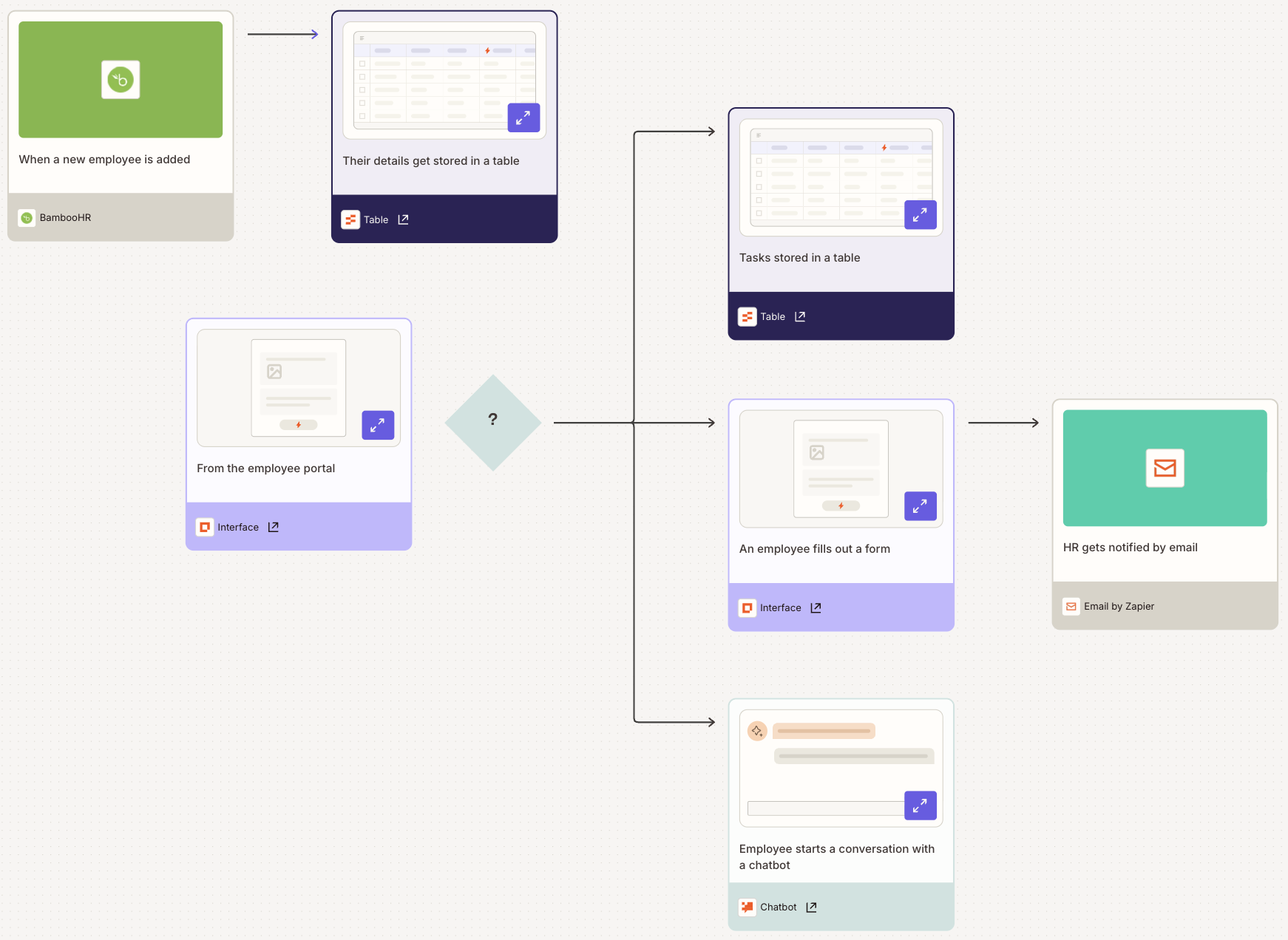
With Zapier, this visibility comes built in. Zapier Canvas lets you build a map of your workflow, so you can visualize every connection and action. If you're collaborating on a workflow with others, you can also add notes so everyone can easily follow the logic without digging through individual steps.

2. Audit user access
Review who on your team has access to what and whether that access is actually necessary. The principle of least privilege applies here: each person should have access only to the tools, folders, and workflows needed to do their job—nothing more.
Zapier lets you assign user roles that control what each person can do at the account level.

You can also set asset permissions to control who can view, edit, or manage specific workflows.
Here's how that might play out in practice: a product manager with Owner and Editor access to a folder can edit a workflow and share it with others, while an IT associate with View-only access to the same folder can monitor whether the workflow is running correctly but can't change any of the steps.
Go through your team's permissions and ask: does this person still need this level of access? If not, dial it back.
3. Evaluate data handling of apps and AI
The principle of least privilege also applies to apps, AI models, and APIs. The broader the permissions, the bigger the blast radius if something goes wrong. For each connected app, check:
Data access: Is the app limited to only the data it needs to operate?
Credentials: Are API keys and sensitive data protected with strong encryption and secure authentication?
Permissions: Does the app have only the minimum permissions required to run this workflow?
While you're at it, look for unused or redundant app connections. If no one's actively using an integration, remove it. Dormant connections are an easy vector for unintended access.
On Zapier, you can manage which apps each user has permission to automate, and you can grant and revoke access from one central location.

And for teams using AI assistants like Claude or ChatGPT, Zapier MCP lets your AI take action across 9,000+ apps with controlled, manageable access and connection event logs, so you stay in control of what the AI can and can't touch.

4. Validate inputs against attacks
Inputs are often the biggest attack vector in AI workflows. Your initial AI prompt may be safe, but inputs flowing in from external tools, documents, and APIs can carry malicious instructions designed to hijack the agent's behavior or expose sensitive data.
Input validation acts as a filter, flagging suspicious patterns before they reach the model. For each workflow, consider:
Pattern-matching: Detect known exfiltration prompts
Canary prompts: Catch jailbreak attempts or unexpected behavior shifts
Output allowlists: Define use-case constraints that limit what the AI is allowed to return
Response drift monitoring: Unexpected changes in your agent's output can indicate data poisoning
Data loss prevention (DLP): Redact or mask sensitive fields where possible to limit exposure
Session isolation: Clear confidential data after every session so it doesn't surface in future requests
Zapier's AI Guardrails automatically handles a lot of this, including inspecting content for PII, toxic language, prompt injection attempts, and negative sentiment. The checks happen in real time, too, so nothing gets held up waiting for a manual review (unless you specifically want to build that in with a human-in-the-loop step).

5. Review human-in-the-loop (HITL) controls
A human-in-the-loop (HITL) step pauses a workflow at a defined checkpoint so a real person can review what's happening before it continues. It's how you make sure high-stakes decisions aren't made by AI alone.
Not every step needs a HITL checkpoint. But for actions that are hard to reverse or could create compliance issues, it's non-negotiable. A useful test: what's the worst-case outcome if the AI gets this wrong? If the answer is significant, add a checkpoint.
High-risk actions that warrant HITL include:
Sending emails or posting public content
Paying invoices or initiating financial transactions
Deleting or modifying data
Zapier has a built-in HITL feature that pauses a Zap wherever you tell it to, giving you a chance to approve the action or fill in missing information before the workflow moves forward. You can route the review through email, Slack, or any of the thousands of apps that connect with Zapier. Every approval, rejection, and collected data point also gets logged in your Zap's change history, which comes in handy if you ever need to demonstrate compliance or trace a decision after the fact.

6. Check for failure visibility
A well-audited workflow goes beyond just running correctly. It also tells you when something goes wrong. For each step of your workflow, ask: would I know if this failed?
Look specifically at how the workflow handles edge cases. What happens when it receives an unexpected input or hits a situation it wasn't designed for? Does it retry, skip the step, or produce a fallback output? If there's no clear answer, that needs fixing.
At a minimum, every workflow should have:
Alerts: Notifications when something fails or behaves unexpectedly
Escalation paths: A defined handoff for tasks outside the AI's scope
Logging trails: A record of every action so you can trace issues back to their source
Zapier's audit logs give you visibility into everything happening across your account.

7. Maintain your security posture over time
A security audit isn't a one-time exercise. As you add new tools, adjust prompts, or expand what your agents can do, the risk profile changes. Build in a recurring review cadence so your audit keeps pace with your workflows.
Beyond the audit itself, establish clear guidelines around which AI tools are approved and how they should be used. There's a fine line to balance here: if the rules feel too restrictive, employees will work around them and use tools outside your visibility, which defeats the purpose. Security awareness training helps with this. When your team understands the real risks behind AI workflows—not just the rules—they're far more likely to flag issues early and make smarter decisions on their own.
AI agent security audit checklist
Use this checklist as a quick reference each time you run an AI agent security audit.

Build AI agents safely with Zapier
AI agents can do a lot, but only if you trust them enough to actually deploy them. That trust comes from knowing what your agents can access, what they're doing with that access, and where your exposure lies. That's what a security audit gives you.
Zapier is built with that oversight in mind. Whether you're mapping workflows in Zapier Canvas, setting permissions for your team, flagging risky inputs with AI Guardrails, or adding a HITL checkpoint before a high-stakes action goes through—it's all in one place.
And if you're using Claude, ChatGPT, or any other agent harness, Zapier MCP gives your AI governed access to your connected apps, so it can take action across your stack with the right level of access, nothing more, nothing less. If you prefer to build in code editors like Cursor or Claude Code, Zapier SDK lets you wire the same governed connections directly into your codebase. You could even ask your AI assistant to kick off a workflow, update a CRM record, or send a Slack message while keeping your permissions exactly where you set them.
Zapier is the most connected AI orchestration platform—integrating with thousands of apps from partners like Google, Salesforce, and Microsoft. Use forms, data tables, and logic to build secure, automated, AI-powered systems for your business-critical workflows across your organization's technology stack. Learn more.