We independently review every app we recommend in our best apps lists. When you click some of the links on this page, we may earn a commission. Learn more.
Employee scheduling technology has come a long way from handwritten schedules pinned to bulletin boards. Employee scheduling apps now come with advanced tools like predictive labor forecasting, compliance automation, and auto-scheduling to make your job easier. And for employees, these tools make it easy to clock in, pick up, and swap shifts.
The best tools let managers create schedules, track labor costs, and keep teams organized, all in one app. But most of these scheduling apps look the same—so how do you figure out which one is right for your business?
I put dozens of employee scheduling apps through rigorous testing and compared experiences from real users, so you don't have to. In this article, I'll walk you through my top picks to help you choose the right employee scheduling platform for your team.
The 11 best employee scheduling apps
Deputy for labor forecasting and compliance
Homebase for the most robust free plan
Planday for businesses with multiple departments or locations
Sling for day-to-day employee management
Findmyshift for a minimalist and easy-to-use app
Agendrix for an app that grows with you
Workfeed for minimal, automated scheduling
7shifts for restaurant businesses
Connecteam for deskless teams
Zoomshift for retail and hourly shift planning
When I Work for shift swapping and employee-driven scheduling
What makes the best employee scheduling app?
How we evaluate and test apps
Our best apps roundups are written by humans who've spent much of their careers using, testing, and writing about software. Unless explicitly stated, we spend dozens of hours researching and testing apps, using each app as it's intended to be used and evaluating it against the criteria we set for the category. We're never paid for placement in our articles from any app or for links to any site—we value the trust readers put in us to offer authentic evaluations of the categories and apps we review. For more details on our process, read the full rundown of how we select apps to feature on the Zapier blog.
There are hundreds of employee scheduling apps out there. Even some apps that didn't make this list, like Workable and TimeClock Plus, offer solid options that might fit your niche.
Every business has different needs, but all great employee scheduling software has a few things in common. So this is what I was looking for:
Ease of use for managers. The platform should have intuitive drag-and-drop interfaces that make it easy to schedule employees and make changes as your staffing needs evolve. The best apps are complex enough to handle businesses with multiple roles, departments, and locations—so you can see at a glance if essential jobs are being covered. And the app gets bonus points if it offers advanced features like auto-scheduling, payroll, and applicant tracking.
Ease of use for employees. All good employee scheduling apps are functional on the employees' side, too. They should have a mobile app that lets your staff see their upcoming schedules, swap or pick up shifts, and put in time-off requests. And of course, push notifications from a mobile app make sure employees are kept in the loop about last-minute schedule changes.
Predictive labor demand. You'll want a tool that uses external data like weather forecasts, local events, and historical sales trends to forecast staffing needs. This way, you can proactively adjust headcounts to make sure you're not overstaffed during a slow Tuesday or scrambling to find help during a busy local festival.
Compliance automation. To protect your business from legal headaches, the software should include automated compliance checks that monitor predictive scheduling laws and labor regulations. I looked for tools that flag "clopening" shifts (working a closing shift then returning for the opening shift the next day) and enforce mandatory rest periods. A good tool weighs these alerts heavily to nix scheduling errors before they happen.
Integrations and exporting. Scheduling is directly tied to other business-critical HR processes, like processing payroll and approving time off. And when you onboard a new employee, all of their information should be readily available in your scheduling app. That's why top software for employee scheduling features easy integrations and import/export functions. Exporting also helps keep labor costs in line with your budget and projections, since you can't tell if you're spending too much on staffing unless you compare those costs with data from other sources.
Available as a standalone app. If you're looking for employee scheduling software, odds are good that you need a lightweight scheduling solution—not broad (and expensive) HR software. Many of the best employee scheduling apps come as standalone tools that are relatively inexpensive.
Our in-depth testing over the years includes signing up for these apps, adding multiple employees and roles, and creating sample schedules—while considering ease of use and features like templates, integrations, leave requests, and in-app messaging. Based on a combination of this testing and experiences from real users, here are my picks for the best employee scheduling platforms.
The best employee scheduling software at a glance
| Best for | Standout feature | Pricing | Website |
|---|---|---|---|---|
Labor forecasting and compliance | Robust reporting and auto-scheduling | Starts at $5.50/user/month | ||
A free employee scheduling app | Robust free plan and intuitive interface | Free plan available; paid plans start at $30/month per location | ||
Businesses with multiple departments or locations | Granular organization options and auto-scheduling | Starts at $2.99/user/month | ||
Day-to-day employee management | Tasks and messaging feature | Free plan available; paid plans start at $2.70/user/month | ||
A minimalist solution | Minimal learning curve | Free plan available; paid plans start at $27/team/month | ||
Scalability | Additional paid modules and customization | Starts at $3.25/user/month | ||
Minimal, automated scheduling | Auto-scheduling and minimalist interface | Free plan available; paid plans start at $4/user/month | ||
Restaurants | Built-in tip management | Free plan available; paid plans start at $44.99/location/month | ||
Deskless teams | Geofencing and GPS | Free plan available; Paid plans start at $29/month for up to 30 users; $0.50 per additional user | ||
Retail and hourly shift planning | Real-time labor cost tracking | Free plan available; paid plans start at $2.50/active team member/month | ||
Shift swapping and employee-driven scheduling | In-app team messaging | Starts at $2.50/user/month |
Best employee scheduling app for labor forecasting and compliance
Deputy (Web, iOS, Android)

Deputy pros:
Easy to get started and use
Time-saving scheduling features
Staffing data analysis features
Plenty of integrations
Deputy cons:
Paid plan is pricier than average
Deputy is an all-in-one employee scheduling, timesheets, task management, and communication platform. Getting started with Deputy is fairly straightforward: when you sign up, the app prompts you to either add new employees manually or bulk import them from another source, like a spreadsheet.
Adding a new shift is also pretty simple: just click the plus sign on the schedule, which you can view by employee or by role. Once you've filled out a shift's details, you can either schedule it or select from a list of helpful options, like repeating the shift tomorrow or for the rest of the week. After testing several scheduling apps, I was thankful for any small feature like this that saved me time scheduling multiple shifts at once.
Deputy's real strength, however, is that it offers several features that can help you make compliant staffing decisions. Deputy invests heavily in compliance knowledge for complex, location-specific labor laws, especially helpful for heavily regulated locations like California, New York, or across Australia and the UK.
Its robust reporting features make it simple to analyze staffing data, like how sales volume correlates with the number of employees on hand at any given time. The tool also offers helpful reminders like "fatigue" notifications that let you know when an employee's schedule might lead to burnout.
The auto-scheduling feature can also use historical data and data from third-party sources to determine how certain factors—like the weather, time of day, or major events like holidays—impact your business. It then takes these factors into consideration when automatically generating schedules, so you always have an ideal number of employees on hand. These features make it a good choice for businesses that want to schedule staff more efficiently but who lack the skills or time to analyze scheduling trends themselves.
Deputy also has more integration options than almost every other tool on this list, making it easy to connect your staffing solution to the rest of your tech stack. And if your chosen tool isn't on the list, Deputy's integration with Zapier lets you create automated workflows with thousands of popular apps.
Deputy pricing: No free plan available. Deputy's pricing plans start at $5.50/user/month for features like basic scheduling, labor law compliance, and payroll and HR integrations.
Best free employee scheduling app
Homebase (Web, iOS, Android)

Homebase pros:
Good free plan
Intuitive schedule builder with role-based view
Well-designed mobile app
Homebase cons:
Limited reporting customizability
Most employee scheduling apps put most (or all) of their features behind a paywall, so it's reasonable to expect to pay for something better than a spreadsheet or a notice board. But if you want to dip your toe into the world of digital employee scheduling without committing to a paid plan, Homebase is your best bet.
Most free plans cap out at just a few employees or make you choose between scheduling and time tracking, but Homebase's free tier allows up to 10 employees in one location, basic scheduling and time tracking functionality, POS integration, and employee management features—plus the option to pay to add payroll.
Homebase's intuitive, drag-and-drop interface is also a great option if you need an app that's easy to learn. Easily drag and drop shifts, copy to other days, and duplicate schedules with a click. Homebase also allows you to group employees into departments and view the schedule according to role, which is especially helpful for businesses like restaurants that need to see whether they have enough back-of-house staff versus front-of-house staff on the schedule.
Homebase is an excellent experience from the employee side, too. The well-designed mobile app lets staff easily trade, find cover for, and claim open shifts. In-app team messaging also simplifies the process of managing their own schedules.
Once you're ready to upgrade to a paid plan, you can take advantage of Homebase's advanced features, like employee shift swapping, location-based clock-ins, team communication tools, and more. In fact, the highest paid tier ($120/location/month) functions as an all-in-one HR tool, offering onboarding workflows and HR & compliance support.
Homebase also offers native integrations with point-of-sale (POS) systems. With native integrations to common POS systems like Square, Shopify, and Clover, you can make staffing decisions backed by real data about when you do the most business.
These integrations also mean you only need to add or delete employees in one system, and the change will sync with the other tool—a huge plus if, like many retailers and restaurants, you hire additional staff seasonally or have high turnover.
Homebase pricing: Free plan available; paid plans from $30/month per location for features like team communication, auto-scheduling, and manager permissions.
Best employee scheduling app for businesses with multiple departments or locations
Planday (Web, iOS, Android)

Planday pros:
Granular organization options for departments and locations
Auto-scheduling and schedule templates
Multiple useful integrations
Planday cons:
Leave management could be easier to use
Planday is a powerful shift scheduling tool for businesses that have multiple locations, departments, or both. The granular hierarchy options built into the platform let you structure employees into groups and departments—and from there, you can use sections, positions, shifts, and shift types to further visualize and organize your employee management.
The scheduling tool contains several views, so managers can easily build a schedule by employee, role, or section. If you need to organize your schedule by categories—like back-of-house and front-of-house, or day shift and night shift—Planday makes it easy.
Other useful features include schedule templates, auto-scheduling, and color coding for quickly pinpointing employees who are over or under their hour limit. Employees can use the Planday app to clock in, swap or pick up open shifts, request time off, and set their available hours.
Planday is part of the Xero family and therefore plays well with Xero's accounting tools. You can also use Planday's Zapier integrations to connect the app to the rest of your tech stack, like your HR tool or Google Sheets.
Planday pricing: No free plan available. Paid plans start at $2.99/user/month for one location and basic scheduling features.
Best employee scheduling software for day-to-day employee management
Sling (Web, iOS, Android)

Sling pros:
Easy and intuitive to use
Auto-scheduling feature
Employee management tools like tasks and messaging
Sling cons:
Limited integrations
Sling offers all of your basic employee scheduling features, like an intuitive interface, role-based scheduling, and customizable templates. It even includes an auto-schedule feature that makes assigning new shifts a breeze. But if you're looking for a tool that prioritizes day-to-day employee management, Sling's thoughtful extras make it a no-brainer.
For example, the Tasks tab lets managers create and attach tasks to shifts, so every employee knows what they're responsible for. Employees can then view all tasks assigned to them on the Tasks tab on their mobile app—or they can click into a shift on the schedule to see attached tasks and subtasks.
To further support a healthy work culture, Sling offers a messaging feature where users can hold group or private conversations. The mobile app makes it easy for employees to swap or pick up shifts, view the company newsfeed, and set their availability. And the platform helps managers identify potential "clopening" scenarios (where the same employee closes on Monday and opens on Tuesday, not getting enough rest time between shifts).
Sling pricing: Free plan available for up to 30 users. Paid plans start at $2.70/user/month for time tracking, templates, and internal messaging.
Best minimalist employee scheduling app
Findmyshift (Web, iOS, Android)

Findmyshift pros:
Easy and fast to use, with intuitive keyboard shortcuts
Useful integrations with popular work management apps
In-app SMS messaging (optional)
Findmyshift cons:
No role-based scheduling view
Lacking advanced features
If you're looking for a scheduling app with a minimal learning curve, try Findmyshift. The tool is easy to use and has a simple interface that helps you quickly build schedules. I don't know why more scheduling apps don't let you click into a square, type "9a-5p" to create a shift, and then use keyboard shortcuts to copy and paste that shift into other squares. But Findmyshift does, so I was able to create multiple weeks' worth of schedules in just a few minutes. You can also drag and drop shifts, color-code schedules, and add notes. The only downside to the scheduler was that you can't group it by role or department—though there are plenty of filter options to choose from.
On the employee side, Findmyshift makes it easy to swap or pick up shifts, and the messages and notice board views keep your team on the same page. Managers can even send text messages to employees via the app with pre-purchased credits. Findmyshift also has native integrations with popular apps like Slack, BambooHR, and monday.com.
While Findmyshift lacks some of the advanced features other apps offer—like role-based scheduling and in-depth reporting—it's easy to use and a great choice for managers that want a simple scheduling solution.
Findmyshift pricing: Free for up to 5 team members and one week of forward planning. Paid plans start at $27/team/month for 20 team members, real-time reporting, templates, and time off requests.
Best employee scheduling app that grows with you
Agendrix (Web, iOS, Android)

Agendrix pros:
Easy and intuitive to use
Can purchase additional workforce management modules as needed
Agendrix cons:
No auto-schedule feature
Pay for time tracking separately
Agendrix is a scheduling, time tracking, and team management app that also offers additional paid features as needed. The app has a user-friendly schedule builder that both looks great and makes it easy to create and assign shifts by employee or role. Agendrix offers an auto-schedule feature and granular filter options with a multi-select tool that lets you edit and duplicate shifts in batches.
The messaging tab makes it easy to start group or private conversations, while the news feed is a great central hub for announcements and training information. Employees can clock in from a mobile phone, tablet, or computer, and they can also easily swap or pick up open shifts and request time off within the app.
While Agendrix is an excellent standalone work scheduling software, it also offers additional modules that you can purchase as needed. These modules include a resource management module for tracking equipment and using geolocation across multiple workplaces, a premium attribution module, and a phone-number-based punch clock that doesn't require internet access.
If you're looking for a build-your-own solution (or a workforce management platform that can grow with you), Agendrix is worth checking out.
Agendrix pricing: No free plan available. Paid plans start at $3.25/user/month for schedule management, or $4.95/user/month with time tracking included.
Best employee scheduling app for minimal, automated scheduling
Workfeed (Web, iOS, Android)

Workfeed pros:
Auto-scheduling
Minimalist, modern interface
Workfeed cons:
Could get overwhelming for larger organizations
Limited exporting options
Workfeed is a scheduling and time tracking tool with a modern interface and helpful automation tools. The auto-assign feature lets you create a new schedule with just a few clicks, and you can set rules for things like the minimum time between shifts and maximum work days in a row. Managers can also decide when and how employees can swap shifts and set availability. And the employee insights feature lets managers view sick days, shift drops, and retention rates.
Overall, I was impressed with Workfeed's user-friendly interface. Employees can clock in via app or terminal, and the group chat feature makes it easier to swap and pick up open shifts.
While Workfeed's simple navigation and straightforward interface work well for smaller teams, I can see how it might become overwhelming for larger businesses. There are limited filter views on the scheduling page, so a larger number of shifts and roles could easily lead to a cluttered, confusing experience for managers.
Workfeed pricing: Free for up to 15 users and 500 lifetime shifts, with limited features. Paid plans start at $4/user/month for scheduling, time tracking, notifications, and calendar integrations. The Pro plan is priced at $5/user/month for automated scheduling, chat functionality, and more.
Best employee scheduling app for restaurants
7shifts (Web, iOS, Android)

7shifts pros:
Ideal for restaurant and catering businesses
Colorful, modern interface
Potential to be an all-in-one scheduling and employee management app
7shifts cons:
Limited native integrations with all-in-one HR tools
7shifts is staff scheduling software designed for restaurants and catering businesses. It's ideal if you want to take care of not just schedules, but also team engagement and retention—something that's traditionally a challenge in the catering world.
The platform includes employee scheduling, time clocking, and basic team communications as standard. Higher tier plans introduce elements like advanced communications, more personalization, performance management, and even onboarding—giving you an all-in-one tool for restaurant employee management.
One feature that stands out, even though it's an exclusive enterprise add-on, is the tip management tool. With this feature, you can set multiple rules, add tips manually, or have them automatically assigned thanks to the POS integrations.
I was impressed by not just the range of features, but also the user interface. The app is bright, colorful, and modern—making using it a positive experience. Scheduling felt easy and intuitive, and the built-in team communication is great for creating a sense of culture and belonging.
You can streamline things even more with 7shifts' Zapier integration, which lets you connect 7shifts to thousands of other apps so you can build a fully automated scheduling system.
7shifts pricing: Free for up to 15 employees and a single location. Paid plans start at $44.99/location/month for up to 30 employees.
Best employee scheduling app for deskless teams
Connecteam (Web, iOS, Android)

Connecteam pros:
Real-time clocking in and out with GPS
Highly customizable
Option to pair with other hubs to create an all-in-one platform
Connecteam cons:
Features like repeating shifts and auto-assign are exclusive to higher-tier plans
Connecteam is an employee scheduling tool designed to simplify the experience for deskless teams of all types. The software is split into three hubs—Operations, Communications, and HR & Skills. The Operations hub is where you'll find the employee scheduling features, but the others may also be of interest if you want to simplify your HR tool stack.
Templates and recurring shifts make organizing the schedule quick and simple, and I appreciated the ability to notify team members when a shift was approved or a change was made. The digital geo-fencing feature is helpful for ensuring team members clock in at the right location, and the built-in forms and checklists make this an attractive option for construction and field services teams.
Overall, I found the software easy to use both as an admin and an employee. Creating, duplicating, and moving shifts is simple, and it's easy to copy previous schedules into future weeks.
For basic employee and shift management for small teams, the free plan should be plenty—but the extras available in the paid plans are also attractive for growing teams that want more in the way of customization and reporting.
And you can automate all of your employee scheduling when you connect Connecteam with Zapier, so it can work with all the other apps your team uses.
Connecteam pricing: Free for up to 10 employees with limited features. Paid plans start at $35/month for up to 30 users for features like clocking in and out, basic scheduling, and unlimited forms and checklists.
Best employee scheduling app for retail and hourly shift planning
Zoomshift (Web, iOS, Android)
Zoomshift pros:
User-friendly scheduling platform with a fast learning curve
Excellent tools for tracking labor costs and budget forecasting
Limited free plan available for smaller teams
Zoomshift cons:
Limited third-party integrations compared to competitors
Missing some advanced HR and reporting features
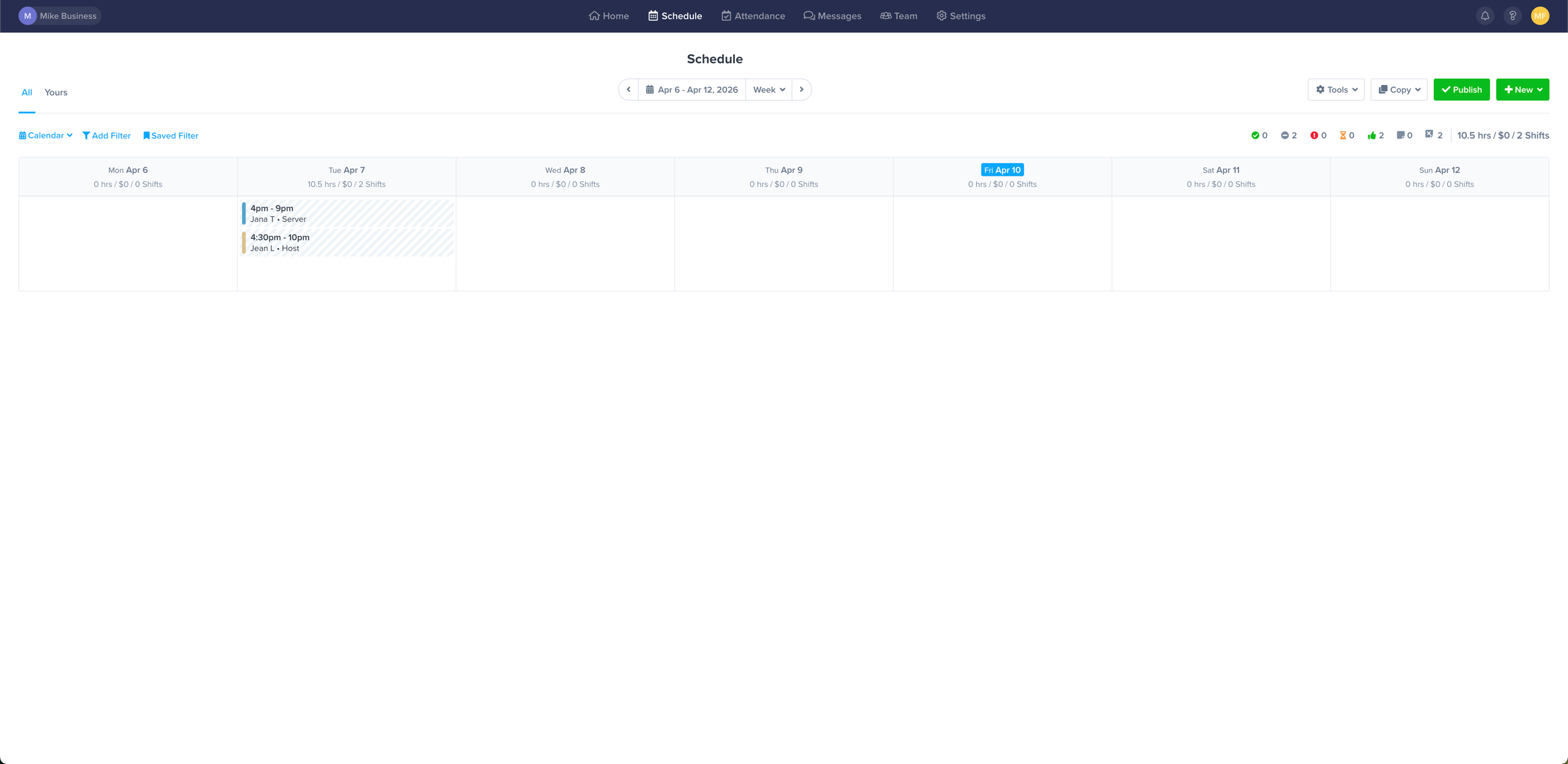
Zoomshift is a straightforward, intuitive scheduling solution. Its aim is to help you streamline shift management while keeping a tight lid on labor expenses. Managers can quickly build templates, drag and drop shifts, and publish schedules in minutes to trim down their admin time.
One standout for Zoomshift is its financial tracking capabilities. As you build the schedule, you can view projected labor hours and costs in real time to easily compare them with your budget.
It also includes overtime alerts to prevent you from accidentally scheduling an employee for too many hours. This makes it valuable for retail businesses and franchises that need to closely monitor their margins.
Another neat trick Zoomshift has up its sleeve is the premium-tier GPS time clock. You can set up specific geofencing rules for your various retail locations or job sites. This ensures your team members can only clock in when they physically arrive on the premises.
The time clock is a fantastic, low-friction way to prevent buddy punching and keep everyone honest. Once the shift is done, those precise timesheet records sync right into your payroll exports. You won't have to chase down paper timesheets or manually verify hours ever again.
For team members, Zoomshift offers a robust mobile app that acts as a central hub. They can clock in and out, submit time-off requests, and swap shifts with their peers directly from their phones. If you manage a team of hourly or shift workers and want to keep your scheduling process simple but financially sound, Zoomshift is a highly capable choice.
Zoomshift pricing: Free plan available for up to 20 users. Paid plans start at $2.50/active team member/month and include features like timesheets, payroll reports, and shift swapping.
Best employee scheduling app for employee-driven scheduling
When I Work (Web, iOS, Android)
When I Work pros:
Highly rated mobile app that employees actually enjoy using
Seamless shift swapping and coverage management
One-click auto-scheduling and drag-and-drop tools
When I Work cons:
Reporting customization and role permissions require a premium add-on
Pricing can escalate quickly for multi-location businesses
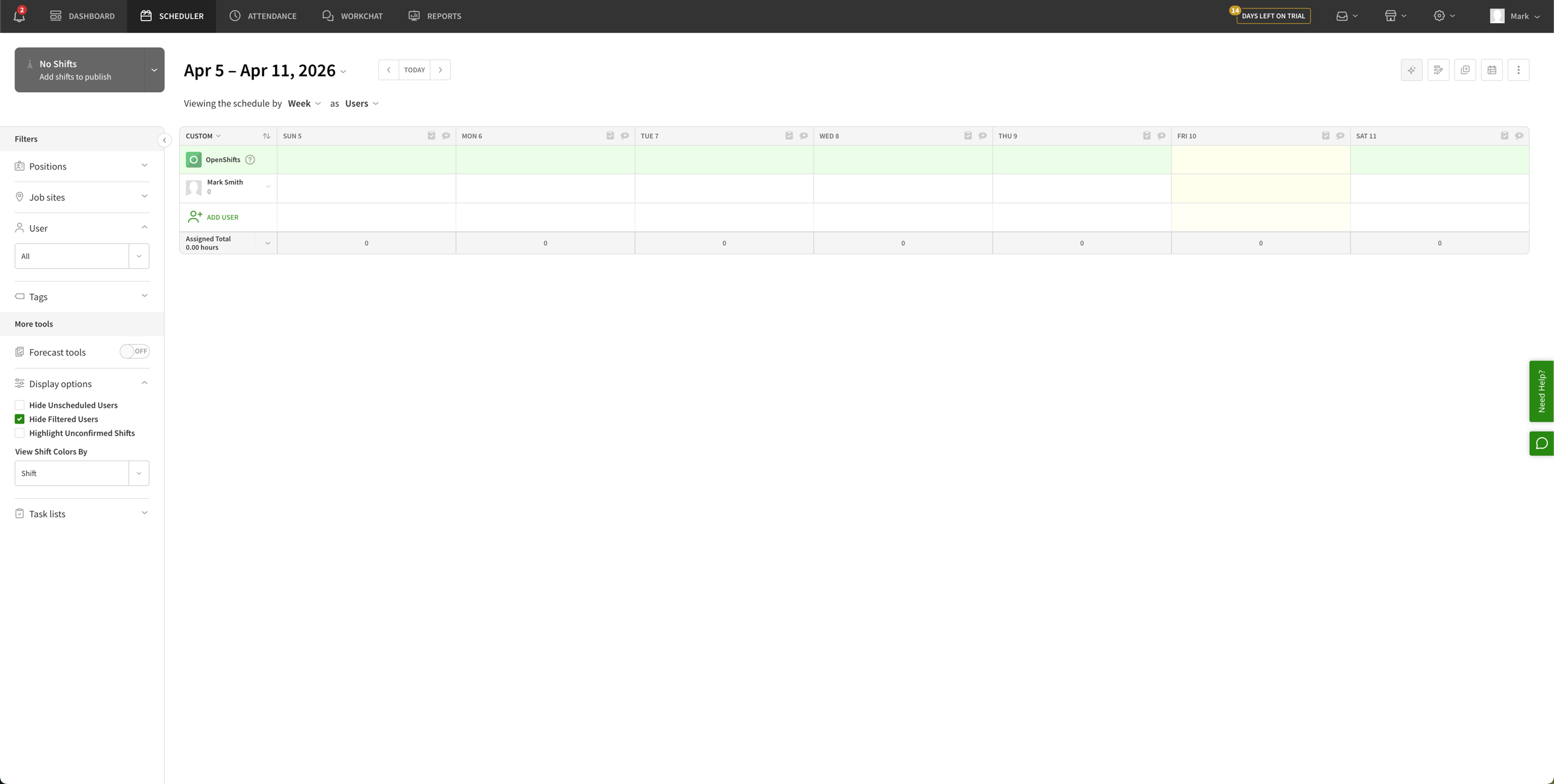
When I Work is a popular scheduling tool that empowers your team to manage their own coverage. When an employee can't make a shift, they can easily drop it or offer a swap with qualified coworkers right in the app. Once a manager approves the swap, the schedule updates automatically.
This employee-first approach extends to availability tracking and time-off requests. Managers can see exactly who is available while building the schedule, completely eliminating the guesswork that leads to coverage gaps. Plus, the intuitive drag-and-drop interface and schedule templates make rostering easy, even for managing a large team with complex shift patterns.
When I Work also shines with its built-in team messaging tool. You can create custom group chats for specific departments or send one-on-one messages directly to staff members. This keeps all work-related communication neatly cordoned off from everyone's personal text messages.
The messaging tool also pairs brilliantly with the app's open shift board. If you suddenly need last-minute coverage for a busy weekend rush, you can blast a message out and let eager employees grab the hours immediately.
While it's an exceptional scheduling platform, it's worth noting that if you're scheduling employees in multiple time zones, job sites, or locations, your monthly per-user rate will double to $5. However, if your goal is to increase staff accountability and reduce the time you spend managing schedule changes and call-outs, When I Work provides one of the best overall user experiences on the market.
Plus, you can easily connect When I Work to Zapier to sync it seamlessly with the rest of your tech stack. Build custom workflows that instantly create When I Work user profiles the moment a new employee is added to BambooHR, or automatically send out Slack notifications whenever a new schedule is published.
When I Work pricing: Plans start at $2.50/user/month for standard scheduling features, time tracking and attendance, and team messaging. For interdepartmental labor sharing, the price rises to $5/user/month.
Which employee scheduling software should you choose?
There's a wealth of employee scheduling apps out there, and most of them are fairly similar—which is why it's crucial to know what's most important to your business.
Compare your goals and needs against our top apps and find the one that's the closest match. For tracking labor spend, that's Deputy. If you need a free tool? Homebase is an ideal app. Maybe you want a dedicated app for your restaurant business? 7shifts is a popular choice.
Once you pick the ideal scheduling app, you can unlock even more value by connecting it to the rest of your tech stack with Zapier. Zapier helps you orchestrate workflows across HR, payroll, scheduling, and more. Build end-to-end systems in a visual editor, or access your HR tech stack directly from your favorite AI tools.
Related reading:
This article was originally published in July 2019 by Hannah Herman. The most recent update, with contributions from Mike Floeck, was in May 2026.