Claude Duet is Anthropic's answer to Meta's Muse and OpenAI's dots. It's an always-on AI agent, which means that instead of waiting for you to type a prompt, it sends you a morning brief, checks your connected apps to see where it can be helpful, and works on tasks in the background. Terrifying? A bit. But before it sends, pays, signs, or deletes anything, it asks you first.
It's still in research preview, but I got early access and spent some time with it on my phone. Here's what Claude Duet is, how it works, and what I found when I tested it.
Table of contents:
What is Claude Duet?
Claude Duet is a proactive agent from Anthropic, built on Claude's latest models. You can sign in with your existing Claude account, but it's a separate app.
Where a regular chatbot waits for your question, Duet looks at what's going on in your connected apps and tells you what needs your attention. You talk to it by text or voice in one continuous thread, and it can do basically anything you let it do. Or at least it'll try.

The app has three tabs:
Chat: This is where you'll ask it questions or tell it to do something (with text or voice). Connected apps will show up as cards in the conversation.
Tasks: This is all the work that Duet runs in the background, without your input (unless it needs your permission).
Make: This is where you'll build out projects. It comes with templates like a daily to-do list and email triage.

How does Claude Duet work?
Duet runs on its own virtual machine with a browser, so your phone or laptop doesn't need to stay on while it works. Here's what that looks like in practice:
A morning brief. Each morning, Duet can send a short summary of the most important items across your connected apps.
Regular check-ins. It checks your accounts every few hours and messages you only when something needs your attention. You can set what you want to hear about and how often.
Context from your Claude account. Your tools, projects, chats, memory, and skills carry over. During setup, Duet shows an "Already knows your setup" screen with the connectors you already use in Claude.

Connectors. Duet connects with all the same apps that Claude does. That's thousands of apps, but most of them aren't verified by Anthropic. To get the most out of Claude connectors, you'll want to install Zapier, which will get you secure access to 9,000+ apps.
Its own browser. Duet can open sites and fill out forms on its own computer of sorts, so it can get work done on sites that have no connector, too.
I connected Gmail, Calendar, and Google Drive during onboarding and didn't ask it to do anything else. When I came back the next morning, Duet had already looked through my inbox, found Google's security alerts about the new connections, matched them to the setup I'd just done, and summarized them. It told me there was nothing to do if that was me, and where to check if it wasn't.

Nothing groundbreaking, but it was pretty impressive given that I didn't ask it to do anything.
Claude Duet pros and cons (based on testing)
I've only used Duet for a few days, and it's a research preview, so treat all of this as a first impression.
Claude Duet pros
Setup is quick. Everything already connected to my Claude account carried over, and the first-party connections (Gmail, Slack, Calendar, and Google Drive) take one tap each.
It's proactive in a useful way. The overnight security summary was a small thing, but I hadn't asked for it, and it was accurate.
Tasks start with suggestions. The Tasks tab starts empty and offers to scan your tools for work it can take on. Later that morning, I already had two tasks running.

It asks before it acts. Duet checked with me before it did anything I wouldn't want it to do without my permission.
Claude Duet cons
It used up my usage limits fast. Duet shares your Claude plan's limits, and my first couple of days of testing used up all of my session limits. Not great for an agent that's supposed to run in the background.

The native Gmail connector only sees one account. This is solvable using Zapier, but it's worth knowing as you get started.
It can mess up. I hope that goes without saying? Any always-on AI agent can easily miss the mark on how urgent something is. It might alert you to low-priority things while missing something nuanced but urgent.

Is Claude Duet safe?
According to Anthropic, Duet will happily read, draft, and prepare work without asking you. But before it sends a message, makes a payment, signs a document, or deletes anything, it shows you exactly what it plans to do and waits for your go. (Some actions, like trading securities or moving money between accounts, are still off-limits even with approval.)
It uses OAuth, so Duet never sees your passwords or sign-in tokens, and you can disconnect any app at any time.

Anthropic also says it screens for prompt injection, uses a classifier to catch sensitive information before it leaks, and has had internal red teams and an outside firm test it. But as with any agent that can act in your accounts, Duet can make mistakes, so check what it's doing, especially early on.
Claude Duet pricing
Claude Duet is included in Pro, Max, and Ultra plans during the research preview. It shares the same usage limits as the rest of Claude, but it uses them differently from ordinary chat. Background checks count toward your limits, for example, and bigger tasks will run through your limits pretty quickly.
I'd assumed Duet was running on my Pro plan's limits, but the app didn't make that clear to me, so it's worth keeping an eye on your usage while you test it. My experience was that Duet burned through my session limits quickly.
If you hit the same issue, it's worth deciding if a deterministic automation might make more sense for your use case. If your task runs the same way every time, ask Duet to set it up for you on Zapier instead—from then on, it'll run using Zapier tasks instead of tokens.
How to use Claude Duet
Claude Duet is a research preview, and access is by waitlist for U.S. Pro, Max, and Ultra subscribers. It's available as a standalone iOS and Android app and on claude.ai. (I got in through a TestFlight invite.)
Once you have access, here's how to get started:
Sign in with your Claude account. You can continue with Google or Apple. Your tools, projects, memory, and skills carry over.
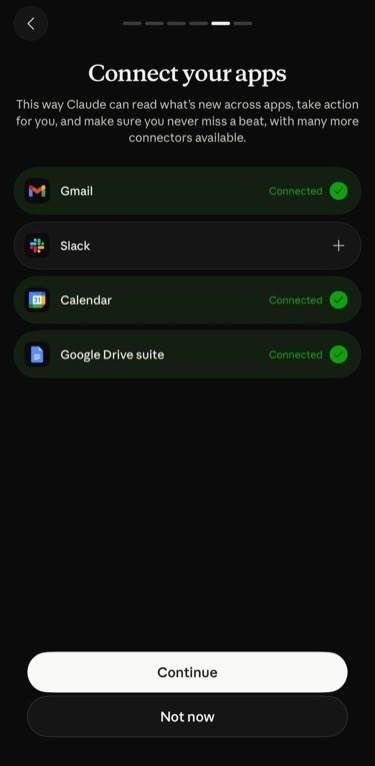
Connect your apps. Onboarding pushes four first-party connections: Gmail, Slack, Calendar, and the Google Drive suite.
Add apps through Zapier. If you already use Zapier with Claude, it shows up in Duet with no extra setup. Zapier gives Duet secure access to the thousands of apps it connects to. You decide which apps to connect, your credentials stay out of the model's context, and you can revoke any connection in one place. You can also build automations that run reliably in the background. If you don't already use Zapier with Claude, add Zapier as a connector, so you can securely connect to every app across your tech stack.
Turn on notifications. Duet will tell you when a task finishes or needs your input.
Give it something to do. Text or tell it a task, or describe a page in the Make tab.

Automate Claude Duet with Zapier
Duet is good at noticing things and handling them once. It's less suited to doing the same task every morning for the next year, especially since background checks count against your Claude plan's usage limits. Zapier picks up the work that repeats, so Duet can stay focused on the work that needs judgment.
Once Zapier is connected to Duet, you can ask it to build a Zap. (Next Gen Zaps are in Early Access, so availability depends on your Zapier plan and account.) Say Duet's email triage keeps flagging invoices from the same vendor. Tell it to build this: when a new email from that vendor lands in Gmail, pull out the amount and due date, add a row to a Google Sheet, and post a note in Slack. Zapier takes it from there, and the workflow keeps running whether or not Duet or a chat window is open.
The workflow runs the same way every time, with regular automation steps wherever they work and AI only where a step needs judgment, like reading an amount off a messy invoice. That keeps runs predictable and avoids paying for an agent to reason through the whole job on every run.
If a run fails, an agent diagnoses the problem and prepares a fix. You decide what it can change on its own and what needs your approval, and every fix shows up as a new version you can review. You can also open any run and see what happened step by step, so you aren't taking the workflow's word for it.
The workflows it builds show up in one place where you can review, adjust, or turn them off. Zapier also connects to 9,000+ apps, so a workflow can reach well past the Gmail, Slack, Calendar, and Drive connections Duet starts with, including the extra Gmail accounts the native connector can't see.
Claude Duet FAQ
What is Claude Duet?
Claude Duet is Anthropic's always-on AI agent. It sends a morning brief, checks your connected apps every few hours, and works on tasks in the background.
How much does Claude Duet cost?
There's no separate price. It's included with Claude Pro, Max, and Ultra plans during the research preview, and it uses your plan's usage limits.
Who can use Claude Duet?
Right now, it's a waitlist for Pro, Max, and Ultra subscribers in the U.S. It's available as an iOS and Android app and on claude.ai.
Does Claude Duet work with Zapier?
Yes. Zapier MCP carries over from your Claude account, so if you've already connected it, it shows up in Duet during setup. If not, you can select Zapier as a connector and connect that way.
Related reading