Does $5,000 in AI spend equal $5,000 in value? If it does, that's a bad investment. A 1x return wouldn't get approved anywhere else in our budget, and AI doesn't get an exception. As the Chief Operating Officer at Zapier, the question I really care about is whether that investment returned more than it cost. But you can't calculate that without seeing the spend, so that's the part we fixed first.
When we initially rolled out AI tools across the organization, everyone got open access, and we measured almost nothing. Now, every employee can see their own AI spend by tool and model, and an automated system proactively allocates more budget when the work calls for it—no tickets or meetings required.
Here's how we built our AI cost management system, and how you can set up your own.
Table of contents:
What is AI cost management?
AI cost management is the system of managing what you spend on AI tools to make sure the AI ROI makes sense. That includes tracking the obvious stuff, like seats for AI tools, as well as the less obvious stuff, like the AI tokens used for daily tasks.
That level of visibility is just the starting point. From there, you use the data to help you spend better by right-sizing licenses, matching cheaper models to simpler tasks, and cutting tools that don't justify their cost.
Why does AI cost management matter?
First, a quick refresher on AI tokens: Most AI providers bill by the token, with separate rates for what goes into a model and what comes out. A bigger, smarter model costs more per token than a smaller, faster one. And an agent working through a multistep task can use a lot of tokens before anyone realizes.
But you don't usually get a token cost line in the chat window. That's why AI spend can get out of control so quickly.
52% of managers say their organizations spend over $100k a month on AI tools, but only 34% of individual contributors know where that money's going. Employees aren't being careless—they just can't see the meter, so they can't make smart tradeoffs.
That's why AI cost management matters, and why I don't think of it as a cost-cutting exercise. We want our teams to use more AI, not less, but on purpose. That means putting the powerful (and pricey) models on the work that needs them and the cheap, fast ones on everything else. It also means knowing when AI isn't the right tool at all. If a task follows the same steps every time, deterministic automation does it more reliably for a fraction of the cost. People can only make those calls if they can see what they're spending.
How Zapier audits AI spend
When we first started measuring AI spend at Zapier, the process was manual. People posted in a Slack channel when they needed more budget, and someone would manually raise their limit. It worked, but it only kicked in after someone was already blocked. So we built a system on Zapier to proactively audit AI usage, and give people visibility and guardrails into their AI spend.
Today, the audit runs in the background and works like this:
Pull data. Usage data from Anthropic, Cursor, OpenAI, and Sidekick (Zapier's agent harness) is pulled into an analytics platform and refreshed daily.
Check AI limits. Every person gets a monthly allocation for each tool, set above their historical usage. Most people sit in a standard tier, and heavier users sit in a power tier. A Zap (our name for automated workflows) compares each person's spend to their allocation. When someone hits 75%, our AI Limit Bot sends them a Slack DM asking what they're working on.
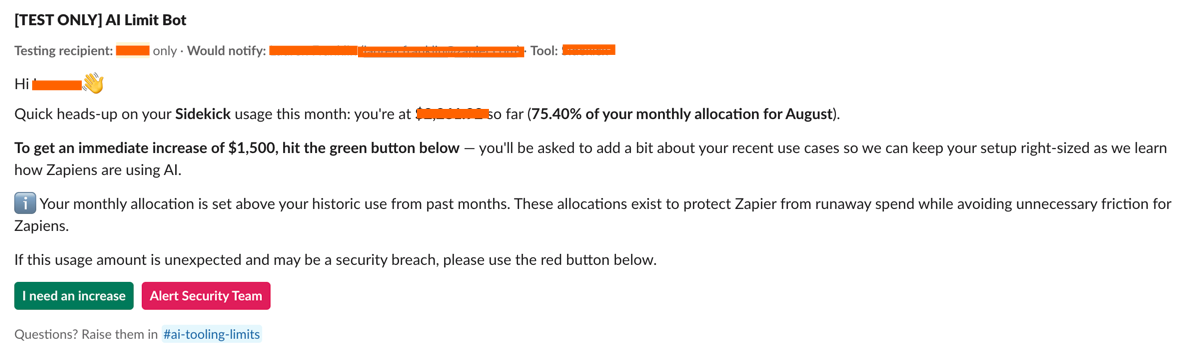
Collect replies. In that DM, the teammate can request an increase in AI budget, or flag the spend to Zapier's security team if something looks off. To get the increase, they write one sentence about what they're working on.
Review answers. A Zap with an AI step reads the response. More budget is added automatically, and the person's manager is notified if they've requested an increase two or more times that month.
Update limits and loop back. The new AI limit shows up in the analytics platform the next day, and anyone who needs an increase three months in a row moves up a tier.

The AI limit is there to catch runaway spend, like a stuck agent loop. But allocations sit high enough that most people never get the DM. A lot of our heaviest users don't hit it either since we started teaching model choice and reasoning levels.
Because the logic is rule-based, the audit runs the same way every time, so nobody has to remember to check a dashboard or chase a teammate for more info. AI only handles the one step that takes judgment (reading a reply someone typed in their own words), and fixed rules decide what happens next.
People don't have to wait until they hit 75% to see where they stand, either. Every teammate gets a personal spend report in Slack from the AI Limit Bot, broken down by tool and model. (Or they can check their AI spend at any time with a Slack slash command.) The report also includes an agent skill, which they can run in their agent harness to get tips on optimizing their AI spend.

How to set up your own AI cost management program
On behalf of finance teams everywhere that have to explain why they can't "just add another line" to the company budget to make up for surprise AI bills, here are some tips for setting up your own AI cost management. It's all based on what we've learned from rolling out our program.
Before you start, I recommend installing Zapier in your AI agent so you can securely access your entire tech stack. I've included AI prompts you can copy and paste to kickstart the process, and they'll work best if you're connected to Zapier.
1. Show people their own numbers first
Give everyone on your team a clear view of what they spend, broken out by tool and model. Most people have no idea what their AI usage costs, and once they can see it, behavior tends to shift without anyone having to ask. A monthly report plus an on-demand way to check (like a Slack command or a simple dashboard) is plenty.
Prompt to try: "I'm setting up AI spend visibility for my team. List the AI tools we pay for, including seats and usage-based costs. For each, tell me where the spend data lives, and draft a monthly report that shows each person their own spend by tool and model."
2. Set limits that fit the work
AI usage varies a lot by role, so limits should too. A developer running agents all day has very different needs than someone who uses AI to tidy up meeting notes. Set limits above normal usage so people aren't second-guessing whether they can afford to use AI for everyday tasks.
You won't get the numbers right on the first try, and that's fine. Build in a way to adjust them. We move people up a tier when they need an increase three months in a row.
Prompt to try: "Help me set individual AI spend limits for these roles: [list roles]. Ask me what typical work looks like for each one, then suggest a limit based on this past usage data: [paste data]. Set limits above normal usage."
3. Automate check-ins at 75% of AI usage
Create an automated check-in system that flags when someone has reached 75% of their AI limit, and ask what they're working on. This gives users a quick path to more AI budget if the project calls for it, or a nudge to switch to a cheaper model if it doesn't. Either way, nobody gets cut off in the middle of a project.
Prompt to try: "Use Zapier to design an alert that fires when someone reaches 75% of their monthly AI spend limit. Include what triggers it and who else gets notified. Write the Slack DM in a curious, friendly tone. It should ask what they're working on and say what happens next. Then list what a clear answer looks like and what needs a human to take a closer look."
4. Teach model choice
Help people see which AI model fits which task, and when a higher reasoning level is worth it. For work that's predictable and repeatable, like formatting or moving data between apps, let them know you may not need a model at all. And wherever you can, set the right model as the default so people don't have to think about it.
Prompt to try: "Review this AI usage data: [paste data]. Point out where we're using expensive models or high reasoning levels for simple tasks, and suggest where a smaller, faster option would work. Then write those recommendations as a reusable skill my team can run against their own usage."
The easiest way to scale this is with an AI skill: a reusable set of instructions you can hand to your AI tool. Here's the one we use at Zapier. You can tweak it for your needs, import it into your own AI tool, and run it against your usage data.
5. Review the numbers on a regular basis
AI token usage, and how companies charge for it, keeps changing. New models launch, pricing shifts, and your team's habits change right along with them. So review it every month. When you do, tie each AI investment to one of five measures: revenue, speed, productivity, cost avoidance, or risk. If you can't name which one it moves, that's the first thing to fix. Get the right people together, look at the numbers, and talk through what worked (or didn't) last month. Then decide what to adjust or try next.
Prompt to try: "Review our AI spend for the past month: [paste usage data]. Break it down by team, tool, and model, then flag notable trends, unusual spikes, and anywhere we're using expensive models for simple tasks. Compare it to the previous month: [paste last month's data]. Tell me what changed, what likely caused it, and suggest two or three things we should try next month."
Use Zapier to help you spend fewer AI tokens
As important as it is for people to understand when it's appropriate to use AI for a given task and which model to lean on, it still requires them to remember to actively switch models for those tasks. Zapier builds that decision-making process into the workflow, so no one has to make the call each time.
Here's how it works: predictable steps, like routing a lead or sending a Slack message, run on plain logic, so they use zero AI tokens. For the steps that need judgment, AI by Zapier chooses the right model for that job—and you won't even pay for tokens, just Zapier tasks. This approach is called deterministic AI: AI interprets, and fixed rules decide what happens next. The result is that you only spend tokens where they count, and you can swap models later without rebuilding anything.
Build the way you already work: in a code editor like Cursor, in your terminal, or by prompting an AI assistant like Claude or ChatGPT. Zapier takes it from there and runs it for you, using traditional if/then steps wherever it can and adding AI only when a step needs it. The capabilities are the same however you start, and everything is governed from one place.
Related reading: