Quo (formerly known as OpenPhone) is a shared business phone system. It gives your team one place to manage calls, texts, and customer contact. But it's just one piece of your tech stack—what takes place in Quo shouldn't stay there. It needs to flow into the other tools your business runs on. And if your team is moving customer interactions manually between systems, that process exposes your data to error and is tough to scale as you grow.
Fortunately, Zapier does away with that issue. By building Zaps—our word for automated workflows—you can automatically follow up with leads, alert your team of new conversations, and move data between Quo and any tools in your tech stack. Intrigued? Then keep scrolling for five automation ideas.
New to Zapier? It's workflow automation software that lets you focus on what matters. Combine forms, data tables, and logic with thousands of apps to build and automate anything you can imagine. Contact sales for more info on how to use this app, and thousands more, with Zapier.
Table of contents:
Keep contact and lead records consistent
What happens after a new lead calls or texts your business? If you're doing things manually, someone probably opens your CRM or lead management tool, checks whether the contact already exists, and either creates a new record or updates an existing one. Then they make the same move in Quo. Multiply that task by every new lead, client, and deal, and you're looking at a needlessly inefficient process.
With Zaps, that process can run on its own. Whenever you receive new or updated info about a client, the Zaps below automatically create or update the matching contact in Quo. That way, your customer records stay consistent without anyone having to hop in and out of other tools.
Create or update Quo contacts for new Jobber clients


Update Quo contacts when Jobber clients are updated
Create or update Quo contacts for new incoming messages
Create or update Quo contacts for new Pipedrive deals

Create or update Quo contacts for new Follow Up Boss contacts

Turn new leads into instant conversations
The moment a lead fills out a form or responds to an ad, their interest in your business is at its highest. But that interest doesn't last long. Fail to follow up quickly, and you leave room for them to browse, compare options, and start conversations with your competitors. And the longer it takes you to reach out, the colder those leads get and the less likely they are to convert.
Instead of losing potential business to slow response time, use automation to engage new leads while their interest is still hot. These Zaps will automatically send a message from Quo the moment a lead submits your lead-generation form or engages with your ad, giving your business the best chance of turning them into customers.

Send Quo messages for new or updated Google Sheets rows


Send Quo messages for new Zapier Forms submissions

Log calls and text for reporting
Usually, Quo logs every incoming call, missed call, or text message so your team always has a record of customer interactions. But not everyone who needs visibility into those interactions works inside Quo. Managers, operations teams, and other stakeholders often need to track call volumes, monitor missed calls, and understand how the team is responding to customers. And pulling out that data manually every time it's requested is just not sustainable.
A better workaround is to use automation to instantly send every customer interaction to the database tool your wider team already works in. Zapier can automatically create new records in whatever tool you use with formatted data, including the contact name, date, and type of interaction. With customer interactions automatically logged in a central place, the right people always have visibility, and building reporting dashboards to track trends and team performance becomes much easier.
Create Google Sheets rows for new completed Quo incoming calls

Create Notion database items for new completed Quo calls

Pro tip: Logging Quo data gives your team a record, but someone still has to open that record to get answers. Install Zapier MCP into your AI assistant—like Claude or ChatGPT—and you can skip your visit to the dashboard altogether. Ask your AI client questions like "What calls did we miss in Quo yesterday?" or "Summarize last week's Quo call with XYZ company" and you'll get an answer right there in your chat window. Learn how to set this up in the Zapier MCP feature guide.
Alert your team when customers reach out
Your internal day-to-day communication probably happens in a chat app or in email. And if that's true, that's the app your teammates are paying the most attention to. So when a customer calls or texts in Quo, the only way anyone will find out is by remembering to check the app. But if people get busy or pulled into other work, checking Quo for updates will get pushed down the priority list. When that happens, responses become the order of the day, and in competitive industries, that's enough to push customers elsewhere.
Instead, you can use automation to streamline your internal communication process and take the burden of monitoring Quo off your team entirely. For instance, you can set up a Zap to instantly send a channel message in your chat app the moment a new message is received in Quo. And if a call comes in that needs a specific person's attention, the Zap can send the details straight to their email. This workflow keeps the right people in the loop at all times and ensures important details don't get missed.
Send Slack channel messages for new incoming Quo messages

Send Microsoft Teams channel messages for new incoming Quo messages

Send Discord channel messages for new Quo messages

Send Gmail emails for completed incoming Quo calls

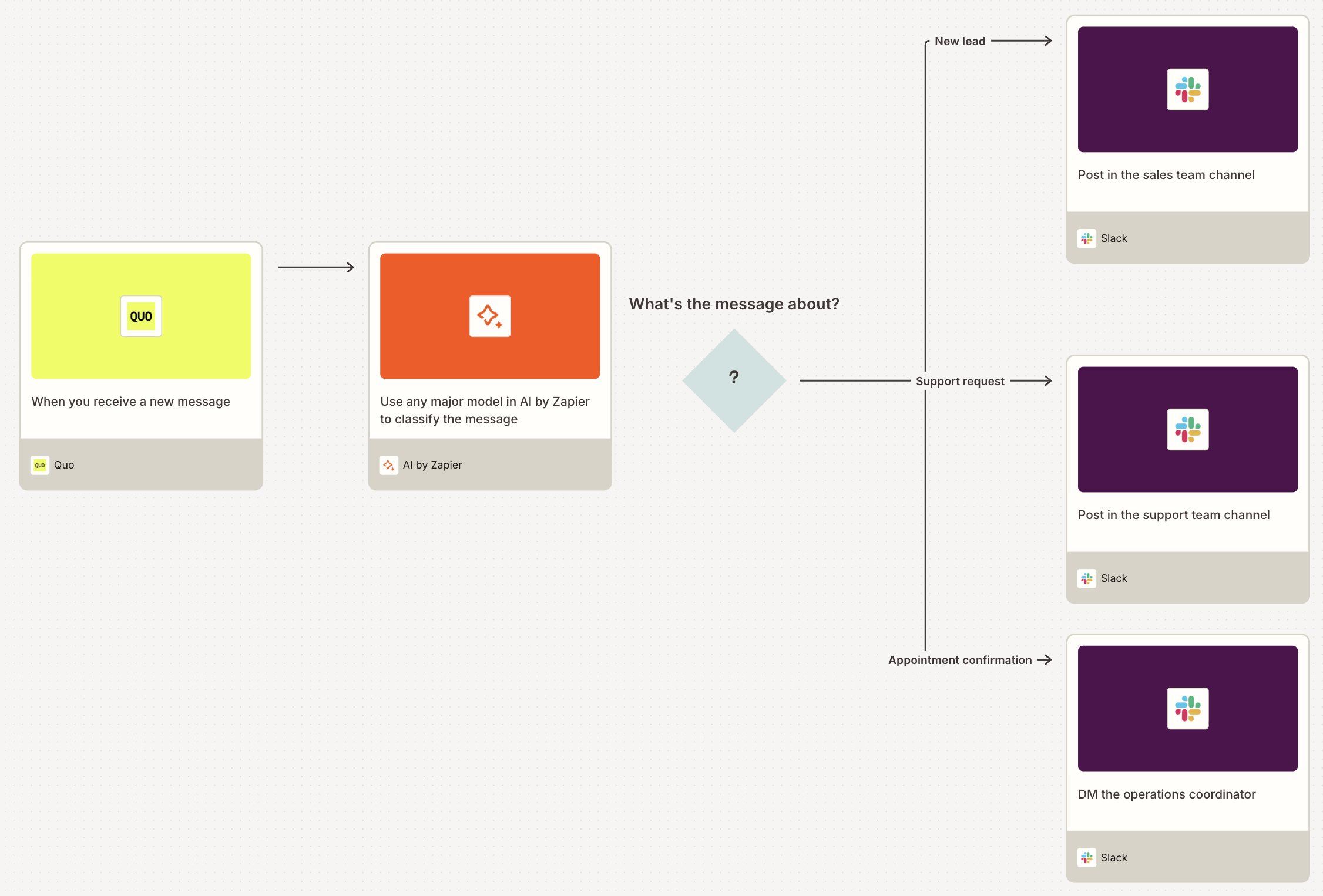
Pro tip: Not every incoming Quo message needs to go to the same person or channel. Add an AI by Zapier step to your Zap to automatically classify each incoming message—whether it's a new lead, a support request, an appointment confirmation, or something else—and use a path step to route it to the right team based on that classification.

Use webhooks to automate other apps with Quo
What if your business relies on a tool—like a niche industry app or custom system—that doesn't (yet) have a native Zapier integration? You can still build Zaps that trigger events in Quo based on actions in that external app and vice versa, using webhooks.
A webhook is an automatic notification that an app can send to Zapier the moment a specific event occurs. So, for instance, when an event is triggered in an external system—such as a new booking or form submission—Zapier can catch that signal and automatically send a message from Quo to the right contact. And when a new message is received in Quo, Zapier can instantly post that data to any external system that needs to know about it.
Use these templates to set up the webhook, point it to your Zapier workflow, and start automating any workflow between Quo and the rest of your tech stack.

Automate your business communication system with Zapier
Automating Quo with Zapier means everything that should happen after a customer conversation happens automatically. Contacts stay up to date, leads get instant responses, interactions are logged, and the right people are always in the loop. This way, you'll have a business communication system that runs smoothly and converts more leads.
And that's just the start of what you can do with Zapier and Quo. What will you automate first?