I answered a phone call recently, and the voice that addressed me was so realistic, I almost didn't catch that it wasn't human—that's how sophisticated AI voice tools are right now. Businesses can use these tools to do things like narrate content without hiring voice actors or generate speech in multiple languages. Other AI voice apps can even analyze audio for details like sentiment and speaker identification.
Manually moving these audio files from app to app creates annoying bottlenecks. By connecting your AI voice app to Zapier, you can automatically and securely route voice data to whichever tools your team already uses.
Here are four types of Zaps—what we call automated workflows—that can turn AI voice capabilities into real business outcomes. Keep scrolling for ideas and Zap templates you can use to start building today.
Skip ahead
Scale content production with AI narration
You've got blog posts, newsletters, training materials, and documentation stacking up. Your audience wants audio versions of them—because some people learn better by listening and others want to multitask during, say, their commute. But manually recording voiceovers for everything? That's costly and requires weeks of studio time.
Apps like ElevenLabs, Murf, and Listnr can generate natural-sounding narration in minutes, but you still need to get that audio to its final destination. These Zaps take care of the entire pipeline, automatically generating audio from new content and distributing it to the other apps you use.
Create audio narrations from new Google Docs and save to Google Drive


Generate audio from RSS feed updates and store in Amazon S3


Create narrations from new Airtable records and save to Google Drive


Narrate new Google Sheets rows and track in Trello


Generate audio from Typeform responses and notify team


Personalize sales outreach with AI voice messages
Everyone can spot a templated email from a mile away. It's why personalized outreach performs so much better these days. But recording individual voice messages for every prospect just isn't scalable when you're managing hundreds of leads.
Using ElevenLabs, you can clone your voice and create personalized audio messages that sound just like you—without spending hours in front of a microphone. These Zaps automatically create those messages and send them by email or text whenever new leads enter your pipeline, making it possible to add that personal touch at scale.
Send personalized voice messages to new HubSpot deals


Create voice messages from LinkedIn lead gen forms

Automate customer interactions with live AI voice agents
Your customers want answers now—not after navigating phone trees or waiting days for a callback. If they've contacted your team outside of business hours, or if reps are drowning in other questions about order statuses, account setup, and basic troubleshooting, you might be keeping your customers waiting.
With Voiceflow, you can automatically call customers as soon as they reach out. The AI can interact with customers in a two-way dialogue, handling common questions intelligently and escalating to humans only when necessary. These Zaps automatically trigger voice calls when customers submit forms, create support tickets, or start conversations, so every interaction gets the immediate attention it deserves.
Make outbound calls from new Intercom conversations


Analyze voice sentiment in support calls
Your support inbox is overflowing, and somewhere in there is a customer who's about to churn if they don't hear back soon. But which ticket is that? Reading through hundreds of messages to gauge urgency is exhausting. By the time you find the truly critical ones, you've already burned through your response time.
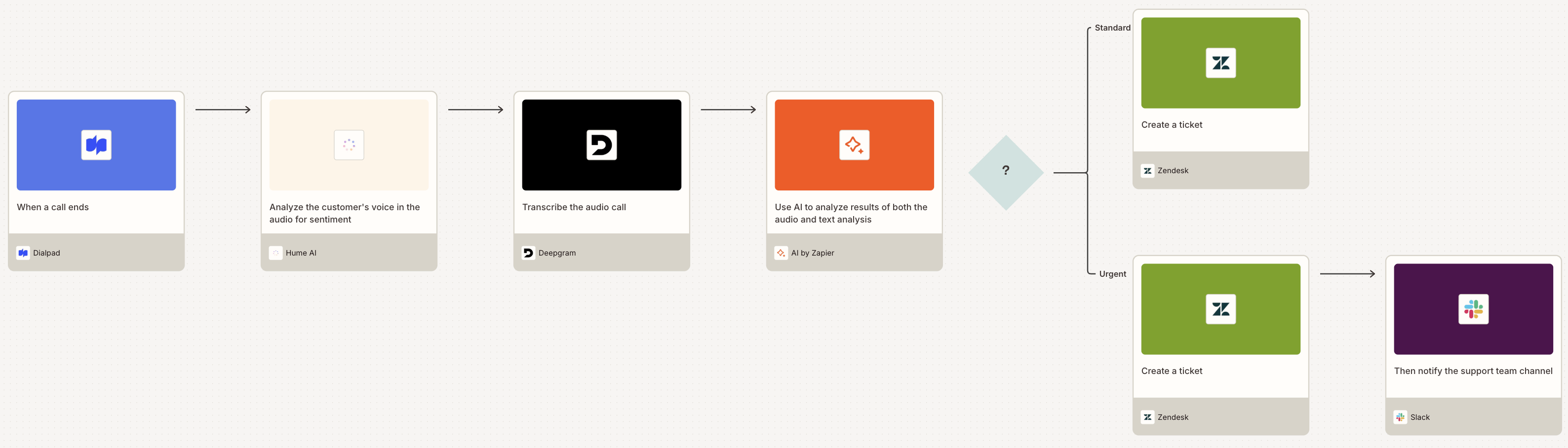
AI voice apps with sentiment analysis capabilities—like Hume and Deepgram—can detect emotional cues in both customer and rep voices, analyzing tone, rhythm, and vocal modulations. These Zaps can auto-analyze incoming support requests, filter for urgent cases, and then create tickets just for those.
That same voice data can also reveal coaching opportunities for your reps. For example, you can gain insight into which reps consistently de-escalate tense calls with empathy, or who struggles to project confidence when answering technical questions.
Note: Although Hume and Deepgram don't offer prebuilt analyze sentiment actions in Zapier, you can access their sentiment analysis features using the API Request (Beta) action. This requires API knowledge—you'll need to configure the endpoint, authentication, request parameters, and parse the response data. This is an advanced setup best suited for users comfortable working with APIs.
Escalate negative customer calls to Zendesk tickets

Track caller sentiment and send personalized follow-up texts

Create Trello cards for meetings with negative sentiment

Pro tip: Try building a comprehensive sentiment analysis Zap like the one below. This uses AI to analyze dimensions of the customer's voice and extract meaning from their spoken words.

Put AI voice technology to work for your business
AI voice apps are powerful, and their value multiplies when you integrate them into your existing workflows. With thousands of Zapier integrations, there's so much more you can build with these apps beyond what I've included here. Head to the Zap editor to start building a workflow.