Every AI provider comes with models of varying strengths. I'm a Claude stan because it just gets my writing style, but I'll often reach for Sonnet 4.6 over the newer models because its results are more consistent for me. And for some tasks, Claude's lineup doesn't cut it at all—when I need to process data at scale, for example, I might reach for Gemini. When I need a versatile generalist for classification or routing, GPT might be my pick. Other people across my team and at Zapier have altogether different preferences, which tend to change with every new model release.
If your stack is built around a single AI provider, you're limiting your team to that vendor's lineup—and cutting off access to models that might actually suit certain tasks better.
With Zapier, you get flexibility. You can use whichever AI models you want, from whichever providers you want, and mix and match them in the same workflow depending on the task. Below, I'll break down why that matters and how to build resilient workflows no matter which AI tools your team prefers.
Zapier is the most connected AI orchestration platform—integrating with thousands of apps from partners like Google, Salesforce, and Microsoft. Use forms, data tables, and logic to build secure, automated, AI-powered systems for your business-critical workflows across your organization's technology stack. Learn more.
Table of contents:
What is AI model flexibility?
When an automation platform like Zapier provides AI model flexibility, it means you can use any AI assistant across your workflows and swap them at any time, without committing to a single provider.
That flexibility matters. No one model dominates at everything, and their relative strengths can shift with every release cycle. So if you've built your workflows around one provider and the pricing, quality, or policies shift—or one model just leapfrogs another—you're stuck rebuilding.
With an interoperable platform, you can maintain an ever-evolving roster of models, and everyone gets to use what they want. Your marketing team might go with Claude to draft long-form content, while Sales uses GPT to summarize call transcripts, and Support routes tickets through Gemini for multilingual triage. Nobody has to compromise.
Even within a single team, preferences can split. It's like cooking in my household. I can't imagine prepping meat with anything but a Santoku knife, while my boyfriend—whose whole MO is speed—tends to reach for kitchen scissors. Same task, different tool. Similarly, one marketer might draft campaigns in Claude, while another prefers GPT for faster iteration.
On Zapier, you can pick the right model for each step of a Zap or tool call within an agent, and swap models in seconds if something better comes along. And there's no need to rebuild a thing.
When you configure AI by Zapier, for example—our built-in tool for adding AI steps to your Zap workflows—you can quickly connect your preferred model from a dropdown menu.

Instead of AI by Zapier, you also have the option to use a direct AI integration. That's best if you want to play with actions and configurations that only exist in that provider's integration.

The cost of building on a single AI vendor
Some AI vendors are expanding into full platforms. OpenAI's Frontier, for example, is designed to build, deploy, and manage AI agents across an entire business. That only deepens the lock-in if you go all in on OpenAI.
When you build directly on one provider without a shared automation layer underneath, you can run into real problems:
Lack of flexibility. When something changes—pricing shifts, a model gets deprecated, a competitor leaps ahead—you can't switch to the best option.
Maintenance issues. Shiny new models launch all the time. If, with every improvement, you need to evaluate whether to rip out and replace your current setup, your team will spend more time managing transitions than actually using AI to get work done. Every custom connection you build between your tools and one specific provider is a liability. Those integrations need maintenance. They break when APIs change. And they make it exponentially harder to try something new, even when the new thing is clearly better. You're wasting time your team could've spent advancing their AI maturity.
Organizational silos and disconnect. When there's no shared infrastructure, departments pick their own AI tools independently. You end up with disconnected workflows, duplicate data, and no shared view of how AI is actually being used across the organization. Leadership can't see the full picture, teams can't learn from each other's setups, and everyone's reinventing the wheel in their own silo.
All this risk can accumulate at the decision-making level. If your AI pilots never actually reach production, it's likely that's for these very reasons.
How to utilize Zapier's AI model flexibility
The best way to understand the value of model-agnostic workflows starts with seeing it in practice. Below, I've listed a few different use cases and mapped out workflows for them that take advantage of different AI models' strengths. And because these are built on Zapier, swapping any model takes minutes and breaks nothing.
Note: The visual diagrams in this section were created in Zapier Canvas, our built-in tool for mapping out your workflows. Learn more about Canvas in our feature guide.
For marketing teams: Repurpose content across channels
Take a webinar transcript and automatically turn it into a blog draft and social posts. Use Claude for the blog draft since its writing tends to read more naturally. Then route social copy through ChatGPT, which excels as a versatile, conversational generalist. If a new model outperforms either one next month, swap it in without touching the rest of the Zap.

Pro tip: Want to expand this Zap? Try adding steps to save drafts to your file storage app, or insert Human in the Loop steps to manually check drafts before scheduling them.
For sales teams: Enrich leads and reach out to them
When a new lead enters your CRM, enrich their profile with an AI-generated company summary, then draft a personalized outreach email. Gemini's massive context window makes it ideal for digesting lengthy company reports or earnings calls in one pass, while Claude can handle the nuanced, friendly outreach email. Each model does what it's best at—within the same Zap.

Pro tip: Have a more complex lead enrichment setup? Spin up an AI teammate in Zapier Agents that plugs into your live CRM and company knowledge, then reuse it across your stack for research, qualification, and outreach. To get started quickly, try the Agents templates below.
This agent enriches new Salesforce contacts with additional company information.
This agent captures lead information from form submissions and manages follow-up actions automatically.
This agent researches new leads and enriches them with key details.
For operations teams: Route and summarize tickets
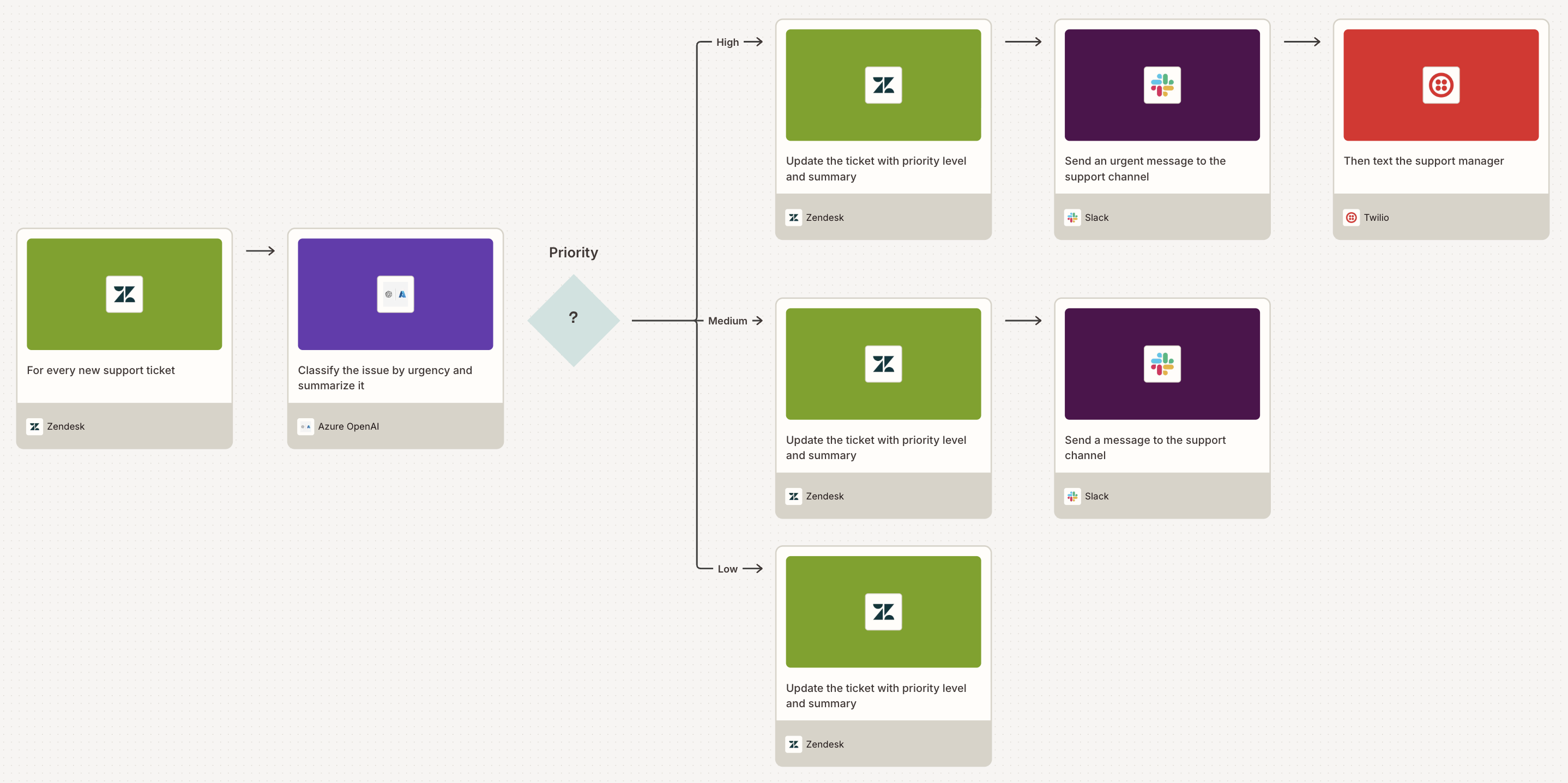
Incoming support tickets get classified by urgency, summarized, and routed to the right queue—all automatically. ChatGPT's versatility makes it a solid default for classification and routing. For enterprises with strict compliance requirements, Azure OpenAI offers the same models wrapped in Microsoft's enterprise-grade security, so regulated industries can automate without compromising on data protection.

Pro tip: In this Zap, you can easily swap the Azure OpenAI step for AI by Zapier to add flexibility. AI by Zapier lets you switch models in a single click without re-authenticating and includes a built-in prompt optimizer to sharpen your results. But if your IT team requires strict data residency or custom content filtering, the direct integration is the way to go—it ensures all your data remains securely within your company's private Azure Tenant.
For research and insights teams: Monitor trends in real time
Track breaking industry news, surface trending conversations, and generate daily briefings for leadership. Grok's direct connection to X gives it a real-time edge on breaking news and trending topics, often surfacing developments before other models pick them up through web crawling. Pair it with Claude or ChatGPT to synthesize those signals into polished executive summaries.

For any team: Take action securely from your favorite AI tools
Maybe your marketing team works out of Claude, or your ops team runs everything through ChatGPT. With Zapier MCP, it doesn't matter which AI tool they rely on. They can all take action across your business apps from wherever they work—while admins keep a single source of control over what's connected, who can use it, and which actions are allowed.
Zapier MCP connects all major AI tools to more than 9,000+ apps and 30,000 actions. Your team can do things like send Slack messages, update CRM records, create calendar events, or trigger entire workflows, all from a natural-language conversation in their chat window. Every action runs through Zapier's managed authentication and permissions, so credentials stay centralized, access is scoped per user or team, and every run is logged for review.
To see what's possible with MCP, check out our Zapier MCP templates.
AI models you can build with on Zapier
Here's a snapshot of the models you can plug into Zapier today. You can mix and match them across AI by Zapier and direct app integrations.
Provider | Available models |
|---|---|
OpenAI (ChatGPT) | GPT-5.5 Pro, GPT-5.5, GPT 5.4, GPT-5.2, GPT-5, GPT-5 mini, GPT-5 nano, GPT-4o mini, GPT-4.1 nano, o3, o3-mini, o1 |
Anthropic (Claude) | Opus 4.7, Opus 4.6, Haiku 4.5, Opus 4.5, Sonnet 4.6, Sonnet 4.5, Opus 4.1, Opus 4.0, Sonnet 4.0, Haiku 3.5 |
Google (Gemini) | Gemini 3.5 Flash, Gemini 3.1 Pro, Gemini 3 Pro, Gemini 2.5 Pro, Gemini 2.5 Flash Lite, Gemini 2.5 Flash, Gemini 2.0 Flash Lite, Gemini 2.0 Flash |
Azure OpenAI | The AI models you've already set up in your own Azure OpenAI account. The exact models depend on what your Azure admin has turned on. |
Amazon Bedrock | The AI models your company has access to in Amazon Bedrock. The exact models depend on what's enabled in your AWS account and region. |
On top of these, Zapier also connects to hundreds of other AI apps and counting, so you can keep using the models and providers your teams already love—and swap them out without rebuilding your workflows.
Did you know? Every time a new major AI model is released, Zapier runs it through AutomationBench, an open benchmark that tests models on real business workflows.
Practical guidance for building resilient AI workflows
A few principles will keep your AI workflows resilient no matter what shifts in the model landscape.
Map the workflow first, not the model. Define what needs to happen in your workflow first. Map out your trigger, any actions that follow, and the destination. Don't worry about picking an AI model until you've nailed the workflow logic. This applies to agents, too: outline the agent's job, its triggers, and what actions it should take before deciding on which downstream AI tools you should connect.
Start with one high-impact AI workflow. Don't try to build a mega-Zap or an omniscient agent that automates everything at once. Pick one workflow where AI will save you the most time or have the most visible impact, build it well, and prove the value. That success will become your case study for expanding.
Reuse successful workflows. Once you've proven the success of a Zap or agent, turn it into a template that other teams can adopt. This is one of the most underused advantages of building on Zapier—when someone on your team builds a killer automation, everyone can take advantage of it. Browse Zapier's template library for inspiration, or create and share internal templates to standardize how your org uses AI.
Build AI workflows that outlast any single model
AI will keep shifting. New models will keep launching. The providers you're evaluating today might look totally different a year from now. Going all in on any single model or a single provider is a bet that won't age well.
The more durable strategy is investing in an interoperable automation layer: one that lets you plug in the best models for each job, swap them when something better arrives, and scale AI across your organization without sacrificing governance or breaking what already works.
That's what Zapier provides. Not a bet on one model, but a platform that lets you experiment, adapt, and grow with AI on your own terms. Start building your model-agnostic automations today.
Related reading:
This article was originally published in March 2026. It was most recently updated in May 2026.