The idea of autonomous AI agents that research prospects, qualify leads, create content briefs, and enrich data across your business systems while you sleep sounds appealing. And with Zapier Agents, that pitch is real. You can build AI teammates that take action across 9,000+ apps without writing code.
But an agent is only useful if you can trust it to do the right thing. Speed without control is just chaos with better branding.
This guide covers the practical strategies that make the difference between an AI agent your team trusts and one that gets turned off after its first mistake.
Table of contents:
What makes an AI agent safe?
A safe AI agent has:
Defined scope. It can only access the apps, data, and actions it needs for its specific job. Nothing more.
Human oversight at critical points. For high-stakes decisions, a human reviews and approves before the action executes.
Content safeguards. Inputs and outputs are screened for issues like personally identifiable information (PII), prompt injection attempts, or toxic content before they reach their destination.
Observability. You can see what the agent did, when it did it, and why.
Recoverability. The agent isn't given permission to do anything irreversible.
The agents that earn trust in production are the ones designed with all of these guardrails from the beginning.
Start with scope, not speed
The most common mistake when building AI agents is giving them too much access too early. It's tempting to connect every app in your stack and let the agent figure out what it needs, but that's unnecessary and can be risky.
Start with the minimum set of permissions your agent needs to do its job. If your agent's job is to research prospects and create draft emails, it needs access to your CRM and email (draft creation only, not sending, is recommended). It doesn't need access to your billing system, your HR tools, or your production database.
Agents with narrow scope are easier to test, easier to debug, and easier to trust. If something goes wrong, the blast radius is contained. A few key principles worth following:
One agent, one job. Build specialized agents with clear responsibilities, then use Zapier's agent-to-agent communication to coordinate between them. In one agent's setup, you add a "call agent" tool, point it at another agent in your stack, and describe in plain English when to use it. At runtime, Agent A automatically delegates the subtask to Agent B when appropriate, without you in the loop.
Separate read from write. Start with agents that can read and analyze data but can't modify it. Expand write access only after you've built confidence in the agent's judgment.
Use draft states over direct actions. Instead of letting an agent send an email, have it create a draft. Instead of having it update a CRM record directly, have it propose the update for review.
Put humans in the loop where it matters
Full automation is the goal, but full automation on day one is a mistake. Zapier's Human in the Loop feature lets you pause any workflow at a critical decision point. A reviewer gets notified (via email, Slack, or a secondary Zap), reviews the agent's proposed action, and approves, rejects, or edits it before the workflow continues.
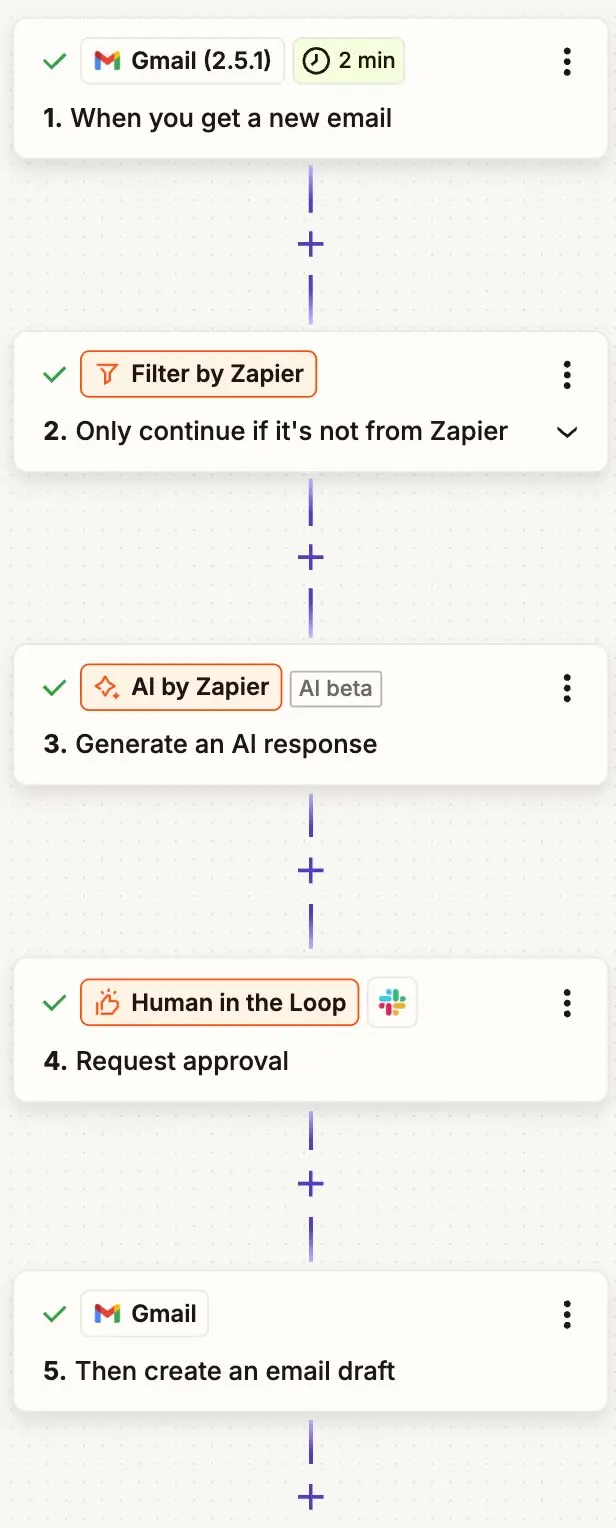
If your Zapier Agent is part of a Zap, you can include a Human in the Loop step like this. Otherwise, you'll just tell Zapier Agents when to pause and wait for human input. Then, once you give it the go-ahead, it'll keep working.
The key is knowing where to place these checkpoints. You don't want them everywhere—that defeats the purpose—but at the points where a wrong decision would actually hurt.
Good candidates for human review:
Customer-facing communications. Any message that goes to a customer should be reviewed until you're confident the agent consistently meets your standards.
Financial or legal actions. Creating invoices, modifying contracts, updating payment information—anything where an error has real financial or legal consequences.
Data modifications that are hard to reverse. This is things like deleting records, merging duplicates, and changing access permissions. If undoing the action would be painful, add a checkpoint.
Escalation decisions. When an agent decides whether to escalate a ticket or flag a lead as high-priority, a human should verify the judgment call.
Where you probably don't need review:
Routine data enrichment
Internal notifications
Logging
Pulling reports
Any action that's easily reversible and low-stakes
Think of it like onboarding a new employee. You check their work closely at first, then gradually give them more autonomy as they prove themselves.
Screen what flows through your agents
AI agents process content from external sources: customer emails, form submissions, web scraped data, API responses, the list goes on. Not all of that content is safe, and not all of it should flow through your systems unchecked.
Zapier offers AI Guardrails, a built-in app (included on all plans) that screens content for specific risks before it reaches your agent or after the agent generates a response. The risks worth screening for:
Personally identifiable information (PII). Customer messages and form submissions may contain government IDs, financial account numbers, or other sensitive data that shouldn't be stored or forwarded to certain systems.
Prompt injection. An attacker embeds instructions in an email or form submission designed to manipulate your agent's behavior. If your agent processes external content, screening for prompt injection should be a baseline safeguard.
Toxic or harmful content. If your agent generates customer-facing responses, screen the output for toxicity before it reaches the customer.

One important caveat: no AI detection system catches everything. False positives and false negatives happen. Treat content screening as one layer in your safety strategy, not the entire strategy. Combine it with scoped permissions (so even if a prompt injection succeeds, the agent can't do much damage) and human oversight for anything high-stakes. Defense in depth is the principle that matters.
Monitor and iterate over time
Building a safe agent isn't a one-time exercise. Zapier provides an activity dashboard that tracks every agent run, along with "needs action" alerts for situations requiring human attention. What to watch for:
Success and failure rates. If an agent that was running smoothly starts failing more often, something changed. Catch these trends early.
Quality of decisions. Periodically review a sample of your agent's outputs. Automated checks catch obvious failures, but human review catches quality drift.
Edge cases. Pay attention to the cases where your agent couldn't complete its task. These are where you'll find gaps in your instructions and opportunities to improve.
Set a regular cadence for reviewing performance. Spot-check outputs, then adjust instructions or guardrails based on what you find. This is maintenance, not micromanagement.
4 principles for trustworthy AI agents
Design for the failure case, not the happy path. Build agents that fail gracefully: they route to a human, log the issue, and don't take irreversible action when uncertain.
Earn trust incrementally. Start with low-stakes, easily reversible tasks. Expand scope only after the agent has proven reliable.
Combine multiple layers of safety. The strongest setups layer scoped permissions, content screening, human checkpoints, and monitoring so each layer catches what the others miss.
Automate the monitoring, not just the work. Set up alerts for failure rates, quality thresholds, and cost limits so you find out about problems before your customers do.
Safe AI agents FAQ
Do I need technical skills to build safe AI agents with Zapier?
No. Zapier Agents are built using plain-language instructions and a no-code interface—and it's just as simple to build safety into your agents. You can add AI Guardrails directly to your agent's instructions with just a few clicks, or add a Human in the Loop step when you call an agent into a Zap. Or simply tell your agent in its instructions to pause and wait for your approval before taking certain actions.
What is AI Guardrails by Zapier?
AI Guardrails is a built-in Zapier tool (included on all plans) that adds safety checks to Zaps, Agents, and Zapier MCP workflows. It can detect personally identifiable information, prompt injection attempts, toxic content, and negative sentiment. You add it as a step in your workflow, and it screens content before or after your agent processes it.
What is Human in the Loop?
Zapier's Human in the Loop tool lets you pause any Zap at a critical decision point. A reviewer gets notified (via email, Slack, or a secondary Zap), reviews the agent's proposed action, and approves, rejects, or edits it before the workflow continues.
How much human oversight is the right amount?
It depends on the stakes. For customer-facing actions, financial operations, and hard-to-reverse data changes, start with human review on every action and reduce over time. For internal notifications, data enrichment, and easily reversible tasks, you can often skip review from the start. The general rule: if a wrong decision would hurt a customer, cost money, or be difficult to undo, add a checkpoint.
What happens if my agent encounters something it wasn't designed for?
That depends on how you built it. A well-designed agent that uses safety checkpoints like Human in the Loop and AI Guardrails will route unexpected inputs to a human reviewer, log the exception, and continue processing other tasks. A poorly-designed agent will guess, take action, and potentially create a mess.
How do I know if my agent is performing well over time?
Use Zapier's activity dashboard to track success and failure rates across agent runs. Set up "needs action" alerts for situations that require attention. Beyond automated monitoring, schedule regular reviews where you spot-check outputs for quality, accuracy, and brand alignment.
Related reading: