
Slack a plus de 2,600 applications dans son répertoire d’applications. Beaucoup d’entre eux sont utiles : par exemple, l’application Vercel de Slack est excellente si vous hébergez des projets de développement web, mais elle n’a aucun attrait en dehors de cela.
Mais la plupart des entreprises utilisant Slack ont les mêmes besoins larges : communication, team building, gestion de projet, automatisation, intégration et réalisation de travail sans beaucoup de changement de contexte. Et bien sûr, un peu de plaisanterie. Les applications Slack peuvent aider pour tout ça. Et avec les capacités d’IA embarquées, elles deviennent de plus en plus un moyen de travailler plutôt que de simplement discuter de leur travail.
J’ai testé des dizaines d’applications Slack susceptibles de plaire à un large public d’équipes hybrides et à distance. Voici les meilleures applications Slack que j’ai trouvées.
Table des matières:
Qu'est-ce qu'une application Slack ?
Une appli Slack est un module complémentaire utile qui fonctionne avec Slack pour automatiser les tâches et les flux de travail, intégrer des outils tiers ou aider votre équipe à vivre une meilleure expérience dans votre espace de travail Slack. Considérez-le comme un assistant virtuel qui vit dans vos canaux Slack, prêt à passer à l’action.
Certaines applications Slack sont des intégrations simples et à usage unique, comme celles qui relient Google Drive à Slack ou vous rappellent quand l’anniversaire de vos collègues approche. D’autres, en particulier les nouvelles applications Slack compatibles avec IA, agissent davantage comme un véritable membre de l’équipe : ils peuvent maintenir leur contexte, travailler seuls et suivre des projets sans qu’on les demande.
Comment ajouter une appli Slack à votre espace de travail
"Voici un guide rapide étape par étape pour ajouter une appli Slack :"
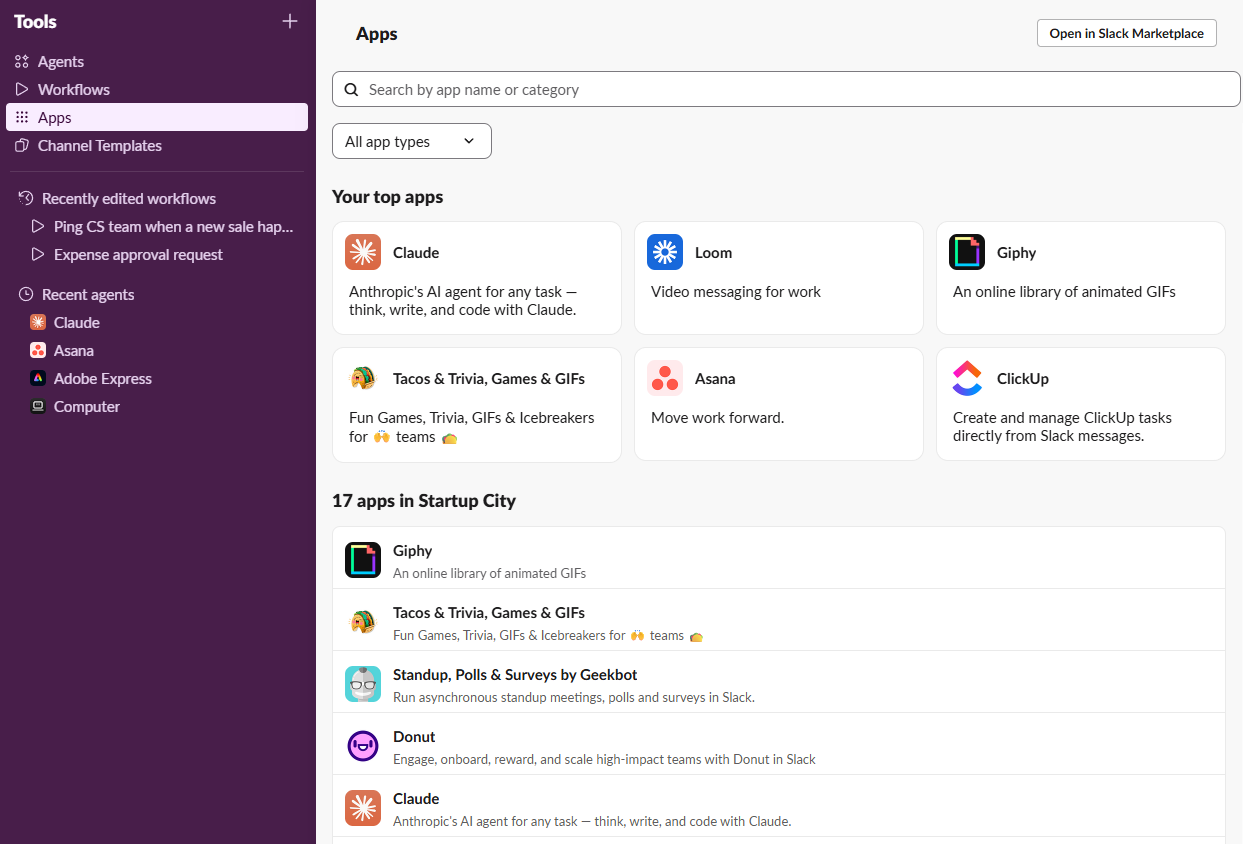
Visitez le marché Slack pour parcourir toutes les applications Slack disponibles. (Vous pouvez aussi chercher depuis votre espace de travail Slack : cliquez sur Outils dans la barre latérale, puis sur Applications, et cherchez l’application que vous souhaitez ajouter.)
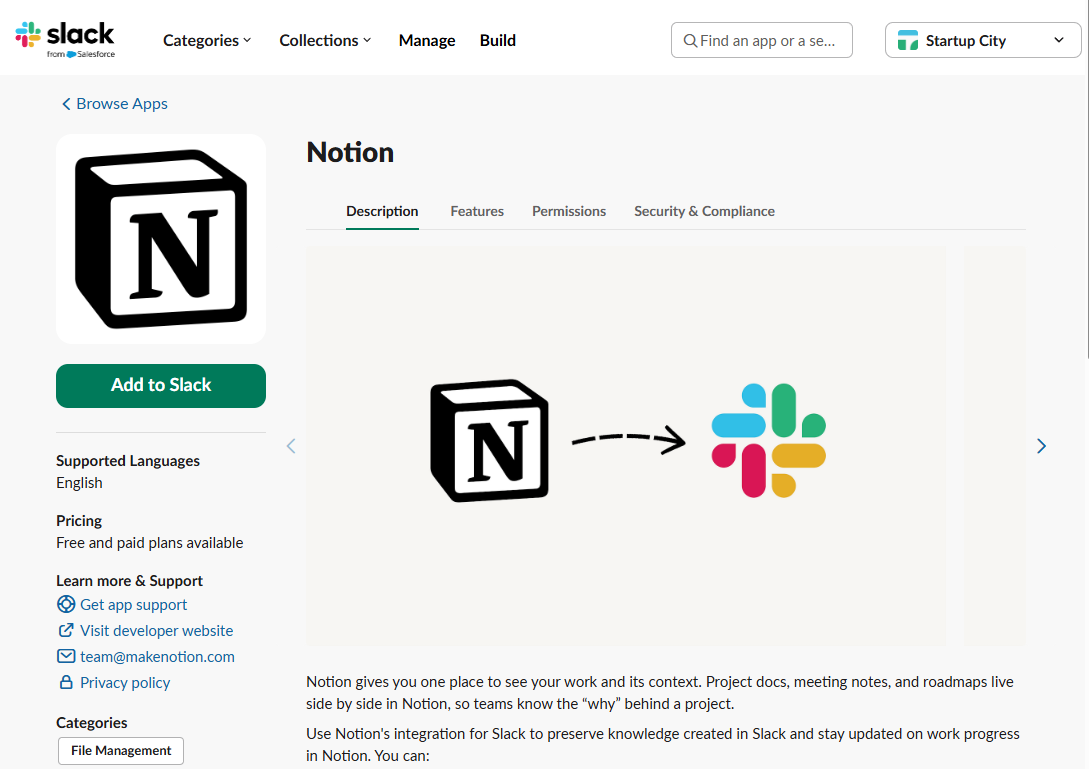
Installez l’appli de votre choix en cliquant sur Ajouter à Slack.
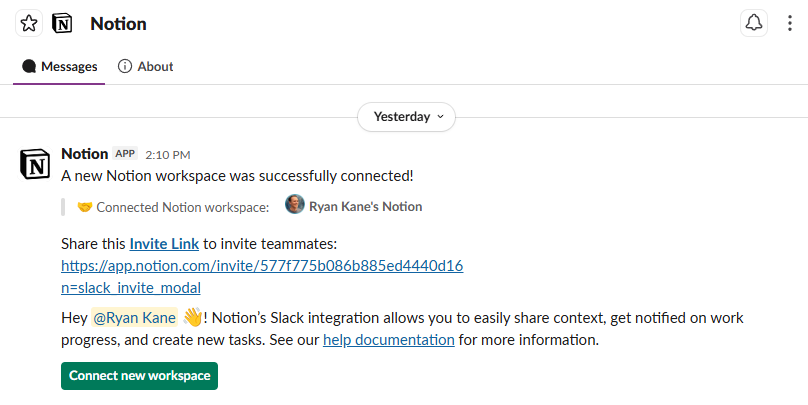
Configurez les paramètres de votre appli dans Slack. Le robot vous guidera à travers tout ce que vous devez faire.


Les meilleures appli Slack en un coup d’œil
Quelques-unes de ces applications Slack sont autonomes, et elles commencent à fonctionner dès que vous les installez. Mais vous ne pouvez pas utiliser l’application ClickUp Slack sans avoir un compte ClickUp, et c’est pareil pour la plupart des autres applications de cette liste. Si vous ne voyez pas vos outils préférés ci-dessous, vous les trouverez probablement sur le marché Slack. Sinon, vous pouvez créer votre propre connexion Slack avec Zapier, qui se connecte à 9,000+applications.
Catégorie | Ce qu'il fait | |
|---|---|---|
Gestion de projet | Créer, mettre à jour et recevoir des notifications pour les cartes Trello dans Slack | |
Gestion de projet | Création de tâches, attribution et réglage de la date d’échéance dans Slack | |
Gestion de projet | Création de tâches, mises à jour de projets et mises à jour de l’état des tâches dans Slack | |
Productivité | Aperçus de liens pour la documentation et les bases de données Notion, ainsi que des notifications de @mention et des alertes de modification de base de données | |
Productivité | Affichage de l'agenda quotidien, rappels des réunions, réponse aux invitations aux réunions sur Slack ; mises à jour automatisées du statut de Slack | |
Productivité | Notifications concernant les modifications apportées aux documents, aux commentaires et aux fichiers partagés sur Slack | |
Productivité | Automatise les flux de travail entre Slack et des milliers d’autres applications et services | |
Productivité | Synchronise automatiquement votre statut avec votre calendrier, protège le temps de concentration et retrouve les horaires des réunions | |
Productivité | Automatise les processus d'approbation ; gère la collecte des approbations des parties prenantes et la mise à jour des demandeurs | |
Communication | Démarrez ou rejoignez des visioconférences directement depuis Slack ; Planification et rejoindtion simplifiées des appels | |
Communication | Partage des messages vidéo de manière asynchrone sur les chaînes Slack ; enregistre l'écran ou la webcam pour des messages détaillés | |
Communication | Notifications automatiques du calendrier sur Slack, ainsi que des aperçus de liens enrichis et un aperçu des réunions quotidiennes | |
Communication | Des stand-ups et des check-ins asynchrones, ainsi que des aperçus alimentés par l’IA qui surveillent l’humeur et révèlent les sujets fréquemment mentionnés | |
AI | agent d'IA polyvalent qui recherche, se connecte à vos autres outils et réalise des tâches directement depuis Slack | |
AI | Le coéquipier IA d’Anthropic pour Slack ; désormais connu sous le nom de Claude Tag, il possède la mémoire d’équipe, des suggestions proactives et la capacité de lancer du travail asynchrone depuis le chat | |
AI | l’application Slack d’OpenAI ; discussion dans la barre latérale pour les questions, les brouillons et le brainstorming ; taguez ChatGPT n’importe où sur Slack pour des réponses rapides et des résumés | |
AI | Générez et modifiez des visuels dans Slack en utilisant les outils de conception IA de Canva, avec des kits de marque et des modèles pour rester fidèle à la marque | |
Engagement et consolidation d’équipe | Robot de reconnaissance pair-à-pair ; vous pouvez envoyer des éloges publics, accumuler des points et lier la reconnaissance aux valeurs de l’entreprise | |
Engagement et consolidation d’équipe | Créez des enquêtes et des sondages complexes, mesurez le sentiment de l'équipe et organisez des check-ins ou des quiz | |
Engagement et consolidation d’équipe | Associez les membres de l'équipe à des pauses-café, à des déjeuners ou à des séances de mentorat virtuels ; lancez des conversations informelles | |
Amusant | Ajoutez des brise-glaces, des anecdotes, des jeux de mots et des classements dans votre espace de travail | |
Amusant | Informe automatiquement des prochains anniversaires ; publie des messages de fête sur les chaînes Slack | |
Amusant | Apporte des GIF animés dans les canaux Slack ; ajoute de la légèreté et de la spontanéité aux interactions d’équipe |
Les meilleures appli Slack pour la gestion de projet
Vous n’allez probablement pas migrer vers un tout nouvel outil de gestion de projet vu la force de son intégration Slack. Dans cette optique, la meilleure appli Slack pour la gestion de projet est l'outil de gestion de projet que votre équipe utilise déjà, donc commencez par là. Sinon, envisagez de choisir l’un de ces programmes.
Trello
Trello a popularisé le style Kanban board de gestion de projet visuelle, il n’est donc pas surprenant que l’appli Trello pour Slack permette de créer de nouvelles cartes, de mettre à jour celles existantes et de recevoir des notifications directement dans Slack. Vous pouvez aussi ajouter un emoji pour enregistrer les messages Slack dans votre boîte de réception Trello, ou cliquer sur n’importe quel message et sélectionner « Créer une carte depuis Trello » pour remplir automatiquement une carte en fonction des détails du message.

Asana
À l’instar de Trello, l’appli Slack d’Asana vous permet de créer facilement des tâches, de les attribuer aux membres de l’équipe et de définir des dates d’échéance directement à partir de vos conversations Slack. Vous pouvez également lier un projet à un canal Slack spécifique, qui publie les mises à jour du projet directement sur ce canal en temps réel, ce qui permet à tout le monde d’être sur la même longueur d’onde sans quitter Slack.
Et si vous êtes abonné à l’un des formules payantes d’Asana, vous pouvez utiliser Asana AI sur Slack pour obtenir des résumés de projets, des informations et des recommandations alimentés par l’IA.

ClickUp
L’application ClickUp Slack vous permet de créer des tâches, de les ajouter à des projets spécifiques, et même de mettre à jour les statuts des tâches sans jamais quitter votre espace de travail Slack. Vous pouvez aussi convertir les messages Slack en tâches exploitables, ou laisser des commentaires directement depuis Slack. Les riches aperçus de liens de ClickUp sont particulièrement utiles, facilitant la compréhension du contexte d’un projet d’un simple coup d’œil. Et vous pouvez aussi envoyer des objets de Slack directement à un « Super Agent » ClickUp alimenté par l’IA pour qu’il puisse agir.

Les meilleurs robots Slack pour la productivité
Le relâchement peut augmenter votre productivité — voire la vider complètement. Plutôt que d’ajouter un élément supplémentaire de saturation numérique, ces applications Slack valent la peine d’être installées car elles facilitent votre travail existant.
Notion
Beaucoup d’équipes utilisent Slack pour le chat interne et Notion pour leur base de connaissances, la documentation et les wikis. Plutôt que de passer constamment d’un à l’autre, vous pouvez utiliser l’application Slack de Notion pour créer une page de base de données Notion à partir d’un message et recevoir des notifications concernant des modifications dans Notion. Vous pouvez aussi coller un lien Notion dans Slack et obtenir un résumé généré automatiquement par IA du contenu.

Calendrier Google
L’application Google Calendar vous maintient dans le planning sans quitter Slack. Vous pouvez voir votre agenda quotidien directement sur Slack, et vous recevrez des rappels à l’heure de la réunion. Vous pouvez même répondre directement aux invitations de réunion depuis Slack, sans ouvrir une nouvelle fenêtre du calendrier Google.
L’application Google Agenda est particulièrement utile pour les équipes travaillant sur différents fuseaux horaires, car elle simplifie la planification et permet à tout le monde de rester aligné. Il met également automatiquement à jour ton statut Slack à " En réunion " lorsque tu es occupée, afin que tous ceux qui t'envoient un message sachent que tu n'es pas disponible pour le moment.

Google Drive
Pour les équipes qui dépendent fortement de Google Drive, l’application Slack de Google Drive est indispensable. Il vous informe directement sur Slack des modifications apportées aux documents, commentaires et fichiers partagés, afin que vous sachiez immédiatement si quelqu’un a laissé un commentaire — et vous pouvez aussi y répondre depuis Slack. Lorsque quelqu’un demande l’accès à un fichier Drive, vous recevrez immédiatement une notification Slack qui vous permet de gérer rapidement la demande depuis la discussion. Vous pouvez même créer de nouveaux documents, diapositives et feuilles sans quitter Slack.

Si vous utilisez un autre système de gestion de fichiers, comme Box ou Dropbox, ils ont également des appli Slack.
Zapier
Zapier élève la productivité de Slack à un autre niveau en reliant votre espace de travail à 9,000+ autres applications et services. Avec l’application Zapier Slack, vous pouvez automatiser les flux de travail entre Slack et tous les autres outils utilisés par votre équipe, y compris les CRM, les plateformes de marketing par e-mail et les outils de gestion de projet. Qu’il s’agisse de créer automatiquement des messages Slack en fonction de l’activité dans d’autres applications ou de publier des mises à jour depuis Slack vers d’autres plateformes, Zapier permet d’automatiser presque toutes les tâches.

Vous pouvez même utiliser Zapier MCP pour connecter Slack (et le reste de vos outils) à votre assistant d'IA comme Claude ou ChatGPT, donc que vous viviez dans une fenêtre Slack ou dans un chat IA, vous pouvez agir à travers votre pile technologique sans changer d’onglet.
Découvrez comment automatiser Slack avec Zapier, ou commencez par vous-même.
Reclaim.ai
Reclaim, qui appartient à Dropbox, synchronise automatiquement votre statut Slack avec votre calendrier, afin que les collègues voient « En réunion » ou « Temps de concentration » sans que vous ayez fait de travail manuel. Il peut aussi déclencher le mode Ne pas déranger, ou vous aider à planifier rapidement du temps avec vos collègues en utilisant des consignes comme « trouvez 30 minutes avec @Serena cette semaine ».
Alors que Slack dispose désormais de ses propres fonctions intégrées pour des choses comme le mode Focus, Reclaim est bien plus flexible : vous pouvez créer des blocs « Habitudes » récurrents pour des choses comme les routines, le travail intense et le temps personnel.

L'approuver
L’application Approveit Slack automatise directement les processus d’approbation dans Slack, facilitant la gestion de tout, des approbations de factures aux demandes de congé.
Dans les cas où plusieurs personnes doivent approuver une décision, Approveit peut informer toutes les parties prenantes puis mettre à jour le demandeur une fois que tout le monde a approuvé. Vous pouvez même déléguer votre autorité d’approbation à quelqu’un d’autre pendant votre absence (pour éviter d’être submergé par un tsunami de demandes non traitées après votre retour de vacances).
L’IA a beaucoup facilité ces choses. Si c’est vous qui faites une demande, vous pouvez télécharger des documents sur Slack, et Approveit extraira les données, remplira à l’avance les formulaires nécessaires et préparera la demande pour que vous puissiez la revoir. Et si vous êtes manager ou membre de l’équipe financière avec des questions sur les anciennes approbations, ces données sont à portée de main sur Slack en quelques secondes.

Les meilleurs robots Slack pour la communication
Taper des messages toute la journée peut sembler limitant. Parfois, vous avez besoin de voir des visages, d’entendre des voix, et de vous rappeler que votre plante succulente et votre tasse de café à moitié vide ne sont pas vos seuls collègues. Que vous souhaitiez discuter lors d’un appel vidéo tranquille ou gagner du temps avec des mises à jour asynchrones, ces applications Slack axées sur la communication peuvent vous aider.
Zoom
L’application Zoom pour Slack vous permet de lancer ou de rejoindre des réunions vidéo directement depuis votre espace de travail Slack. Cela simplifie le processus de planification et de rejoint les appels, facilitant le passage des discussions par texto aux conversations en face à face. Il suffit de taper une simple commande de barre oblique (/zoom), et votre réunion peut commencer.
Une fois votre réunion terminée, l’AI Companion de Zoom se déclenche, et vous recevrez automatiquement des résumés générés par l’IA dans Slack. Si vous n’avez pas assisté à la réunion, vous pouvez poser des questions comme « Mon nom a-t-il été mentionné ? » En option, Zoom peut également créer automatiquement un canal Slack privé pour les réunions Zoom ; les participants internes sont automatiquement ajoutés, tout comme tous les éléments post-réunion, tels que les résumés, enregistrements et liens de discussion.

Métier à tisser
Slack propose désormais une solution vidéo asynchrone native appelée Clips, qui fonctionne bien pour les vidéos internes de moins de cinq minutes. Mais parfois, il vous faut des extraits vidéo plus longs — comme des formations, des démonstrations ou des explications détaillées — et vous avez besoin de pouvoir les partager sur d’autres plateformes. Loom reste la meilleure option pour ça. L’application Loom Slack vous permet de regarder des métiers intégrés directement dans Slack, et vous pouvez aussi commencer à les enregistrer là-bas.

Calendly
Si la plupart de vos réunions sont avec des clients externes ou des partenaires, il y a de fortes chances que vous utilisiez Calendly pour les programmer. L’application Calendly Slack vous tient informé avec des notifications automatiques de réunion directement sur Slack chaque fois qu’un événement est programmé, reprogrammé ou annulé, afin que vous puissiez rapidement adapter votre emploi du temps aux changements de dernière minute.
Lorsque vous collez des liens Calendly sur Slack, vous obtiendrez des aperçus riches de liens avec des informations importantes sur votre réunion. Vous pouvez également consulter toutes vos réunions Calendly programmées pour la journée depuis Slack sur la page d’accueil de l’application.

Geekbot
Si vous avez déjà vécu la redoutée « réunion qui aurait dû être un e-mail », vous savez à quel point il est important d’agir avec prudence lorsque vous demandez de la place dans l’agenda de vos collègues. Avec l’application Slack de Geekbot, vous pouvez utiliser des séances asynchrones debout et des suivis pour rester pleinement informé de ce que fait votre équipe sans perturber leur journée.
Au lieu de s’engager dans un chat vidéo quotidien de 15minutes (qui implique généralement beaucoup d’écoute des rapports d’état des collègues), votre équipe reçoit des questions automatisées de Geekbot dans leurs messages privés Slack. Geekbot consolide les réponses et partage les résultats ; il collecte également l'analytique des sentiments et les tendances au fil du temps. En plus des stand-ups, vous pouvez aussi utiliser Geekbot pour des rétrospectives, des sondages et des enquêtes, et il existe des modèles pour des cas d’usage courants comme le développement de produits et les processus RH.

Les meilleurs robots Slack AI
Alterner entre plusieurs outils d’IA et Slack crée des frictions inutiles dans votre flux de travail. Les applications IA Slack intègrent des fonctionnalités puissantes d’intelligence artificielle directement dans vos canaux Slack, vous permettant de générer du contenu, d’analyser des données et d’obtenir des réponses intelligentes avec une commande rapide de barre blanche. Ils intègrent aussi de plus en plus les activités d’agents dans Slack, ce qui vous permet de déléguer le travail aux agents comme s’ils étaient collègues — et de réaliser des projets entiers sans quitter le confort de votre fenêtre de chat.
Ordinateur de perplexité
L’application Slack de Perplexity servait autrefois d’assistant de recherche. Aujourd’hui, c’est une version intégrée de Perplexity Computer, un agent d'IA polyvalent. Quand vous @Computer identifiez dans une chaîne ou un message privé, il peut rechercher sur le web, puiser dans votre historique Slack et se connecter à d’autres outils ; il va alors plus loin et accomplit réellement la tâche pour vous. En coulisses, Perplexity Computer dispose d’un véritable système de fichiers, d’un navigateur et d’intégrations, fonctionne dans un environnement isolé, et peut concevoir des flux de travail entiers et les exécuter pendant des heures voire des jours.

Claude Tag
L’application Slack de Claude a fait de grands progrès récemment. Il s’appelle désormais Claude Tag, et il se concentre moins sur le rôle d’assistant d'IA que sur le fait d’être un véritable membre de l’équipe au sein de Slack. Par exemple, lorsque vous identifiez Claude pour des tâches de codage, il posera toutes les questions nécessaires, terminera les tâches de façon asynchrone, puis vous fera un rapport une fois terminées. Chaque chaîne a son propre Claude, avec sa propre mémoire et contexte qui ne saute pas d’une chaîne à l’autre. Et si vous activez l’option « Comportement ambiant », Claude vous informera aussi de manière proactive s’il pense que vous devez savoir quelque chose, et vous recommandera les prochaines étapes.

Note: Claude a retiré son appli Slack « legacy » originale, qui était plutôt un simple assistant d'IA. Vous avez besoin d’une formule Claude Team ou entreprise pour utiliser les nouvelles fonctionnalités Claude Tag. (J’ai essayé d’utiliser l’application Slack de Claude avec un compte Claude Pro et je n’ai rien réussi à faire fonctionner.)
ChatGPT
OpenAI a aussi sa propre application officielle Slack. Il fonctionne principalement comme un 1:1 discussion dans la barre latérale : vous pouvez l’ouvrir, poser une question et obtenir des réponses. Contrairement à Claude Tag, l’application Slack de ChatGPT ne propose pas (encore) de suggestions ambiantes ni ne conserve le contexte et la mémoire persistants de tout votre canal.

Canva
Et si vous pouviez itérer sur le contenu visuel directement depuis Slack ? L’application Canva Slack convient parfaitement aux chaînes Slack #design et #brainstorming où les visuels sont plus puissants que le texte. Vous pouvez rapidement générer des images, créer des flyers ou concevoir des publications sur les réseaux sociaux directement depuis la fenêtre de discuter.
En plus de générer des visuels IA à la volée, l’intégration Slack de Canva inclut de nombreuses fonctionnalités de collaboration : vous pouvez recevoir des notifications lorsque votre design est mis à jour, répondre aux commentaires et @mentions Canva, et même modifier les permissions directement dans Slack pour que d’autres puissent accéder à vos designs Canva.

Les meilleures appli Slack pour l’engagement et le renforcement de l’esprit d’équipe
Les espaces de travail numériques exigent autant de travail d’équipe que ceux en présentiel, voire plus. L’essentiel est de se concentrer sur les petits détails : chaque petite interaction qui se produit au cours d’une journée de travail a un impact sur cette chose amorphe que nous appelons la « culture d’entreprise ». Les applications Slack peuvent favoriser le type d’interactions que vous souhaitez, vous aidant à transformer un groupe d’individus à distance en une communauté soudée.
Karma
Dans certaines organisations, la reconnaissance a tendance à... ne pas se produire avant certains jalons imposés par le calendrier, comme un événement de fin de trimestre ou une retraite annuelle d’équipe. Avec Karma, il est si facile de reconnaître ses collègues qu’il est difficile de ne pas le faire. Tout ce que vous avez à faire depuis Slack, c’est @mention vos collègues comme vous le feriez normalement, puis ajouter « ++ » à leur nom d’utilisateur accompagné d’un commentaire. Ils recevront instantanément la reconnaissance que vous avez valorisé leur contribution, ainsi que des points Karma qui pourront être utilisés pour des choses comme les cartes cadeaux Amazon.

Polly
La convention classique de Slack pour prendre des décisions de base en groupe consiste à ajouter quelques emojis à votre publication — chacun représentant une option — et à demander à votre équipe de cliquer sur l’option pour laquelle elle souhaite « voter ». Cela fonctionne bien, par exemple, pour choisir entre burgers et sushis, mais c’est trop léger pour les décisions d’équipe plus grandes. Polly va encore plus loin en permettant des enquêtes et sondages plus complexes, avec des analytiques et des informations. Vous pouvez utiliser Polly pour mesurer l’esprit de l’équipe, organiser des séances de représentation ou des bilans réguliers, ou même organiser des quiz amusants pour briser la monotonie de la journée de travail.

Donut
Donut met en relation les membres de l’équipe pour des pauses café virtuelles, des déjeuners ou des séances de mentorat, encourageant des présentations informelles et des connexions qui ne se produiront pas dans le cadre habituel du travail (surtout si vous travaillez à distance). Donut peut aussi susciter des conversations amusantes à la machine à café, envoyer des messages de célébration et permettre à votre équipe de rendre hommage virtuellement à ses collègues. Et si vous utilisez intensivement Slack pour les ressources humaines, Donut systématise ces interactions en vous permettant d’inscrire des employés dans des « Parcours » Slack prédéfinis avec des points de contact programmés pour des processus comme l’intégration, la formation, les événements et le déplacement.

Les meilleures appli Slack pour s’amuser
Comme le personnage de Jack Nicholson dans Shining tapa obsessionnellement alors qu’il vacillait au bord de la raison : « Tout travail et pas de jeu fait de Jack un garçon ennuyeux. » Si ce n’est pas le genre de culture à distance que vous recherchez, installez quelques applications Slack pour le pur plaisir, des quiz aux applications GIF où vous pouvez — quoi d’autre ? — intégrer des mèmes de The Shining.
Tacos et anecdotes
Comment ne pas s’amuser avec une application appelée Tacos & Trivia? Vous pouvez lancer des parties rapides à deux joueurs comme Pierre, Papier, Ciseaux, organiser des brise-glaces en groupe, ou défier votre équipe à des quiz hebdomadaires sur les films. Le meilleur, c’est qu’il y a un classement, ce qui vous permet de vous vanter d’avoir gagné semaine après semaine. Et oui, il y a un vrai but à justifier toute cette fête comme une dépense professionnelle : cela aidera votre équipe à se sentir plus proche, surtout si vous travaillez à distance.

BirthdayBot
Célébrer les anniversaires des membres de votre équipe à distance peut être difficile. BirthdayBot facilite les choses : il informe automatiquement votre équipe des anniversaires et anniversaires de travail à venir, puis publie des messages de célébration dans un canal d’équipe. Elle s’est étendue au-delà des anniversaires — elle offre désormais aussi la reconnaissance des pairs et des cartes cadeaux — mais c’est toujours la meilleure et la plus simple façon de s’assurer que tout le monde dans votre équipe reçoive une carte virtuelle et un flot de messages lors de leur journée spéciale.


GIPHY
Tout le monde aime un bon GIF. Remercions notre bonne étoile qu’ils soient considérés comme appropriés pour des environnements professionnels, car sans eux, votre conversation au travail serait une série de mises à jour de projet ennuyeuses. Heureusement, l’application GIPHY Slack intègre des GIFs animés dans vos chaînes Slack. Pour en poster un, il suffit d’utiliser la commande /giphy slash et de cliquer sur « Shuffle » jusqu’à trouver le GIF qui capture parfaitement votre humeur. Lorsque vous configurez votre intégration GIPHY, vous pouvez choisir d’autoriser ou non des GIFs osés en sélectionnant parmi un ensemble de classifications de style film (G, PG, PG-13, R).

Créez votre propre robot Slack
Vous trouverez probablement les applications dont vous avez besoin dans le vaste annuaire d’applications de Slack. Mais parfois, il faut quelque chose d’un peu plus sur mesure. C’est là que la magie de Zapier entre en jeu, vous permettant de créer votre propre robot Slack personnalisable.
Avec Zapier, vous pouvez créer un bot Slack qui fait exactement ce dont vous avez besoin, comme vous le souhaitez. Imaginez un robot capable d’extraire l’analytique de votre plateforme de vente vers un canal Slack chaque matin, ou un robot qui organise automatiquement les soumissions de projets dans un dossier partagé et notifie l’équipe via Slack.
Ou, si vous travaillez déjà dans un assistant d'IA comme Claude ou ChatGPT, Zapier MCP permet à votre IA d’agir sur Slack — et sur 9,000+ autres applications — sans que vous quittiez jamais la fenêtre de chat.
Lectures connexes :
5 fonctionnalités avancées pour les utilisateurs expérimentés de Slack
Slack Workflow Builder : 9 exemples de flux de travail Slack pour automatiser votre entreprise
Comment te débarrasser de tes mauvaises habitudes avec Slack
Utilisez Slack MCP pour prendre une action dans vos outils d’IA
Cet article a été publié à l’origine en mars 2024 par Hsing Tseng. La dernière mise à jour date d’août 2026.


