
Slack hat mehr als 2600 Anwendungen in seinem Anwendungs-Verzeichnis. Viele davon sind nur begrenzt nützlich: Zum Beispiel ist Slacks Vercel-Anwendung großartig, wenn du Webentwicklungsprojekte hostest, aber sie hat außerhalb davon keinen Reiz.
Aber die meisten Unternehmen, die Slack nutzen, haben dieselben breiten Bedürfnisse: Kommunikation, Teambuilding, Projektmanagement, Automatisierung, Onboarding und Aufgaben ohne viel Kontextwechsel erledigen. Und natürlich ein bisschen Herumalbern. Slack-Anwendungen können bei all dem helfen. Und mit eingebetteten KI-Fähigkeiten werden sie zunehmend zu einer Möglichkeit, Arbeit zu erledigen , anstatt nur über das Erbringen zu Chat .
Ich habe Dutzende von Slack-Anwendungen getestet, die wahrscheinlich eine breite Zielgruppe von Hybrid- und Remote-Teams ansprechen. Hier sind die besten Slack-Anwendungen, die ich gefunden habe.
Inhalt:
Was ist eine Slack-Anwendung?
Eine Slack-Anwendung ist ein hilfreiches Add-on, das mit Slack zusammenarbeitet, um Aufgaben und Workflows zu automatisieren, Drittanbieter-Tools zu integrieren oder Ihrem Team ein besseres Erlebnis in Ihrem Slack-Arbeitsbereich zu ermöglichen. Stell es dir wie einen virtuellen Assistenten vor, der in deinen Slack-Kanälen lebt und bereit ist, sofort zur Aktion überzugehen.
Einige Slack-Anwendungen sind einfache, einzweckorientierte Integrationen, wie die, die Google Drive mit Slack verknüpfen oder daran erinnern, wann die Geburtstage deiner Kollegen bevorstehen. Andere, insbesondere die neueren KI-gestützten Slack-Anwendungen, verhalten sich eher wie ein echtes Teammitglied: Sie können den Kontext pflegen, eigenständig arbeiten und Projekte verfolgen, ohne gefragt zu werden.
So fügst du eine Slack-Anwendung zu deinem Workspace hinzu
Hier ist eine kurze Schritt-für-Schritt-Anleitung zum Hinzufügen einer Slack-Anwendung:
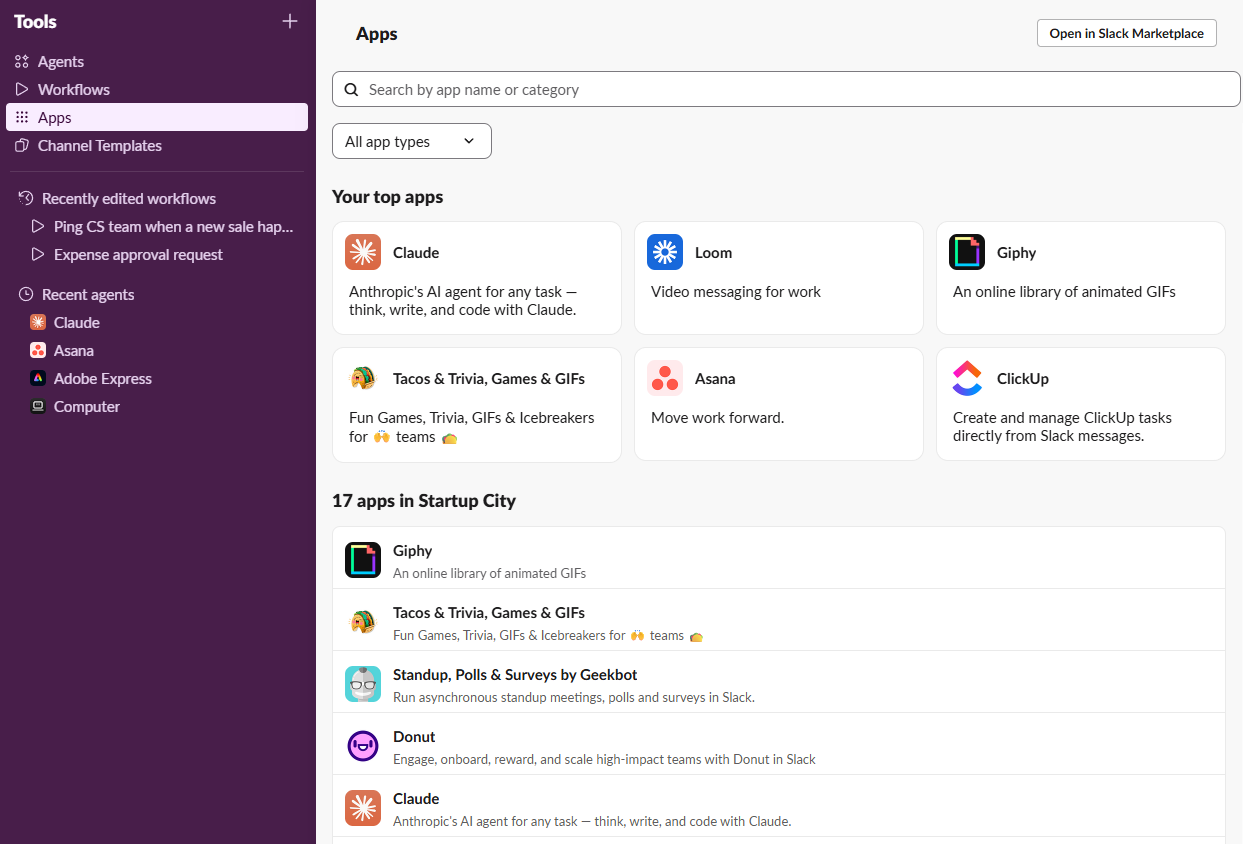
Besuchen Sie den Slack-Marktplatz, um alle verfügbaren Slack-Anwendungen zu durchstöbern. (Du kannst auch innerhalb deines Slack-Arbeitsbereichs suchen: Klicke in der Seitenleiste auf Tools , dann auf Anwendungen und suche nach der Anwendung, die du hinzufügen möchtest.)
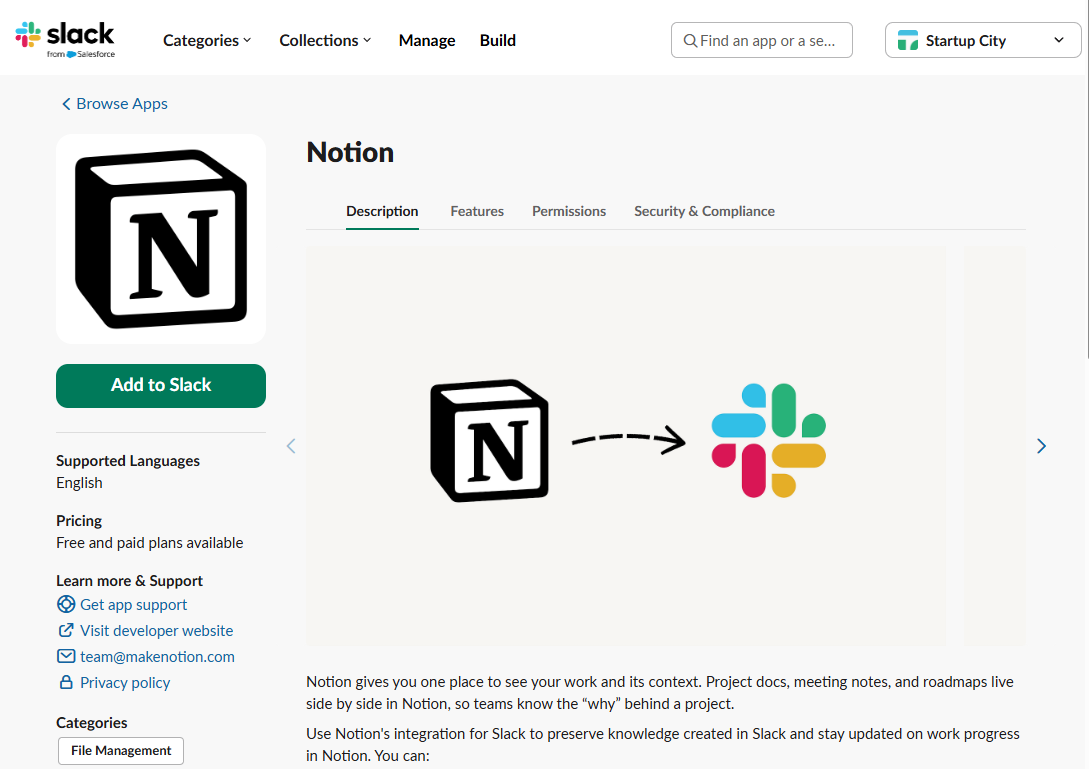
Installiere die gewünschte Anwendung, indem du auf „Zu Slack hinzufügen” klickst.
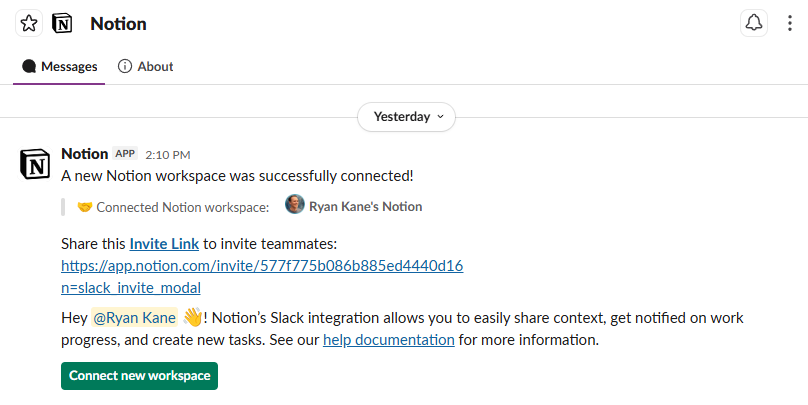
Konfigurier deine App-Einstellungen in Slack. Der Bot zeigt dir alles, was du machen musst.


Die besten Slack-Anwendungen auf einen Blick
Einige dieser Slack-Anwendungen sind eigenständige Anwendungen und beginnen sofort zu funktionieren, sobald du sie installierst. Aber du kannst die ClickUp Slack-Anwendung nicht ohne ein ClickUp-Konto nutzen, und das gilt auch für die meisten anderen Anwendungen auf dieser Liste. Wenn du unten deine bevorzugten Tools nicht siehst, findest du sie wahrscheinlich auf dem Slack-Marktplatz. Wenn nicht, kannst du deine eigene Slack-Verbindung mit Zapier erstellen, die sich verbindet mit 9,000+ Anwendungen.
Kategorie | Was es tut | |
|---|---|---|
Projektmanagement | Erstellen, Aktualisieren und Empfangen von Benachrichtigungen für Trello-Karten in Slack | |
Projektmanagement | Aufgaben erstellen, zuweisen und Termine festlegen in Slack | |
Projektmanagement | Aufgaben erstellen, Projekte aktualisieren und den Status von Aufgaben in Slack checken | |
Produktivität | Link-Vorschauen für Notion-Dokumente und -Datenbanken sowie @mention Benachrichtigungen und Datenbankänderungswarnungen | |
Produktivität | Tägliche Agenda-Ansicht, Meeting-Erinnerungen, Antworten auf Meeting-Einladungen in Slack; automatisierte Slack-Statusaktualisierungen | |
Produktivität | Benachrichtigungen über Änderungen an Dokumenten, Kommentaren und freigegebenen Dateien in Slack | |
Produktivität | Automatisiert Workflows zwischen Slack und tausenden anderen Anwendungen und Diensten. | |
Produktivität | Synchronisiert deinen Status automatisch mit deinem Kalender, schützt Fokuszeit und findet Termine der Meetings | |
Produktivität | Automatisiert Genehmigungsprozesse; kümmert sich um das Einholen von Genehmigungen von Beteiligten und das Aktualisieren von Anfragenden. | |
Kommunikation | Videokonferenzen direkt aus Slack starten oder beitreten; einfache Zeitplanung und Beitreten von Anrufen | |
Kommunikation | Teilen Sie Videonachrichten asynchron innerhalb von Slack-Kanälen; Nehmen Sie den Bildschirm oder die Webcam auf, um detaillierte Nachrichten zu erhalten | |
Kommunikation | Automatische Calendly-Benachrichtigungen in Slack sowie Rich-Link-Vorschauen und eine tägliche Meeting-Übersicht | |
Kommunikation | Asynchrone Standup-Meetings und Check-ins sowie KI-gestützte Einblicke, die die Stimmung im Team beobachten und häufig angesprochene Themen aufzeigen | |
KI | Allgemeiner KI-Agent, der sucht, sich mit deinen anderen Tools verbindet und Aufgaben direkt über Slack erledigt. | |
KI | Anthropics KI-Teamkollege für Slack; jetzt bekannt als Claude Tag, verfügt er über Teamgedächtnis, proaktive Vorschläge und die Möglichkeit, asynchrone Arbeit aus dem Chat zu starten | |
KI | OpenAIs Slack-Anwendung; Seitenbar-Chat für Fragen, Entwürfe und Brainstorming; Tagg ChatGPT überall in Slack für schnelle Antworten und Zusammenfassungen | |
KI | Erstellen und bearbeiten Sie visuelle Elemente innerhalb von Slack mit den KI-Designtools von Canva, mit Markenkits und Vorlagen, um am Brand zu bleiben | |
Engagement und Teambildung | Peer-to-Peer-Erkennungsbot; Sie können öffentliches Lob senden, Punkte sammeln und Anerkennung mit Unternehmenswerten verknüpfen | |
Engagement und Teambildung | Erstellen Sie komplexe Umfragen und Abstimmungen, messen Sie die Stimmung im Team und führen Sie Check-ins oder Quizfragen durch | |
Engagement und Teambildung | Teammitglieder für virtuelle Kaffeepausen, Mittagessen oder Mentoring-Sitzungen zusammenbringen; Initiieren Sie zwanglose Gespräche | |
Spaß | Füge Eisbrecher, Trivia, Wortspiele und Bestenlisten zu deinem Arbeitsbereich hinzu | |
Spaß | Benachrichtigt automatisch über bevorstehende Geburtstage; Veröffentlicht feierliche Nachrichten in Slack-Kanälen | |
Spaß | Bringt animierte GIFs in Slack-Kanäle und sorgt so für mehr Spaß und Spontaneität in der Teamkommunikation. |
Die besten Slack Anwendungen für Projektmanagement
Du wirst wahrscheinlich nicht auf ein komplett neues Projektmanagement-Tool umsteigen, basierend auf der Stärke der Slack-Integration. Vor diesem Hintergrund ist die beste Slack-Anwendung für Projektmanagement das Projektmanagement-Tool , das dein Team bereits nutzt – fang also auf jeden Fall dort an. Ansonsten solltest du in Erwägung ziehen, eine dieser Optionen zu nehmen.
Trello
Trello hat den Kanban-Board-Stil des visuellen Projektmanagements populär gemacht, daher ist es keine Überraschung, dass die Trello-Anwendung für Slack es ermöglicht, neue Karten zu erstellen, bestehende zu aktualisieren und Benachrichtigungen direkt in Slack zu erhalten. Du kannst auch ein Emoji hinzufügen, um Slack-Nachrichten in deinem Trello-Posteingang zu speichern, oder auf eine beliebige Nachricht klicken und "Karte aus Trello erstellen" auswählen, um eine Karte automatisch basierend auf den Details der Nachricht auszufüllen.

Asana
Genau wie Trello ist auch die Asana Slack-Anwendung kann man ganz einfach Aufgaben erstellen, sie an Teammitglieder verteilen und direkt in den Slack-Chats Termine festlegen. Du kannst ein Projekt auch mit einem bestimmten Slack-Kanal verknüpfen, sodass Projektaktualisierungen direkt in Echtzeit in diesem Kanal gepostet werden und alle auf dem Laufenden bleiben, ohne Slack verlassen zu müssen.
Und wenn Sie einen der kostenpflichtigen Asana-Pläne abonnieren, können Sie Asana KI in Slack nutzen, um KI-gestützte Projektzusammenfassungen, Einblicke und Empfehlungen zu erhalten.

Klicken Sie auf
Die ClickUp Slack-Anwendung ermöglicht es dir, Aufgaben zu erstellen, sie bestimmten Projekten hinzuzufügen und sogar Aufgabenstatus zu aktualisieren, ohne jemals deinen Slack-Arbeitsbereich zu verlassen. Du kannst auch Slack-Nachrichten in umsetzbare Aufgaben umwandeln oder Kommentare direkt von Slack aus hinterlassen. Die reichhaltigen Linkvorschauen von ClickUp sind besonders hilfreich, da sie es leicht machen, den Kontext eines Projekts mit einem schnellen Blick zu verstehen. Außerdem kannst du Items direkt von Slack an einen KI-gesteuerten ClickUp-"Super Agent" schicken, damit dieser darauf reagieren kann.

Die besten Slack-Bots für mehr Produktivität
Slack kann Ihre Produktivität steigern – oder sie komplett entziehen. Anstatt noch ein weiteres Element der digitalen Überforderung hinzuzufügen, lohnen sich diese Slack-Anwendungen zu installieren, weil sie Ihre bestehende Arbeit erleichtern.
Begriff
Viele Teams nutzen Slack für den internen Chat und Notion für ihre Wissensdatenbank, Dokumente und Wikis. Anstatt ständig zwischen den beiden zu wechseln, können Sie die Slack-Anwendung von Notion nutzen, um eine Notion-Datenbankseite aus einer Nachricht zu erstellen und Benachrichtigungen über Änderungen in Notion zu erhalten. Du kannst auch einen Notion-Link in Slack einfügen und eine automatisch generierte KI-Zusammenfassung des Contents erhalten.

Google Kalender
Die Google Kalender-Anwendung hält dich im Zeitplan, ohne Slack zu verlassen. Du kannst deinen Tagesplan direkt in Slack sehen und bekommst Erinnerungen, wenn es Zeit für ein Meeting ist. Sie können sogar direkt aus Slack auf Meeting-Einladungen antworten, ohne ein neues Google-Kalenderfenster zu öffnen.
Die Google Kalender-Anwendung ist besonders praktisch für Teams, die in verschiedenen Zeitzonen arbeiten, weil sie die Zeitplanung vereinfacht und alle auf dem Laufenden hält. Außerdem wird dein Slack-Status automatisch auf "In einem Meeting" aktualisiert, wenn du beschäftigt bist, sodass jeder, der dir eine Nachricht sendet, weiß, dass du im Moment nicht verfügbar bist.

Google-Laufwerk
Für Teams, die stark auf Google Drive angewiesen sind, ist die Google Drive Slack-Anwendung ein absolutes Muss. Es benachrichtigt Sie direkt in Slack über Änderungen an Dokumenten, Kommentaren und geteilten Dateien, sodass Sie sofort wissen, ob jemand ein Feedback hinterlassen hat – und Sie können auch von Slack aus darauf antworten. Wenn jemand Zugriff auf eine Drive-Datei anfordert, erhalten Sie sofort eine Slack-Benachrichtigung, mit der Sie die Anfrage schnell direkt im Chat bearbeiten können. Du kannst sogar neue Dokumente, Folien und Sheets erstellen, ohne Slack zu verlassen.

Wenn du ein anderes Dateiverwaltungssystem wie Box oder Dropbox verwendest, gibt es auch Slack-Anwendungen dafür.
Zapier
Zapier hebt die Produktivität von Slack auf ein neues Niveau, indem es Ihren Arbeitsbereich mit 9,000+ anderen Anwendungen und Diensten verbindet. Mit der Zapier Slack-Anwendung können Sie Workflows zwischen Slack und allen anderen Tools Ihres Teams automatisieren, einschließlich CRMs, E-Mail-Marketing-Plattformen und Projektmanagement-Tools. Ob es nun darum geht, automatisch Slack-Nachrichten basierend auf Aktivitäten in anderen Anwendungen zu erstellen oder Updates von Slack auf andere Plattformen zu posten – Zapier macht es möglich, fast jede Aufgabe zu automatisieren.

Du kannst sogar Zapier MCP verwenden, um Slack (und die anderen deiner Tools) mit deinem KI-Assistenten wie Claude oder ChatGPT zu verbinden, sodass du, egal ob du in einem Slack-Fenster oder einem KI-Chatfenster wohnst, Aktionen über deinen Tech-Stack hinweg ausführen kannst, ohne die Tabs zu wechseln.
Erfahren Sie mehr darüber , wie Sie Slack mit Zapier automatisieren können, oder legen Sie selbst los.
Reclaim.ai
Reclaim, das Dropbox gehört, synchronisiert automatisch deinen Slack-Status mit deinem Kalender, sodass Kollegen "In einer Besprechung" oder "Fokuszeit" sehen, ohne dass du manuell arbeiten musst. Es kann auch den "Nicht stören"-Modus aktivieren oder Ihnen helfen, schnell Zeit mit Kollegen zu vereinbaren, indem Sie Eingaben wie "Finden Sie 30 Minuten mit @Serena diese Woche" nutzen.
Während Slack jetzt eigene integrierte Funktionen für Dinge wie den Fokus-Modus hat, ist Reclaim deutlich flexibler: Du kannst wiederkehrende "Gewohnheits"-Blöcke für Dinge wie Routinen, tiefgehende Arbeit und persönliche Zeit erstellen.

Genehmigen
Die Approveit Slack-Anwendung automatisiert die Genehmigungsprozesse direkt in Slack und erleichtert so die Abwicklung von Rechnungsgenehmigungen bis hin zu Urlaubsanfragen.
In Fällen, in denen mehrere Personen eine Entscheidung aberkennen müssen, kann Approveit alle Beteiligten informieren und den Antragsteller aktualisieren, sobald alle zugestimmt haben. Du kannst deine Genehmigungsbefugnis sogar an jemand anderen delegieren, während du nicht im Amt bist (um eine Flut unbearbeiteter Anfragen nach der Rückkehr aus dem Urlaub zu vermeiden).
KI hat vieles davon erleichtert. Wenn du selbst eine Anfrage stellst, kannst du Dokumente in Slack hochladen, und Approveit extrahiert die Daten, füllt alle notwendigen Formulare vorab aus und bereitet die Anfrage zur Überprüfung vor. Und wenn Sie Manager oder Mitglied des Finanzteams sind und Fragen zu früheren Genehmigungen haben, sind diese Daten in Slack innerhalb von Sekunden griffbereit.

Die besten Slack-Bots für die Kommunikation
Den ganzen Tag Nachrichten zu tippen, kann sich einschränkend anfühlen. Manchmal muss man Gesichter sehen, Stimmen hören und sich daran erinnern, dass die Sukkulentenpflanze und die halb leere Kaffeetasse nicht die einzigen Mitarbeiter sind. Egal, ob Sie gemütlich per Videoanruf chatten oder Zeit mit asynchronen Updates sparen möchten – diese kommunikationsorientierten Slack-Anwendungen können Ihnen helfen.
Zoom
Die Zoom-Anwendung für Slack ermöglicht es dir, Videomeetings direkt von deinem Slack-Arbeitsbereich aus zu starten oder daran teilzunehmen. Es vereinfacht den Prozess der Zeitplanung und Teilnahme an Anrufen und erleichtert es, Diskussionen von Text auf persönliche Gespräche zu verlagern. Gib einfach einen einfachen Schrägstrichbefehl (/zoom) ein, und dein Meeting kann beginnen.
Sobald Ihr Meeting vorbei ist, aktiviert sich Zooms KI Companion, und Sie erhalten automatisch KI-generierte Sitzungszusammenfassungen in Slack. Wenn du nicht an dem Treffen teilgenommen hast, kannst du Fragen stellen wie: "Wurde mein Name erwähnt?" Optional kann Zoom auch automatisch einen privaten Slack-Kanal für Zoom-Meetings erstellen; interne Teilnehmer werden automatisch hinzugefügt, ebenso wie alle Nachbesprechungs-Assets wie Zusammenfassungen, Aufzeichnungen und Chat-Links.

Webstuhl
Slack hat jetzt eine native asynchrone Videolösung namens Clips, die gut für interne Videos unter fünf Minuten funktioniert. Aber manchmal braucht man längere Videoclips – wie Schulungen, Demos oder detaillierte Walkthroughs – und die Möglichkeit, sie auf anderen Plattformen zu teilen. Loom ist dafür immer noch die beste Option. Die Loom Slack Anwendung ermöglicht es dir, eingebettete Looms direkt in Slack anzuschauen, und du kannst sie dort auch aufnehmen.

Calendly
Wenn die meisten Ihrer Meetings mit externen Kunden oder Partnern stattfinden, besteht eine gute Chance, dass Sie Calendly nutzen, um sie zu planen. Die Calendly Slack-Anwendung hält Sie mit automatischen Meeting-Benachrichtigungen direkt in Slack auf dem Laufenden, sobald etwas geplant, neu terminiert oder abgesagt wird, sodass Sie Ihren Zeitplan schnell an Last-Minute-Änderungen anpassen können.
Wenn Sie Calendly-Links in Slack einfügen, erhalten Sie reichhaltige Link-Vorschauen mit wichtigen Informationen zu Ihrem Meeting. Sie können außerdem alle Ihre geplanten Calendly-Meetings für den Tag in Slack auf der Startseite der Anwendung einsehen.

Geekbot
Wenn Sie jemals das gefürchtete "Meeting, das eigentlich eine E-Mail hätte sein sollen" erlebt haben, wissen Sie, wie wichtig es ist, vorsichtig vorzugehen, wenn Sie um Platz im Kalender Ihrer Kollegen bitten. Mit Geekbots Slack-Anwendung kannst du asynchrone Stand-ups und Check-ins nutzen, um stets auf dem Laufenden zu bleiben, was dein Team gerade macht, ohne den Tag zu stören.
Anstatt sich auf einen täglichen 15-minütigen Videochat einzulassen (der in der Regel viele Statusberichte von Kollegen beinhaltet), erhält Ihr Team automatisierte Fragen von Geekbot in ihren Slack-DMs. Geekbot fasst die Antworten zusammen und teilt die Ergebnisse; er sammelt außerdem Sentiment-Analytics und Trends im Laufe der Zeit. Neben Standups können Sie Geekbot auch für Rückblicke, Umfragen und Umfragen nutzen, und es gibt Vorlagen für gängige Anwendungsfälle wie Produktentwicklung und HR-Prozesse.

Die besten KI-Slack-Bots
Das Hin- und Herwechseln zwischen mehreren KI-Tools und Slack erzeugt unnötige Reibung in Ihrem Workflow. KI-Slack-Anwendungen bringen leistungsstarke KI-Features direkt in Ihre Slack-Kanäle, sodass Sie Content generieren, Daten analysieren und mit einem schnellen Schrägstrich-Befehl kluge Antworten erhalten können. Sie übertragen auch zunehmend agentische Aktivitäten in Slack, sodass du die Arbeit an Agenten delegieren kannst, als wären sie Mitarbeiter – und ganze Projekte abschließen kannst, ohne den Komfort deines Chatfensters zu verlassen.
Perplexitätsrechner
Die Slack-Anwendung von Perplexity war früher ein Forschungsassistent. Jetzt handelt es sich um eine eingebettete Version von Perplexity Computer, einem universellen KI-Agenten. Wenn du @Computer in einem Kanal oder einer DM markierst, kann es im Web suchen, aus deinem Slack-Verlauf abrufen und sich mit anderen Tools verbinden; dann geht es noch einen Schritt weiter und erledigt die Aufgabe tatsächlich für dich. Hinter den Kulissen verfügt Perplexity Computer über ein echtes Dateisystem, einen Browser und Integrationen, läuft in einer isolierten Umgebung und kann komplette Workflows entwerfen und stunden- oder tagelang ausführen.

Claude Tag
Claudes Slack-Anwendung hat in letzter Zeit große Fortschritte gemacht. Es ist jetzt als Claude Tag bekannt und konzentriert sich weniger darauf, ein KI-Assistent zu sein, sondern mehr darauf, ein echtes Teammitglied in Slack zu sein. Wenn du zum Beispiel Claude für Codierungsaufgaben markierst, stellt er alle notwendigen Fragen, erledigt die Aufgaben asynchron und berichtet, wenn sie erledigt sind. Jeder Kanal hat seinen eigenen Claude, mit eigenem Gedächtnis und Kontext, der nicht zwischen den Kanälen springt. Und wenn du die Option "Ambient Behavior" aktivierst, wird Claude dich auch proaktiv informieren, wenn es denkt, dass du etwas wissen musst, und empfiehlt weitere Schritte.

Hinweis: Claude hat seine ursprüngliche "Legacy" Slack-Anwendung eingestellt, die eher ein unkomplizierter KI-Assistent war. Sie benötigen einen Claude Team oder einen Enterprise-Plan, um die neuen Claude Tag-Feature zu nutzen. (Ich habe versucht, Claudes Slack-Anwendung mit einem Claude Pro-Konto zu nutzen, aber es gelang nichts, dass sie etwas bewirkt.)
ChatGPT
OpenAI hat auch eine eigene offizielle Slack-Anwendung. Es funktioniert hauptsächlich als 1:1 Seitenleisten-Chat: Man kann es öffnen, etwas fragen und Antworten erhalten. Im Gegensatz zu Claude Tag bietet die Slack-Anwendung von ChatGPT (noch) keine Ambient-Vorschläge und speichert keinen dauerhaften Kontext und Speicher von deinem gesamten Kanal.

Canva
Was wäre, wenn du auf visuellen Content direkt innerhalb von Slack iterieren könntest? Die Canva Slack Anwendung eignet sich perfekt für diejenigen, die #design und #brainstorming Slack-Kanäle nutzen, bei denen die visuellen Effekte stärker sind als Text. Sie können schnell Bilder generieren, Flyer erstellen oder Social-Media-Beiträge direkt im Chatfenster gestalten.
Neben der dynamischen Generierung von KI-Visuals bietet Canvas Slack-Integration zahlreiche Zusammenarbeits-Features: Sie können Benachrichtigungen erhalten, wenn Ihr Design aktualisiert wird, auf Canva-Kommentare und @mentions antworten und sogar die Berechtigungen direkt in Slack ändern, damit andere Zugriff auf Ihre Canva-Designs haben.

Die besten Slack-Anwendungen für Engagement und Teambuilding
Digitale Arbeitsplätze erfordern genauso viel Teambuilding wie Präsenzarbeit, wenn nicht sogar mehr. Der Schlüssel ist, sich auf die kleinen Dinge zu konzentrieren: Jede noch so kleine Interaktion, die an einem Arbeitstag stattfindet, wirkt sich auf das amorphe Element aus, das wir "Unternehmenskultur" nennen. Slack-Anwendungen können die Art von Interaktionen fördern, die Sie sich wünschen, und helfen Ihnen, eine Gruppe entfernter Personen in eine eng verbundene Community zu verwandeln.
Karma
In manchen Organisationen hat Anerkennung die Tendenz, einfach... erst bei bestimmten kalendervorgeschriebenen Meilensteinen stattzufinden, wie einer Veranstaltung zum Quartalsende oder einem jährlichen Team-Retreat. Mit Karma ist es so einfach, Kollegen Anerkennung zu geben, dass es schwerfällt, es nicht zu tun. Alles, was du in Slack tun musst, ist, deine Kollegen wie gewohnt zu @mention und dann "++" zusammen mit einem Kommentar zu ihrem Benutzernamen hinzuzufügen. Sie erhalten sofortige Anerkennung, dass du ihren Beitrag geschätzt hast, plus Karma-Punkte, die für Dinge wie Amazon-Geschenkkarten verwendet werden können.

Polly
Die bewährte Slack-Konvention für grundlegende Entscheidungen als Gruppe besteht darin, ein paar Emojis zu Ihrem Beitrag hinzuzufügen – jeder steht für eine Option – und Ihr Team anzuweisen, die Option zu wählen, für die sie "abstimmen" möchten. Das funktioniert gut, um zum Beispiel zwischen Burgern und Sushi zu wählen, aber für größere Teamentscheidungen ist es zu leicht. Polly geht das Team-Engagement noch einen Schritt weiter, indem sie komplexere Umfragen und Umfragen ermöglicht, komplett mit Analytics und Einblicke. Du kannst Polly nutzen, um Teamstimmung zu messen, Stand-ups oder regelmäßige Check-ins durchzuführen oder sogar lustige Quizze zu machen, um die Monotonie des Arbeitstags zu durchbrechen.

Donut
Donut bringt Teammitglieder zu virtuellen Kaffeepausen, Mittagessen oder Mentoring-Sitzungen zusammen und fördert so lockere Kontakte und Verbindungen, die im üblichen Arbeitsverlauf (vor allem, wenn man remote arbeitet) vielleicht nicht entstehen. Donut kann außerdem unterhaltsame Gespräche am Wasserspender anregen, Feiernachrichten senden und Ihrem Team ermöglichen, Kollegen virtuelle Anerkennung zu geben. Und wenn Sie Slack intensiv für HR nutzen, systematisiert Donut diese Interaktionen, indem Sie Mitarbeiter in vorgefertigte Slack-"Journeys" mit geplanten Kontaktpunkten für Prozesse wie Onboarding, Schulungen, Veranstaltungen und Offboarding anmelden können.

Die besten Slack-Anwendungen für Spaß
Wie Jack Nicholsons Figur in The Shining obsessiv tippte, während er am Rande der Vernunft stand: "Nur Arbeit und kein Spaß macht Jack zu einem langweiligen Jungen." Wenn das nicht die Art von Remote-Kultur ist, die Sie suchen, installieren Sie einige Slack-Anwendungen aus purem Spaß, von Trivia bis GIF-Anwendungen, wo Sie – was sonst? – Memes von The Shining einbetten können.
Tacos & Trivia
Wie könnte man mit einer App namens Tacos & Trivia keinen Spaß haben? Du kannst schnelle Zwei-Spieler-Spiele wie Schere, Stein, Papier, Stein starten, Eisbrecher für Gruppen leiten oder dein Team zu wöchentlichen Film-Trivia herausfordern. Das Beste daran ist, dass es eine Bestenliste gibt, mit der man Woche für Woche angeben kann, wenn man gewinnt. Und ja, es gibt einen echten Grund, all diesen Trubel als Geschäftsausgabe zu rechtfertigen: Es hilft deinem Team, sich näher zu fühlen, besonders wenn du remote arbeitest.

Geburtstags-Bot
Die Geburtstage Ihrer Teammitglieder aus der Ferne zu feiern, kann schwierig sein. BirthdayBot macht es einfacher: Es informiert dein Team automatisch über bevorstehende Geburtstage und Arbeitsjubiläen und postet dann Feiernachrichten in einem Teamkanal. Es hat sich über Geburtstage hinaus ausgeweitet – es bietet jetzt auch Anerkennung von Kollegen und Geschenkkarten – aber es ist immer noch der beste und einfachste Weg, um sicherzustellen, dass jeder in deinem Team eine virtuelle Karte und einen Nachrichtenstrom an seinem besonderen Tag erhält.


GIPHY
Jeder liebt ein gutes GIF. Lassen Sie uns unseren Glückssternen danken, dass sie als geeignet für berufliche Einrichtungen gelten, denn ohne sie wäre Ihr Arbeitsplatz-Chat ein eintöniger Block von Projektupdates nach dem anderen. Glücklicherweise bringt die GIPHY Slack-Anwendung animierte GIFs in Ihre Slack-Kanäle. Um eines zu posten, benutze einfach den /giphy-Schrägstrich-Befehl und klicke auf "Mischen", bis du das GIF findest, das deine Stimmung perfekt einfängt. Wenn Sie Ihre GIPHY-Integration einrichten, können Sie wählen, ob gewagte GIFs erlaubt sind oder nicht, indem Sie aus einer Reihe von Film-Style-Bewertungen (G, PG, PG-13, R) auswählen.

Mach dir deinen eigenen Slack-Bot
Die Anwendungen, die du brauchst, findest du wahrscheinlich im riesigen Anwendungen-Verzeichnis von Slack. Aber manchmal braucht man etwas, das ein bisschen maßgeschneiderter ist. Hier kommt die Magie von Zapier ins Spiel, denn du kannst deinen eigenen anpassbaren Slack-Bot bauen.
Mit Zapier kannst du einen Slack-Bot erstellen, der genau das tut, was du brauchst, so wie du es brauchst. Stellen Sie sich einen Bot vor, der jeden Morgen Analytics von Ihrer Vertriebs-Plattform in einen Slack-Kanal ziehen kann, oder einen, der Projekteinreichungen automatisch in einem freigegebenen Ordner organisiert und das Team über Slack benachrichtigt.
Oder wenn Sie bereits in einem KI-Assistenten wie Claude oder ChatGPT arbeiten, ermöglicht Zapier MCP Ihrer KI Aktionen in Slack – und über 9,000+ andere Anwendungen – ohne dass Sie das Chatfenster verlassen.
Verwandte Lektüre:
Slack Workflow Builder: 9 Beispiele für Slack-Workflows zur Automatisierung deines Unternehmens
Nutze Slack MCP, um in deinen KI-Tools Aktionen durchzuführen.
Dieser Artikel wurde ursprünglich im März 2024 von Hsing Tseng veröffentlicht. Das letzte Update war im August 2026.


