Avoma's feature set lands it somewhere between an AI note-taking app and a revenue intelligence platform for analyzing sales calls. And although it comes with AI features that make your teams more efficient, it's capable of so much more when you connect it to Zapier.
With Zapier, you can automatically do things like send Avoma conversations to your documentation systems, share summaries with your team, update your CRM, and build analytics workflows from your meeting data.
Ready to start automating? Scroll through the use cases and templates below.
Table of contents
Turn conversations into organized documentation
If you're anything like me, you rely on your AI notetaker to capture detailed notes during meetings. Tools like Avoma are a great way to capture meeting transcripts and make sure you have detailed notes of what you covered. Only later do you run into roadblocks, when you have to search Avoma to locate a specific call. That's easy enough to do, but it's exactly the kind of low-value task that automation should be handling for you.
With Zapier, you can automatically push those conversations into whatever system you already use to organize your information. Every new Avoma conversation can create a database item in Notion, a Google Doc, a Trello card, or a note in Evernote.
Create Notion data source items for new Avoma conversations


Create Google Docs documents for new Avoma conversations


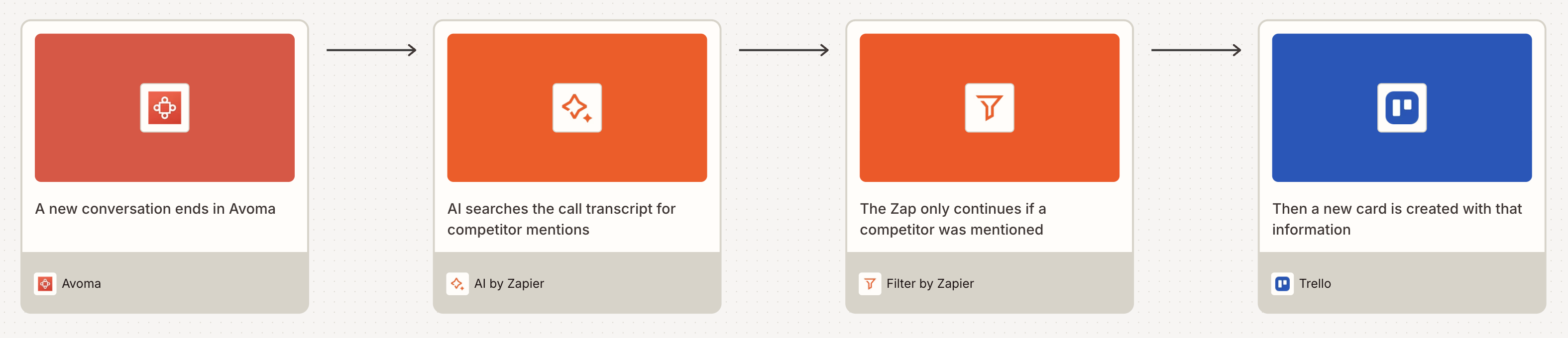
Pro tip: Spending too much time hunting through transcripts for the same specific details, like a budget number, a competitor mention, or a key decision? Add an AI by Zapier step to your Zap. It can automatically extract that information from every new transcript and send it exactly where it needs to go. And with a filter step, you can continue the workflow only if it finds the information you're looking for. To learn how AI by Zapier works and how it compares to adding a Claude or ChatGPT step to your Zaps, check out our feature guide.

Share Avoma summaries with your team
Sales calls, customer interviews, and internal meetings often contain info that the rest of your team needs to see, even if they weren't at the meeting. Instead of asking your team to go to Avoma to search through every new conversation, you can automatically share summaries across all communication channels. When a new conversation is recorded, Zapier can post a message to Slack or Microsoft Teams with a short recap and a link to the full call (or some other custom message of your design).
You can even go a step further and turn Avoma conversations into tasks. Automatically route Avoma conversations to an AI by Zapier step to identify a list of action items mentioned during the call. Then loop over those items to automatically create tasks in ClickUp or Asana. You can even have the AI identify details like due dates and assign tasks to the appropriate people. With this system in place, you'll stop losing track of call follow-ups.
Send Slack channel messages for new Avoma conversations

Send Microsoft Teams messages for new Avoma conversations

Extract tasks from new Avoma conversations and create ClickUp tasks

Extract tasks from new Avoma conversations and create Asana tasks

Keep your CRM and pipeline up to date
Usually, prospects lay out important information during sales calls, like their timelines, budgets, and priorities. Unfortunately, all of that context stays in the call log or in the sales rep's head until they remember to log it in the CRM. With Zapier, you can automatically update contacts in HubSpot, LeadConnector, or Salesforce whenever a new Avoma conversation is recorded.
This makes it easy to keep your sales pipeline up to date without adding extra work for your team. For example, you can automatically create a new call activity on the contact record in Salesforce for each new Avoma conversation. Or you can update the Last Contacted date in HubSpot or LeadConnector to make sure it stays accurate. You can even attach a link to the call recording or transcript directly to the contact, giving anyone reviewing the record access to the full conversation.
If you want to make this system even more powerful, you can use AI to analyze the conversation for key buying signals. Zapier can review the transcript for pricing questions or mentions of competitors, then update fields in your CRM accordingly. Over time, this gives your CRM a richer context and helps your sales team prioritize the leads showing the strongest intent.
Create or update HubSpot contacts for new Avoma conversations

Update LeadConnector contacts for new Avoma conversations

Create Salesforce records for new Avoma conversations

Analyze buying signals from Avoma conversations and update HubSpot contacts

Analyze buying signals from Avoma conversations and update Salesforce contacts
Build reporting and analytics workflows
Leadership teams often want to know what's happening inside conversations with prospects and customers. Which topics come up most often? How many sales calls happen every week per team member? Instead of manually looking through recordings, you can automatically send Avoma conversation data to your reporting tools for each new call.
Zapier can create new records in Google Sheets, Zapier Tables, or Airtable with formatted data, including the meeting title, participants, date, and a link to the transcript. With your call data automatically updating in a spreadsheet or database, it becomes much easier to analyze patterns across conversations. You can build dashboards to track trends over time or identify common themes in customer feedback.
You can also send Avoma conversation data to Relevance AI for deeper analysis of your meetings. For example, Relevance AI can detect recurring customer pain points and categorize conversations by topic. That way, leadership understands what people are saying and can steer their decisions to align with what customers really want.
Add new Avoma conversations to Google Sheets as rows

Add new Avoma conversations to Zapier Tables as rows

Create Airtable records for new Avoma conversations


Forward outside calls to Avoma for analysis
Avoma is great for transcribing and analyzing calls that occur with their AI meeting assistant. But not every conversation happens inside Avoma. Many teams take mobile calls that Avoma can't access directly. If you're saving those call recordings to a central place like Dropbox, you can automatically copy them over to Avoma for analysis.
For example, Zapier can run daily or weekly workflows to search Dropbox for new calls and automatically upload them to Avoma, so they can live alongside the rest of your meetings.


Pro tip: Try building a Zapier agent that runs on a regular schedule to review your latest Avoma conversations. It can surface patterns across them, then deliver a summary to Slack, your email, or some other tool you use. Learn more about Zapier Agents.
Archive Avoma calls in your cloud storage
Maybe you're required to keep copies of customer conversations for compliance or regulatory reasons. In that case, you can automatically archive recordings whenever new conversations are created. Whether you use Dropbox, Amazon S3, or Google Drive, Zapier can automatically copy all your call recordings to the right place, maintaining an independent record of every meeting.

Upload new Avoma conversation files to Google Drive

Start automating Avoma today
Avoma already does the hard work of recording and transcribing your meetings, but Zapier makes sure that information doesn't stop there. With Avoma and Zapier working together, every conversation becomes a powerful source of information for your business, effortlessly. Try one of these templates or jump into the Zap editor to build your own perfect Zap.