
Con Zapier, puedes conectar miles de aplicaciones dentro de un Zap (lo que llamamos un flujo de trabajo automatizado). Añade formularios, tablas y la capacidad de acceder a tus datos desde cualquier herramienta de IA , y hay mucho que puedes hacer.
Pero a veces necesitas más. Quizá las acción o trigger existentes de Zapier no te lleven a donde necesitas. Quizá estés sacando información de la aplicación A, pero no está en el formato adecuado para la aplicación B. O quizá tengas algo más en mente, como revisar registros de una aplicación, llamar a una segunda aplicación para cada una y luego escribir los resultados en una tercera.
Ahí es donde entra Code by Zapier . Es una herramienta integrada que te permite insertar código personalizado—JavaScript o Python—directamente en tus flujos de trabajo de Zap, para que puedas manejar los casos límite, transformaciones y lógica que las acciones estándar no pueden. Así es como funciona.
Build automations from wherever you work. Describe the outcome you want, and Zapier connects your tools, runs the steps, and stays on the job after you close the chat. Combine AI with reliable, deterministic automation across 9,000+ apps. Get started for free.
Saltar adelante
¿Qué es Code by Zapier?
Code by Zapier te permite añadir código personalizado a tus flujos de trabajo de Zap para realizar tareas específicas que van más allá de los disparadores y acciones predefinidos que proporcionan las integraciones existentes de Zapier.
Los pasos de código actúan como cualquier otro trigger o acción, con una diferencia importante: dices a esos pasos qué hacer en Python o JavaScript. Estas instrucciones adicionales dentro de tus flujos de trabajo de Zap pueden ser útiles cuando necesites hacer algo más avanzado que Zapier quizá no soporte nativamente. Por ejemplo, podrías usar pasos de código para implementar tablas de consulta complejas, procesar partidas, limpiar datos en bruto como XML o recuperar fechas dinámicas de tus datos.
Cuando se utiliza como trigger, Code by Zapier normalmente procesa datos de entrada o comprueba condiciones específicas para decidir si el flujo de trabajo debe iniciarse. Como acción, te permite escribir código que interactuará con datos procedentes del trigger o de un paso de acción anterior. Las acciones que usan código pueden procesar información, reorganizar datos o recuperar datos de una API antes de enviarlos a pasos posteriores de tu Zap. Por defecto, estos pasos duran dos minutos, pero puedes aumentar ese tiempo de ejecución hasta 10 minutos en total.
En el editor Zap, puedes elegir extender el tiempo de ejecución de un paso de código en uno, dos, cuatro u ocho minutos. Normalmente, los incrementos de tiempo de ejecución real suponen tareas adicionales (redondeadas hacia arriba por minutos parciales). Pero por un tiempo limitado, las temporadas prolongadas son gratuitas.

También puedes acceder al SDK de Zapier desde los pasos de tu código. Esto te permite llamar a cualquier aplicación conectada a Zapier y abre la puerta a flujos de trabajo complejos y multi-app —como solicitudes encadenadas, paginaciones y reintentos— todo en un solo paso. Como cada paso puede durar hasta 10 minutos, trabajos más largos no sufrirán fallos de tiempo de espera. Y puedes elegir exactamente a qué aplicaciones y cuentas puede llegar el paso, así que nunca entregas a tu código acceso amplio o autónomo a tus credenciales.
Nota: El SDK de Zapier en pasos de código solo soporta JavaScript por ahora.
Usar Code by Zapier no se limita a los desarrolladores. Si no sabes escribir código en absoluto—o simplemente te quedas atascado—puedes usar IA directamente dentro del editor de Zap para generar fragmentos de código simplemente describiendo lo que te gustaría hacer.
En esencia, los pasos de código le permiten personalizar completamente sus flujos de trabajo y llevar sus procesos de negocio al siguiente nivel.
Las características principales incluyen:
Scripts personalizados: escriba código JavaScript o Python para ejecutar lógica u operaciones personalizadas no compatibles con las integraciones estándar de Zapier.
Manipulación de datos: transformar, formatear o modificar datos de pasos anteriores de Zap para cumplir con requisitos específicos.
Soporte de variables: utilice variables para almacenar y manipular datos dentro de sus scripts, haciendo que su código sea más dinámico y adaptable.
Utilidades de Python incorporadas: almacene y recupere datos entre ejecuciones de Zap con StoreClient, envíe solicitudes HTTP con la utilidad solicitud y utilice la utilidad de impresión para depurar su función durante la ejecución.
Utilidades de JavaScript incorporadas: almacene y recupere datos entre ejecuciones de Zap con StoreClient, use funciones de devolución de llamada para manejar tareas que toman tiempo en completarse, realice solicitudes HTTP con la utilidad fetch y depure su función con console.registro.
Duración extendida: Cada paso dura por defecto dos minutos, pero puedes extenderlo hasta un máximo de 10minutos. Y, por un tiempo limitado, el tiempo extra es gratuito.
Generador de código de IA: Describe cómo te gustaría personalizar tu trigger o acción (en inglés sencillo), y la IA escribirá el código JavaScript o Python para ti.
Pruebas y depuración: Ejecuta tu Zap a través del panel de control para confirmar el comportamiento que esperas y revisa tu historial de Zap para obtener información sobre los datos de entrada, los detalles de salida y los registros de tus pasos de código.
Acceso al SDK de Zapier: Llama a cualquier aplicación conectada a Zapier de un solo paso de código para manejar lógica compleja como llamadas encadenadas o orquestación personalizada, y elige exactamente qué aplicaciones y cuentas puede alcanzar ese paso.
Qué puedes hacer con Code by Zapier
Con Code by Zapier, las posibilidades son infinitas. Aunque la mayoría de los casos de uso dependerán de los retos únicos de tu negocio, aquí tienes algunos ejemplos populares.
Send scheduled HTTP requests to an external API
Quieres enviar o recuperar datos de una aplicación que no tenga una integración nativa con Zapier.
Cómo podría verse esto:
Un Zap se activa cada hora usando Schedule by Zapier.
Un paso de Code by Zapier envía una solicitud HTTP personalizada a un punto de conexión externo de la API y analiza la respuesta.
La respuesta de la API analizada se utiliza para añadir o actualizar una fila a una hoja de Google.
Análisis y transformación de mensajes de Slack con JavaScript
Quieres extraer y limpiar datos específicos de los mensajes de Slack antes de enviarlos a otra aplicación, sin depender de varios pasos Formatter.
Cómo podría verse esto:
Se publica un nuevo mensaje en un canal de Slack .
Un Code by Zapier analiza paso a paso el texto del mensaje, elimina las menciones de usuario y extrae el contenido relevante usando regex.
El texto del mensaje limpiado se envía a Airtable como un campo estructurado en un nuevo registro.

Nota: Para la mayoría de los cambios de un solo paso —como separar un campo, encontrar y reemplazar valores, o ajustar el caso— puedes usar Formatter en su lugar. Los pasos de código son para ti si necesitas más control o complejidad, como combinar varios ajustes en un solo paso que de otro modo requeriría varios pasos de acción de Formatter.
Normalización de marcas de tiempo para el almacenamiento de tablas
Tus registros de tabla entrantes usan formatos de fecha ambiguos o inconsistentes, y quieres asegurarte de que las marcas de tiempo se almacenen de forma consistente.
Cómo podría verse esto:
Un registro se añade o actualiza en Zapier Tables.
Un paso de Code by Zapier analiza explícitamente la marca de tiempo entrante y la convierte a ISO 8601 en UTC.
La marca de tiempo normalizada se escribe de nuevo en las Zapier Tables actualizando el registro original.
Consejo: si te encuentras con problemas, las comunidades de codificación como Stack Overflow o la Comunidad Zapier son excelentes para obtener ayuda de otros codificadores para ajustar tu código o solucionar problemas.
Cómo empezar a usar Code by Zapier
¿Quieres probar un paso de código?
Para utilizar el código como trigger, siga estos pasos:
En el editor de Zap, haga clic en el paso desencadenante, luego busque y seleccione Código de Zapier.
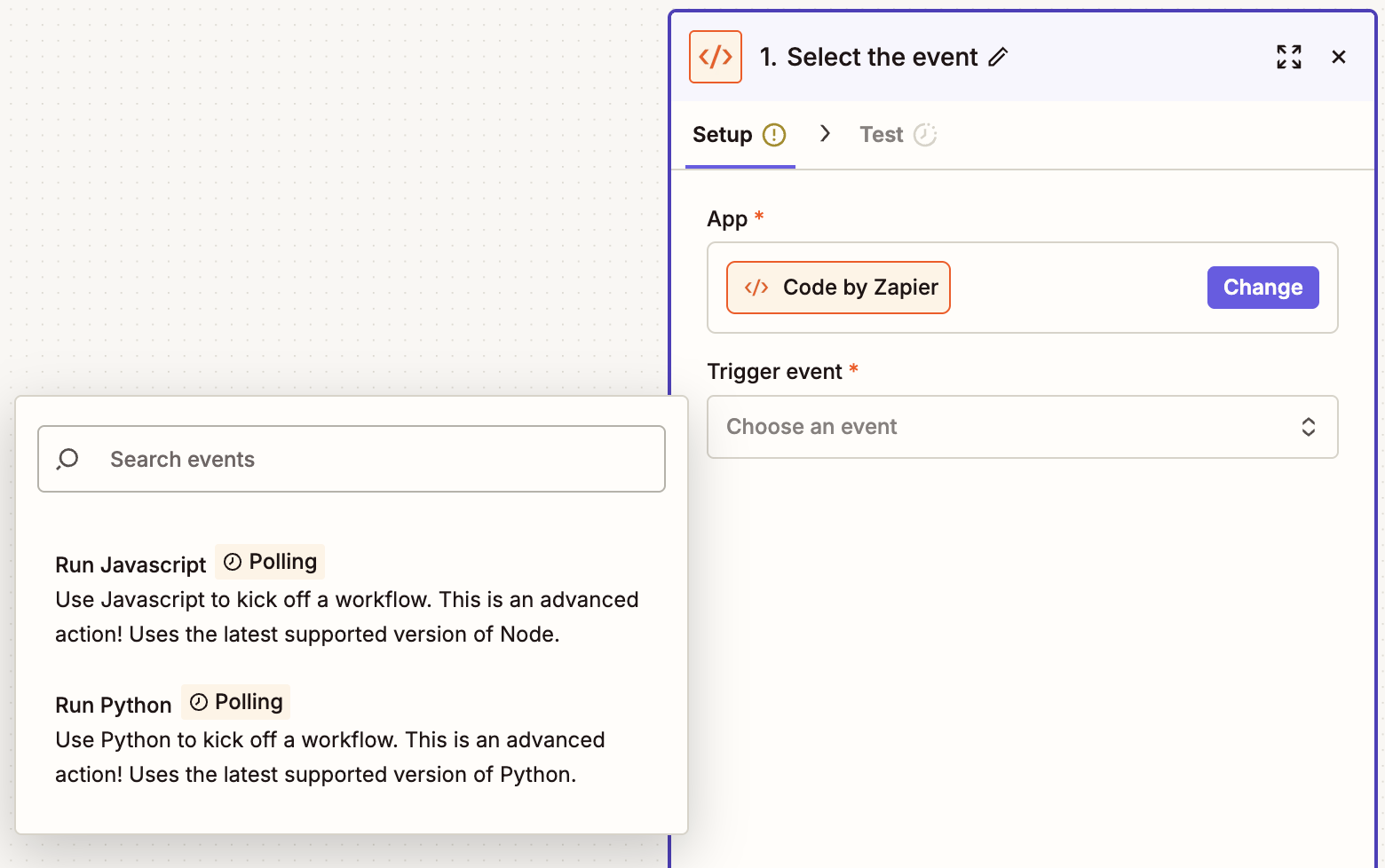
Haz clic en el menú desplegable del evento y selecciona Ejecutar Javascript o Ejecutar Python, luego haz clic en Continuar.
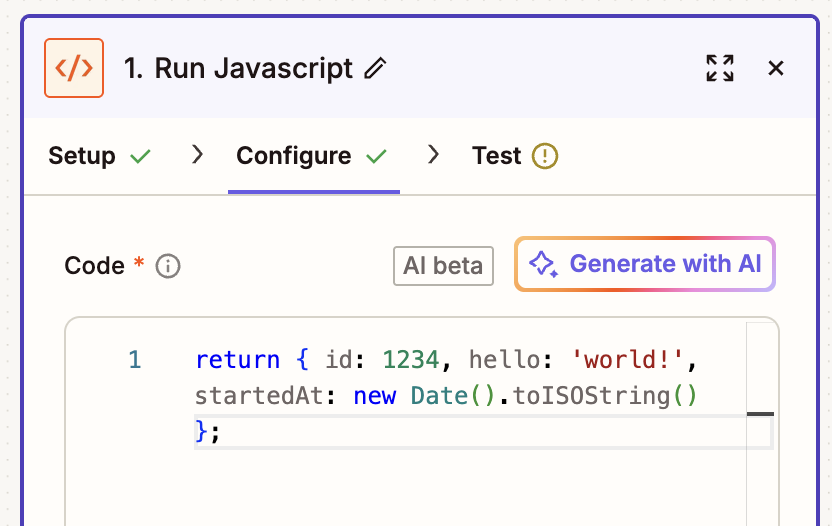
En la pestaña Configurar , utiliza el campo Código para introducir tu código en JavaScript o Python.
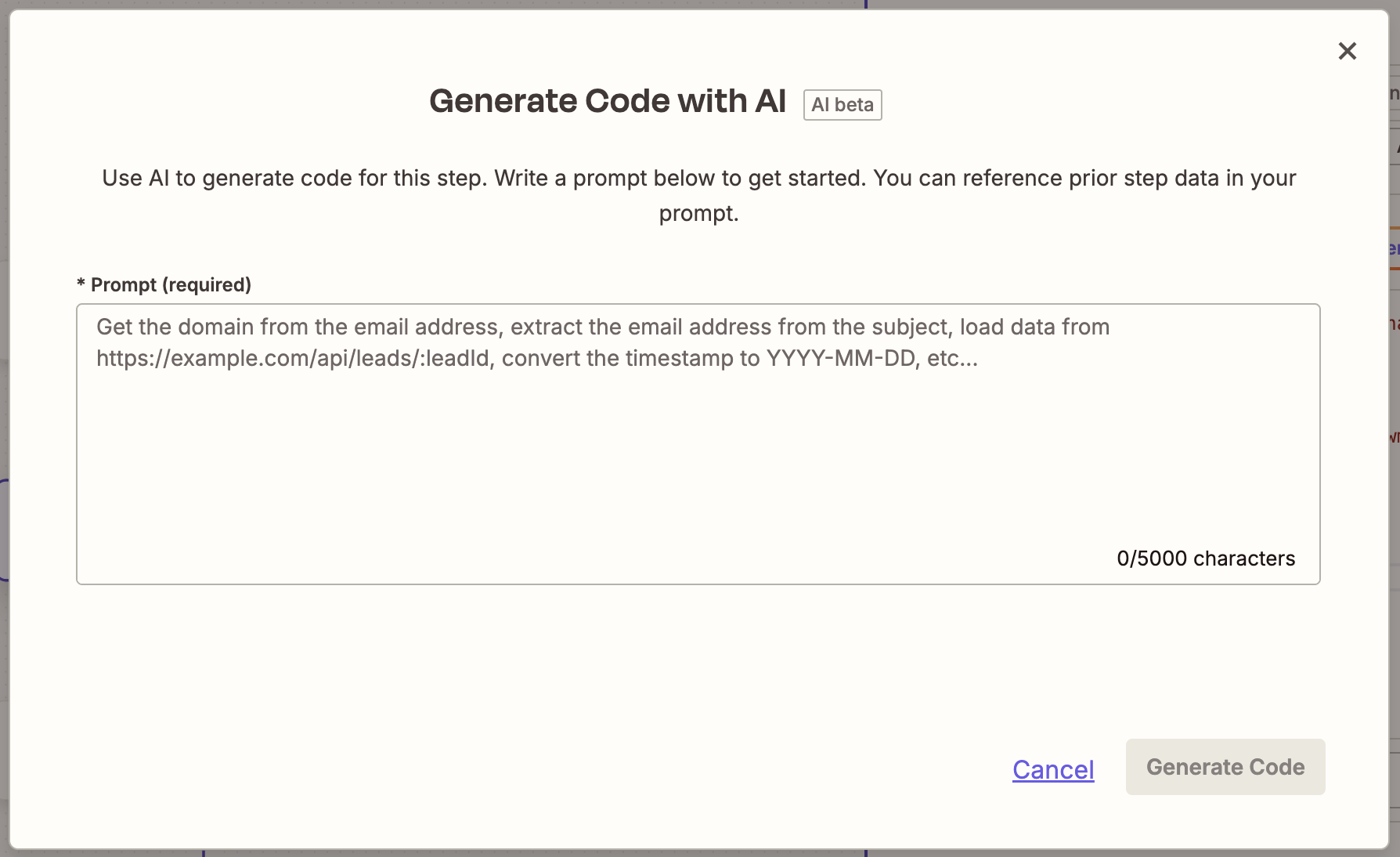
Si desea que la IA escriba el código para usted, haga clic en Generar con IA. En el cuadro de diálogo, ingrese un mensaje que describa el código deseado. Haga clic en Generar código y luego clic en Usar código.
Una vez que haya terminado de agregar su código, haga clic en Continuar para probar su paso de código. Si su código es válido, el paso mostrará que fue exitoso y mostrará los datos.
Ahora es el momento de agregar una acción. Busque y seleccione su aplicación de acción. Conecte su cuenta, configure el paso de acción y pruebe la acción.
Una vez que hayas terminado de agregar tus pasos de acción a tu Zap, recuerda activarlo.


Para utilizar el Código como acción, siga estos pasos:
En el editor Zap, haga clic en el paso de activación, luego busque y seleccione su aplicación de activación y el evento de activación. Conecte su cuenta, configure el paso trigger y pruebe el paso.
Una vez que haya terminado de configurar su trigger, haga clic en el ícono +para agregar un nuevo paso.
Busque y seleccione Código de Zapier.
Haga clic en el menú desplegable del evento y seleccione Ejecutar Javascript o Ejecutar Python. Luego haga clic en Continuar.
En el campo Datos de entrada , proporcione un nombre de clave y asigne los datos de su paso de activación. En el campo Código , ingrese su código JavaScript o Python.
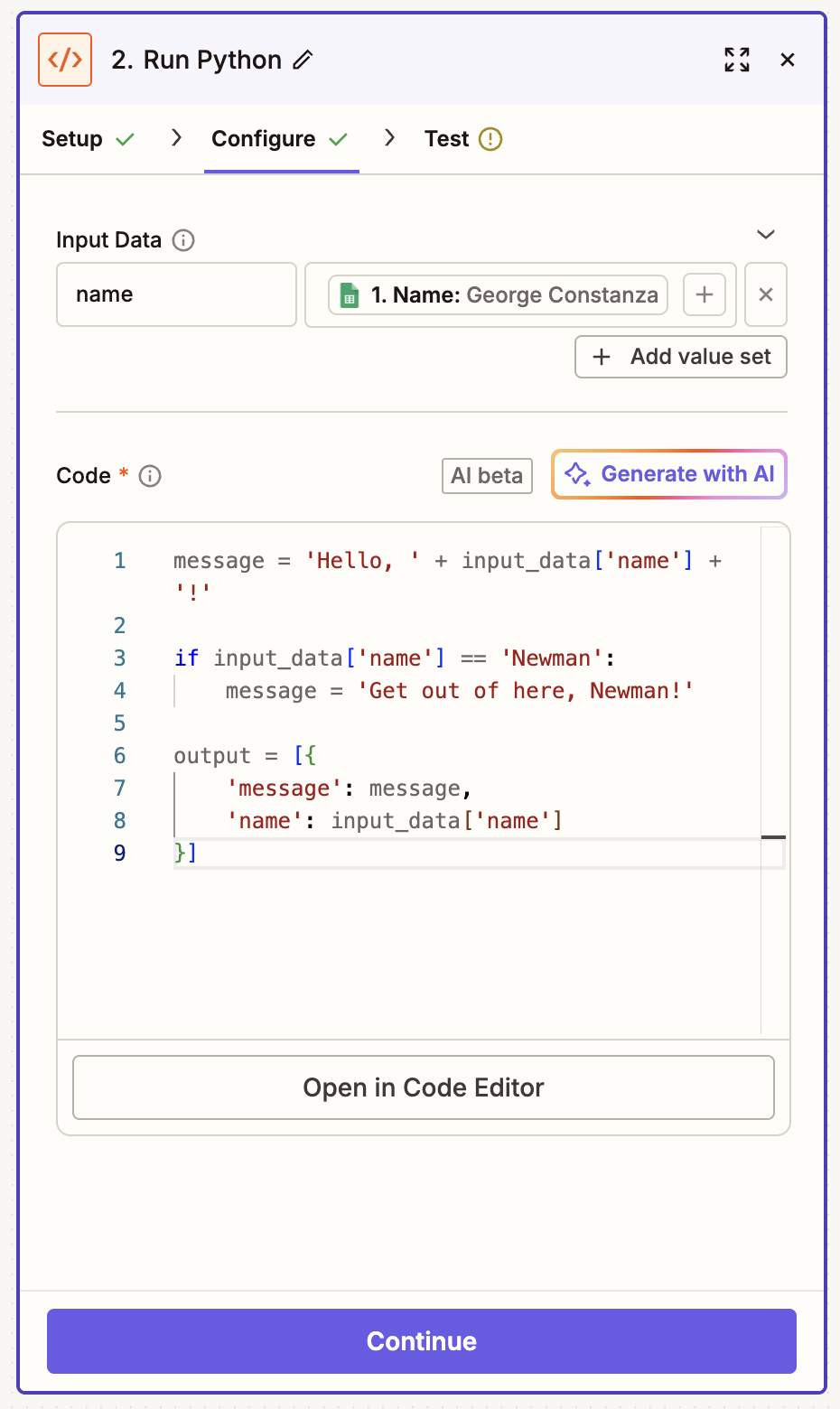
Si desea utilizar la opción IA, haga clic en Generar con IA. En el cuadro de diálogo, ingrese un mensaje que describa el código deseado. Haga clic en Generar código y luego clic en Usar código.
Haga clic Continuar, luego clic paso de prueba. Si su código es válido, el paso mostrará que fue exitoso y mostrará los datos enviados.
Una vez que hayas terminado de agregar tus pasos de acción a tu Zap, recuerda probarlo y activarlo.

Para más información sobre cómo configurar los pasos de código en tu Zap, consulta nuestras guías de ayuda en JavaScript o Python para instrucciones paso a paso.
Did you know? You can ask Copilot, Zapier's built-in AI assistant, to brainstorm, build, configure, and maintain cross-product automated systems.

Para recibir instrucciones paso a paso para añadir el SDK Zapier a un paso de código, visita nuestra documentación de ayuda.
Utilice pasos de código para impulsar el crecimiento de su negocio
Con Code by Zapier, puedes personalizar tus flujos de trabajo para que automaticen tareas complejas, se integren perfectamente con cualquier API o aplicación personalizada y, en última instancia, resuelvan problemas exclusivos de tu negocio.
Al agregar esa capa adicional de código, puede transformar sus datos de maneras que las integraciones estándar no pueden.
¿Estás listo para probarlo tú mismo? Crea un Zap con pasos de código ahora y comience a impulsar su negocio hoy mismo.
Esta guía fue publicada originalmente en mayo de 2022 por Tyler Robertson con actualizaciones previas de Elena Alston. Se actualizó por última vez en junio de 2026.



