Automated RFQ Enrichment | Outlook → ChatGPT & Perplexity
Transform incoming RFQ emails into enriched product intelligence reports that are automatically delivered to your sales team with comprehensive details, synonyms, manufacturers, and applications.
APPS:


Kunal @ Parchem
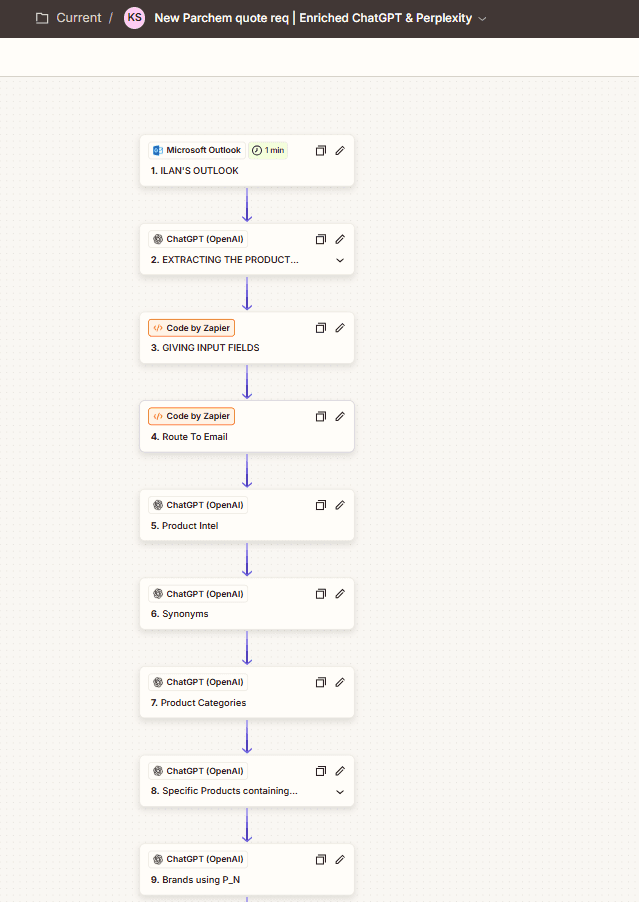
This workflow streamlines the Request for Quote (RFQ) process for sales teams. When a new RFQ email arrives in Outlook, the workflow:
Parses & Extracts Key Data – Automatically pulls out product names, CAS numbers, and other critical details.
Cleans & Routes – Removes internal metadata before processing.
Generates Product Intelligence – Uses ChatGPT and Perplexity to enrich data with synonyms, product categories, manufacturers, brands, and related products.
Refines Insights – Consolidates and formats the output into a structured summary.
Delivers to Sales – Sends a polished email directly to the designated sales team, saving time and ensuring consistent, high-quality insights.
Impact
Eliminates manual parsing of RFQs.
Speeds up response time for sales teams.
Provides deeper product insights from dual AI sources.
Ensures accuracy and consistency across every RFQ.
B2B companies, distributors, and sales teams that handle frequent RFQ emails and want to save time while enriching product data for better decision-making.
Basic Explanation of the Workflow
Email Capture – Whenever a new RFQ arrives in Outlook, the workflow picks it up automatically.
Extract Key Details – It pulls out important information like product names and CAS numbers from the email.
Clean & Prepare – It removes extra things like internal email addresses and makes the data easy to use.
Enrich with AI – Both ChatGPT and Perplexity are used to gather extra details about the product:
Synonyms and related terms
Product categories
Applications and use cases
Manufacturers, brands, and distributors
Refine & Format – The results are cleaned up, combined, and turned into a clear summary.
Send to Sales – Finally, a polished email is sent to the right sales team, giving them all the product intelligence they need in one place.
How It Helps
Saves time by avoiding manual copy-paste and research.
Makes sure the sales team always gets consistent, accurate information.
Combines insights from two AI tools for richer results.
Speeds up customer responses and improves professionalism.


